

| # model-keyword | |
| Automatic1111 WEBUI extension to autofill keyword(trigger words) for custom stable diffusion models and LORA models. | |
| [model-keyword-github.webm](https://user-images.githubusercontent.com/1288793/205525862-a8eaebfe-1860-41d1-bc66-335896b467dd.webm) | |
| ## Installation | |
| Copy the url of the repository ( https://github.com/mix1009/model-keyword ) into the extension tab and press "Install" | |
| <img width="936" alt="Screenshot 2022-12-01 at 12 14 25 PM" src="https://user-images.githubusercontent.com/1288793/204957471-63712085-783b-437b-9925-ee8f935093f7.png"> | |
| From "Extensions/Installed" tab press "Apply and restart UI". | |
| <img width="925" alt="Screenshot 2022-12-01 at 12 18 43 PM" src="https://user-images.githubusercontent.com/1288793/204958071-357d1c9b-22aa-47fc-98b4-582349b1b0cd.png"> | |
| ## Usage | |
| From txt2img, img2img tab, "Model Keyword" section is added. Model keyword extension is enabled by default. Click Model Keyword or triangle to reveal options. | |
| 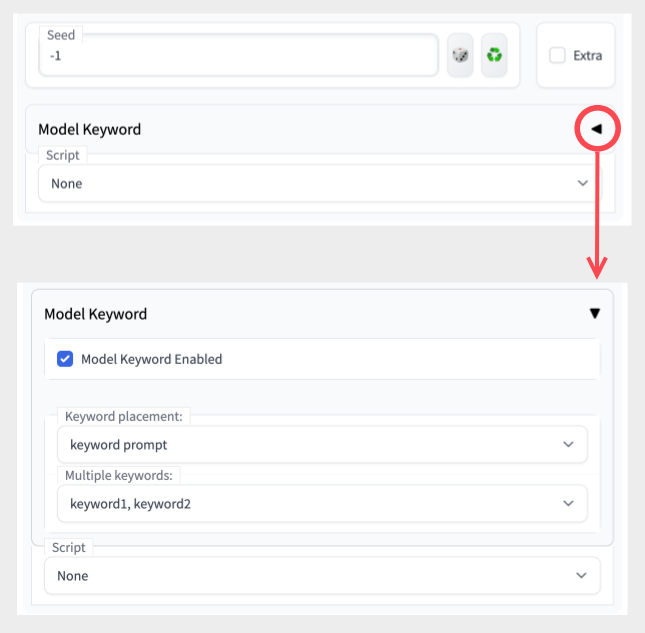 | |
| When generating image, the extension will try to figure out which model is used and insert matching keyword to the prompt: | |
| <img width="1246" alt="model-keyword-usage" src="https://user-images.githubusercontent.com/1288793/205525854-9a4f90a7-6547-4fab-b49b-ab31b37707d6.png"> | |
| ### Keyword placement | |
| <img width="569" alt="Screenshot 2022-12-01 at 12 26 41 PM" src="https://user-images.githubusercontent.com/1288793/204959180-8d2b509c-722e-44c3-84d6-e7dfd24f40ae.png"> | |
| ### Multiple keywords | |
| <img width="577" alt="Screenshot 2022-12-01 at 12 27 00 PM" src="https://user-images.githubusercontent.com/1288793/204959221-66ae2e7f-5fd0-4896-9dc3-402f0db60dba.png"> | |
| 1) keyword1, keyword2 - use all keywords separated by comma | |
| 2) random - choose one random keyword | |
| 3) iterate - iterate through each keyword for each image generation | |
| * If sd-dynamic-prompts extension is installed, iterate will not work properly. Please disable Dynamic Prompts. | |
| * Alternatively, you can rename model-keyword to sd-model-keyword in the extensions folder. It will change the order of the extension and fix the bug. | |
| 4) keyword1 - use first keyword | |
| 5) keyword2 - use second keyword (if it exists) | |
| ### LORA model support | |
| <img width="579" alt="LORA" src="https://user-images.githubusercontent.com/1288793/222634648-7f02fce3-6854-4ea9-8550-362a4ce98f8e.png"> | |
| 1) Select LORA model from the Model dropdown. | |
| 2) Keywords dropdown list should contain keywords for the selected model. | |
| 3) Limitation: You can only select one model, and select one keyword or all keywords. | |
| 4) If you are using multiple LORA models, please check https://lora-help.coolai.app/ . | |
| ## Add Custom Mappings | |
| <img width="795" alt="custom_mappings" src="https://user-images.githubusercontent.com/1288793/212851582-8c3c39a2-0f18-44d4-bbb5-3a31cb61e339.png"> | |
| * "Check" -> outputs model filename, hash, matching keyword(s), and source of match in result. | |
| * "Save" -> save custom mapping with keyword. (Fill keyword) | |
| * "Delete" -> deletes custom mapping for model if it's available. | |
| * Mappings are saved in custom-mappings.txt | |
| * If previous mapping is found, save overwrites it. | |
| * do NOT edit model-keyword.txt . It can be overwritten or cause conflict while upgrading. | |
| * hash value for model has been changed in webui(2023-01-14), this extension uses old hash value. Old hash value is no longer displayed in webui. | |