

| <div align="center"> | |
| <a href="https://www.youtube.com/watch?v=jlMAX2Oaht0"> | |
| <img width=560 width=315 alt="Making TGI deployment optimal" src="https://huggingface.co/datasets/Narsil/tgi_assets/resolve/main/thumbnail.png"> | |
| </a> | |
| # Text Generation Inference | |
| <a href="https://github.com/huggingface/text-generation-inference"> | |
| <img alt="GitHub Repo stars" src="https://img.shields.io/github/stars/huggingface/text-generation-inference?style=social"> | |
| </a> | |
| <a href="https://huggingface.github.io/text-generation-inference"> | |
| <img alt="Swagger API documentation" src="https://img.shields.io/badge/API-Swagger-informational"> | |
| </a> | |
| A Rust, Python and gRPC server for text generation inference. Used in production at [HuggingFace](https://huggingface.co) | |
| to power Hugging Chat, the Inference API and Inference Endpoint. | |
| </div> | |
| ## Table of contents | |
| - [Get Started](#get-started) | |
| - [API Documentation](#api-documentation) | |
| - [Using a private or gated model](#using-a-private-or-gated-model) | |
| - [A note on Shared Memory](#a-note-on-shared-memory-shm) | |
| - [Distributed Tracing](#distributed-tracing) | |
| - [Local Install](#local-install) | |
| - [CUDA Kernels](#cuda-kernels) | |
| - [Optimized architectures](#optimized-architectures) | |
| - [Run Mistral](#run-a-model) | |
| - [Run](#run) | |
| - [Quantization](#quantization) | |
| - [Develop](#develop) | |
| - [Testing](#testing) | |
| Text Generation Inference (TGI) is a toolkit for deploying and serving Large Language Models (LLMs). TGI enables high-performance text generation for the most popular open-source LLMs, including Llama, Falcon, StarCoder, BLOOM, GPT-NeoX, and [more](https://huggingface.co/docs/text-generation-inference/supported_models). TGI implements many features, such as: | |
| - Simple launcher to serve most popular LLMs | |
| - Production ready (distributed tracing with Open Telemetry, Prometheus metrics) | |
| - Tensor Parallelism for faster inference on multiple GPUs | |
| - Token streaming using Server-Sent Events (SSE) | |
| - Continuous batching of incoming requests for increased total throughput | |
| - Optimized transformers code for inference using [Flash Attention](https://github.com/HazyResearch/flash-attention) and [Paged Attention](https://github.com/vllm-project/vllm) on the most popular architectures | |
| - Quantization with : | |
| - [bitsandbytes](https://github.com/TimDettmers/bitsandbytes) | |
| - [GPT-Q](https://arxiv.org/abs/2210.17323) | |
| - [EETQ](https://github.com/NetEase-FuXi/EETQ) | |
| - [AWQ](https://github.com/casper-hansen/AutoAWQ) | |
| - [Safetensors](https://github.com/huggingface/safetensors) weight loading | |
| - Watermarking with [A Watermark for Large Language Models](https://arxiv.org/abs/2301.10226) | |
| - Logits warper (temperature scaling, top-p, top-k, repetition penalty, more details see [transformers.LogitsProcessor](https://huggingface.co/docs/transformers/internal/generation_utils#transformers.LogitsProcessor)) | |
| - Stop sequences | |
| - Log probabilities | |
| - [Speculation](https://huggingface.co/docs/text-generation-inference/conceptual/speculation) ~2x latency | |
| - [Guidance/JSON](https://huggingface.co/docs/text-generation-inference/conceptual/guidance). Specify output format to speed up inference and make sure the output is valid according to some specs.. | |
| - Custom Prompt Generation: Easily generate text by providing custom prompts to guide the model's output | |
| - Fine-tuning Support: Utilize fine-tuned models for specific tasks to achieve higher accuracy and performance | |
| ### Hardware support | |
| - [Nvidia](https://github.com/huggingface/text-generation-inference/pkgs/container/text-generation-inference) | |
| - [AMD](https://github.com/huggingface/text-generation-inference/pkgs/container/text-generation-inference) (-rocm) | |
| - [Inferentia](https://github.com/huggingface/optimum-neuron/tree/main/text-generation-inference) | |
| - [Intel GPU](https://github.com/huggingface/text-generation-inference/pull/1475) | |
| - [Gaudi](https://github.com/huggingface/tgi-gaudi) | |
| - [Google TPU](https://huggingface.co/docs/optimum-tpu/howto/serving) | |
| ## Get Started | |
| ### Docker | |
| For a detailed starting guide, please see the [Quick Tour](https://huggingface.co/docs/text-generation-inference/quicktour). The easiest way of getting started is using the official Docker container: | |
| ```shell | |
| model=HuggingFaceH4/zephyr-7b-beta | |
| volume=$PWD/data # share a volume with the Docker container to avoid downloading weights every run | |
| docker run --gpus all --shm-size 1g -p 8080:80 -v $volume:/data ghcr.io/huggingface/text-generation-inference:2.0 --model-id $model | |
| ``` | |
| And then you can make requests like | |
| ```bash | |
| curl 127.0.0.1:8080/generate_stream \ | |
| -X POST \ | |
| -d '{"inputs":"What is Deep Learning?","parameters":{"max_new_tokens":20}}' \ | |
| -H 'Content-Type: application/json' | |
| ``` | |
| **Note:** To use NVIDIA GPUs, you need to install the [NVIDIA Container Toolkit](https://docs.nvidia.com/datacenter/cloud-native/container-toolkit/install-guide.html). We also recommend using NVIDIA drivers with CUDA version 12.2 or higher. For running the Docker container on a machine with no GPUs or CUDA support, it is enough to remove the `--gpus all` flag and add `--disable-custom-kernels`, please note CPU is not the intended platform for this project, so performance might be subpar. | |
| **Note:** TGI supports AMD Instinct MI210 and MI250 GPUs. Details can be found in the [Supported Hardware documentation](https://huggingface.co/docs/text-generation-inference/supported_models#supported-hardware). To use AMD GPUs, please use `docker run --device /dev/kfd --device /dev/dri --shm-size 1g -p 8080:80 -v $volume:/data ghcr.io/huggingface/text-generation-inference:2.0-rocm --model-id $model` instead of the command above. | |
| To see all options to serve your models (in the [code](https://github.com/huggingface/text-generation-inference/blob/main/launcher/src/main.rs) or in the cli): | |
| ``` | |
| text-generation-launcher --help | |
| ``` | |
| ### API documentation | |
| You can consult the OpenAPI documentation of the `text-generation-inference` REST API using the `/docs` route. | |
| The Swagger UI is also available at: [https://huggingface.github.io/text-generation-inference](https://huggingface.github.io/text-generation-inference). | |
| ### Using a private or gated model | |
| You have the option to utilize the `HUGGING_FACE_HUB_TOKEN` environment variable for configuring the token employed by | |
| `text-generation-inference`. This allows you to gain access to protected resources. | |
| For example, if you want to serve the gated Llama V2 model variants: | |
| 1. Go to https://huggingface.co/settings/tokens | |
| 2. Copy your cli READ token | |
| 3. Export `HUGGING_FACE_HUB_TOKEN=<your cli READ token>` | |
| or with Docker: | |
| ```shell | |
| model=meta-llama/Llama-2-7b-chat-hf | |
| volume=$PWD/data # share a volume with the Docker container to avoid downloading weights every run | |
| token=<your cli READ token> | |
| docker run --gpus all --shm-size 1g -e HUGGING_FACE_HUB_TOKEN=$token -p 8080:80 -v $volume:/data ghcr.io/huggingface/text-generation-inference:2.0 --model-id $model | |
| ``` | |
| ### A note on Shared Memory (shm) | |
| [`NCCL`](https://docs.nvidia.com/deeplearning/nccl/user-guide/docs/index.html) is a communication framework used by | |
| `PyTorch` to do distributed training/inference. `text-generation-inference` make | |
| use of `NCCL` to enable Tensor Parallelism to dramatically speed up inference for large language models. | |
| In order to share data between the different devices of a `NCCL` group, `NCCL` might fall back to using the host memory if | |
| peer-to-peer using NVLink or PCI is not possible. | |
| To allow the container to use 1G of Shared Memory and support SHM sharing, we add `--shm-size 1g` on the above command. | |
| If you are running `text-generation-inference` inside `Kubernetes`. You can also add Shared Memory to the container by | |
| creating a volume with: | |
| ```yaml | |
| - name: shm | |
| emptyDir: | |
| medium: Memory | |
| sizeLimit: 1Gi | |
| ``` | |
| and mounting it to `/dev/shm`. | |
| Finally, you can also disable SHM sharing by using the `NCCL_SHM_DISABLE=1` environment variable. However, note that | |
| this will impact performance. | |
| ### Distributed Tracing | |
| `text-generation-inference` is instrumented with distributed tracing using OpenTelemetry. You can use this feature | |
| by setting the address to an OTLP collector with the `--otlp-endpoint` argument. | |
| ### Architecture | |
| 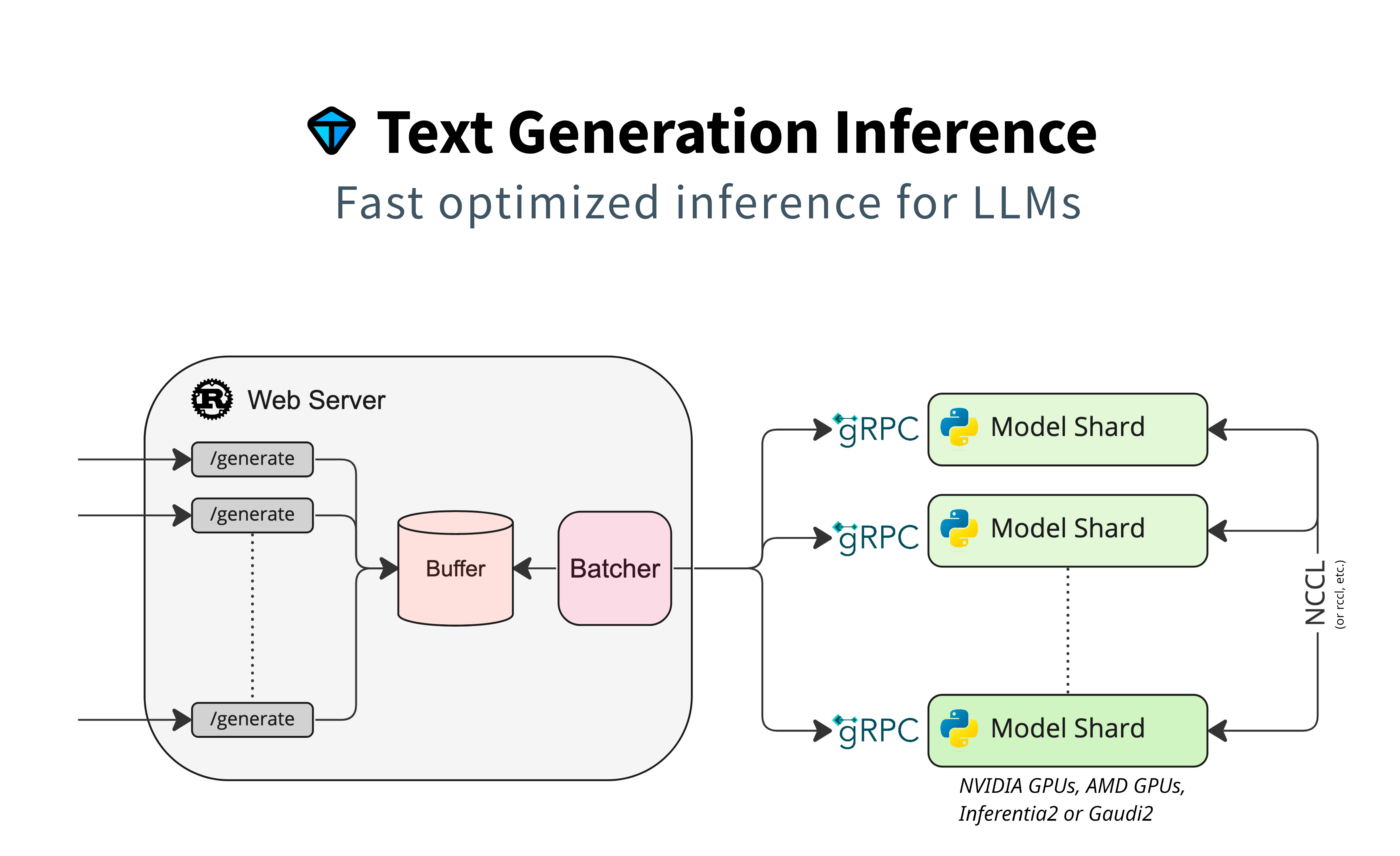 | |
| ### Local install | |
| You can also opt to install `text-generation-inference` locally. | |
| First [install Rust](https://rustup.rs/) and create a Python virtual environment with at least | |
| Python 3.9, e.g. using `conda`: | |
| ```shell | |
| curl --proto '=https' --tlsv1.2 -sSf https://sh.rustup.rs | sh | |
| conda create -n text-generation-inference python=3.11 | |
| conda activate text-generation-inference | |
| ``` | |
| You may also need to install Protoc. | |
| On Linux: | |
| ```shell | |
| PROTOC_ZIP=protoc-21.12-linux-x86_64.zip | |
| curl -OL https://github.com/protocolbuffers/protobuf/releases/download/v21.12/$PROTOC_ZIP | |
| sudo unzip -o $PROTOC_ZIP -d /usr/local bin/protoc | |
| sudo unzip -o $PROTOC_ZIP -d /usr/local 'include/*' | |
| rm -f $PROTOC_ZIP | |
| ``` | |
| On MacOS, using Homebrew: | |
| ```shell | |
| brew install protobuf | |
| ``` | |
| Then run: | |
| ```shell | |
| BUILD_EXTENSIONS=True make install # Install repository and HF/transformer fork with CUDA kernels | |
| text-generation-launcher --model-id mistralai/Mistral-7B-Instruct-v0.2 | |
| ``` | |
| **Note:** on some machines, you may also need the OpenSSL libraries and gcc. On Linux machines, run: | |
| ```shell | |
| sudo apt-get install libssl-dev gcc -y | |
| ``` | |
| ## Optimized architectures | |
| TGI works out of the box to serve optimized models for all modern models. They can be found in [this list](https://huggingface.co/docs/text-generation-inference/supported_models). | |
| Other architectures are supported on a best-effort basis using: | |
| `AutoModelForCausalLM.from_pretrained(<model>, device_map="auto")` | |
| or | |
| `AutoModelForSeq2SeqLM.from_pretrained(<model>, device_map="auto")` | |
| ## Run locally | |
| ### Run | |
| ```shell | |
| text-generation-launcher --model-id mistralai/Mistral-7B-Instruct-v0.2 | |
| ``` | |
| ### Quantization | |
| You can also quantize the weights with bitsandbytes to reduce the VRAM requirement: | |
| ```shell | |
| text-generation-launcher --model-id mistralai/Mistral-7B-Instruct-v0.2 --quantize | |
| ``` | |
| 4bit quantization is available using the [NF4 and FP4 data types from bitsandbytes](https://arxiv.org/pdf/2305.14314.pdf). It can be enabled by providing `--quantize bitsandbytes-nf4` or `--quantize bitsandbytes-fp4` as a command line argument to `text-generation-launcher`. | |
| ## Develop | |
| ```shell | |
| make server-dev | |
| make router-dev | |
| ``` | |
| ## Testing | |
| ```shell | |
| # python | |
| make python-server-tests | |
| make python-client-tests | |
| # or both server and client tests | |
| make python-tests | |
| # rust cargo tests | |
| make rust-tests | |
| # integration tests | |
| make integration-tests | |
| ``` | |