

Install from WinGet (Windows)
winget install llama.cpp
# Start a local OpenAI-compatible server with a web UI:
llama serve -hf feder-cr/jev:Q4_K_M# Run inference directly in the terminal:
llama cli -hf feder-cr/jev:Q4_K_MUse pre-built binary
# Download pre-built binary from:
# https://github.com/ggerganov/llama.cpp/releases# Start a local OpenAI-compatible server with a web UI:
./llama-server -hf feder-cr/jev:Q4_K_M# Run inference directly in the terminal:
./llama-cli -hf feder-cr/jev:Q4_K_MBuild from source code
git clone https://github.com/ggerganov/llama.cpp.git
cd llama.cpp
cmake -B build
cmake --build build -j --target llama-server llama-cli# Start a local OpenAI-compatible server with a web UI:
./build/bin/llama-server -hf feder-cr/jev:Q4_K_M# Run inference directly in the terminal:
./build/bin/llama-cli -hf feder-cr/jev:Q4_K_MUse Docker
docker model run hf.co/feder-cr/jev:Q4_K_M

jevos-v4
Decisions on a laptop CPU in 28–130 ms. Send a text and a question (yes/no, multiple choice or a score) and get back the probability of each answer, in TypeSafe Jev's API, on your own machine. Free and open source: an alternative to Jev that runs locally.
Same Snake game, same questions for both: jevos-v4 on a laptop answers in about 20 ms, Jev's cloud API in about 350 ms (mostly the network round trip), so the local snake makes many more moves in the same time.
Files
| File | What it is |
|---|---|
model/ |
the OpenVINO INT8 model that the jev binary runs (CPU) |
jevos-v4-q4_k_m.gguf |
the same model as 4-bit GGUF, for llama.cpp and the tools built on it |
jevos-v4-q8_0.gguf |
the same model as 8-bit GGUF |
These are the same files as the jevos-v4 release on GitHub;
the SHA-256 of each is in that release's SHA256SUMS.txt.
Quickstart
Get the jev binary for your system from the GitHub release
(Windows, Linux, macOS on Apple silicon), then put the model next to it:
tar -xzf jev-linux-x64.tar.gz # Windows: unzip jev-windows-x64.zip
hf download feder-cr/jev --include "model/*" --local-dir jev
cd jev
./jev serve # Windows: jev.exe serve
curl http://127.0.0.1:8017/v1/systemone -H 'Content-Type: application/json' -d '{
"model": "jev-latest",
"state": "I was charged twice for the same order.",
"questions": {"billing": {"type": "noul", "instructions": "Is this a billing problem?"}}}'
{"model": "jevos-v4", "answers": {"billing": {"type": "noul", "noul": 0.94}}, "usage": {"input_tokens": 27, "output_tokens": 0}}
One binary, CPU only, no Python.
Benchmarks
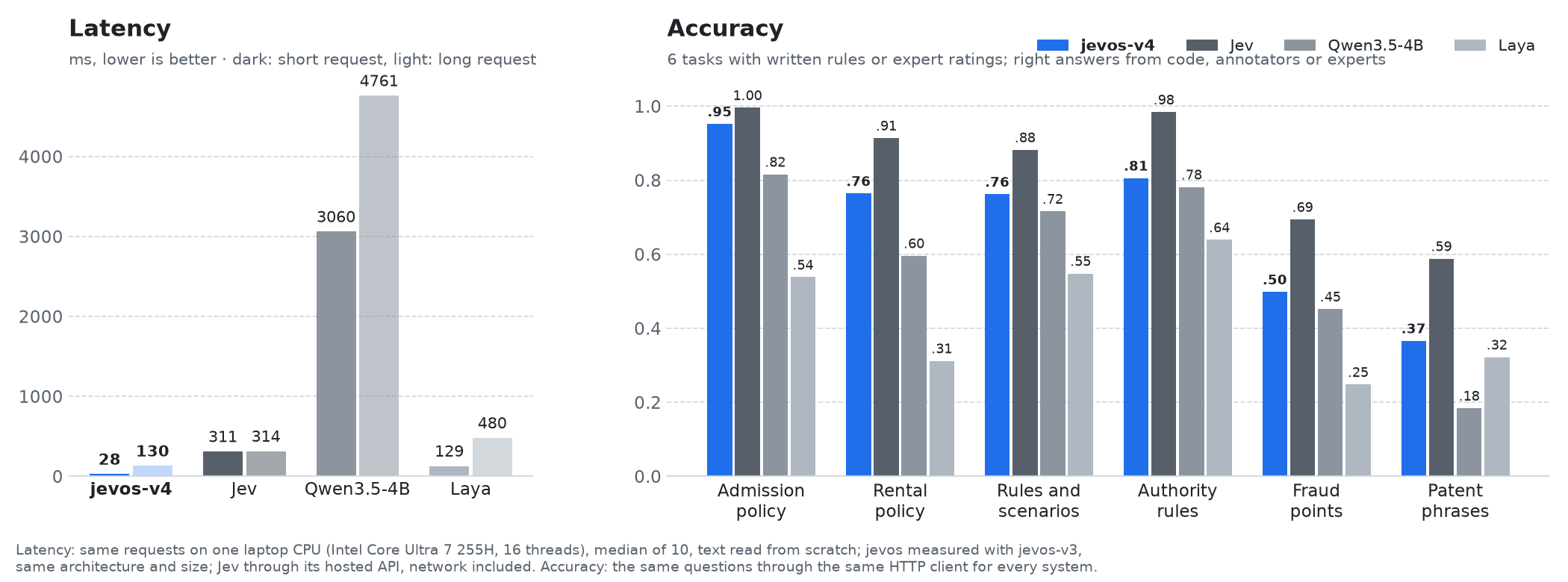
Same questions for every system, through the same HTTP client. Latency is the median of 10 requests on an Intel Core Ultra 7 255H laptop, 16 threads, each text read from scratch. No task text was used to train jevos; five of the six sets helped choose the released checkpoint.
| jevos-v4 | Jev | Laya | |
|---|---|---|---|
| Yes/no questions | ✓ | ✓ | ✓ |
| Multiple choice | ✓ | ✓ | ✓ |
| Scores | ✓ (early) | ✓ | ✓ |
| Runs on | your machine | cloud | your machine |
| Cost | free | per token | free |
| Context | 8,192 tokens | not stated | 512 tokens |
jevos-v4 is much faster than the cloud API and free, but less accurate than Jev on the harder tasks above (fraud points, patent phrases): check it on your own questions before relying on it.
API
POST /v1/systemone, in TypeSafe Jev's wire format: code written for Jev's SDK works unchanged for yes/no
questions. One request can ask several questions about the same text, which is read once:
{
"model": "jev-latest",
"state": {"item": "wireless mouse", "customer_message": "The box arrived empty. This is the second time!"},
"questions": {
"refund": {"type": "noul", "instructions": "Our policy refunds items reported missing within 30 days of delivery. Should this customer get a refund?"},
"team": {"type": "choice", "instructions": "Which team should handle this message?",
"criteria": {"billing": "payments, refunds", "shipping": "deliveries, missing parcels", "tech": "a product that does not work"}},
"anger": {"type": "score", "instructions": "How angry is the customer?", "criteria": ["calm", "annoyed", "angry", "furious"]}
}
}
A noul returns P(yes); a choice the most probable option; a score the expected level. Choices and scores
also return a probability per answer and a confidence: when it is low, send the case to a person. Put the
rule in the question, and do sums in code.
Options, memory use and building from source are in the README on GitHub; guides and measurements are in the wiki.
License and authors
MIT. Built by Federico Elia (@feder-cr) together with Loris Salsi (@LosaLosSantos).
- Downloads last month
- 125
Install (macOS, Linux)
# Start a local OpenAI-compatible server with a web UI: llama serve -hf feder-cr/jev:Q4_K_M# Run inference directly in the terminal: llama cli -hf feder-cr/jev:Q4_K_M