
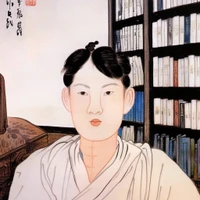
공유마당에 있는 단원 김홍도 그림을 학습시킨 hypernetworks 파일. 첫 시도이며, 제대로 이미지를 넣지 않았기에 미흡한 면이 많습니다. 드림부스로도 제작 중입니다. 여기서는 좀 더 많은 제대로 된 이미지로 학습할 예정입니다.
A hypernetworks file trained on the picture of Kim Hong-do in "https://gongu.copyright.or.kr/". This is my first attempt, and there are many shortcomings because I didn't put the image properly. It is also being produced as a Dream Booth. We are going to learn with more proper images here.
스테이블 디퓨전 1.5버전을 사용하고 있습니다. 다른 모델에서 잘 작동되는지 알 수 없습니다. 또한 같은 모델을 쓴다 하더라도 아직은 제대로 작동하지 않는 면이 있습니다.
I am using Stable Diffusion version 1.5. Don't know if it works well on other models. Also, even if you use the same model, there are aspects that still don't work properly.
'img2img'으로 쓸 용도를 고려하여 만들어졌습니다.
It was created considering the use of 'img2img'.
-Translated through Google Translate.
사용 방법
'stylekimhongdo' 라는 프롬프트를 넣으면 작동합니다.
If I put the 'stylekimhongdo' prompt, it works.
-Translated through Google Translate.
샘플 이미지 sample image
관련 글 Related article

- Downloads last month
- -