
Instructions to use google/gemma-3-27b-it with libraries, inference providers, notebooks, and local apps. Follow these links to get started.
- Libraries
- Transformers
How to use google/gemma-3-27b-it with Transformers:
# Use a pipeline as a high-level helper from transformers import pipeline pipe = pipeline("image-text-to-text", model="google/gemma-3-27b-it") messages = [ { "role": "user", "content": [ {"type": "image", "url": "https://huggingface.co/datasets/huggingface/documentation-images/resolve/main/p-blog/candy.JPG"}, {"type": "text", "text": "What animal is on the candy?"} ] }, ] pipe(text=messages)# Load model directly from transformers import AutoProcessor, AutoModelForImageTextToText processor = AutoProcessor.from_pretrained("google/gemma-3-27b-it") model = AutoModelForImageTextToText.from_pretrained("google/gemma-3-27b-it") messages = [ { "role": "user", "content": [ {"type": "image", "url": "https://huggingface.co/datasets/huggingface/documentation-images/resolve/main/p-blog/candy.JPG"}, {"type": "text", "text": "What animal is on the candy?"} ] }, ] inputs = processor.apply_chat_template( messages, add_generation_prompt=True, tokenize=True, return_dict=True, return_tensors="pt", ).to(model.device) outputs = model.generate(**inputs, max_new_tokens=40) print(processor.decode(outputs[0][inputs["input_ids"].shape[-1]:])) - Inference
- HuggingChat
- Notebooks
- Google Colab
- Kaggle
- Local Apps
- vLLM
How to use google/gemma-3-27b-it with vLLM:
Install from pip and serve model
# Install vLLM from pip: pip install vllm # Start the vLLM server: vllm serve "google/gemma-3-27b-it" # Call the server using curl (OpenAI-compatible API): curl -X POST "http://localhost:8000/v1/chat/completions" \ -H "Content-Type: application/json" \ --data '{ "model": "google/gemma-3-27b-it", "messages": [ { "role": "user", "content": [ { "type": "text", "text": "Describe this image in one sentence." }, { "type": "image_url", "image_url": { "url": "https://cdn.britannica.com/61/93061-050-99147DCE/Statue-of-Liberty-Island-New-York-Bay.jpg" } } ] } ] }'Use Docker
docker model run hf.co/google/gemma-3-27b-it
- SGLang
How to use google/gemma-3-27b-it with SGLang:
Install from pip and serve model
# Install SGLang from pip: pip install sglang # Start the SGLang server: python3 -m sglang.launch_server \ --model-path "google/gemma-3-27b-it" \ --host 0.0.0.0 \ --port 30000 # Call the server using curl (OpenAI-compatible API): curl -X POST "http://localhost:30000/v1/chat/completions" \ -H "Content-Type: application/json" \ --data '{ "model": "google/gemma-3-27b-it", "messages": [ { "role": "user", "content": [ { "type": "text", "text": "Describe this image in one sentence." }, { "type": "image_url", "image_url": { "url": "https://cdn.britannica.com/61/93061-050-99147DCE/Statue-of-Liberty-Island-New-York-Bay.jpg" } } ] } ] }'Use Docker images
docker run --gpus all \ --shm-size 32g \ -p 30000:30000 \ -v ~/.cache/huggingface:/root/.cache/huggingface \ --env "HF_TOKEN=<secret>" \ --ipc=host \ lmsysorg/sglang:latest \ python3 -m sglang.launch_server \ --model-path "google/gemma-3-27b-it" \ --host 0.0.0.0 \ --port 30000 # Call the server using curl (OpenAI-compatible API): curl -X POST "http://localhost:30000/v1/chat/completions" \ -H "Content-Type: application/json" \ --data '{ "model": "google/gemma-3-27b-it", "messages": [ { "role": "user", "content": [ { "type": "text", "text": "Describe this image in one sentence." }, { "type": "image_url", "image_url": { "url": "https://cdn.britannica.com/61/93061-050-99147DCE/Statue-of-Liberty-Island-New-York-Bay.jpg" } } ] } ] }' - Docker Model Runner
How to use google/gemma-3-27b-it with Docker Model Runner:
docker model run hf.co/google/gemma-3-27b-it
Getting 401 unaauthorized when trying to use google/gemma-3-27b-it
HTTPError: 401 Client Error: Unauthorized for url: https://huggingface.co/google/gemma-3-27b-it/resolve/main/config.json
The above exception was the direct cause of the following exception:
GatedRepoError Traceback (most recent call last)
GatedRepoError: 401 Client Error. (Request ID: Root=1-6812bda5-3f9919350ec1c9730764bd02;298f606a-ac9a-490e-a5f7-d07569aafa5f)
Cannot access gated repo for url https://huggingface.co/google/gemma-3-27b-it/resolve/main/config.json.
Access to model google/gemma-3-27b-it is restricted. You must have access to it and be authenticated to access it. Please log in.
You must login to huggingface_hub by using your hf_token. You also need to be granted access to the model on your account for the token to work
Hi @Milinddurugkar ,
Follow the link provided below and complete the steps to gain access to the “Google Gemma models on HuggingFace”.
https://www.kaggle.com/models/google/gemma-2/license/consent
Click on “Verify via Hugging Face” and also click “continue with Hugging Face”.
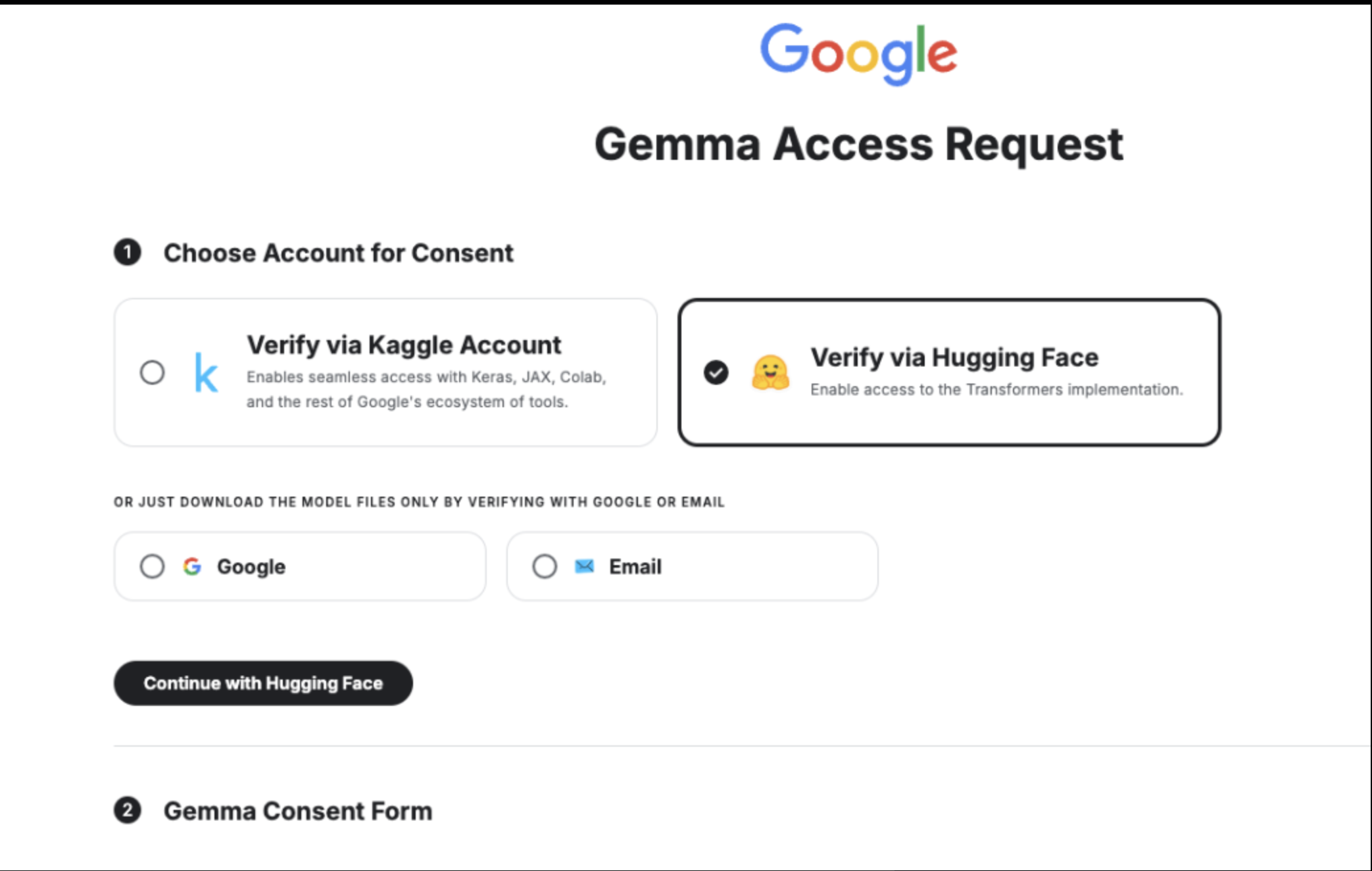
By following above step then will get as
Click on "Authorize," which will redirect you to the Kaggle Gemma Consent Form page. Fill out the required fields, accept the terms, and you will receive access to the Google Gemma models on HuggingFace in less than a minute.
Kindly try and let me know if you have any concerns. Thank you.


