

# Load model directly
from transformers import AutoProcessor, AutoModelForMultimodalLM
processor = AutoProcessor.from_pretrained("gospacedev/blip-image-captioning-base-bf16")
model = AutoModelForMultimodalLM.from_pretrained("gospacedev/blip-image-captioning-base-bf16", device_map="auto")Quick Links
Blip Image Captioning Base BF16
This model is a quantized version of the Salesforce/blip-image-captioning-base, an image-to-text model. From a memory footprint of 989 MBs -> 494 MBs by quantizing the percision of float32 to bfloat 16, reducing the model's memory size by 50 percent.
Example
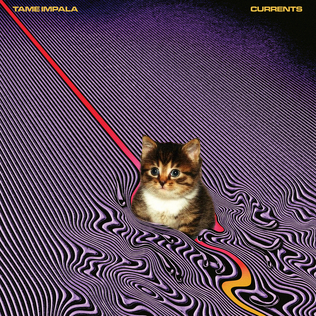 |
|---|
| a cat sitting on top of a purple and red striped carpet |
How to Get Started with the Model
Use the code below to get started with the model.
from transformers import BlipForConditionalGeneration, BlipProcessor
import requests
from PIL import Image
model = BlipForConditionalGeneration.from_pretrained("gospacedev/blip-image-captioning-base-bf16")
processor = BlipProcessor.from_pretrained("gospacedev/blip-image-captioning-base-bf16")
# Load sample image
image = Image.open(requests.get(img_url, stream=True).raw).convert('RGB')
# Generate output
inputs = processor(image, return_tensors="pt")
output = model.generate(**inputs)
result = processor.decode(out[0], skip_special_tokens=True)
print(results)
Model Details
- Developed by: Grantley Cullar
- Model type: Image-to-Text
- Language(s) (NLP): English
- License: MIT License
- Downloads last month
- 23
# Use a pipeline as a high-level helper
# Warning: Pipeline type "image-to-text" is no longer supported in transformers v5.
# You must load the model directly (see below) or downgrade to v4.x with:
# 'pip install "transformers<5.0.0'
from transformers import pipeline

pipe = pipeline("image-to-text", model="gospacedev/blip-image-captioning-base-bf16")