| --- |
| library_name: transformers |
| license: apache-2.0 |
| license_link: https://huggingface.co/Qwen/Qwen3-Coder-Next/blob/main/LICENSE |
| pipeline_tag: text-generation |
| --- |
| |
| # Qwen3-Coder-Next-FP8 |
|
|
| ## Highlights |
|
|
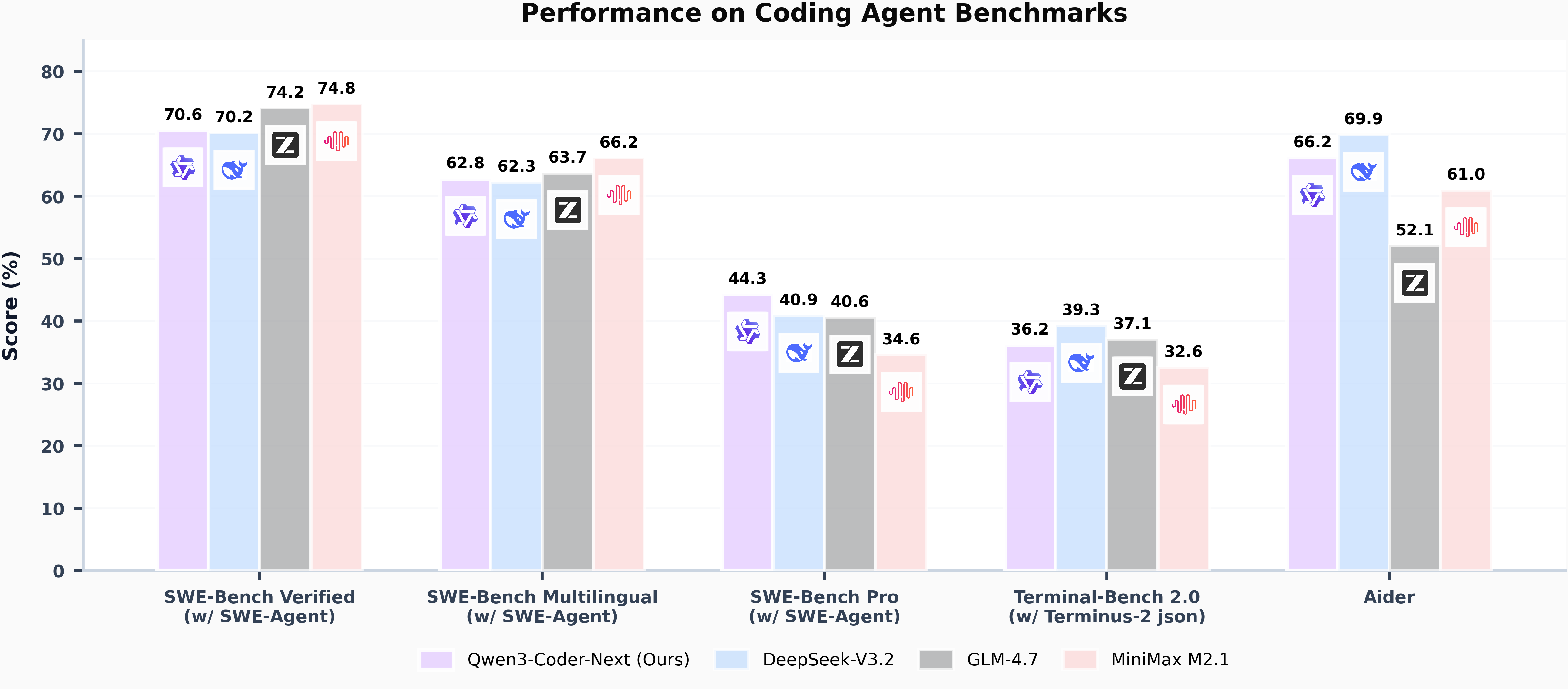
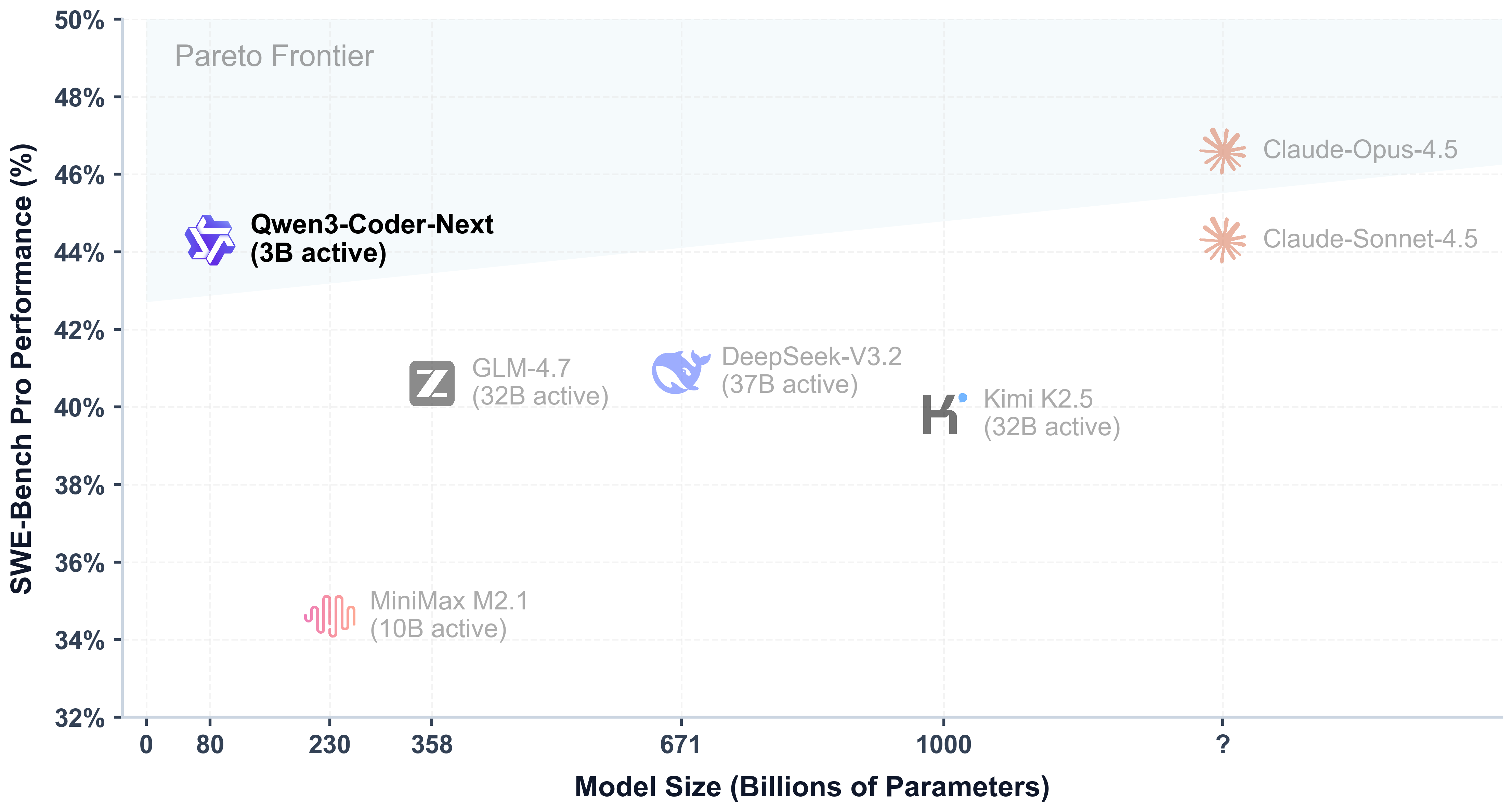
| Today, we're announcing **Qwen3-Coder-Next-FP8**, an open-weight language model designed specifically for coding agents and local development. It features the following key enhancements: |
|
|
| - **Super Efficient with Significant Performance**: With only 3B activated parameters (80B total parameters), it achieves performance comparable to models with 10–20x more active parameters, making it highly cost-effective for agent deployment. |
| - **Advanced Agentic Capabilities**: Through an elaborate training recipe, it excels at long-horizon reasoning, complex tool usage, and recovery from execution failures, ensuring robust performance in dynamic coding tasks. |
| - **Versatile Integration with Real-World IDE**: Its 256k context length, combined with adaptability to various scaffold templates, enables seamless integration with different CLI/IDE platforms (e.g., Claude Code, Qwen Code, Qoder, Kilo, Trae, Cline, etc.), supporting diverse development environments. |
|
|
|  |
|
|
|  |
|
|
| > [!Note] |
| > This repository contains the **FP8-quantized Qwen3-Coder-Next** model checkpoint for convenience and performance. |
| > The quantization method is "fine-grained fp8" quantization with block size of 128. |
| > You can find more details in the `quantization_config` field in `config.json`. |
| > |
| > In addition, the experimental results presented in this model card are obtained from the original bfloat16 model prior to FP8 quantization. |
| |
| ## Model Overview |
| |
| **Qwen3-Coder-Next-FP8** has the following features: |
| - Type: Causal Language Models |
| - Training Stage: Pretraining & Post-training |
| - Number of Parameters: 80B in total and 3B activated |
| - Number of Parameters (Non-Embedding): 79B |
| - Hidden Dimension: 2048 |
| - Number of Layers: 48 |
| - Hybrid Layout: 12 \* (3 \* (Gated DeltaNet -> MoE) -> 1 \* (Gated Attention -> MoE)) |
| - Gated Attention: |
| - Number of Attention Heads: 16 for Q and 2 for KV |
| - Head Dimension: 256 |
| - Rotary Position Embedding Dimension: 64 |
| - Gated DeltaNet: |
| - Number of Linear Attention Heads: 32 for V and 16 for QK |
| - Head Dimension: 128 |
| - Mixture of Experts: |
| - Number of Experts: 512 |
| - Number of Activated Experts: 10 |
| - Number of Shared Experts: 1 |
| - Expert Intermediate Dimension: 512 |
| - Context Length: 262,144 natively |
| |
| **NOTE: This model supports only non-thinking mode and does not generate ``<think></think>`` blocks in its output. Meanwhile, specifying `enable_thinking=False` is no longer required.** |
| |
| For more details, including benchmark evaluation, hardware requirements, and inference performance, please refer to our [blog](https://qwen.ai/blog?id=qwen3-coder-next), [GitHub](https://github.com/QwenLM/Qwen3-Coder), and [Documentation](https://qwen.readthedocs.io/en/latest/). |
| |
| |
| ## Quickstart |
| |
| We advise you to use the latest version of `transformers`. |
| |
| The following contains a code snippet illustrating how to use the model generate content based on given inputs. |
| ```python |
| from transformers import AutoModelForCausalLM, AutoTokenizer |
| |
| model_name = "Qwen/Qwen3-Coder-Next-FP8" |
|
|
| # load the tokenizer and the model |
| tokenizer = AutoTokenizer.from_pretrained(model_name) |
| model = AutoModelForCausalLM.from_pretrained( |
| model_name, |
| torch_dtype="auto", |
| device_map="auto" |
| ) |
|
|
| # prepare the model input |
| prompt = "Write a quick sort algorithm." |
| messages = [ |
| {"role": "user", "content": prompt} |
| ] |
| text = tokenizer.apply_chat_template( |
| messages, |
| tokenize=False, |
| add_generation_prompt=True, |
| ) |
| model_inputs = tokenizer([text], return_tensors="pt").to(model.device) |
|
|
| # conduct text completion |
| generated_ids = model.generate( |
| **model_inputs, |
| max_new_tokens=65536 |
| ) |
| output_ids = generated_ids[0][len(model_inputs.input_ids[0]):].tolist() |
| |
| content = tokenizer.decode(output_ids, skip_special_tokens=True) |
| |
| print("content:", content) |
| ``` |
| |
| **Note: If you encounter out-of-memory (OOM) issues, consider reducing the context length to a shorter value, such as `32,768`.** |
| |
| For local use, applications such as Ollama, LMStudio, MLX-LM, llama.cpp, and KTransformers have also supported Qwen3. |
| |
| ## Deployment |
| |
| For deployment, you can use the latest `sglang` or `vllm` to create an OpenAI-compatible API endpoint. |
| |
| ### SGLang |
| |
| [SGLang](https://github.com/sgl-project/sglang) is a fast serving framework for large language models and vision language models. |
| SGLang could be used to launch a server with OpenAI-compatible API service. |
| |
| `sglang>=v0.5.8` is required for Qwen3-Coder-Next-FP8, which can be installed using: |
| ```shell |
| pip install 'sglang[all]>=v0.5.8' |
| ``` |
| See [its documentation](https://docs.sglang.ai/get_started/install.html) for more details. |
| |
| The following command can be used to create an API endpoint at `http://localhost:30000/v1` with maximum context length 256K tokens using tensor parallel on 4 GPUs. |
| ```shell |
| python -m sglang.launch_server --model Qwen/Qwen3-Coder-Next-FP8 --port 30000 --tp-size 2 --tool-call-parser qwen3_coder``` |
| ``` |
| |
| > [!Note] |
| > The default context length is 256K. Consider reducing the context length to a smaller value, e.g., `32768`, if the server fails to start. |
| |
| |
| ### vLLM |
| |
| [vLLM](https://github.com/vllm-project/vllm) is a high-throughput and memory-efficient inference and serving engine for LLMs. |
| vLLM could be used to launch a server with OpenAI-compatible API service. |
| |
| `vllm>=0.15.0` is required for Qwen3-Coder-Next-FP8, which can be installed using: |
| ```shell |
| pip install 'vllm>=0.15.0' |
| ``` |
| See [its documentation](https://docs.vllm.ai/en/stable/getting_started/installation/index.html) for more details. |
| |
| The following command can be used to create an API endpoint at `http://localhost:8000/v1` with maximum context length 256K tokens using tensor parallel on 4 GPUs. |
| ```shell |
| vllm serve Qwen/Qwen3-Coder-Next-FP8 --port 8000 --tensor-parallel-size 2 --enable-auto-tool-choice --tool-call-parser qwen3_coder |
| ``` |
| |
| > [!Note] |
| > The default context length is 256K. Consider reducing the context length to a smaller value, e.g., `32768`, if the server fails to start. |
| |
| |
| ## Agentic Coding |
| |
| Qwen3-Coder-Next-FP8 excels in tool calling capabilities. |
| |
| You can simply define or use any tools as following example. |
| ```python |
| # Your tool implementation |
| def square_the_number(num: float) -> dict: |
| return num ** 2 |
| |
| # Define Tools |
| tools=[ |
| { |
| "type":"function", |
| "function":{ |
| "name": "square_the_number", |
| "description": "output the square of the number.", |
| "parameters": { |
| "type": "object", |
| "required": ["input_num"], |
| "properties": { |
| 'input_num': { |
| 'type': 'number', |
| 'description': 'input_num is a number that will be squared' |
| } |
| }, |
| } |
| } |
| } |
| ] |
| |
| from openai import OpenAI |
| # Define LLM |
| client = OpenAI( |
| # Use a custom endpoint compatible with OpenAI API |
| base_url='http://localhost:8000/v1', # api_base |
| api_key="EMPTY" |
| ) |
| |
| messages = [{'role': 'user', 'content': 'square the number 1024'}] |
| |
| completion = client.chat.completions.create( |
| messages=messages, |
| model="Qwen3-Coder-Next-FP8", |
| max_tokens=65536, |
| tools=tools, |
| ) |
| |
| print(completion.choices[0]) |
| ``` |
| |
| ## Best Practices |
| |
| To achieve optimal performance, we recommend the following sampling parameters: `temperature=1.0`, `top_p=0.95`, `top_k=40`. |
| |
| |
| ## Citation |
| |
| If you find our work helpful, feel free to give us a cite. |
| |
| ``` |
| @techreport{qwen_qwen3_coder_next_tech_report, |
| title = {Qwen3-Coder-Next Technical Report}, |
| author = {{Qwen Team}}, |
| url = {https://github.com/QwenLM/Qwen3-Coder/blob/main/qwen3_coder_next_tech_report.pdf}, |
| note = {Accessed: 2026-02-03} |
| } |
| ``` |


