| --- |
| sidebar_position: 10 |
| title: "Skins & Themes" |
| description: "Customize the Hermes CLI with built-in and user-defined skins" |
| --- |
| |
| # Skins & Themes |
|
|
| Skins control the **visual presentation** of the Hermes CLI: banner colors, spinner faces and verbs, response-box labels, branding text, and the tool activity prefix. |
|
|
| Conversational style and visual style are separate concepts: |
|
|
| - **Personality** changes the agent's tone and wording. |
| - **Skin** changes the CLI's appearance. |
|
|
| ## Change skins |
|
|
| ```bash |
| /skin # show the current skin and list available skins |
| /skin ares # switch to a built-in skin |
| /skin mytheme # switch to a custom skin from ~/.hermes/skins/mytheme.yaml |
| ``` |
|
|
| Or set the default skin in `~/.hermes/config.yaml`: |
|
|
| ```yaml |
| display: |
| skin: default |
| ``` |
|
|
| ## Built-in skins |
|
|
| | Skin | Description | Agent branding | Visual character | |
| |------|-------------|----------------|------------------| |
| | `default` | Classic Hermes — gold and kawaii | `Hermes Agent` | Warm gold borders, cornsilk text, kawaii faces in spinners. The familiar caduceus banner. Clean and inviting. | |
| | `ares` | War-god theme — crimson and bronze | `Ares Agent` | Deep crimson borders with bronze accents. Aggressive spinner verbs ("forging", "marching", "tempering steel"). Custom sword-and-shield ASCII art banner. | |
| | `mono` | Monochrome — clean grayscale | `Hermes Agent` | All grays — no color. Borders are `#555555`, text is `#c9d1d9`. Ideal for minimal terminal setups or screen recordings. | |
| | `slate` | Cool blue — developer-focused | `Hermes Agent` | Royal blue borders (`#4169e1`), soft blue text. Calm and professional. No custom spinner — uses default faces. | |
| | `daylight` | Light theme for bright terminals with dark text and cool blue accents | `Hermes Agent` | Designed for white or bright terminals. Dark slate text with blue borders, pale status surfaces, and a light completion menu that stays readable in light terminal profiles. | |
| | `warm-lightmode` | Warm brown/gold text for light terminal backgrounds | `Hermes Agent` | Warm parchment tones for light terminals. Dark brown text with saddle-brown accents, cream-colored status surfaces. An earthy alternative to the cooler daylight theme. | |
| | `poseidon` | Ocean-god theme — deep blue and seafoam | `Poseidon Agent` | Deep blue to seafoam gradient. Ocean-themed spinners ("charting currents", "sounding the depth"). Trident ASCII art banner. | |
| | `sisyphus` | Sisyphean theme — austere grayscale with persistence | `Sisyphus Agent` | Light grays with stark contrast. Boulder-themed spinners ("pushing uphill", "resetting the boulder", "enduring the loop"). Boulder-and-hill ASCII art banner. | |
| | `charizard` | Volcanic theme — burnt orange and ember | `Charizard Agent` | Warm burnt orange to ember gradient. Fire-themed spinners ("banking into the draft", "measuring burn"). Dragon-silhouette ASCII art banner. | |
|
|
| ## Complete list of configurable keys |
|
|
| ### Colors (`colors:`) |
|
|
| Controls all color values throughout the CLI. Values are hex color strings. |
|
|
| | Key | Description | Default (`default` skin) | |
| |-----|-------------|--------------------------| |
| | `banner_border` | Panel border around the startup banner | `#CD7F32` (bronze) | |
| | `banner_title` | Title text color in the banner | `#FFD700` (gold) | |
| | `banner_accent` | Section headers in the banner (Available Tools, etc.) | `#FFBF00` (amber) | |
| | `banner_dim` | Muted text in the banner (separators, secondary labels) | `#B8860B` (dark goldenrod) | |
| | `banner_text` | Body text in the banner (tool names, skill names) | `#FFF8DC` (cornsilk) | |
| | `ui_accent` | General UI accent color (highlights, active elements) | `#FFBF00` | |
| | `ui_label` | UI labels and tags | `#4dd0e1` (teal) | |
| | `ui_ok` | Success indicators (checkmarks, completion) | `#4caf50` (green) | |
| | `ui_error` | Error indicators (failures, blocked) | `#ef5350` (red) | |
| | `ui_warn` | Warning indicators (caution, approval prompts) | `#ffa726` (orange) | |
| | `prompt` | Interactive prompt text color | `#FFF8DC` | |
| | `input_rule` | Horizontal rule above the input area | `#CD7F32` | |
| | `response_border` | Border around the agent's response box (ANSI escape) | `#FFD700` | |
| | `session_label` | Session label color | `#DAA520` | |
| | `session_border` | Session ID dim border color | `#8B8682` | |
| | `status_bar_bg` | Background color for the TUI status / usage bar | `#1a1a2e` | |
| | `voice_status_bg` | Background color for the voice-mode status badge | `#1a1a2e` | |
| | `completion_menu_bg` | Background color for the completion menu list | `#1a1a2e` | |
| | `completion_menu_current_bg` | Background color for the active completion row | `#333355` | |
| | `completion_menu_meta_bg` | Background color for the completion meta column | `#1a1a2e` | |
| | `completion_menu_meta_current_bg` | Background color for the active completion meta column | `#333355` | |
|
|
| ### Spinner (`spinner:`) |
|
|
| Controls the animated spinner shown while waiting for API responses. |
|
|
| | Key | Type | Description | Example | |
| |-----|------|-------------|---------| |
| | `waiting_faces` | list of strings | Faces cycled while waiting for API response | `["(⚔)", "(⛨)", "(▲)"]` | |
| | `thinking_faces` | list of strings | Faces cycled during model reasoning | `["(⚔)", "(⌁)", "(<>)"]` | |
| | `thinking_verbs` | list of strings | Verbs shown in spinner messages | `["forging", "plotting", "hammering plans"]` | |
| | `wings` | list of [left, right] pairs | Decorative brackets around the spinner | `[["⟪⚔", "⚔⟫"], ["⟪▲", "▲⟫"]]` | |
|
|
| When spinner values are empty (like in `default` and `mono`), hardcoded defaults from `display.py` are used. |
|
|
| ### Branding (`branding:`) |
|
|
| Text strings used throughout the CLI interface. |
|
|
| | Key | Description | Default | |
| |-----|-------------|---------| |
| | `agent_name` | Name shown in banner title and status display | `Hermes Agent` | |
| | `welcome` | Welcome message shown at CLI startup | `Welcome to Hermes Agent! Type your message or /help for commands.` | |
| | `goodbye` | Message shown on exit | `Goodbye! ⚕` | |
| | `response_label` | Label on the response box header | ` ⚕ Hermes ` | |
| | `prompt_symbol` | Symbol before the user input prompt | `❯ ` | |
| | `help_header` | Header text for the `/help` command output | `(^_^)? Available Commands` | |
|
|
| ### Other top-level keys |
|
|
| | Key | Type | Description | Default | |
| |-----|------|-------------|---------| |
| | `tool_prefix` | string | Character prefixed to tool output lines in the CLI | `┊` | |
| | `tool_emojis` | dict | Per-tool emoji overrides for spinners and progress (`{tool_name: emoji}`) | `{}` | |
| | `banner_logo` | string | Rich-markup ASCII art logo (replaces the default HERMES_AGENT banner) | `""` | |
| | `banner_hero` | string | Rich-markup hero art (replaces the default caduceus art) | `""` | |
|
|
| ## Custom skins |
|
|
| Create YAML files under `~/.hermes/skins/`. User skins inherit missing values from the built-in `default` skin, so you only need to specify the keys you want to change. |
|
|
| ### Full custom skin YAML template |
|
|
| ```yaml |
| # ~/.hermes/skins/mytheme.yaml |
| # Complete skin template — all keys shown. Delete any you don't need; |
| # missing values automatically inherit from the 'default' skin. |
| |
| name: mytheme |
| description: My custom theme |
| |
| colors: |
| banner_border: "#CD7F32" |
| banner_title: "#FFD700" |
| banner_accent: "#FFBF00" |
| banner_dim: "#B8860B" |
| banner_text: "#FFF8DC" |
| ui_accent: "#FFBF00" |
| ui_label: "#4dd0e1" |
| ui_ok: "#4caf50" |
| ui_error: "#ef5350" |
| ui_warn: "#ffa726" |
| prompt: "#FFF8DC" |
| input_rule: "#CD7F32" |
| response_border: "#FFD700" |
| session_label: "#DAA520" |
| session_border: "#8B8682" |
| status_bar_bg: "#1a1a2e" |
| voice_status_bg: "#1a1a2e" |
| completion_menu_bg: "#1a1a2e" |
| completion_menu_current_bg: "#333355" |
| completion_menu_meta_bg: "#1a1a2e" |
| completion_menu_meta_current_bg: "#333355" |
| |
| spinner: |
| waiting_faces: |
| - "(⚔)" |
| - "(⛨)" |
| - "(▲)" |
| thinking_faces: |
| - "(⚔)" |
| - "(⌁)" |
| - "(<>)" |
| thinking_verbs: |
| - "processing" |
| - "analyzing" |
| - "computing" |
| - "evaluating" |
| wings: |
| - ["⟪⚡", "⚡⟫"] |
| - ["⟪●", "●⟫"] |
| |
| branding: |
| agent_name: "My Agent" |
| welcome: "Welcome to My Agent! Type your message or /help for commands." |
| goodbye: "See you later! ⚡" |
| response_label: " ⚡ My Agent " |
| prompt_symbol: "⚡ ❯ " |
| help_header: "(⚡) Available Commands" |
| |
| tool_prefix: "┊" |
| |
| # Per-tool emoji overrides (optional) |
| tool_emojis: |
| terminal: "⚔" |
| web_search: "🔮" |
| read_file: "📄" |
| |
| # Custom ASCII art banners (optional, Rich markup supported) |
| # banner_logo: | |
| # [bold #FFD700] MY AGENT [/] |
| # banner_hero: | |
| # [#FFD700] Custom art here [/] |
| ``` |
|
|
| ### Minimal custom skin example |
|
|
| Since everything inherits from `default`, a minimal skin only needs to change what's different: |
|
|
| ```yaml |
| name: cyberpunk |
| description: Neon terminal theme |
| |
| colors: |
| banner_border: "#FF00FF" |
| banner_title: "#00FFFF" |
| banner_accent: "#FF1493" |
| |
| spinner: |
| thinking_verbs: ["jacking in", "decrypting", "uploading"] |
| wings: |
| - ["⟨⚡", "⚡⟩"] |
| |
| branding: |
| agent_name: "Cyber Agent" |
| response_label: " ⚡ Cyber " |
| |
| tool_prefix: "▏" |
| ``` |
|
|
| ## Hermes Mod — Visual Skin Editor |
|
|
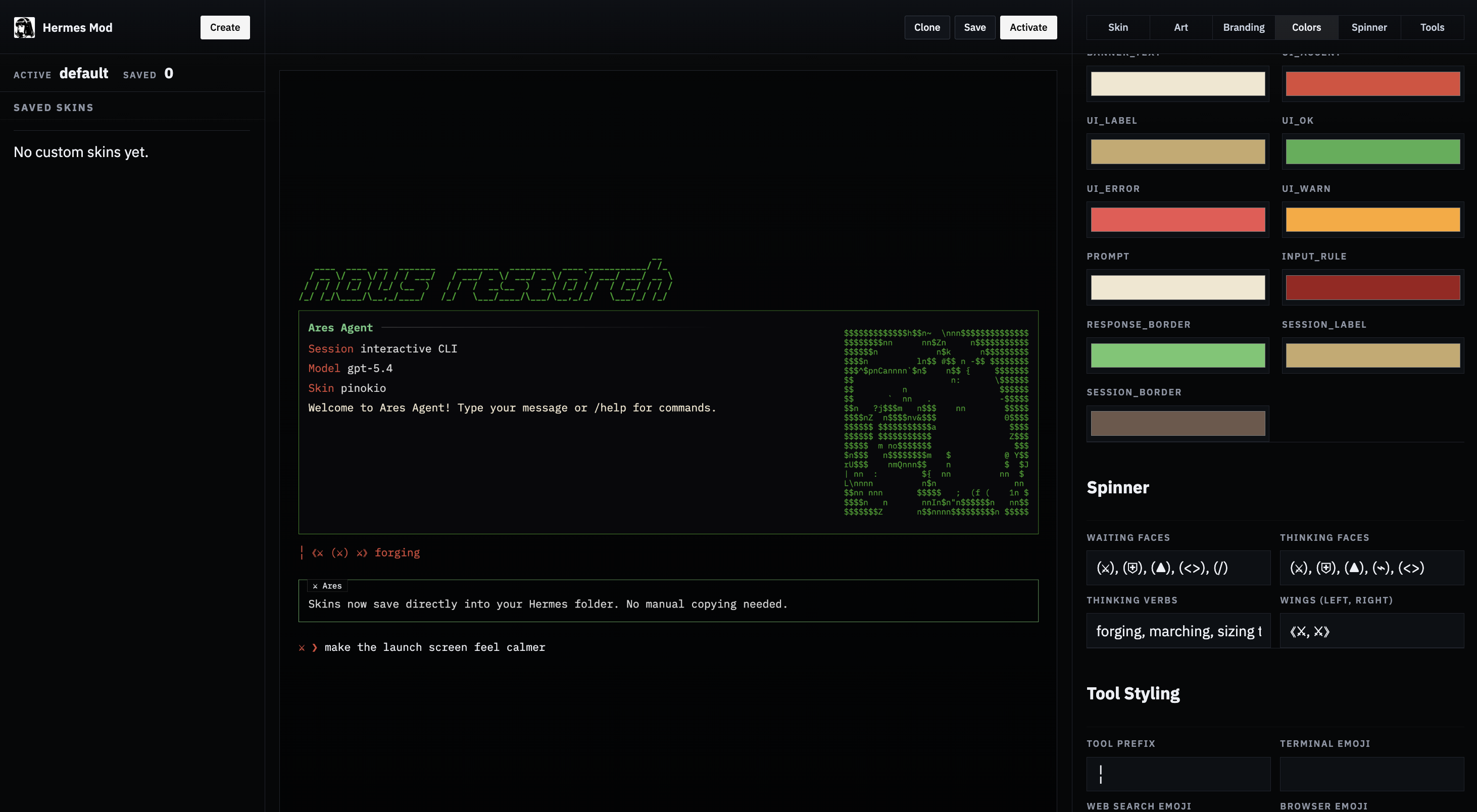
| [Hermes Mod](https://github.com/cocktailpeanut/hermes-mod) is a community-built web UI for creating and managing skins visually. Instead of writing YAML by hand, you get a point-and-click editor with live preview. |
|
|
|  |
|
|
| **What it does:** |
|
|
| - Lists all built-in and custom skins |
| - Opens any skin into a visual editor with all Hermes skin fields (colors, spinner, branding, tool prefix, tool emojis) |
| - Generates `banner_logo` text art from a text prompt |
| - Converts uploaded images (PNG, JPG, GIF, WEBP) into `banner_hero` ASCII art with multiple render styles (braille, ASCII ramp, blocks, dots) |
| - Saves directly to `~/.hermes/skins/` |
| - Activates a skin by updating `~/.hermes/config.yaml` |
| - Shows the generated YAML and a live preview |
|
|
| ### Install |
|
|
| **Option 1 — Pinokio (1-click):** |
|
|
| Find it on [pinokio.computer](https://pinokio.computer) and install with one click. |
|
|
| **Option 2 — npx (quickest from terminal):** |
|
|
| ```bash |
| npx -y hermes-mod |
| ``` |
|
|
| **Option 3 — Manual:** |
|
|
| ```bash |
| git clone https://github.com/cocktailpeanut/hermes-mod.git |
| cd hermes-mod/app |
| npm install |
| npm start |
| ``` |
|
|
| ### Usage |
|
|
| 1. Start the app (via Pinokio or terminal). |
| 2. Open **Skin Studio**. |
| 3. Choose a built-in or custom skin to edit. |
| 4. Generate a logo from text and/or upload an image for hero art. Pick a render style and width. |
| 5. Edit colors, spinner, branding, and other fields. |
| 6. Click **Save** to write the skin YAML to `~/.hermes/skins/`. |
| 7. Click **Activate** to set it as the current skin (updates `display.skin` in `config.yaml`). |
|
|
| Hermes Mod respects the `HERMES_HOME` environment variable, so it works with [profiles](/docs/user-guide/profiles) too. |
|
|
| ## Operational notes |
|
|
| - Built-in skins load from `hermes_cli/skin_engine.py`. |
| - Unknown skins automatically fall back to `default`. |
| - `/skin` updates the active CLI theme immediately for the current session. |
| - User skins in `~/.hermes/skins/` take precedence over built-in skins with the same name. |
| - Skin changes via `/skin` are session-only. To make a skin your permanent default, set it in `config.yaml`. |
| - The `banner_logo` and `banner_hero` fields support Rich console markup (e.g., `[bold #FF0000]text[/]`) for colored ASCII art. |
|
|

