Instructions to use hitonet/hito-1.7b with libraries, inference providers, notebooks, and local apps. Follow these links to get started.
- Libraries
- Transformers
How to use hitonet/hito-1.7b with Transformers:
# Use a pipeline as a high-level helper from transformers import pipeline pipe = pipeline("text-generation", model="hitonet/hito-1.7b") messages = [ {"role": "user", "content": "Who are you?"}, ] pipe(messages)# Load model directly from transformers import AutoTokenizer, AutoModelForCausalLM tokenizer = AutoTokenizer.from_pretrained("hitonet/hito-1.7b") model = AutoModelForCausalLM.from_pretrained("hitonet/hito-1.7b", device_map="auto") messages = [ {"role": "user", "content": "Who are you?"}, ] inputs = tokenizer.apply_chat_template( messages, add_generation_prompt=True, tokenize=True, return_dict=True, return_tensors="pt", ).to(model.device) outputs = model.generate(**inputs, max_new_tokens=40) print(tokenizer.decode(outputs[0][inputs["input_ids"].shape[-1]:])) - Inference
- Notebooks
- Google Colab
- Kaggle
- Local Apps Settings
- vLLM
How to use hitonet/hito-1.7b with vLLM:
Install from pip and serve model
# Install vLLM from pip: pip install vllm # Start the vLLM server: vllm serve "hitonet/hito-1.7b" # Call the server using curl (OpenAI-compatible API): curl -X POST "http://localhost:8000/v1/chat/completions" \ -H "Content-Type: application/json" \ --data '{ "model": "hitonet/hito-1.7b", "messages": [ { "role": "user", "content": "What is the capital of France?" } ] }'Use Docker
docker model run hf.co/hitonet/hito-1.7b
- SGLang
How to use hitonet/hito-1.7b with SGLang:
Install from pip and serve model
# Install SGLang from pip: pip install sglang # Start the SGLang server: python3 -m sglang.launch_server \ --model-path "hitonet/hito-1.7b" \ --host 0.0.0.0 \ --port 30000 # Call the server using curl (OpenAI-compatible API): curl -X POST "http://localhost:30000/v1/chat/completions" \ -H "Content-Type: application/json" \ --data '{ "model": "hitonet/hito-1.7b", "messages": [ { "role": "user", "content": "What is the capital of France?" } ] }'Use Docker images
docker run --gpus all \ --shm-size 32g \ -p 30000:30000 \ -v ~/.cache/huggingface:/root/.cache/huggingface \ --env "HF_TOKEN=<secret>" \ --ipc=host \ lmsysorg/sglang:latest \ python3 -m sglang.launch_server \ --model-path "hitonet/hito-1.7b" \ --host 0.0.0.0 \ --port 30000 # Call the server using curl (OpenAI-compatible API): curl -X POST "http://localhost:30000/v1/chat/completions" \ -H "Content-Type: application/json" \ --data '{ "model": "hitonet/hito-1.7b", "messages": [ { "role": "user", "content": "What is the capital of France?" } ] }' - Docker Model Runner
How to use hitonet/hito-1.7b with Docker Model Runner:
docker model run hf.co/hitonet/hito-1.7b
The Test Results are Fake! It Spreads Misinformation!
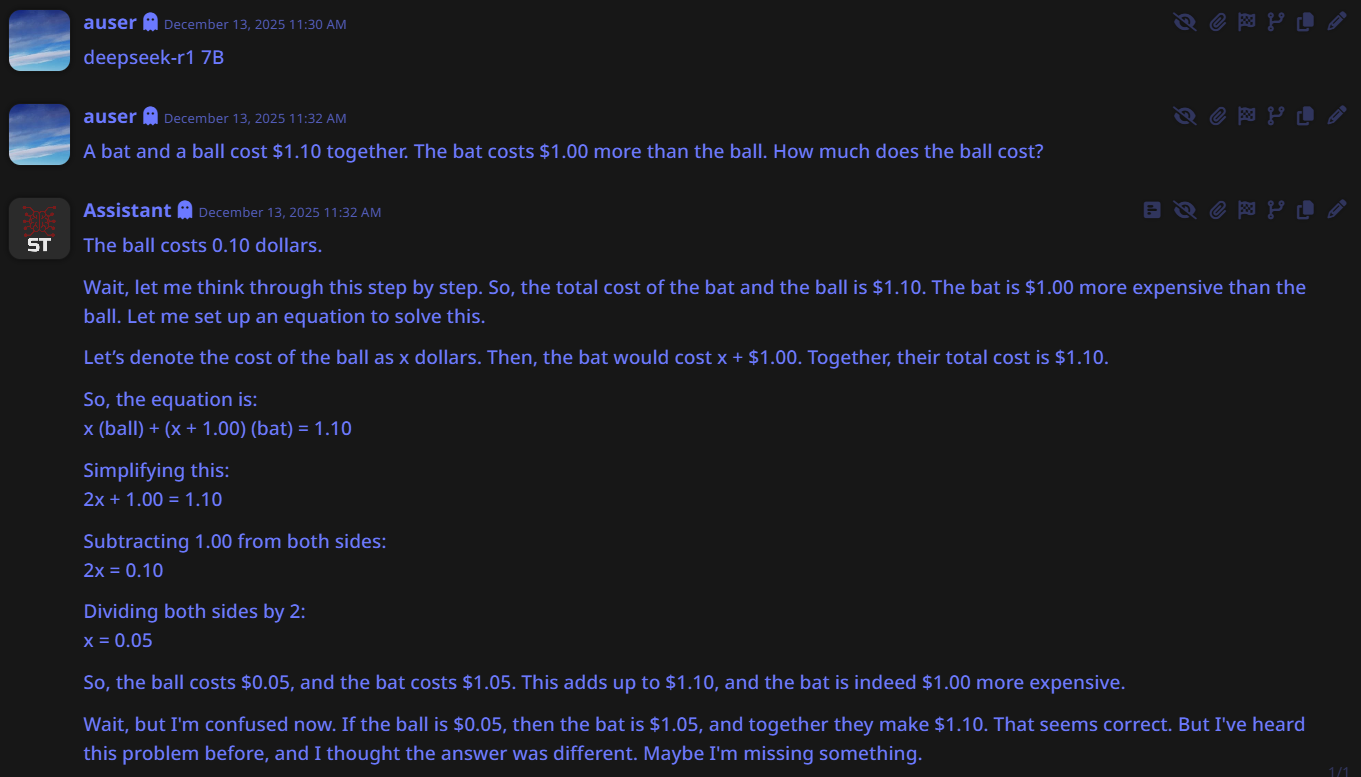
Deepseek 7B https://files.catbox.moe/103jud.jpg
Hi,
Thanks for the review but please dont judge by using low quantization. Run the main model wieghts thats what we used for test.
Some community members uploaded better quantized file.
Also from the screenahot i cant see our custom tags loaded. Are you not rendering them on the front end or your screenshot is from another model? Please get the official gguf q8 works perfectly fine. You should see etc.
If you need help let me know and remember production model is on https://chat.hitonet.com
Hope i helped you.
Also our test was ran automatically no editing involved we use a python file that runs exact prompt on all test subjects and generate the results.
Its accurate try to use different tempreture or 0
