Instructions to use igor-im/flux_prompt_expander with libraries, inference providers, notebooks, and local apps. Follow these links to get started.
- Libraries
- Transformers
How to use igor-im/flux_prompt_expander with Transformers:
# Use a pipeline as a high-level helper from transformers import pipeline pipe = pipeline("text-generation", model="igor-im/flux_prompt_expander") messages = [ {"role": "user", "content": "Who are you?"}, ] pipe(messages)# Load model directly from transformers import AutoModel model = AutoModel.from_pretrained("igor-im/flux_prompt_expander", dtype="auto") - PEFT
How to use igor-im/flux_prompt_expander with PEFT:
Task type is invalid.
- llama-cpp-python
How to use igor-im/flux_prompt_expander with llama-cpp-python:
# !pip install llama-cpp-python from llama_cpp import Llama llm = Llama.from_pretrained( repo_id="igor-im/flux_prompt_expander", filename="unsloth.F16.gguf", )
llm.create_chat_completion( messages = [ { "role": "user", "content": "What is the capital of France?" } ] ) - Notebooks
- Google Colab
- Kaggle
- Local Apps
- llama.cpp
How to use igor-im/flux_prompt_expander with llama.cpp:
Install from brew
brew install llama.cpp # Start a local OpenAI-compatible server with a web UI: llama-server -hf igor-im/flux_prompt_expander:Q4_K_M # Run inference directly in the terminal: llama-cli -hf igor-im/flux_prompt_expander:Q4_K_M
Install from WinGet (Windows)
winget install llama.cpp # Start a local OpenAI-compatible server with a web UI: llama-server -hf igor-im/flux_prompt_expander:Q4_K_M # Run inference directly in the terminal: llama-cli -hf igor-im/flux_prompt_expander:Q4_K_M
Use pre-built binary
# Download pre-built binary from: # https://github.com/ggerganov/llama.cpp/releases # Start a local OpenAI-compatible server with a web UI: ./llama-server -hf igor-im/flux_prompt_expander:Q4_K_M # Run inference directly in the terminal: ./llama-cli -hf igor-im/flux_prompt_expander:Q4_K_M
Build from source code
git clone https://github.com/ggerganov/llama.cpp.git cd llama.cpp cmake -B build cmake --build build -j --target llama-server llama-cli # Start a local OpenAI-compatible server with a web UI: ./build/bin/llama-server -hf igor-im/flux_prompt_expander:Q4_K_M # Run inference directly in the terminal: ./build/bin/llama-cli -hf igor-im/flux_prompt_expander:Q4_K_M
Use Docker
docker model run hf.co/igor-im/flux_prompt_expander:Q4_K_M
- LM Studio
- Jan
- vLLM
How to use igor-im/flux_prompt_expander with vLLM:
Install from pip and serve model
# Install vLLM from pip: pip install vllm # Start the vLLM server: vllm serve "igor-im/flux_prompt_expander" # Call the server using curl (OpenAI-compatible API): curl -X POST "http://localhost:8000/v1/chat/completions" \ -H "Content-Type: application/json" \ --data '{ "model": "igor-im/flux_prompt_expander", "messages": [ { "role": "user", "content": "What is the capital of France?" } ] }'Use Docker
docker model run hf.co/igor-im/flux_prompt_expander:Q4_K_M
- SGLang
How to use igor-im/flux_prompt_expander with SGLang:
Install from pip and serve model
# Install SGLang from pip: pip install sglang # Start the SGLang server: python3 -m sglang.launch_server \ --model-path "igor-im/flux_prompt_expander" \ --host 0.0.0.0 \ --port 30000 # Call the server using curl (OpenAI-compatible API): curl -X POST "http://localhost:30000/v1/chat/completions" \ -H "Content-Type: application/json" \ --data '{ "model": "igor-im/flux_prompt_expander", "messages": [ { "role": "user", "content": "What is the capital of France?" } ] }'Use Docker images
docker run --gpus all \ --shm-size 32g \ -p 30000:30000 \ -v ~/.cache/huggingface:/root/.cache/huggingface \ --env "HF_TOKEN=<secret>" \ --ipc=host \ lmsysorg/sglang:latest \ python3 -m sglang.launch_server \ --model-path "igor-im/flux_prompt_expander" \ --host 0.0.0.0 \ --port 30000 # Call the server using curl (OpenAI-compatible API): curl -X POST "http://localhost:30000/v1/chat/completions" \ -H "Content-Type: application/json" \ --data '{ "model": "igor-im/flux_prompt_expander", "messages": [ { "role": "user", "content": "What is the capital of France?" } ] }' - Ollama
How to use igor-im/flux_prompt_expander with Ollama:
ollama run hf.co/igor-im/flux_prompt_expander:Q4_K_M
- Unsloth Studio new
How to use igor-im/flux_prompt_expander with Unsloth Studio:
Install Unsloth Studio (macOS, Linux, WSL)
curl -fsSL https://unsloth.ai/install.sh | sh # Run unsloth studio unsloth studio -H 0.0.0.0 -p 8888 # Then open http://localhost:8888 in your browser # Search for igor-im/flux_prompt_expander to start chatting
Install Unsloth Studio (Windows)
irm https://unsloth.ai/install.ps1 | iex # Run unsloth studio unsloth studio -H 0.0.0.0 -p 8888 # Then open http://localhost:8888 in your browser # Search for igor-im/flux_prompt_expander to start chatting
Using HuggingFace Spaces for Unsloth
# No setup required # Open https://huggingface.co/spaces/unsloth/studio in your browser # Search for igor-im/flux_prompt_expander to start chatting
- Pi new
How to use igor-im/flux_prompt_expander with Pi:
Start the llama.cpp server
# Install llama.cpp: brew install llama.cpp # Start a local OpenAI-compatible server: llama-server -hf igor-im/flux_prompt_expander:Q4_K_M
Configure the model in Pi
# Install Pi: npm install -g @mariozechner/pi-coding-agent # Add to ~/.pi/agent/models.json: { "providers": { "llama-cpp": { "baseUrl": "http://localhost:8080/v1", "api": "openai-completions", "apiKey": "none", "models": [ { "id": "igor-im/flux_prompt_expander:Q4_K_M" } ] } } }Run Pi
# Start Pi in your project directory: pi
- Hermes Agent new
How to use igor-im/flux_prompt_expander with Hermes Agent:
Start the llama.cpp server
# Install llama.cpp: brew install llama.cpp # Start a local OpenAI-compatible server: llama-server -hf igor-im/flux_prompt_expander:Q4_K_M
Configure Hermes
# Install Hermes: curl -fsSL https://hermes-agent.nousresearch.com/install.sh | bash hermes setup # Point Hermes at the local server: hermes config set model.provider custom hermes config set model.base_url http://127.0.0.1:8080/v1 hermes config set model.default igor-im/flux_prompt_expander:Q4_K_M
Run Hermes
hermes
- Docker Model Runner
How to use igor-im/flux_prompt_expander with Docker Model Runner:
docker model run hf.co/igor-im/flux_prompt_expander:Q4_K_M
- Lemonade
How to use igor-im/flux_prompt_expander with Lemonade:
Pull the model
# Download Lemonade from https://lemonade-server.ai/ lemonade pull igor-im/flux_prompt_expander:Q4_K_M
Run and chat with the model
lemonade run user.flux_prompt_expander-Q4_K_M
List all available models
lemonade list
Install from WinGet (Windows)
winget install llama.cpp
# Start a local OpenAI-compatible server with a web UI:
llama-server -hf igor-im/flux_prompt_expander:# Run inference directly in the terminal:
llama-cli -hf igor-im/flux_prompt_expander:Use pre-built binary
# Download pre-built binary from:
# https://github.com/ggerganov/llama.cpp/releases# Start a local OpenAI-compatible server with a web UI:
./llama-server -hf igor-im/flux_prompt_expander:# Run inference directly in the terminal:
./llama-cli -hf igor-im/flux_prompt_expander:Build from source code
git clone https://github.com/ggerganov/llama.cpp.git
cd llama.cpp
cmake -B build
cmake --build build -j --target llama-server llama-cli# Start a local OpenAI-compatible server with a web UI:
./build/bin/llama-server -hf igor-im/flux_prompt_expander:# Run inference directly in the terminal:
./build/bin/llama-cli -hf igor-im/flux_prompt_expander:Use Docker
docker model run hf.co/igor-im/flux_prompt_expander:v 0.2 Trained for 1 epoch ~2500 steps. Generates good prompt but doesn't fully follow input prompt
Uploaded model
- Developed by: igor-im
- License: apache-2.0
- Finetuned from model : unsloth/llama-3.2-3b-instruct-bnb-4bit
This llama model was trained 2x faster with Unsloth and Huggingface's TRL library.

Samples
Jaggernaut XL - rundiffusion Foocus
Flux - huggingface inference
Prompts used to generated Samples
Plain Prompt
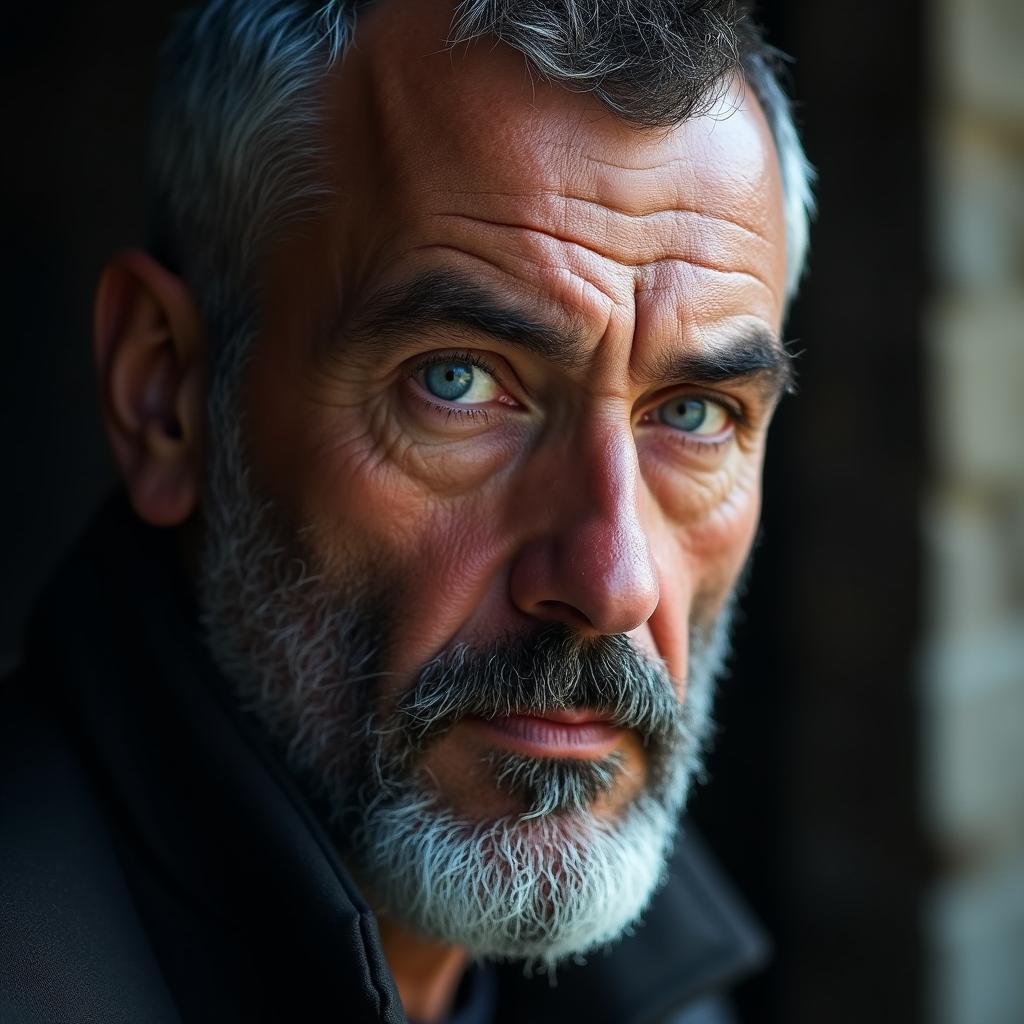
A portrait of a man looking off into a distance, he has long hair, and a short beard
Fine Tuned Prompt (generated by simply passing plain prompt to the model)
Imagine a super-realistic portrait of an enigmatic middle-aged man with a rugged appearance and a close-cropped beard that frames his intense, deep-set blue eyes. He has an air of wisdom and contemplation as he gazes pensively into the distance, exuding a sense of resilience and strength. From an eye-level perspective, observe his slightly furrowed brow and the subtle creases around his mouth, a testament to his life experience. The soft yet direct lighting accentuates the depth and texture of his features, creating an intimate and powerful connection with the subject.
Claude prompt (generated via following template: create a prompt to be used with an image generation ai to better guide it to generate based on user input: /n INPUT: {plain_prompt})
Create a highly detailed portrait photograph of a contemplative man gazing toward the horizon. Subject has flowing shoulder-length hair with natural movement and texture, paired with a neatly trimmed short beard. Capture in natural lighting during golden hour, with soft rim lighting highlighting his hair's texture. Shot with a high-end portrait lens at f/2.8 for pleasing bokeh. Composition follows rule of thirds, with subject positioned to direct attention toward his eyeline. Color palette emphasizes warm, muted tones. Style reference: Modern fashion photography meets classical portraiture. Technical details: Ultra high resolution, photorealistic quality, masterful depth of field, sharp focus on facial features. 8K, highly detailed, professional photography, award-winning portrait.
Llama 3.2 3B untuned prompt (generated via following template: create a prompt to be used with an image generation ai to better guide it to generate based on user input: /n INPUT: {plain_prompt})
Generate an image of a realistic portrait of a man in his 40s or 50s, standing in front of a background with a subtle blur effect on the distant landscape. The subject's facial features should be well-defined, and he should have medium-length (not too long nor too short) hair that falls around his shoulders. His beard should be short (e.g., V-shaped) and neatly trimmed, with a slight curl at the edges. Incorporate some subtle shading and texture to give the image depth and dimensionality
- Downloads last month
- 61


Install from brew
# Start a local OpenAI-compatible server with a web UI: llama-server -hf igor-im/flux_prompt_expander:# Run inference directly in the terminal: llama-cli -hf igor-im/flux_prompt_expander: