


Install from WinGet (Windows)
winget install llama.cpp
# Start a local OpenAI-compatible server with a web UI:
llama-server -hf infinity-studio/MiniCPM-V-4-gguf:# Run inference directly in the terminal:
llama-cli -hf infinity-studio/MiniCPM-V-4-gguf:Use pre-built binary
# Download pre-built binary from:
# https://github.com/ggerganov/llama.cpp/releases# Start a local OpenAI-compatible server with a web UI:
./llama-server -hf infinity-studio/MiniCPM-V-4-gguf:# Run inference directly in the terminal:
./llama-cli -hf infinity-studio/MiniCPM-V-4-gguf:Build from source code
git clone https://github.com/ggerganov/llama.cpp.git
cd llama.cpp
cmake -B build
cmake --build build -j --target llama-server llama-cli# Start a local OpenAI-compatible server with a web UI:
./build/bin/llama-server -hf infinity-studio/MiniCPM-V-4-gguf:# Run inference directly in the terminal:
./build/bin/llama-cli -hf infinity-studio/MiniCPM-V-4-gguf:Use Docker
docker model run hf.co/infinity-studio/MiniCPM-V-4-gguf:A GPT-4V Level MLLM for Single Image, Multi Image and Video on Your Phone
MiniCPM-V 4.0
MiniCPM-V 4.0 is the latest efficient model in the MiniCPM-V series. The model is built based on SigLIP2-400M and MiniCPM4-3B with a total of 4.1B parameters. It inherits the strong single-image, multi-image and video understanding performance of MiniCPM-V 2.6 with largely improved efficiency. Notable features of MiniCPM-V 4.0 include:
🔥 Leading Visual Capability. With only 4.1B parameters, MiniCPM-V 4.0 achieves an average score of 69.0 on OpenCompass, a comprehensive evaluation of 8 popular benchmarks, outperforming GPT-4.1-mini-20250414, MiniCPM-V 2.6 (8.1B params, OpenCompass 65.2) and Qwen2.5-VL-3B-Instruct (3.8B params, OpenCompass 64.5). It also shows good performance in multi-image understanding and video understanding.
🚀 Superior Efficiency. Designed for on-device deployment, MiniCPM-V 4.0 runs smoothly on end devices. For example, it devlivers less than 2s first token delay and more than 17 token/s decoding on iPhone 16 Pro Max, without heating problems. It also shows superior throughput under concurrent requests.
💫 Easy Usage. MiniCPM-V 4.0 can be easily used in various ways including llama.cpp, Ollama, vLLM, SGLang, LLaMA-Factory and local web demo etc. We also open-source iOS App that can run on iPhone and iPad. Get started easily with our well-structured Cookbook, featuring detailed instructions and practical examples.
Evaluation
Click to view single image results on OpenCompass.
| model | Size | Opencompass | OCRBench | MathVista | HallusionBench | MMMU | MMVet | MMBench V1.1 | MMStar | AI2D |
|---|---|---|---|---|---|---|---|---|---|---|
| Proprietary | ||||||||||
| GPT-4v-20240409 | - | 63.5 | 656 | 55.2 | 43.9 | 61.7 | 67.5 | 79.8 | 56.0 | 78.6 |
| Gemini-1.5-Pro | - | 64.5 | 754 | 58.3 | 45.6 | 60.6 | 64.0 | 73.9 | 59.1 | 79.1 |
| GPT-4.1-mini-20250414 | - | 68.9 | 840 | 70.9 | 49.3 | 55.0 | 74.3 | 80.9 | 60.9 | 76.0 |
| Claude 3.5 Sonnet-20241022 | - | 70.6 | 798 | 65.3 | 55.5 | 66.4 | 70.1 | 81.7 | 65.1 | 81.2 |
| Open-source | ||||||||||
| Qwen2.5-VL-3B-Instruct | 3.8B | 64.5 | 828 | 61.2 | 46.6 | 51.2 | 60.0 | 76.8 | 56.3 | 81.4 |
| InternVL2.5-4B | 3.7B | 65.1 | 820 | 60.8 | 46.6 | 51.8 | 61.5 | 78.2 | 58.7 | 81.4 |
| Qwen2.5-VL-7B-Instruct | 8.3B | 70.9 | 888 | 68.1 | 51.9 | 58.0 | 69.7 | 82.2 | 64.1 | 84.3 |
| InternVL2.5-8B | 8.1B | 68.1 | 821 | 64.5 | 49.0 | 56.2 | 62.8 | 82.5 | 63.2 | 84.6 |
| MiniCPM-V-2.6 | 8.1B | 65.2 | 852 | 60.8 | 48.1 | 49.8 | 60.0 | 78.0 | 57.5 | 82.1 |
| MiniCPM-o-2.6 | 8.7B | 70.2 | 889 | 73.3 | 51.1 | 50.9 | 67.2 | 80.6 | 63.3 | 86.1 |
| MiniCPM-V-4.0 | 4.1B | 69.0 | 894 | 66.9 | 50.8 | 51.2 | 68.0 | 79.7 | 62.8 | 82.9 |
Click to view single image results on ChartQA, MME, RealWorldQA, TextVQA, DocVQA, MathVision, DynaMath, WeMath, Object HalBench and MM Halbench.
| model | Size | ChartQA | MME | RealWorldQA | TextVQA | DocVQA | MathVision | DynaMath | WeMath | Obj Hal | MM Hal | ||
|---|---|---|---|---|---|---|---|---|---|---|---|---|---|
| CHAIRs↓ | CHAIRi↓ | score avg@3↑ | hall rate avg@3↓ | ||||||||||
| Proprietary | |||||||||||||
| GPT-4v-20240409 | - | 78.5 | 1927 | 61.4 | 78.0 | 88.4 | - | - | - | - | - | - | - |
| Gemini-1.5-Pro | - | 87.2 | - | 67.5 | 78.8 | 93.1 | 41.0 | 31.5 | 50.5 | - | - | - | - |
| GPT-4.1-mini-20250414 | - | - | - | - | - | - | 45.3 | 47.7 | - | - | - | - | - |
| Claude 3.5 Sonnet-20241022 | - | 90.8 | - | 60.1 | 74.1 | 95.2 | 35.6 | 35.7 | 44.0 | - | - | - | - |
| Open-source | |||||||||||||
| Qwen2.5-VL-3B-Instruct | 3.8B | 84.0 | 2157 | 65.4 | 79.3 | 93.9 | 21.9 | 13.2 | 22.9 | 18.3 | 10.8 | 3.9 | 33.3 |
| InternVL2.5-4B | 3.7B | 84.0 | 2338 | 64.3 | 76.8 | 91.6 | 18.4 | 15.2 | 21.2 | 13.7 | 8.7 | 3.2 | 46.5 |
| Qwen2.5-VL-7B-Instruct | 8.3B | 87.3 | 2347 | 68.5 | 84.9 | 95.7 | 25.4 | 21.8 | 36.2 | 13.3 | 7.9 | 4.1 | 31.6 |
| InternVL2.5-8B | 8.1B | 84.8 | 2344 | 70.1 | 79.1 | 93.0 | 17.0 | 9.4 | 23.5 | 18.3 | 11.6 | 3.6 | 37.2 |
| MiniCPM-V-2.6 | 8.1B | 79.4 | 2348 | 65.0 | 80.1 | 90.8 | 17.5 | 9.0 | 20.4 | 7.3 | 4.7 | 4.0 | 29.9 |
| MiniCPM-o-2.6 | 8.7B | 86.9 | 2372 | 68.1 | 82.0 | 93.5 | 21.7 | 10.4 | 25.2 | 6.3 | 3.4 | 4.1 | 31.3 |
| MiniCPM-V-4.0 | 4.1B | 84.4 | 2298 | 68.5 | 80.8 | 92.9 | 20.7 | 14.2 | 32.7 | 6.3 | 3.5 | 4.1 | 29.2 |
Click to view multi-image and video understanding results on Mantis, Blink and Video-MME.
| model | Size | Mantis | Blink | Video-MME | |
|---|---|---|---|---|---|
| wo subs | w subs | ||||
| Proprietary | |||||
| GPT-4v-20240409 | - | 62.7 | 54.6 | 59.9 | 63.3 |
| Gemini-1.5-Pro | - | - | 59.1 | 75.0 | 81.3 |
| GPT-4o-20240513 | - | - | 68.0 | 71.9 | 77.2 |
| Open-source | |||||
| Qwen2.5-VL-3B-Instruct | 3.8B | - | 47.6 | 61.5 | 67.6 |
| InternVL2.5-4B | 3.7B | 62.7 | 50.8 | 62.3 | 63.6 |
| Qwen2.5-VL-7B-Instruct | 8.3B | - | 56.4 | 65.1 | 71.6 |
| InternVL2.5-8B | 8.1B | 67.7 | 54.8 | 64.2 | 66.9 |
| MiniCPM-V-2.6 | 8.1B | 69.1 | 53.0 | 60.9 | 63.6 |
| MiniCPM-o-2.6 | 8.7B | 71.9 | 56.7 | 63.9 | 69.6 |
| MiniCPM-V-4.0 | 4.1B | 71.4 | 54.0 | 61.2 | 65.8 |
Examples
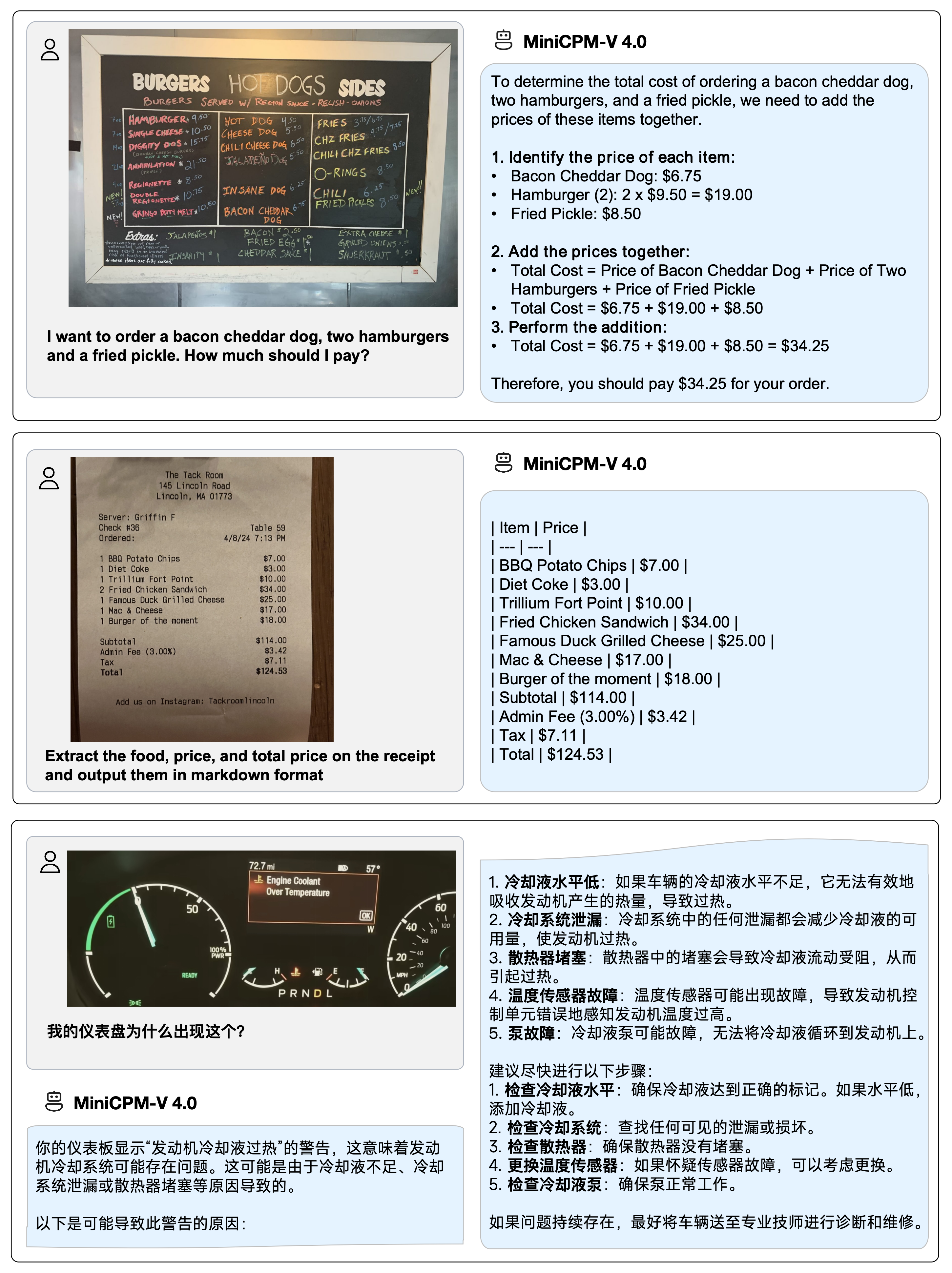
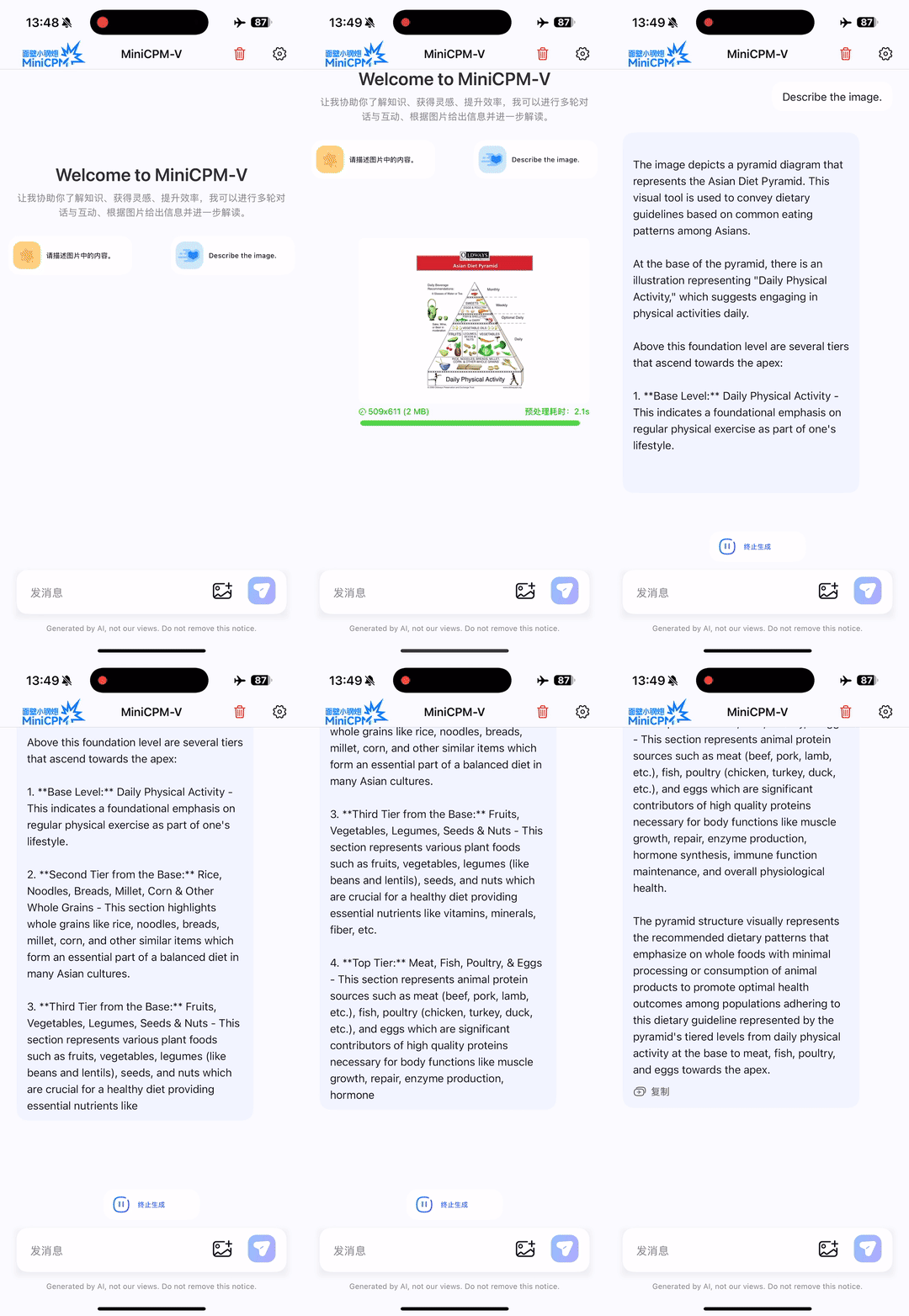
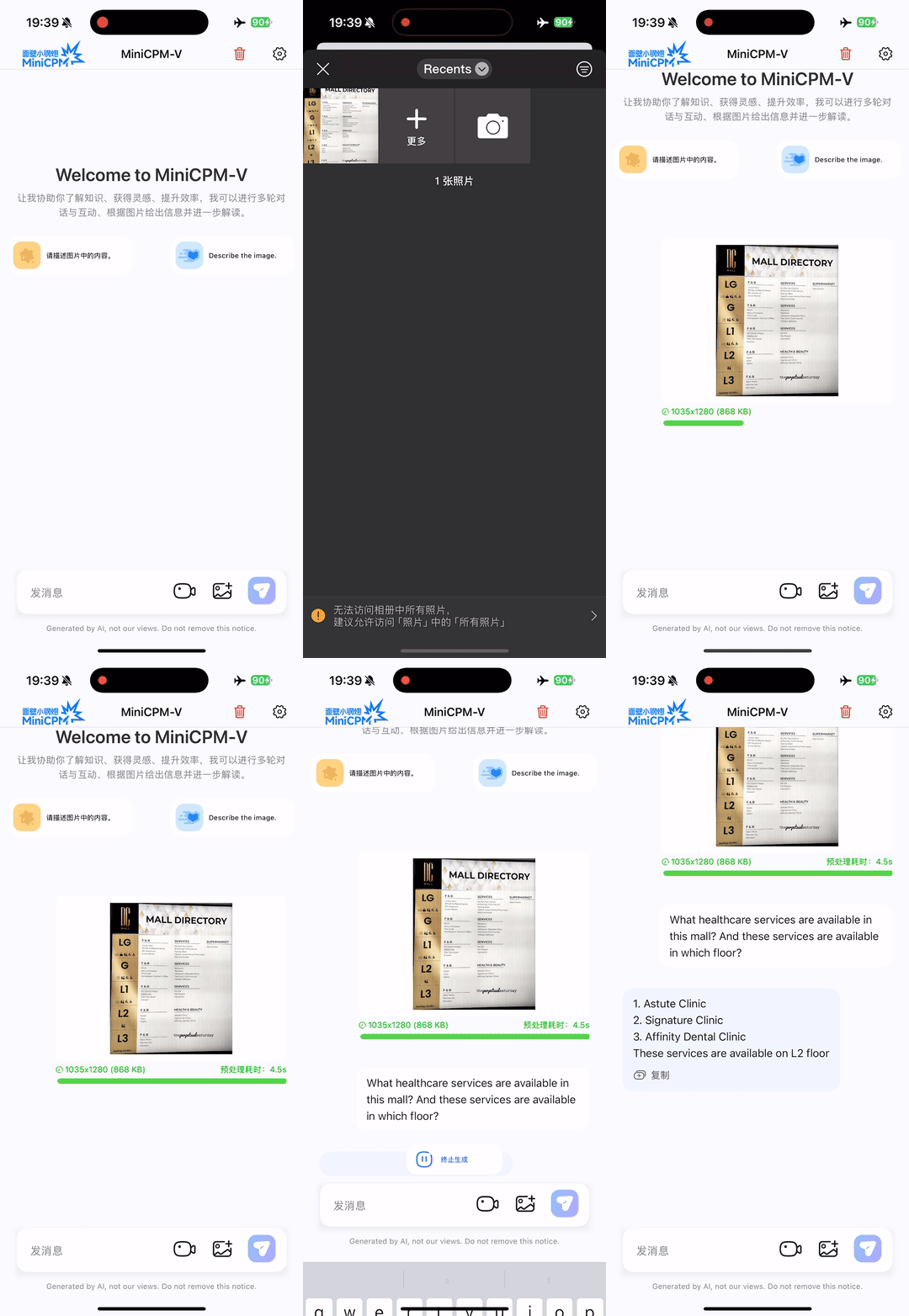
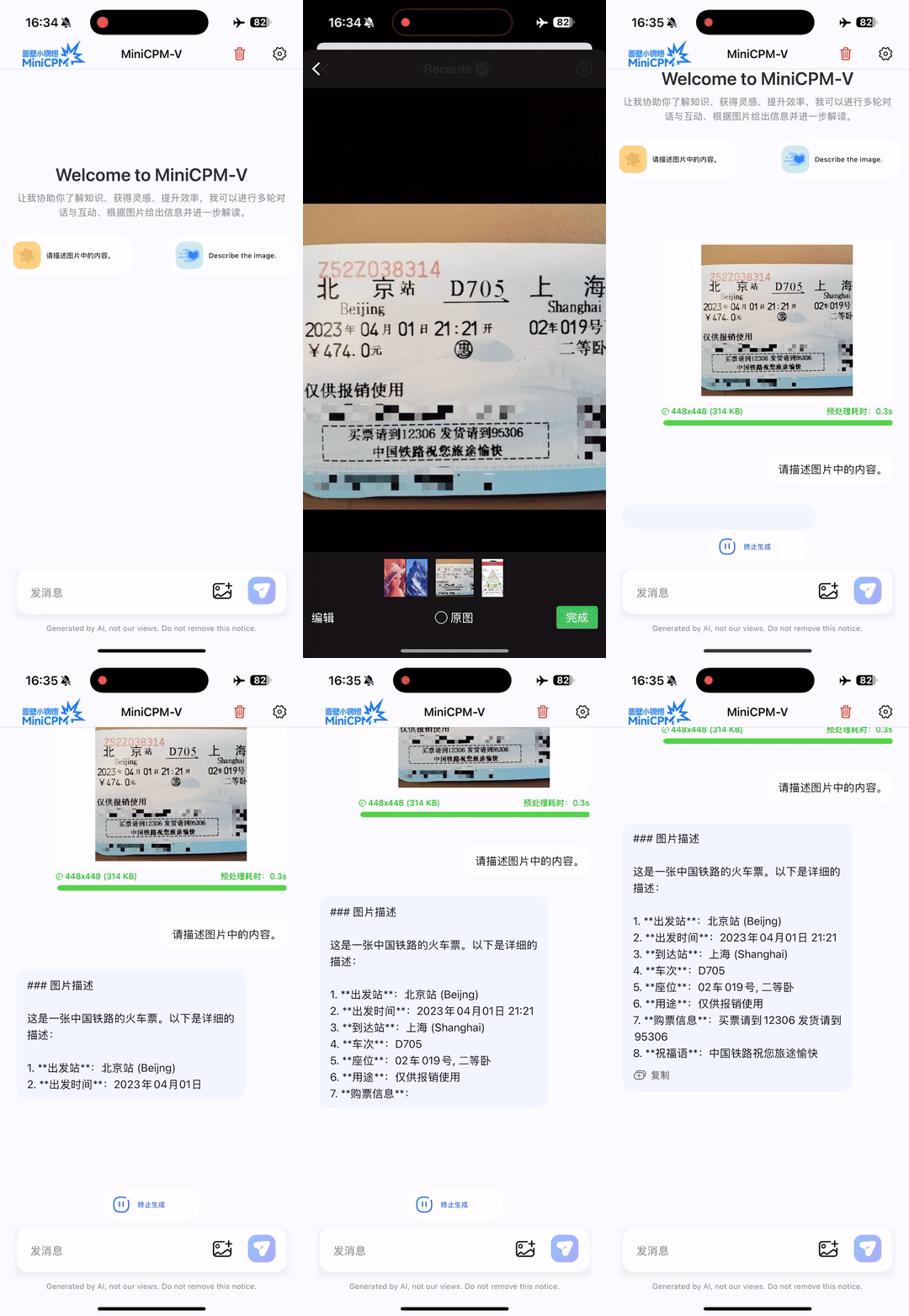
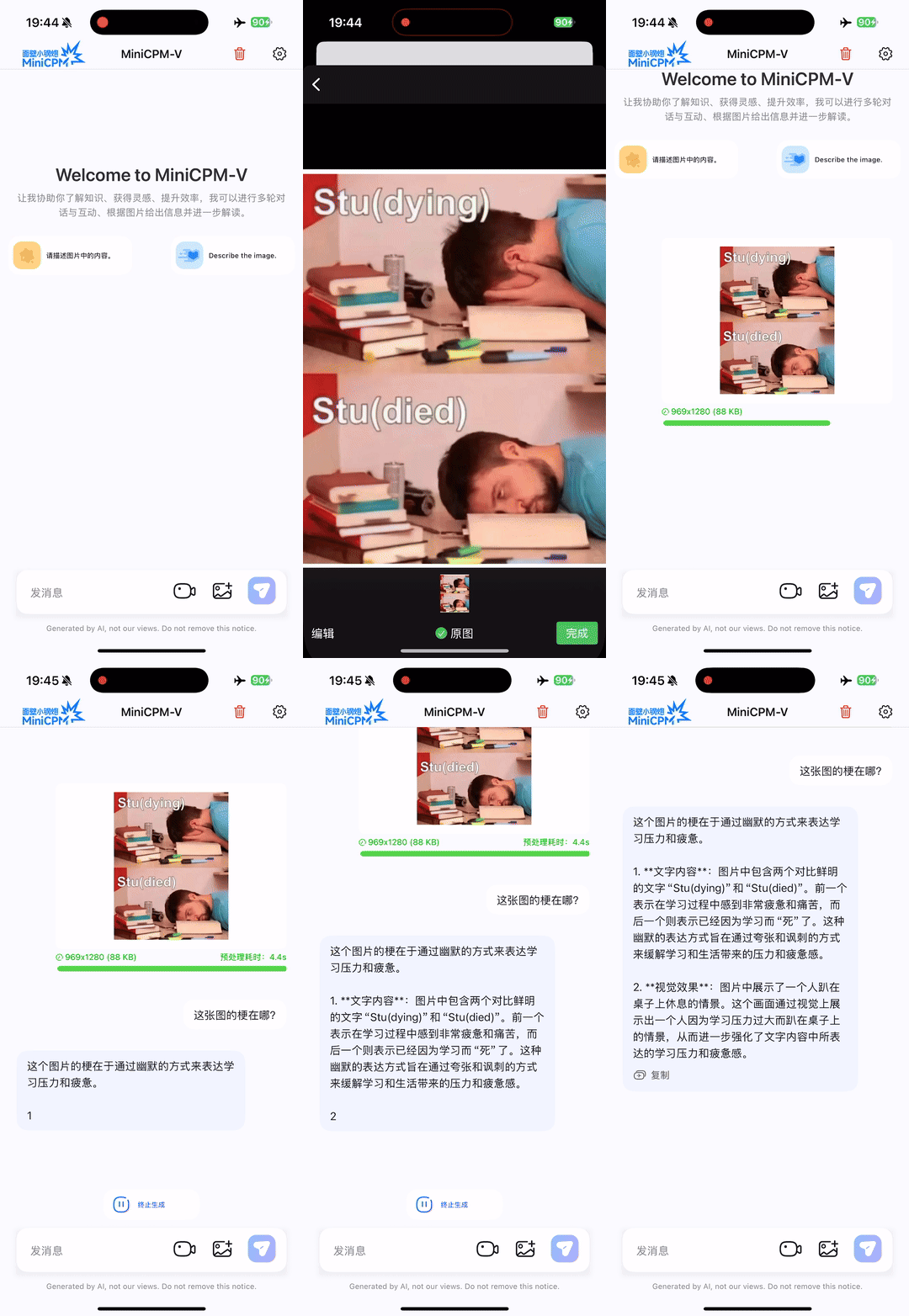
Run locally on iPhone 16 Pro Max with iOS demo.
Usage
from PIL import Image
import torch
from transformers import AutoModel, AutoTokenizer

model_path = 'openbmb/MiniCPM-V-4'
model = AutoModel.from_pretrained(model_path, trust_remote_code=True,
                                  # sdpa or flash_attention_2, no eager
                                  attn_implementation='sdpa', torch_dtype=torch.bfloat16)
model = model.eval().cuda()
tokenizer = AutoTokenizer.from_pretrained(
    model_path, trust_remote_code=True)


image = Image.open('./assets/single.png').convert('RGB')

# First round chat
question = "What is the landform in the picture?"
msgs = [{'role': 'user', 'content': [image, question]}]

answer = model.chat(
    msgs=msgs,
    image=image,
    tokenizer=tokenizer
)
print(answer)


# Second round chat, pass history context of multi-turn conversation
msgs.append({"role": "assistant", "content": [answer]})
msgs.append({"role": "user", "content": [
            "What should I pay attention to when traveling here?"]})

answer = model.chat(
    msgs=msgs,
    image=None,
    tokenizer=tokenizer
)
print(answer)
License
Model License
- The code in this repo is released under the Apache-2.0 License.
- The usage of MiniCPM-V series model weights must strictly follow MiniCPM Model License.md.
- The models and weights of MiniCPM are completely free for academic research. After filling out a "questionnaire" for registration, MiniCPM-V 2.6 weights are also available for free commercial use.
Statement
- As an LMM, MiniCPM-V 4.0 generates contents by learning a large mount of multimodal corpora, but it cannot comprehend, express personal opinions or make value judgement. Anything generated by MiniCPM-V 4.0 does not represent the views and positions of the model developers
- We will not be liable for any problems arising from the use of the MinCPM-V models, including but not limited to data security issues, risk of public opinion, or any risks and problems arising from the misdirection, misuse, dissemination or misuse of the model.
Key Techniques and Other Multimodal Projects
👏 Welcome to explore key techniques of MiniCPM-V 2.6 and other multimodal projects of our team:
VisCPM | RLHF-V | LLaVA-UHD | RLAIF-V
Citation
If you find our work helpful, please consider citing our papers 📝 and liking this project ❤️!
@article{yao2024minicpm,
  title={MiniCPM-V: A GPT-4V Level MLLM on Your Phone},
  author={Yao, Yuan and Yu, Tianyu and Zhang, Ao and Wang, Chongyi and Cui, Junbo and Zhu, Hongji and Cai, Tianchi and Li, Haoyu and Zhao, Weilin and He, Zhihui and others},
  journal={Nat Commun 16, 5509 (2025)},
  year={2025}
}
- Downloads last month
- 257
4-bit
5-bit
6-bit
8-bit
Install from brew
# Start a local OpenAI-compatible server with a web UI: llama-server -hf infinity-studio/MiniCPM-V-4-gguf:# Run inference directly in the terminal: llama-cli -hf infinity-studio/MiniCPM-V-4-gguf: