

Z-Image: An Efficient Image Generation Foundation Model with Single-Stream Diffusion Transformer
Paper • 2511.22699 • Published • 249





A pre-flighted bundle of Z-Image-Turbo + Qwen3-4B-Instruct (text encoder) + FLUX VAE, sized and quantized to fit on iPhone 16 Pro / 17 Pro and run via Mirage — the on-device diffusion engine for iOS / macOS / visionOS.
Z-Image-Turbo is a 6B-parameter S3-DiT (Scalable Single-Stream Diffusion Transformer), distilled to 8-9 sampling steps via Decoupled-DMD + DMDR. It produces photorealistic images at 1024×1024 with bilingual (English + Chinese) prompt understanding.
| File | Role | Size |
|---|---|---|
z-image-turbo-Q3_K_M.gguf |
Diffusion transformer — 6B params, Q3_K_M quant | 3.9 GB |
Qwen3-4B-Instruct-2507-Q4_K_M.gguf |
Text encoder | 2.3 GB |
ae.safetensors |
VAE (from FLUX.1) | 320 MB |
safety_negative_prompt.txt |
Recommended default negative prompt to apply at inference time for SFW-by-default deployments | <1 KB |
Total bundle size: ~6.5 GB. Total GPU residency at generation time: ~7-8 GB (weights + activations + KV cache).
This bundle is intended for shipping in consumer apps and ships with a recommended default negative prompt at safety_negative_prompt.txt. Consumers building on top of this bundle SHOULD load the file and prepend its contents to any user-supplied negative prompt by default, with an explicit user-facing opt-out for adult/artistic contexts.
The blocklist covers:
nsfw, nude, explicit, sexual, anatomical detailgore, blood, mutilation, etc.swastika, nazi, extremistDiffusion models steer away from negative-prompt concepts; they don't binary-reject them. A sufficiently determined prompt can still produce undesirable output, so apps shipping this bundle to general audiences should pair the negative-prompt filter with output-side classification (e.g. a CSAM/NSFW classifier on the generated CGImage) before display.
import Mirage

let docs = FileManager.default.urls(for: .documentDirectory, in: .userDomainMask)[0]

let engine = try Engine(models: ModelFiles(
    diffusionModel: docs.appendingPathComponent("z-image-turbo-Q3_K_M.gguf"),
    vae:            docs.appendingPathComponent("ae.safetensors"),
    textEncoder:    docs.appendingPathComponent("Qwen3-4B-Instruct-2507-Q4_K_M.gguf")
))

let image = try await engine.generate(.init(
    prompt: "a photorealistic golden retriever puppy in a sunlit field of wildflowers",
    width: 1024, height: 1024,
    steps: 9,         // Turbo distillation — don't go higher
    cfgScale: 1.0     // CFG is baked in
))
That's the whole pipeline. See the Mirage README for the full SwiftUI example.
Z-Image-Turbo conditions on the Qwen3-4B-Instruct text encoder, which means it reads prompts the way an instruction-tuned LLM does — long, natural-language descriptions outperform short tag lists. The official Tongyi-MAI examples are short paragraphs describing subject, pose, attributes, environment, and lighting in flowing prose.
When your prompt fuses two well-known concepts (Statue of Liberty + dog, American Gothic + corgis, Tony Soprano + golden retriever), the diffusion transformer's cross-attention often collapses toward whichever concept it has seen photographed thousands of times — and ignores the other. Encoder-side, Qwen3 reads your prompt correctly; the failure happens at the DiT's denoising stage, where strong "icon attractors" overwhelm the creative twist at the locked turbo CFG of 1.0.
If you write "a bronze statue of a golden retriever ... on Liberty Island ... with the New York harbor" the model usually paints just the Statue of Liberty. The dog token loses the attention competition.
Four mitigations that actually work:
Some prompts are genuinely hard and may need multiple seeds. When all else fails, image-to-image (start from a photo of the underdog subject, apply the prompt at moderate strength) is the industry workaround — not yet exposed by Mirage's public API.
| Idea | Z-Image-Turbo prompt |
|---|---|
| Loch Ness selfie | A slightly washed-out iPhone selfie photograph posted to Instagram, a long-necked plesiosaur-style aquatic reptile taking the selfie with its front flipper holding the phone, half-submerged in a Scottish loch with green hills and a stone bridge visible behind, the creature making a "duck face" expression with closed eyes, slight motion blur, front-facing-camera color palette, photorealistic, social-media aesthetic. Negative: cartoon, drawing, illustration |
| American Gothic corgis | A photograph of two Pembroke Welsh corgis standing side-by-side in front of a white wooden farmhouse with a tall gothic-arched window, vertical portrait composition, the front corgi holding an upright steel pitchfork with the prongs facing up, the back corgi looking forward with the same stern expression, both with floppy ears and stocky bodies, overcast midwestern light, dusty rural setting, photorealistic. Negative: human face, person, man, woman, farmer, anthropomorphic |
| Vending machine on Everest | A photograph at the summit of Mount Everest in the snow, a fully-illuminated modern red Coca-Cola branded vending machine standing upright in the snow, fluorescent interior light, glass front showing stocked sodas and snacks, three climbers in red and orange expedition gear standing in a polite line waiting to use it, prayer flags blowing on a string overhead, golden alpenglow on snow-covered peaks behind, photorealistic |
| Mona Lisa barista | A photograph of a busy modern coffee shop in the East Village at morning rush, the barista behind the polished espresso machine is a woman with the exact face and slight smile of the Mona Lisa, wearing the dark Renaissance dress of the painting under a beige work apron, holding a metal portafilter in her hands, soft natural window light from camera left, chalkboard menu and pastry case visible behind her, photorealistic, candid photojournalism style. Negative: art gallery, museum, oil painting frame, classical art exhibition |
| Astronauts on the subway | A photograph from inside a busy New York City subway car at rush hour, completely packed with people in full white NASA EVA spacesuits with gold reflective visors down, all holding the silver overhead bars or seated, fluorescent ceiling lights, dirty subway-car interior aesthetic, ads visible above the windows, one astronaut reading a folded New York Times, perfectly mundane commuter body language, photorealistic, ultra wide-angle |
| Tony Soprano dog | A cinematic still in HBO premium-cable color grading and shallow depth of field, an adult golden retriever sitting upright in a red vinyl diner booth wearing a half-buttoned black silk bowling shirt over its chest, the dog's eyes fixed on the camera with a calm watchful expression, an onion ring held halfway to its open mouth on a fork, a jukebox glowing warm yellow visible behind the booth, plates of food on the table, late-night Northeast diner atmosphere, film grain. Negative: human face, person, man, woman, mafia boss |
| Stonehenge in suburbia | An aerial drone photograph of an ordinary cul-de-sac suburban backyard with a green mowed lawn, white picket fence, kids' wooden swing set, plastic pink flamingo, and a full-scale ring of massive weathered stone trilithons occupying the center of the yard, late afternoon shadows from the stones falling across a trampoline, the homeowner in a t-shirt watering the lawn with a hose in the corner unbothered, photorealistic, banal composition |
| Picard collie | A cinematic still from a 1990s science fiction television show, a black-and-white border collie sitting in a high-backed captain's chair on the bridge of a starship, the collie wearing a custom-tailored red and black Starfleet command uniform jacket, alert posture with front paws resting on the armrests, ears upright and attentive, a tabby cat at one console and a beagle at another visible at their stations in the background, the main viewscreen showing distant stars, soft 1990s television lighting, photorealistic. Negative: human face, person, man, bald man |
| Last Supper at Waffle House | A photograph composed as a long horizontal frieze, thirteen figures seated along one side of a long yellow Formica counter under fluorescent lighting at a 24-hour Waffle House in the American South, the central figure in a white robe gesturing with both hands while the others react in varied emotional postures of surprise and concern, plates of hashbrowns and waffles in front of each diner, coffee carafe in the foreground, photorealistic, 3 a.m. atmosphere, balanced symmetrical composition |
| Pigeon TED talk | A photograph of a TED talk presentation in progress, the speaker standing alone on a circular red carpet stage is a single common pigeon wearing a tiny black headset microphone wrapped around its head, the pigeon calmly walking across the red carpet mid-stride, audience seated in dark silhouettes listening attentively, the large screen behind the pigeon shows a clean modern infographic with a chart, professional event lighting, photorealistic |
| Eiffel wine glass | A close-up food-photography photograph on a small marble bistro table in Paris, a single tall slender glass of deep red wine, the entire shape of the glass itself sculpted to match the silhouette of the Eiffel Tower with its widening base, narrow middle, and tapered top, delicate iron-lattice patterns etched into the glass surface, a small plate of brie and a sliced baguette beside it, golden hour light from a window, shallow depth of field, romantic atmosphere |
| Hackathon Rembrandt | A Dutch Golden Age oil painting in the style of Rembrandt's group portraits, dramatic chiaroscuro lighting falling from a single candle and several glowing laptop screens onto five modern programmers in hoodies and graphic t-shirts hunched over a long wooden table, three empty Red Bull cans gleaming in the warm light on the table, one figure pointing at a laptop screen in revelation, the others leaning in with expressions of focused intensity, deep dark background, warm golden palette, visible thick oil brushwork |
| Device | 1024² @ 9 steps | 512² @ 9 steps |
|---|---|---|
| iPhone 17 Pro | ~3 min | ~50 s |
| iPhone 16 Pro | ~5 min | ~90 s |
| M2 / M3 Mac | ~7.5 min | ~2 min |
Memory ceiling — iPhone 14 and older cannot run this bundle. Gate availability on:
ProcessInfo.processInfo.physicalMemory >= 8 * 1024 * 1024 * 1024
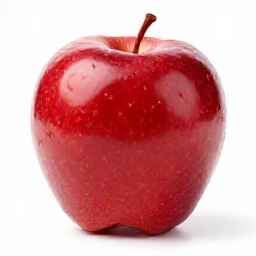
Prompt: "a single red apple on a white background, photorealistic" · 256² · 4 steps · 28 s on Apple Silicon Mac:
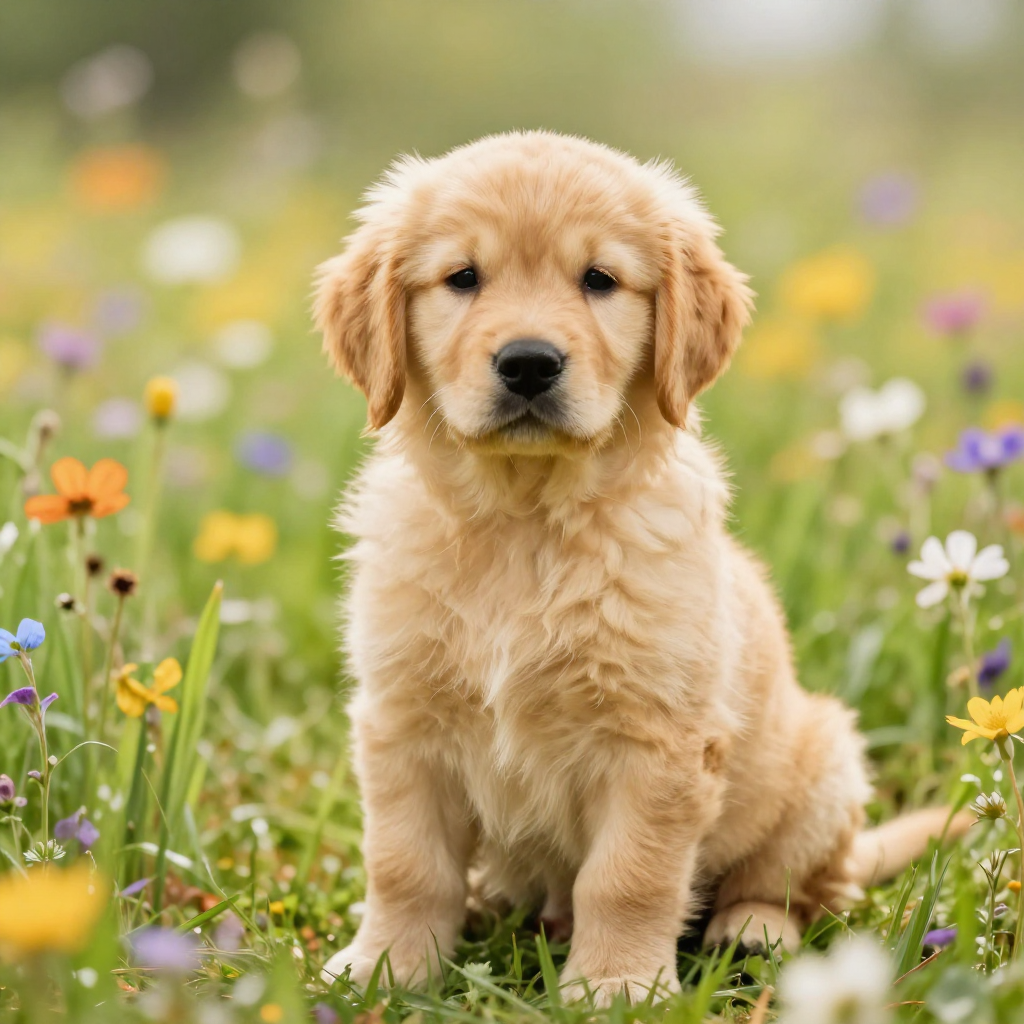
Prompt: "a photorealistic golden retriever puppy in a sunlit field of wildflowers" · 1024² · 9 steps · 7.5 min on Apple Silicon Mac:
The official Z-Image release is PyTorch + Diffusers — great for servers, doesn't run on iPhone. Unsloth shipped the GGUF-quantized variant, but using it on iOS requires:
ae.safetensors)Picking those three apart from upstream takes effort. This bundle packages them once, with the right quants for iPhone memory budgets.
| Component | Upstream | License |
|---|---|---|
| Diffusion transformer | Tongyi-MAI/Z-Image-Turbo | Apache 2.0 |
| GGUF conversion | unsloth/Z-Image-Turbo-GGUF | Apache 2.0 |
| Text encoder | unsloth/Qwen3-4B-Instruct-2507-GGUF | Tongyi-Qianwen |
| VAE | ffxvs/vae-flux (re-host of FLUX.1's ae.safetensors) |
FLUX-1-dev-non-commercial |
This repository's bundling and documentation are released under Apache 2.0. The individual model weights retain their upstream licenses (linked above). Read each license before commercial use.
3-bit
4-bit
Base model
Tongyi-MAI/Z-Image-Turbo
docker model run hf.co/jc-builds/Z-Image-Turbo-iOS:Q4_K_M