

OCR-free Document Understanding Transformer
Paper • 2111.15664 • Published • 6
Donut model fine-tuned on DocVQA. It was introduced in the paper OCR-free Document Understanding Transformer by Geewok et al. and first released in this repository.
Disclaimer: The team releasing Donut did not write a model card for this model so this model card has been written by the Hugging Face team.
Donut consists of a vision encoder (Swin Transformer) and a text decoder (BART). Given an image, the encoder first encodes the image into a tensor of embeddings (of shape batch_size, seq_len, hidden_size), after which the decoder autoregressively generates text, conditioned on the encoding of the encoder.
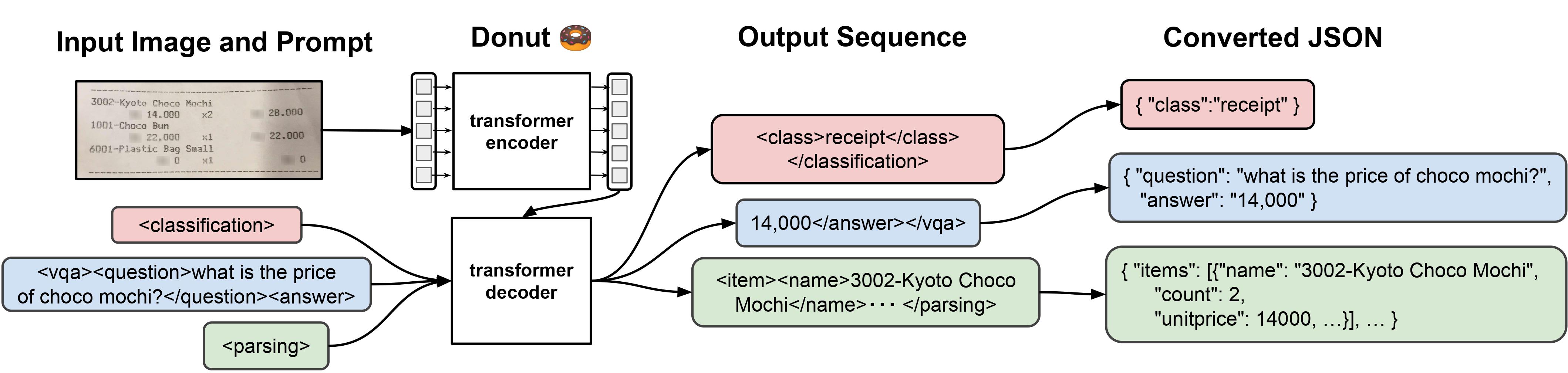
This model is fine-tuned on DocVQA, a document visual question answering dataset.
We refer to the documentation which includes code examples.