

Jivi-RadX: Large Language Vision Assistant for Xrays
Introducing Jivi-RadX-v1, an advanced visual language model specifically designed for sophisticated image reasoning in the healthcare domain. With its robust capabilities, this model excels at interpreting radiographic X-ray images, offering accurate and insightful responses to a wide range of diagnostic and analytical questions. Whether it's aiding clinicians in making informed decisions or assisting researchers in understanding complex image data, Jivi-RadX-v1 pushes the boundaries of medical imaging analysis.
Model Architecture: Jivi-RadX-v1 is built on top of Llama 3.1 text-only model, which is an auto-regressive language model that uses an optimized transformer architecture. To support image recognition tasks, we use a separately trained vision encoder and a vision projector that integrates with our base language model.
Benchmarks
We have released our x-ray benchmark jivi_chexnet which combines rich and diverse x-ray images along with verified question and answer on them. Below is the comparision of our model with other open-source and closed-source vision LLMs.
| Model | CheXpert (Stanford dataset) | NIH Chest X-Ray (NIH UK Dataset) | Overall Accuracy |
|---|---|---|---|
| Jivi AI (Jivi-RadX) | 85% | 64.5% | 75% |
| Open AI (GPT-4o) | 81.5% | 66.3% | 74% |
| Stanford AIMI (ChexAgent-8b) | 55.6% | 50.3% | 53% |
| Microsoft (Llava-Med) | 51% | 46.6% | 49% |
| *Google (Gemini 1.5 Pro) | 36% | 58% | 47% |
*Gemini 1.5 Pro occasionally declines to respond to medical questions, which affects its overall accuracy.
*Benchmark numbers were calculated using lmms-eval by LMMs-Lab.
Training process:
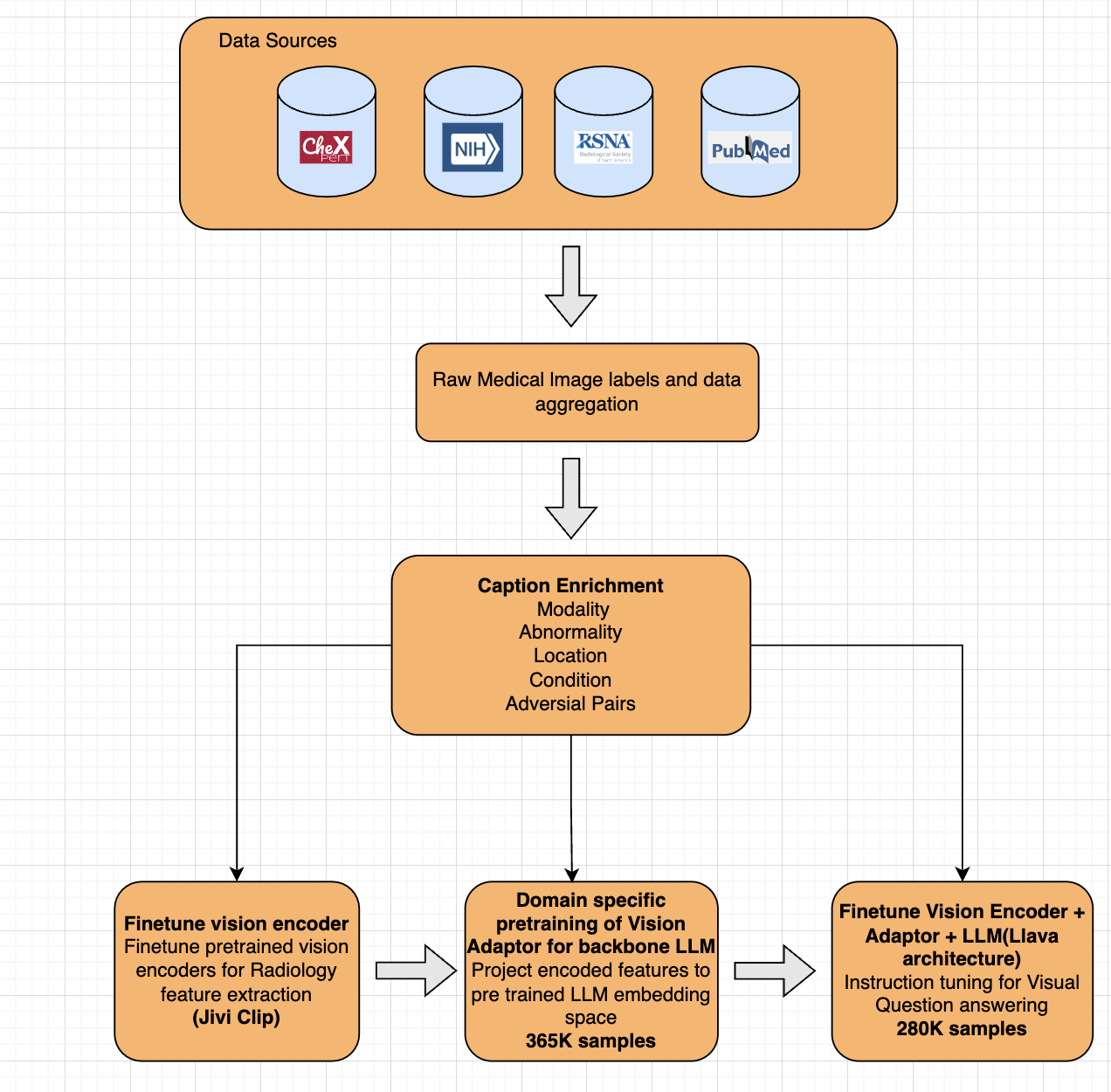
Training Data
Jivi-RadX-v1 was pretrained on 365k medical image and text pairs. The instruction tuning data includes over 280k synthetically generated examples.
Synthetic Data Generation
We leveraged various closed-source and open-source visual LLMs and used the metadata of the x-ray images to generate rich captions for training.
How to use
Use with transformers
Please ensure transformers>=4.45.2
import requests
import torch
from PIL import Image
from transformers import (AutoProcessor, AutoTokenizer,
                          LlavaForConditionalGeneration)

conversation = [
    {"role": "system", "content": "You a helpful AI assistant."},
    {
        "role": "user",
        "content": "<image>\n Please describe this x-ray.",
    },
]

model_id = "jiviai/Jivi-RadX-v1"

tokenizer = AutoTokenizer.from_pretrained(model_id)
processor = AutoProcessor.from_pretrained(model_id)
model = LlavaForConditionalGeneration.from_pretrained(
    model_id, attn_implementation="eager", device_map="cuda", torch_dtype=torch.float16
)


prompt = tokenizer.apply_chat_template(
    conversation, tokenize=False, add_generation_prompt=True
)

url = "https://d3axayv063q8rp.cloudfront.net/hf_resources/chest_xray_radx_example.jpg"
image = Image.open(requests.get(url, stream=True).raw)
inputs = processor(text=prompt, images=image, return_tensors="pt").to(
    model.device, dtype=model.dtype
)
# Generate
generate_ids = model.generate(**inputs, max_new_tokens=30)
output = processor.decode(
    generate_ids[0], skip_special_tokens=True, clean_up_tokenization_spaces=False
)
print(output)
Supported Languages: Currently we only support english. We are planning to introduce multi-lingual support shortly.
Feedback: To send any feedback/questions please use the community section of the model.
Intended use
The data, code, and model checkpoints are intended to be used solely for:
- Future research on visual-language processing.
- Reproducibility of the experimental results reported in the reference paper.
Disclaimer: The data, code, and model checkpoints are not intended to be used in clinical care or for any clinical decision making purposes.
- Downloads last month
- -