Instructions to use lemonilia/AshhLimaRP-Mistral-7B with libraries, inference providers, notebooks, and local apps. Follow these links to get started.
- Libraries
- Transformers
How to use lemonilia/AshhLimaRP-Mistral-7B with Transformers:
# Use a pipeline as a high-level helper from transformers import pipeline pipe = pipeline("text-generation", model="lemonilia/AshhLimaRP-Mistral-7B")# Load model directly from transformers import AutoTokenizer, AutoModelForCausalLM tokenizer = AutoTokenizer.from_pretrained("lemonilia/AshhLimaRP-Mistral-7B") model = AutoModelForCausalLM.from_pretrained("lemonilia/AshhLimaRP-Mistral-7B", device_map="auto") - Notebooks
- Google Colab
- Kaggle
- Local Apps Settings
- llama.cpp
How to use lemonilia/AshhLimaRP-Mistral-7B with llama.cpp:
Install (macOS, Linux)
curl -LsSf https://llama.app/install.sh | sh # Start a local OpenAI-compatible server with a web UI: llama serve -hf lemonilia/AshhLimaRP-Mistral-7B:Q4_K_M # Run inference directly in the terminal: llama cli -hf lemonilia/AshhLimaRP-Mistral-7B:Q4_K_M
Install from WinGet (Windows)
winget install llama.cpp # Start a local OpenAI-compatible server with a web UI: llama serve -hf lemonilia/AshhLimaRP-Mistral-7B:Q4_K_M # Run inference directly in the terminal: llama cli -hf lemonilia/AshhLimaRP-Mistral-7B:Q4_K_M
Use pre-built binary
# Download pre-built binary from: # https://github.com/ggerganov/llama.cpp/releases # Start a local OpenAI-compatible server with a web UI: ./llama-server -hf lemonilia/AshhLimaRP-Mistral-7B:Q4_K_M # Run inference directly in the terminal: ./llama-cli -hf lemonilia/AshhLimaRP-Mistral-7B:Q4_K_M
Build from source code
git clone https://github.com/ggerganov/llama.cpp.git cd llama.cpp cmake -B build cmake --build build -j --target llama-server llama-cli # Start a local OpenAI-compatible server with a web UI: ./build/bin/llama-server -hf lemonilia/AshhLimaRP-Mistral-7B:Q4_K_M # Run inference directly in the terminal: ./build/bin/llama-cli -hf lemonilia/AshhLimaRP-Mistral-7B:Q4_K_M
Use Docker
docker model run hf.co/lemonilia/AshhLimaRP-Mistral-7B:Q4_K_M
- LM Studio
- Jan
- vLLM
How to use lemonilia/AshhLimaRP-Mistral-7B with vLLM:
Install from pip and serve model
# Install vLLM from pip: pip install vllm # Start the vLLM server: vllm serve "lemonilia/AshhLimaRP-Mistral-7B" # Call the server using curl (OpenAI-compatible API): curl -X POST "http://localhost:8000/v1/completions" \ -H "Content-Type: application/json" \ --data '{ "model": "lemonilia/AshhLimaRP-Mistral-7B", "prompt": "Once upon a time,", "max_tokens": 512, "temperature": 0.5 }'Use Docker
docker model run hf.co/lemonilia/AshhLimaRP-Mistral-7B:Q4_K_M
- SGLang
How to use lemonilia/AshhLimaRP-Mistral-7B with SGLang:
Install from pip and serve model
# Install SGLang from pip: pip install sglang # Start the SGLang server: python3 -m sglang.launch_server \ --model-path "lemonilia/AshhLimaRP-Mistral-7B" \ --host 0.0.0.0 \ --port 30000 # Call the server using curl (OpenAI-compatible API): curl -X POST "http://localhost:30000/v1/completions" \ -H "Content-Type: application/json" \ --data '{ "model": "lemonilia/AshhLimaRP-Mistral-7B", "prompt": "Once upon a time,", "max_tokens": 512, "temperature": 0.5 }'Use Docker images
docker run --gpus all \ --shm-size 32g \ -p 30000:30000 \ -v ~/.cache/huggingface:/root/.cache/huggingface \ --env "HF_TOKEN=<secret>" \ --ipc=host \ lmsysorg/sglang:latest \ python3 -m sglang.launch_server \ --model-path "lemonilia/AshhLimaRP-Mistral-7B" \ --host 0.0.0.0 \ --port 30000 # Call the server using curl (OpenAI-compatible API): curl -X POST "http://localhost:30000/v1/completions" \ -H "Content-Type: application/json" \ --data '{ "model": "lemonilia/AshhLimaRP-Mistral-7B", "prompt": "Once upon a time,", "max_tokens": 512, "temperature": 0.5 }' - Ollama
How to use lemonilia/AshhLimaRP-Mistral-7B with Ollama:
ollama run hf.co/lemonilia/AshhLimaRP-Mistral-7B:Q4_K_M
- Unsloth Studio
How to use lemonilia/AshhLimaRP-Mistral-7B with Unsloth Studio:
Install Unsloth Studio (macOS, Linux, WSL)
curl -fsSL https://unsloth.ai/install.sh | sh # Run unsloth studio unsloth studio -H 0.0.0.0 -p 8888 # Then open http://localhost:8888 in your browser # Search for lemonilia/AshhLimaRP-Mistral-7B to start chatting
Install Unsloth Studio (Windows)
irm https://unsloth.ai/install.ps1 | iex # Run unsloth studio unsloth studio -H 0.0.0.0 -p 8888 # Then open http://localhost:8888 in your browser # Search for lemonilia/AshhLimaRP-Mistral-7B to start chatting
Using HuggingFace Spaces for Unsloth
# No setup required # Open https://huggingface.co/spaces/unsloth/studio in your browser # Search for lemonilia/AshhLimaRP-Mistral-7B to start chatting
- Atomic Chat new
- Docker Model Runner
How to use lemonilia/AshhLimaRP-Mistral-7B with Docker Model Runner:
docker model run hf.co/lemonilia/AshhLimaRP-Mistral-7B:Q4_K_M
- Lemonade
How to use lemonilia/AshhLimaRP-Mistral-7B with Lemonade:
Pull the model
# Download Lemonade from https://lemonade-server.ai/ lemonade pull lemonilia/AshhLimaRP-Mistral-7B:Q4_K_M
Run and chat with the model
lemonade run user.AshhLimaRP-Mistral-7B-Q4_K_M
List all available models
lemonade list
AshhLimaRP-Mistral-7B (Alpaca, v1)
This is a version of LimaRP with 2000 training samples up to about 9k tokens length finetuned on Ashhwriter-Mistral-7B.
LimaRP is a longform-oriented, novel-style roleplaying chat model intended to replicate the experience of 1-on-1 roleplay on Internet forums. Short-form, IRC/Discord-style RP (aka "Markdown format") is not supported. The model does not include instruction tuning, only manually picked and slightly edited RP conversations with persona and scenario data.
Ashhwriter, the base, is a model entirely finetuned on human-written lewd stories.
Available versions
- Float16 HF weights
- LoRA Adapter (adapter_config.json and adapter_model.bin)
- 4bit AWQ
- Q4_K_M GGUF
- Q6_K GGUF
Prompt format
Extended Alpaca format,
with ### Instruction:, ### Input: immediately preceding user inputs and ### Response:
immediately preceding model outputs. While Alpaca wasn't originally intended for multi-turn
responses, in practice this is not a problem; the format follows a pattern already used by
other models.
### Instruction:
Character's Persona: {bot character description}
User's Persona: {user character description}
Scenario: {what happens in the story}
Play the role of Character. You must engage in a roleplaying chat with User below this line. Do not write dialogues and narration for User.
### Input:
User: {utterance}
### Response:
Character: {utterance}
### Input
User: {utterance}
### Response:
Character: {utterance}
(etc.)
You should:
- Replace all text in curly braces (curly braces included) with your own text.
- Replace
UserandCharacterwith appropriate names.
Message length control
Inspired by the previously named "Roleplay" preset in SillyTavern, with this version of LimaRP it is possible to append a length modifier to the response instruction sequence, like this:
### Input
User: {utterance}
### Response: (length = medium)
Character: {utterance}
This has an immediately noticeable effect on bot responses. The lengths using during training are:
micro, tiny, short, medium, long, massive, huge, enormous, humongous, unlimited.
The recommended starting length is medium. Keep in mind that the AI can ramble or impersonate
the user with very long messages.
The length control effect is reproducible, but the messages will not necessarily follow lengths very precisely, rather follow certain ranges on average, as seen in this table with data from tests made with one reply at the beginning of the conversation:
Response length control appears to work well also deep into the conversation. By omitting the modifier, the model will choose the most appropriate response length (although it might not necessarily be what the user desires).
Suggested settings
You can follow these instruction format settings in SillyTavern. Replace medium with
your desired response length:
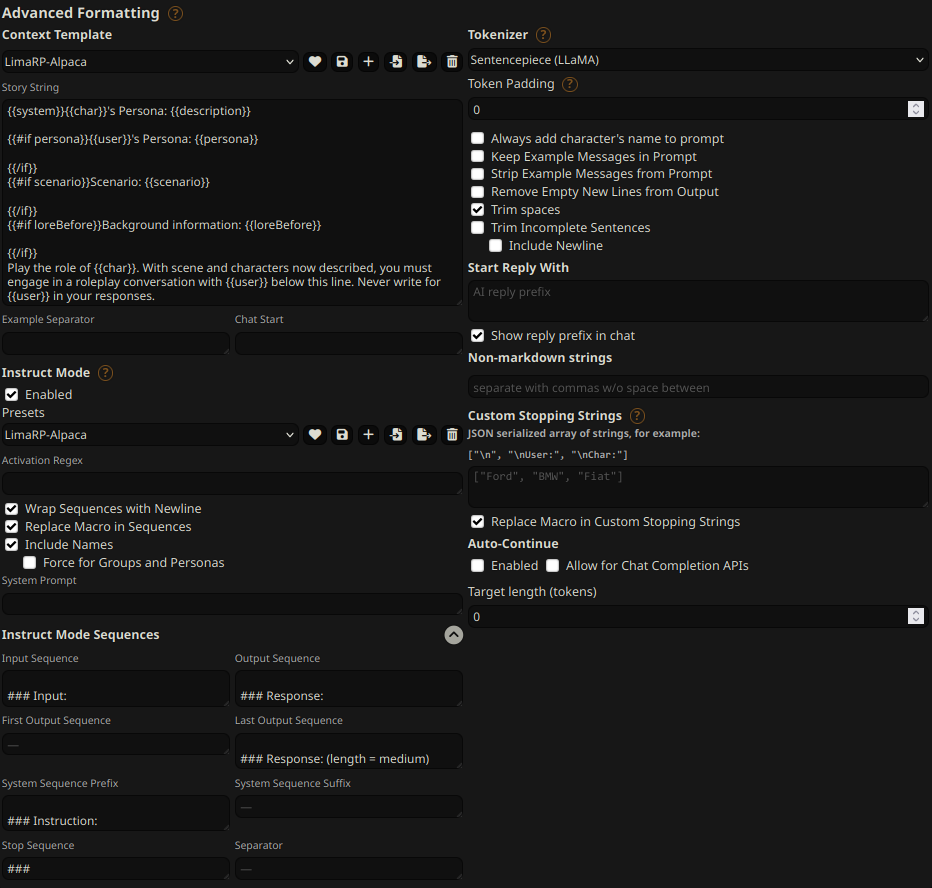
Text generation settings
These settings could be a good general starting point:
- TFS = 0.90
- Temperature = 0.70
- Repetition penalty = ~1.11
- Repetition penalty range = ~2048
- top-k = 0 (disabled)
- top-p = 1 (disabled)
Training procedure
Axolotl was used for training on 2x NVidia A40 GPUs.
The A40 GPUs have been graciously provided by Arc Compute.
Training hyperparameters
A lower learning rate than usual was employed. Due to an unforeseen issue the training was cut short and as a result 3 epochs were trained instead of the planned 4. Using 2 GPUs, the effective global batch size would have been 16.
Training was continued from the most recent LoRA adapter from Ashhwriter, using the same LoRA R and LoRA alpha.
- lora_model_dir: /home/anon/bin/axolotl/OUT_mistral-stories/checkpoint-6000/
- learning_rate: 0.00005
- lr_scheduler: cosine
- noisy_embedding_alpha: 3.5
- num_epochs: 4
- sequence_len: 8750
- lora_r: 256
- lora_alpha: 16
- lora_dropout: 0.05
- lora_target_linear: True
- bf16: True
- fp16: false
- tf32: True
- load_in_8bit: True
- adapter: lora
- micro_batch_size: 2
- optimizer: adamw_bnb_8bit
- warmup_steps: 10
- optimizer: adamw_torch
- flash_attention: true
- sample_packing: true
- pad_to_sequence_len: true
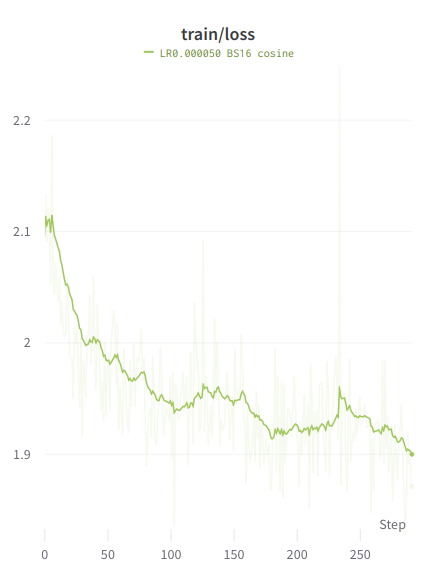
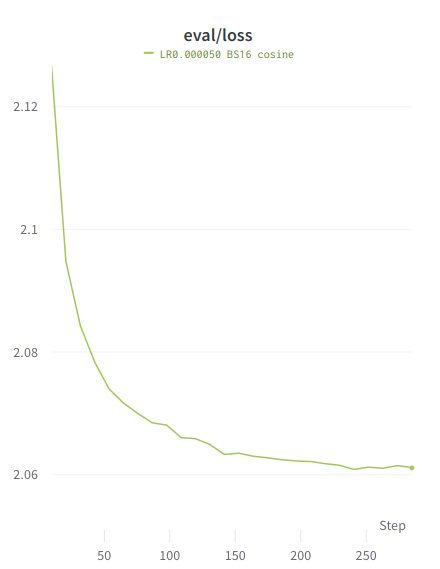
Loss graphs
Values are higher than typical because the training is performed on the entire sample, similar to unsupervised finetuning.
Train loss
Eval loss
- Downloads last month
- 65
4-bit
6-bit


