
Instructions to use mgoin/GLM-4.6-FP8-BLOCK with libraries, inference providers, notebooks, and local apps. Follow these links to get started.
- Libraries
- Transformers
How to use mgoin/GLM-4.6-FP8-BLOCK with Transformers:
# Use a pipeline as a high-level helper from transformers import pipeline pipe = pipeline("text-generation", model="mgoin/GLM-4.6-FP8-BLOCK") messages = [ {"role": "user", "content": "Who are you?"}, ] pipe(messages)# Load model directly from transformers import AutoTokenizer, AutoModelForCausalLM tokenizer = AutoTokenizer.from_pretrained("mgoin/GLM-4.6-FP8-BLOCK") model = AutoModelForCausalLM.from_pretrained("mgoin/GLM-4.6-FP8-BLOCK") messages = [ {"role": "user", "content": "Who are you?"}, ] inputs = tokenizer.apply_chat_template( messages, add_generation_prompt=True, tokenize=True, return_dict=True, return_tensors="pt", ).to(model.device) outputs = model.generate(**inputs, max_new_tokens=40) print(tokenizer.decode(outputs[0][inputs["input_ids"].shape[-1]:])) - Notebooks
- Google Colab
- Kaggle
- Local Apps
- vLLM
How to use mgoin/GLM-4.6-FP8-BLOCK with vLLM:
Install from pip and serve model
# Install vLLM from pip: pip install vllm # Start the vLLM server: vllm serve "mgoin/GLM-4.6-FP8-BLOCK" # Call the server using curl (OpenAI-compatible API): curl -X POST "http://localhost:8000/v1/chat/completions" \ -H "Content-Type: application/json" \ --data '{ "model": "mgoin/GLM-4.6-FP8-BLOCK", "messages": [ { "role": "user", "content": "What is the capital of France?" } ] }'Use Docker
docker model run hf.co/mgoin/GLM-4.6-FP8-BLOCK
- SGLang
How to use mgoin/GLM-4.6-FP8-BLOCK with SGLang:
Install from pip and serve model
# Install SGLang from pip: pip install sglang # Start the SGLang server: python3 -m sglang.launch_server \ --model-path "mgoin/GLM-4.6-FP8-BLOCK" \ --host 0.0.0.0 \ --port 30000 # Call the server using curl (OpenAI-compatible API): curl -X POST "http://localhost:30000/v1/chat/completions" \ -H "Content-Type: application/json" \ --data '{ "model": "mgoin/GLM-4.6-FP8-BLOCK", "messages": [ { "role": "user", "content": "What is the capital of France?" } ] }'Use Docker images
docker run --gpus all \ --shm-size 32g \ -p 30000:30000 \ -v ~/.cache/huggingface:/root/.cache/huggingface \ --env "HF_TOKEN=<secret>" \ --ipc=host \ lmsysorg/sglang:latest \ python3 -m sglang.launch_server \ --model-path "mgoin/GLM-4.6-FP8-BLOCK" \ --host 0.0.0.0 \ --port 30000 # Call the server using curl (OpenAI-compatible API): curl -X POST "http://localhost:30000/v1/chat/completions" \ -H "Content-Type: application/json" \ --data '{ "model": "mgoin/GLM-4.6-FP8-BLOCK", "messages": [ { "role": "user", "content": "What is the capital of France?" } ] }' - Docker Model Runner
How to use mgoin/GLM-4.6-FP8-BLOCK with Docker Model Runner:
docker model run hf.co/mgoin/GLM-4.6-FP8-BLOCK
GLM-4.6-FP8-Block
Creation
Made using LLM Compressor model_free_ptq:
from llmcompressor import model_free_ptq
MODEL_ID = "zai-org/GLM-4.6"
SAVE_DIR = MODEL_ID.rstrip("/").split("/")[-1] + "-FP8-BLOCK"
# Apply FP8-Block to the model
# Once quantized, the model is saved
# using compressed-tensors to the SAVE_DIR.
model_free_ptq(
model_stub=MODEL_ID,
save_directory=SAVE_DIR,
scheme="FP8_BLOCK",
ignore=[
"re:.*gate$",
"lm_head",
"model.embed_tokens",
],
max_workers=15,
device="cuda:0",
)
Eval
GSM8k running with vLLM TP=4 on GB300
vllm serve GLM-4.6-FP8-BLOCK -tp=4
python tests/evals/gsm8k/gsm8k_eval.py
Running GSM8K evaluation: 1319 questions, 5-shot
Evaluating: 100%|█████████████████████████████████████████████████████████████████████████████████████████████████████████████████████████████████████████████████████████████████████████████████████████████████████████████████████████████████████████████████████████████████████████████████████████████████████████████████████████████████████████| 1319/1319 [00:52<00:00, 25.15it/s]
Results:
Accuracy: 0.929
Invalid responses: 0.001
Total latency: 52.449 s
Questions per second: 25.148
Total output tokens: 131828
Output tokens per second: 2513.428
GLM-4.6
👋 Join our Discord community.
📖 Check out the GLM-4.6 technical blog, technical report(GLM-4.5), and Zhipu AI technical documentation.
📍 Use GLM-4.6 API services on Z.ai API Platform.
👉 One click to GLM-4.6.
Model Introduction
Compared with GLM-4.5, GLM-4.6 brings several key improvements:
- Longer context window: The context window has been expanded from 128K to 200K tokens, enabling the model to handle more complex agentic tasks.
- Superior coding performance: The model achieves higher scores on code benchmarks and demonstrates better real-world performance in applications such as Claude Code、Cline、Roo Code and Kilo Code, including improvements in generating visually polished front-end pages.
- Advanced reasoning: GLM-4.6 shows a clear improvement in reasoning performance and supports tool use during inference, leading to stronger overall capability.
- More capable agents: GLM-4.6 exhibits stronger performance in tool using and search-based agents, and integrates more effectively within agent frameworks.
- Refined writing: Better aligns with human preferences in style and readability, and performs more naturally in role-playing scenarios.
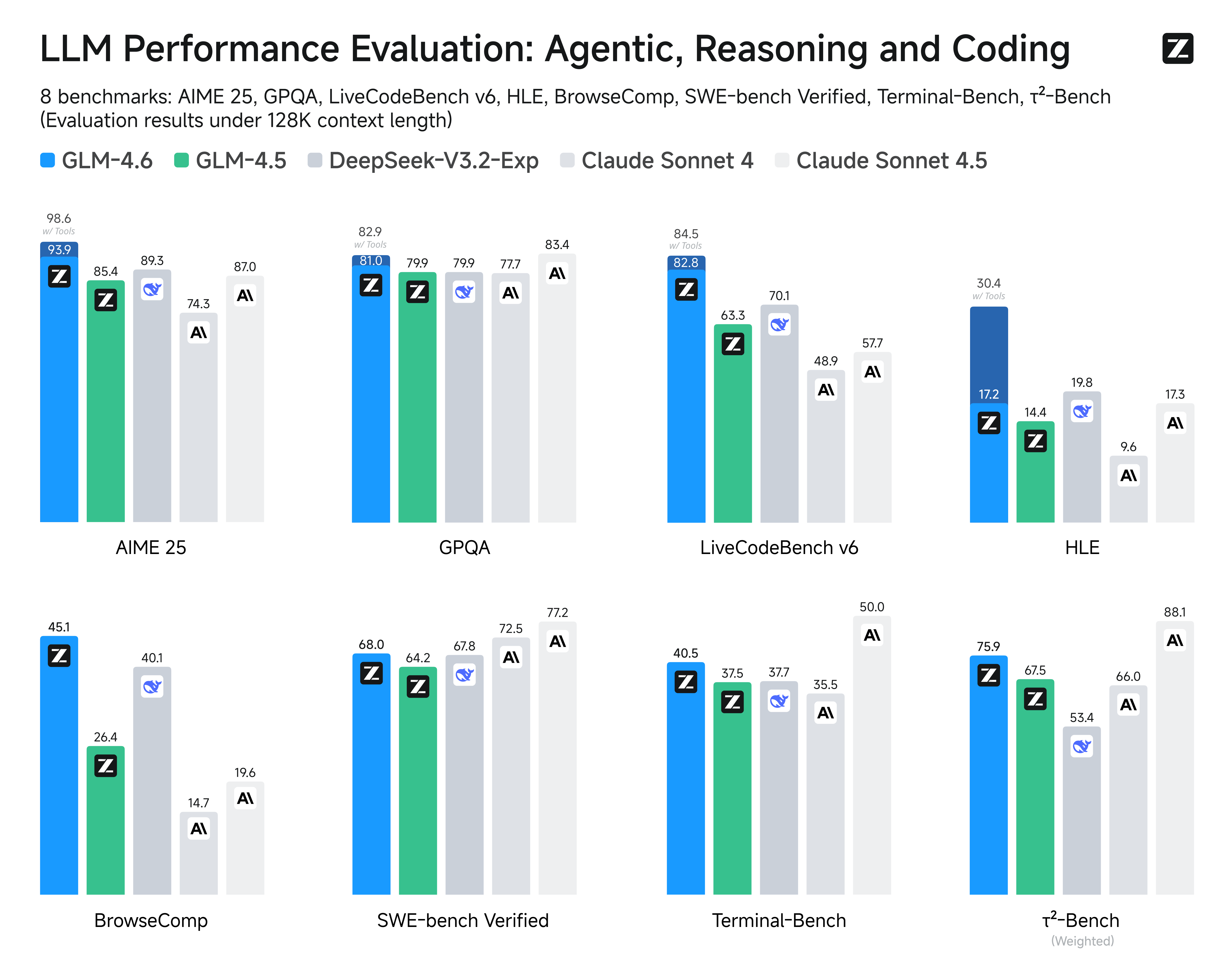
We evaluated GLM-4.6 across eight public benchmarks covering agents, reasoning, and coding. Results show clear gains over GLM-4.5, with GLM-4.6 also holding competitive advantages over leading domestic and international models such as DeepSeek-V3.1-Terminus and Claude Sonnet 4.
Inference
Both GLM-4.5 and GLM-4.6 use the same inference method.
you can check our github for more detail.
Recommended Evaluation Parameters
For general evaluations, we recommend using a sampling temperature of 1.0.
For code-related evaluation tasks (such as LCB), it is further recommended to set:
top_p = 0.95top_k = 40
Evaluation
- Downloads last month
- 134
Model tree for mgoin/GLM-4.6-FP8-BLOCK
Base model
zai-org/GLM-4.6