






Real-ESRGAN: Training Real-World Blind Super-Resolution with Pure Synthetic Data
Paper • 2107.10833 • Published • 3
ONNX builds of Real-ESRGAN, made by Moonbox for on-device use with ONNX Runtime (CUDA, DirectML, CPU). The
model is a single graph: each precision is one folder holding model.onnx.
The last column is the benchmark: each precision's output against the fp32 graph's on the same eval pictures, and its own score on the eval set (details under How to run).
| Precision | File | Size | sha256 | Benchmark |
|---|---|---|---|---|
| fp16 | fp16/model.onnx |
0.03 GB | 50eedabe29b4 |
vs fp32 PSNR 59.1 / 59.0 dB (Set14 / BSD100), vs ground truth PSNR-Y 24.73 / 24.22, SSIM-Y 0.673 / 0.629; 171 ms a picture |
| int8 | int8/model.onnx |
0.02 GB | f2c1fb815ce1 |
vs fp32 PSNR 38.8 / 39.0 dB (worst 29.9), vs ground truth PSNR-Y 24.80 / 24.30, SSIM-Y 0.674 / 0.630; 92 ms a picture |
Real-ESRGAN x4plus, the general 4x upscaler for real-world photos, exported to ONNX from the official
RealESRGAN_x4plus.pth (GitHub release v0.1.0). Height and width are free: the graph takes any picture size.
ONNX Runtime (RGB in 0-1, output 4x larger):
import numpy as np, onnxruntime as ort
from PIL import Image

sess = ort.InferenceSession("int8/model.onnx", providers=["CUDAExecutionProvider", "CPUExecutionProvider"])
x = np.asarray(Image.open("photo.png").convert("RGB"), np.float32).transpose(2, 0, 1)[None] / 255
y = sess.run(None, {"input": x})[0][0]
Image.fromarray((np.clip(y.transpose(1, 2, 0), 0, 1) * 255).round().astype(np.uint8)).save("photo_x4.png")
Memory grows with the picture (the network runs at the output size in its last layers): for pictures above about 1000 x 1000, upscale in tiles (for example 256 px with 16 px of overlap) and stitch.
Precisions. fp16: weights and math in fp16, inputs and outputs fp32. int8: weights int8 per output channel behind DequantizeLinear, activations in float (weight-only: no calibration; calibrated activation quantization hurts GAN upscalers' fine detail). No int4 (the network has no MatMul layers) and no bf16 (no bf16 convolution in ONNX Runtime's CUDA provider).
Benchmark. Set14 and BSD100 at 4x (bicubic-downscaled inputs, the standard SR test sets), ONNX Runtime 1.30 CUDA provider on an RTX 3080 Laptop GPU. The last column gives each precision's PSNR against the fp32 graph's output and its PSNR / SSIM (Y channel, 4 px border cropped) against the ground truth. Real-ESRGAN is trained for real-world degradations rather than bicubic ones, so its ground-truth PSNR is lower than a bicubic-trained model's; the numbers compare these precisions with each other. On this GPU the fp16 graph ran slower than fp32 (171 vs 86 ms a picture at these sizes); fp16 halves the file and memory, int8 quarters the file at fp32 speed.
From Real-ESRGAN at revision a4abfb2979, starting from an fp32 ONNX graph (where it came from is said above):
fp16 with onnxconverter-common (inputs and outputs kept fp32), int8 with ONNX Runtime static QDQ quantization
(per-channel int8 weights, uint8 activations, MinMax calibration on pictures outside the eval set), int4 with ONNX
Runtime's MatMulNBits (weight-only, block 32) where the graph is mostly matrix multiplications. bf16 is left out for
convolutional graphs: ONNX Runtime's CUDA provider has no bf16 convolution. Every graph was benchmarked before
upload; the sha256 column above is what the files must hash to.
BSD-3-Clause. These files are a derivative of the original model and carry its license: it is copied in this repository, and it governs your use of these files. The original model card follows unchanged.

🔥 AnimeVideo-v3 model (动漫视频小模型). Please see [anime video models] and [comparisons]
🔥 RealESRGAN_x4plus_anime_6B for anime images (动漫插图模型). Please see [anime_model]

 | Online Colab demo for for Real-ESRGAN (anime videos):
Real-ESRGAN aims at developing Practical Algorithms for General Image/Video Restoration.
We extend the powerful ESRGAN to a practical restoration application (namely, Real-ESRGAN), which is trained with pure synthetic data.
🌌 Thanks for your valuable feedbacks/suggestions. All the feedbacks are updated in feedback.md.
If Real-ESRGAN is helpful, please help to ⭐ this repo or recommend it to your friends 😊
Other recommended projects:
▶️ GFPGAN: A practical algorithm for real-world face restoration
▶️ BasicSR: An open-source image and video restoration toolbox
▶️ facexlib: A collection that provides useful face-relation functions.
▶️ HandyView: A PyQt5-based image viewer that is handy for view and comparison
▶️ HandyFigure: Open source of paper figures
[Paper] [YouTube Video] [B站讲解] [Poster] [PPT slides]
Xintao Wang, Liangbin Xie, Chao Dong, Ying Shan
Tencent ARC Lab; Shenzhen Institutes of Advanced Technology, Chinese Academy of Sciences

--outscale (It actually further resizes outputs with LANCZOS4). Add RealESRGAN_x2plus.pth model.Clone repo
git clone https://github.com/xinntao/Real-ESRGAN.git
cd Real-ESRGAN
Install dependent packages
# Install basicsr - https://github.com/xinntao/BasicSR
# We use BasicSR for both training and inference
pip install basicsr
# facexlib and gfpgan are for face enhancement
pip install facexlib
pip install gfpgan
pip install -r requirements.txt
python setup.py develop
There are usually three ways to inference Real-ESRGAN.
You can download Windows / Linux / MacOS executable files for Intel/AMD/Nvidia GPU.
This executable file is portable and includes all the binaries and models required. No CUDA or PyTorch environment is needed.
You can simply run the following command (the Windows example, more information is in the README.md of each executable files):
./realesrgan-ncnn-vulkan.exe -i input.jpg -o output.png -n model_name
We have provided five models:
You can use the -n argument for other models, for example, ./realesrgan-ncnn-vulkan.exe -i input.jpg -o output.png -n realesrnet-x4plus
outscale) as the python script inference_realesrgan.py.Usage: realesrgan-ncnn-vulkan.exe -i infile -o outfile [options]...
-h show this help
-i input-path input image path (jpg/png/webp) or directory
-o output-path output image path (jpg/png/webp) or directory
-s scale upscale ratio (can be 2, 3, 4. default=4)
-t tile-size tile size (>=32/0=auto, default=0) can be 0,0,0 for multi-gpu
-m model-path folder path to the pre-trained models. default=models
-n model-name model name (default=realesr-animevideov3, can be realesr-animevideov3 | realesrgan-x4plus | realesrgan-x4plus-anime | realesrnet-x4plus)
-g gpu-id gpu device to use (default=auto) can be 0,1,2 for multi-gpu
-j load:proc:save thread count for load/proc/save (default=1:2:2) can be 1:2,2,2:2 for multi-gpu
-x enable tta mode"
-f format output image format (jpg/png/webp, default=ext/png)
-v verbose output
Note that it may introduce block inconsistency (and also generate slightly different results from the PyTorch implementation), because this executable file first crops the input image into several tiles, and then processes them separately, finally stitches together.
outscale. The program will further perform cheap resize operation after the Real-ESRGAN output.Usage: python inference_realesrgan.py -n RealESRGAN_x4plus -i infile -o outfile [options]...
A common command: python inference_realesrgan.py -n RealESRGAN_x4plus -i infile --outscale 3.5 --face_enhance
-h show this help
-i --input Input image or folder. Default: inputs
-o --output Output folder. Default: results
-n --model_name Model name. Default: RealESRGAN_x4plus
-s, --outscale The final upsampling scale of the image. Default: 4
--suffix Suffix of the restored image. Default: out
-t, --tile Tile size, 0 for no tile during testing. Default: 0
--face_enhance Whether to use GFPGAN to enhance face. Default: False
--fp32 Use fp32 precision during inference. Default: fp16 (half precision).
--ext Image extension. Options: auto | jpg | png, auto means using the same extension as inputs. Default: auto
Download pre-trained models: RealESRGAN_x4plus.pth
wget https://github.com/xinntao/Real-ESRGAN/releases/download/v0.1.0/RealESRGAN_x4plus.pth -P weights
Inference!
python inference_realesrgan.py -n RealESRGAN_x4plus -i inputs --face_enhance
Results are in the results folder
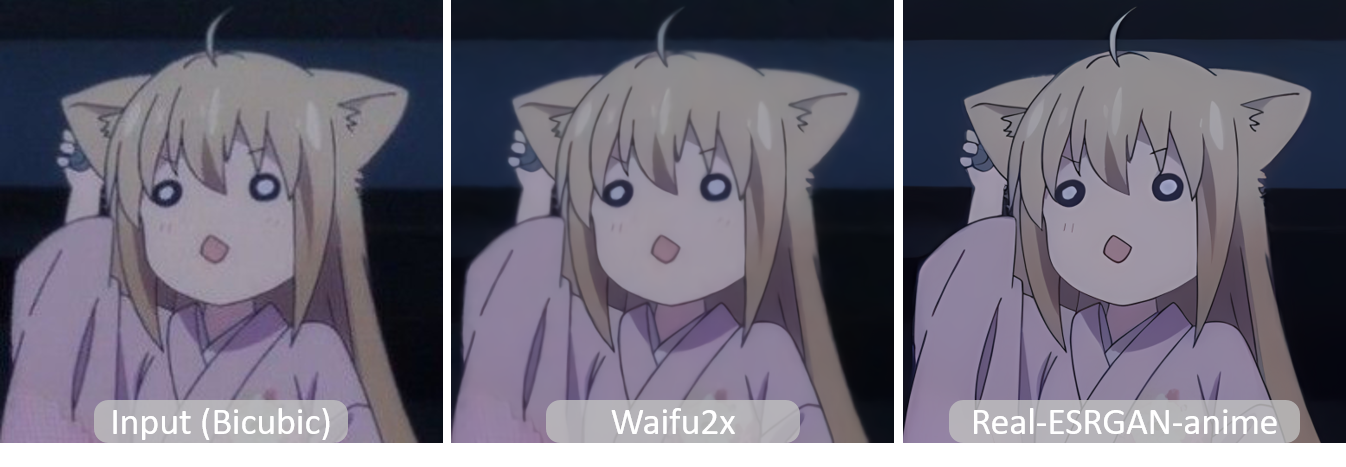
Pre-trained models: RealESRGAN_x4plus_anime_6B
More details and comparisons with waifu2x are in anime_model.md
# download model
wget https://github.com/xinntao/Real-ESRGAN/releases/download/v0.2.2.4/RealESRGAN_x4plus_anime_6B.pth -P weights
# inference
python inference_realesrgan.py -n RealESRGAN_x4plus_anime_6B -i inputs
Results are in the results folder
@InProceedings{wang2021realesrgan,
    author    = {Xintao Wang and Liangbin Xie and Chao Dong and Ying Shan},
    title     = {Real-ESRGAN: Training Real-World Blind Super-Resolution with Pure Synthetic Data},
    booktitle = {International Conference on Computer Vision Workshops (ICCVW)},
    date      = {2021}
}
If you have any question, please email xintao.wang@outlook.com or xintaowang@tencent.com.
If you develop/use Real-ESRGAN in your projects, welcome to let me know.
GUI
Thanks for all the contributors.