
Instructions to use nebchi/Llama3-Chat_Vector-kor_llava-v02 with libraries, inference providers, notebooks, and local apps. Follow these links to get started.
- Libraries
- Transformers
How to use nebchi/Llama3-Chat_Vector-kor_llava-v02 with Transformers:
# Use a pipeline as a high-level helper from transformers import pipeline pipe = pipeline("image-text-to-text", model="nebchi/Llama3-Chat_Vector-kor_llava-v02") messages = [ { "role": "user", "content": [ {"type": "image", "url": "https://huggingface.co/datasets/huggingface/documentation-images/resolve/main/p-blog/candy.JPG"}, {"type": "text", "text": "What animal is on the candy?"} ] }, ] pipe(text=messages)# Load model directly from transformers import AutoProcessor, AutoModelForImageTextToText processor = AutoProcessor.from_pretrained("nebchi/Llama3-Chat_Vector-kor_llava-v02") model = AutoModelForImageTextToText.from_pretrained("nebchi/Llama3-Chat_Vector-kor_llava-v02") messages = [ { "role": "user", "content": [ {"type": "image", "url": "https://huggingface.co/datasets/huggingface/documentation-images/resolve/main/p-blog/candy.JPG"}, {"type": "text", "text": "What animal is on the candy?"} ] }, ] inputs = processor.apply_chat_template( messages, add_generation_prompt=True, tokenize=True, return_dict=True, return_tensors="pt", ).to(model.device) outputs = model.generate(**inputs, max_new_tokens=40) print(processor.decode(outputs[0][inputs["input_ids"].shape[-1]:])) - Notebooks
- Google Colab
- Kaggle
- Local Apps Settings
- vLLM
How to use nebchi/Llama3-Chat_Vector-kor_llava-v02 with vLLM:
Install from pip and serve model
# Install vLLM from pip: pip install vllm # Start the vLLM server: vllm serve "nebchi/Llama3-Chat_Vector-kor_llava-v02" # Call the server using curl (OpenAI-compatible API): curl -X POST "http://localhost:8000/v1/chat/completions" \ -H "Content-Type: application/json" \ --data '{ "model": "nebchi/Llama3-Chat_Vector-kor_llava-v02", "messages": [ { "role": "user", "content": [ { "type": "text", "text": "Describe this image in one sentence." }, { "type": "image_url", "image_url": { "url": "https://cdn.britannica.com/61/93061-050-99147DCE/Statue-of-Liberty-Island-New-York-Bay.jpg" } } ] } ] }'Use Docker
docker model run hf.co/nebchi/Llama3-Chat_Vector-kor_llava-v02
- SGLang
How to use nebchi/Llama3-Chat_Vector-kor_llava-v02 with SGLang:
Install from pip and serve model
# Install SGLang from pip: pip install sglang # Start the SGLang server: python3 -m sglang.launch_server \ --model-path "nebchi/Llama3-Chat_Vector-kor_llava-v02" \ --host 0.0.0.0 \ --port 30000 # Call the server using curl (OpenAI-compatible API): curl -X POST "http://localhost:30000/v1/chat/completions" \ -H "Content-Type: application/json" \ --data '{ "model": "nebchi/Llama3-Chat_Vector-kor_llava-v02", "messages": [ { "role": "user", "content": [ { "type": "text", "text": "Describe this image in one sentence." }, { "type": "image_url", "image_url": { "url": "https://cdn.britannica.com/61/93061-050-99147DCE/Statue-of-Liberty-Island-New-York-Bay.jpg" } } ] } ] }'Use Docker images
docker run --gpus all \ --shm-size 32g \ -p 30000:30000 \ -v ~/.cache/huggingface:/root/.cache/huggingface \ --env "HF_TOKEN=<secret>" \ --ipc=host \ lmsysorg/sglang:latest \ python3 -m sglang.launch_server \ --model-path "nebchi/Llama3-Chat_Vector-kor_llava-v02" \ --host 0.0.0.0 \ --port 30000 # Call the server using curl (OpenAI-compatible API): curl -X POST "http://localhost:30000/v1/chat/completions" \ -H "Content-Type: application/json" \ --data '{ "model": "nebchi/Llama3-Chat_Vector-kor_llava-v02", "messages": [ { "role": "user", "content": [ { "type": "text", "text": "Describe this image in one sentence." }, { "type": "image_url", "image_url": { "url": "https://cdn.britannica.com/61/93061-050-99147DCE/Statue-of-Liberty-Island-New-York-Bay.jpg" } } ] } ] }' - Docker Model Runner
How to use nebchi/Llama3-Chat_Vector-kor_llava-v02 with Docker Model Runner:
docker model run hf.co/nebchi/Llama3-Chat_Vector-kor_llava-v02
Llama3-Chat_Vector-kor_llava
I have implemented a Korean LLAVA model referring to the models created by Beomi, who made the Korean Chat Vector LLAVA model, and Toshi456, who made the Japanese Chat Vector LLAVA model.
Reference Models:
- beomi/Llama-3-KoEn-8B-xtuner-llava-preview(https://huggingface.co/beomi/Llama-3-KoEn-8B-xtuner-llava-preview)
- toshi456/chat-vector-llava-v1.5-7b-ja(https://huggingface.co/toshi456/chat-vector-llava-v1.5-7b-ja)
- xtuner/llava-llama-3-8b-transformers
Citation
@misc {Llama3-Chat_Vector-kor_llava,
author = { {nebchi} },
title = { Llama3-Chat_Vector-kor_llava },
year = 2024,
url = { https://huggingface.co/nebchi/Llama3-Chat_Vector-kor_llava },
publisher = { Hugging Face }
}
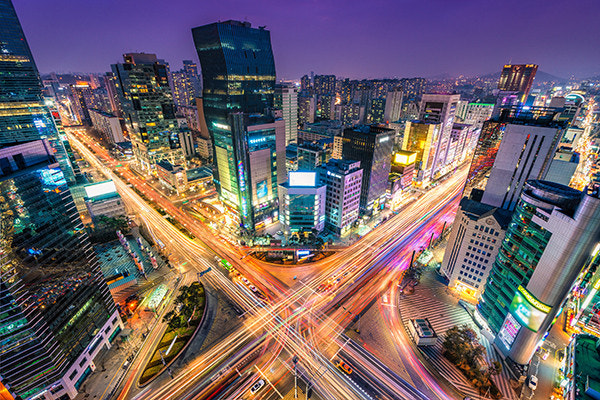
Running the model on GPU
import requests
from PIL import Image
import torch
from transformers import AutoProcessor, LlavaForConditionalGeneration, TextStreamer
model_id = "nebchi/Llama3-Chat_Vector-kor_llava"
model = LlavaForConditionalGeneration.from_pretrained(
model_id,
torch_dtype='auto',
device_map='auto',
revision='a38aac3',
)
processor = AutoProcessor.from_pretrained(model_id)
tokenizer = processor.tokenizer
terminators = [
tokenizer.eos_token_id,
tokenizer.convert_tokens_to_ids("<|eot_id|>")
]
streamer = TextStreamer(tokenizer)
prompt = ("<|start_header_id|>user<|end_header_id|>\n\n<image>\n์ด ์ด๋ฏธ์ง์ ๋ํด์ ์ค๋ช
ํด์ฃผ์ธ์.<|eot_id|>"
"<|start_header_id|>assistant<|end_header_id|>\n\n์ด ์ด๋ฏธ์ง์๋")
image_file = "https://search.pstatic.net/common/?src=http%3A%2F%2Fimgnews.naver.net%2Fimage%2F5582%2F2018%2F04%2F20%2F0000001323_001_20180420094641826.jpg&type=sc960_832"
raw_image = Image.open(requests.get(image_file, stream=True).raw)
inputs = processor(prompt, raw_image, return_tensors='pt').to(0, torch.float16)
output = model.generate(
**inputs,
max_new_tokens=512,
do_sample=True,
eos_token_id=terminators,
no_repeat_ngram_size=3,
temperature=0.7,
top_p=0.9,
streamer=streamer
)
print(processor.decode(output[0][2:], skip_special_tokens=False))
results
์ด ์ด๋ฏธ์ง์๋ ๋์์ ๋ชจ์ต์ด ์ ๋ณด์ฌ์ง๋๋ค. ๋์ ๋ด๋ถ์๋ ์ฌ๋ฌ ๊ฑด๋ฌผ๊ณผ ๊ฑด๋ฌผ๋ค์ด ์๊ณ , ๋์๋ฅผ ์ฐ๊ฒฐํ๋ ๋๋ก์ ๊ตํต ์์คํ
์ด ์ ๋ฐ๋ฌ๋์ด ์์ต๋๋ค. ์ด ๋์์ ํน์ง์ ๋๊ณ ๊ด๋ฒ์ํ ๊ฑด๋ฌผ๋ค๊ณผ ๊ตํต๋ง์ ๊ฐ์ถ ๊ฒ์ด ์ข์ต๋๋ค.
- Downloads last month
- 12
