

Scaling Instruction-Finetuned Language Models
Paper • 2210.11416 • Published • 8
winget install llama.cpp
# Start a local OpenAI-compatible server with a web UI:
llama serve -hf nyxtesla/omnious# Run inference directly in the terminal:
llama cli -hf nyxtesla/omnious# Download pre-built binary from:
# https://github.com/ggerganov/llama.cpp/releases# Start a local OpenAI-compatible server with a web UI:
./llama-server -hf nyxtesla/omnious# Run inference directly in the terminal:
./llama-cli -hf nyxtesla/omniousgit clone https://github.com/ggerganov/llama.cpp.git
cd llama.cpp
cmake -B build
cmake --build build -j --target llama-server llama-cli# Start a local OpenAI-compatible server with a web UI:
./build/bin/llama-server -hf nyxtesla/omnious# Run inference directly in the terminal:
./build/bin/llama-cli -hf nyxtesla/omniousdocker model run hf.co/nyxtesla/omnious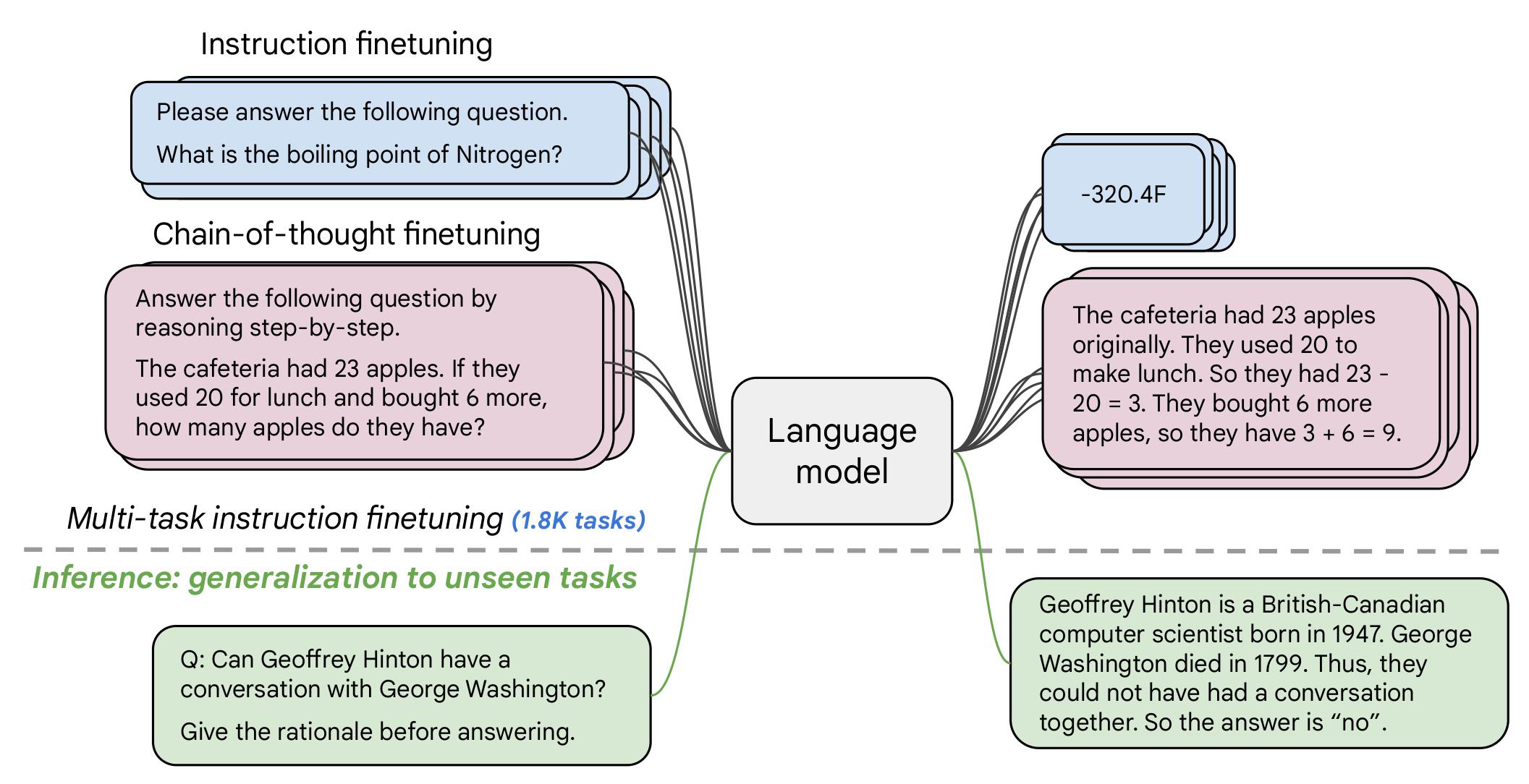
If you already know T5, FLAN-T5 is just better at everything. For the same number of parameters, these models have been fine-tuned on more than 1000 additional tasks covering also more languages. As mentioned in the first few lines of the abstract :
Flan-PaLM 540B achieves state-of-the-art performance on several benchmarks, such as 75.2% on five-shot MMLU. We also publicly release Flan-T5 checkpoints,1 which achieve strong few-shot performance even compared to much larger models, such as PaLM 62B. Overall, instruction finetuning is a general method for improving the performance and usability of pretrained language models.
Disclaimer: Content from this model card has been written by the Hugging Face team, and parts of it were copy pasted from the T5 model card.
Find below some example scripts on how to use the model in transformers:
from transformers import T5Tokenizer, T5ForConditionalGeneration
tokenizer = T5Tokenizer.from_pretrained("google/flan-t5-small")
model = T5ForConditionalGeneration.from_pretrained("google/flan-t5-small")
input_text = "translate English to German: How old are you?"
input_ids = tokenizer(input_text, return_tensors="pt").input_ids
outputs = model.generate(input_ids)
print(tokenizer.decode(outputs[0]))
# pip install accelerate
from transformers import T5Tokenizer, T5ForConditionalGeneration
tokenizer = T5Tokenizer.from_pretrained("google/flan-t5-small")
model = T5ForConditionalGeneration.from_pretrained("google/flan-t5-small", device_map="auto")
input_text = "translate English to German: How old are you?"
input_ids = tokenizer(input_text, return_tensors="pt").input_ids.to("cuda")
outputs = model.generate(input_ids)
print(tokenizer.decode(outputs[0]))
# pip install accelerate
import torch
from transformers import T5Tokenizer, T5ForConditionalGeneration
tokenizer = T5Tokenizer.from_pretrained("google/flan-t5-small")
model = T5ForConditionalGeneration.from_pretrained("google/flan-t5-small", device_map="auto", torch_dtype=torch.float16)
input_text = "translate English to German: How old are you?"
input_ids = tokenizer(input_text, return_tensors="pt").input_ids.to("cuda")
outputs = model.generate(input_ids)
print(tokenizer.decode(outputs[0]))
# pip install bitsandbytes accelerate
from transformers import T5Tokenizer, T5ForConditionalGeneration
tokenizer = T5Tokenizer.from_pretrained("google/flan-t5-small")
model = T5ForConditionalGeneration.from_pretrained("google/flan-t5-small", device_map="auto", load_in_8bit=True)
input_text = "translate English to German: How old are you?"
input_ids = tokenizer(input_text, return_tensors="pt").input_ids.to("cuda")
outputs = model.generate(input_ids)
print(tokenizer.decode(outputs[0]))
The authors write in the original paper's model card that:
The primary use is research on language models, including: research on zero-shot NLP tasks and in-context few-shot learning NLP tasks, such as reasoning, and question answering; advancing fairness and safety research, and understanding limitations of current large language models
See the research paper for further details.
More information needed.
The information below in this section are copied from the model's official model card:
Language models, including Flan-T5, can potentially be used for language generation in a harmful way, according to Rae et al. (2021). Flan-T5 should not be used directly in any application, without a prior assessment of safety and fairness concerns specific to the application.
Flan-T5 is fine-tuned on a large corpus of text data that was not filtered for explicit content or assessed for existing biases. As a result the model itself is potentially vulnerable to generating equivalently inappropriate content or replicating inherent biases in the underlying data.
Flan-T5 has not been tested in real world applications.
Flan-T5 should not be applied for any unacceptable use cases, e.g., generation of abusive speech.
The model was trained on a mixture of tasks, that includes the tasks described in the table below (from the original paper, figure 2):

According to the model card from the original paper:
These models are based on pretrained T5 (Raffel et al., 2020) and fine-tuned with instructions for better zero-shot and few-shot performance. There is one fine-tuned Flan model per T5 model size.
The model has been trained on TPU v3 or TPU v4 pods, using t5x codebase together with jax.
The authors evaluated the model on various tasks covering several languages (1836 in total). See the table below for some quantitative evaluation:
 For full details, please check the research paper.
For full results for FLAN-T5-Small, see the research paper, Table 3.
Carbon emissions can be estimated using the Machine Learning Impact calculator presented in Lacoste et al. (2019).
BibTeX:
@misc{https://doi.org/10.48550/arxiv.2210.11416,
doi = {10.48550/ARXIV.2210.11416},
url = {https://arxiv.org/abs/2210.11416},
author = {Chung, Hyung Won and Hou, Le and Longpre, Shayne and Zoph, Barret and Tay, Yi and Fedus, William and Li, Eric and Wang, Xuezhi and Dehghani, Mostafa and Brahma, Siddhartha and Webson, Albert and Gu, Shixiang Shane and Dai, Zhuyun and Suzgun, Mirac and Chen, Xinyun and Chowdhery, Aakanksha and Narang, Sharan and Mishra, Gaurav and Yu, Adams and Zhao, Vincent and Huang, Yanping and Dai, Andrew and Yu, Hongkun and Petrov, Slav and Chi, Ed H. and Dean, Jeff and Devlin, Jacob and Roberts, Adam and Zhou, Denny and Le, Quoc V. and Wei, Jason},
keywords = {Machine Learning (cs.LG), Computation and Language (cs.CL), FOS: Computer and information sciences, FOS: Computer and information sciences},
title = {Scaling Instruction-Finetuned Language Models},
publisher = {arXiv},
year = {2022},
copyright = {Creative Commons Attribution 4.0 International}
}
Install (macOS, Linux)
# Start a local OpenAI-compatible server with a web UI: llama serve -hf nyxtesla/omnious# Run inference directly in the terminal: llama cli -hf nyxtesla/omnious