


license: apache-2.0
language:
  - en
  - zh
pipeline_tag: image-text-to-text
tags:
  - minicpm-ocr
  - ocr
  - correctness-decision
  - ocr-verification
  - multimodal
  - vision-language
  - jev
MiniCPM-OCR Jev is a 2B OCR correctness decision model for text, formula, and table regions. Given a region image and a candidate OCR result, it returns a score from 0 to 1 — higher means the candidate is more likely correct. Use it to auto-accept reliable regions, route the rest to human review, or pick the best result among several OCR models.
- 🛡️ A small model that beats larger ones: at only 2B parameters, decision AUROC (×100) on JevOCRBench is 93.6, above JEV-35B-A3B (90.1) and close to Qwen3.5-397B-A17B (93.8).
- 🧩 Stable generalization: on parses from MiniCPM-OCR 1.0, GLM-OCR, PaddleOCR-VL-1.6, and Xiaomi-OCR-0, AUROC (×100) stays in 91.9–93.4.
Architecture
Trained from Qwen3.5-2B. The vision encoder and language backbone are retained, and the
language-model output head lm_head is replaced with a binary classification head that
learns whether a candidate is correct.
Inputs and outputs
| Item | Description |
|---|---|
| Assessment unit | One text / formula / table region plus its candidate OCR result |
| Original region image | The crop from the document |
| Candidate content | OCR text and an image rendered from that text |
| Output | Score in 0–1; higher = more likely correct |
Internally, the model uses a matched original region image, candidate text, and rendered image. When calling the cloud API, the Docker image, or the SDK service with a built-in renderer, provide the original region image, candidate text, and the correct region category (text, formula, or table); the service handles rendering. The SDK service without a renderer requires the caller to supply the rendered image. See the deployment guide for request fields and image encoding formats.
Evaluation Results
The table below reports overall and per-category AUROC (×100) on JevOCRBench. Higher values indicate better discrimination between correct and incorrect parsing results.
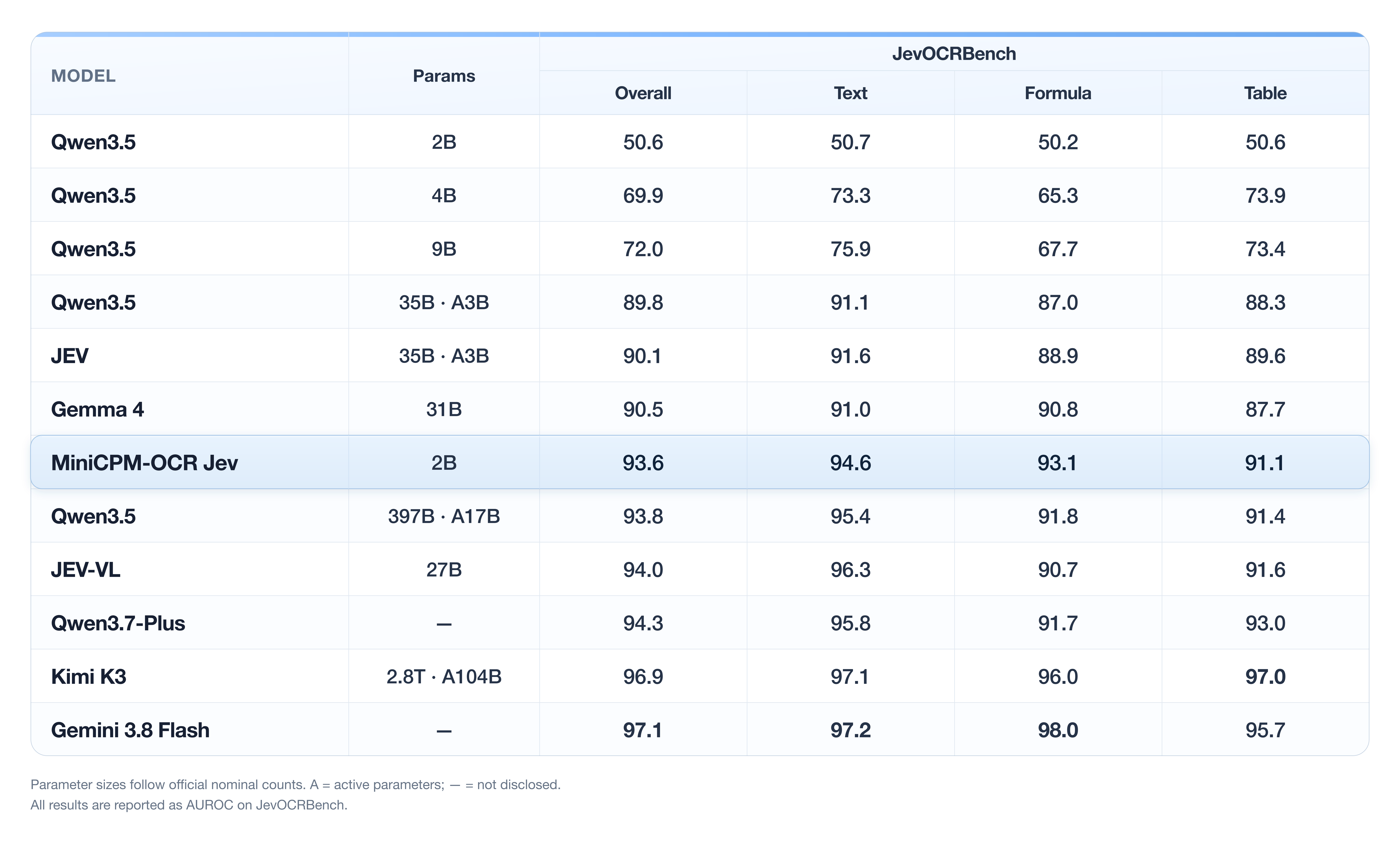
Discrimination across OCR models
The cross-parser experiment uses the same 200 samples randomly drawn from JevOCRBench. Four OCR models parse the samples independently; each result is manually labelled correct or incorrect and then scored by MiniCPM-OCR Jev.
| OCR model | MiniCPM-OCR 1.0 | GLM-OCR | PaddleOCR-VL-1.6 | Xiaomi-OCR-0 |
|---|---|---|---|---|
| AUROC (×100) | 92.7 | 91.9 | 93.4 | 93.1 |
In this experiment, AUROC (×100) ranges from 91.9 to 93.4, with a maximum difference of 1.5 points. These results describe performance on the samples and parser combinations above. Validate separately on your target data when using other parsers or new document types.
Automatic screening to reduce human review
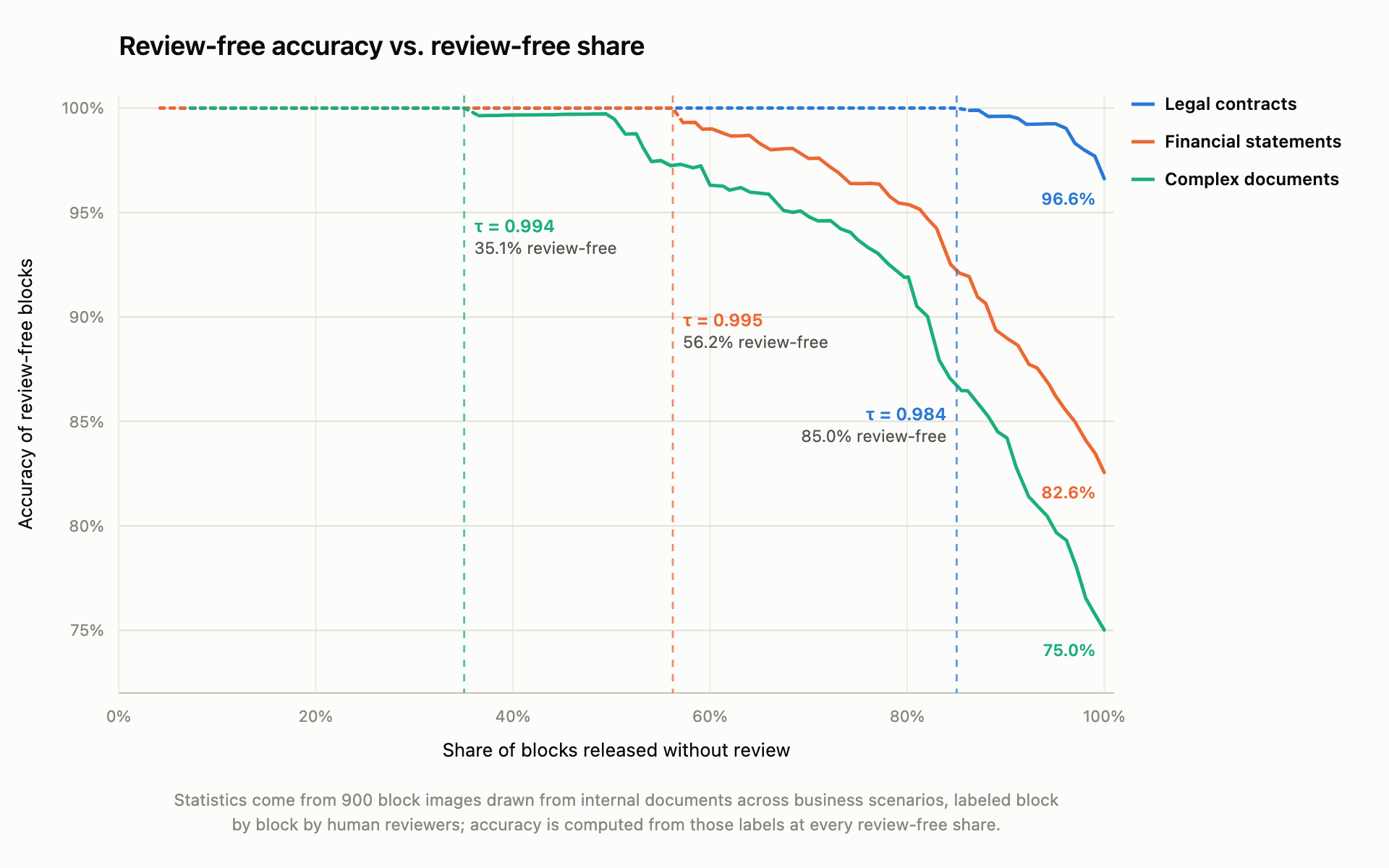
Score the parsed result for each region and choose a threshold using samples from your application. Results above the threshold proceed automatically; the rest go to human review. A higher threshold typically reduces the number of results that pass automatically, so monitor both the accuracy of automatically accepted results and the volume of human review.
Selecting across models to improve parsing quality
Use the same layout segmentation to have several OCR models parse each region. MiniCPM-OCR Jev scores the candidates for the same region, selects the highest-scoring candidate, and combines the selected results in reading order. If all candidates fall below the application threshold, the region can still be sent for human review.
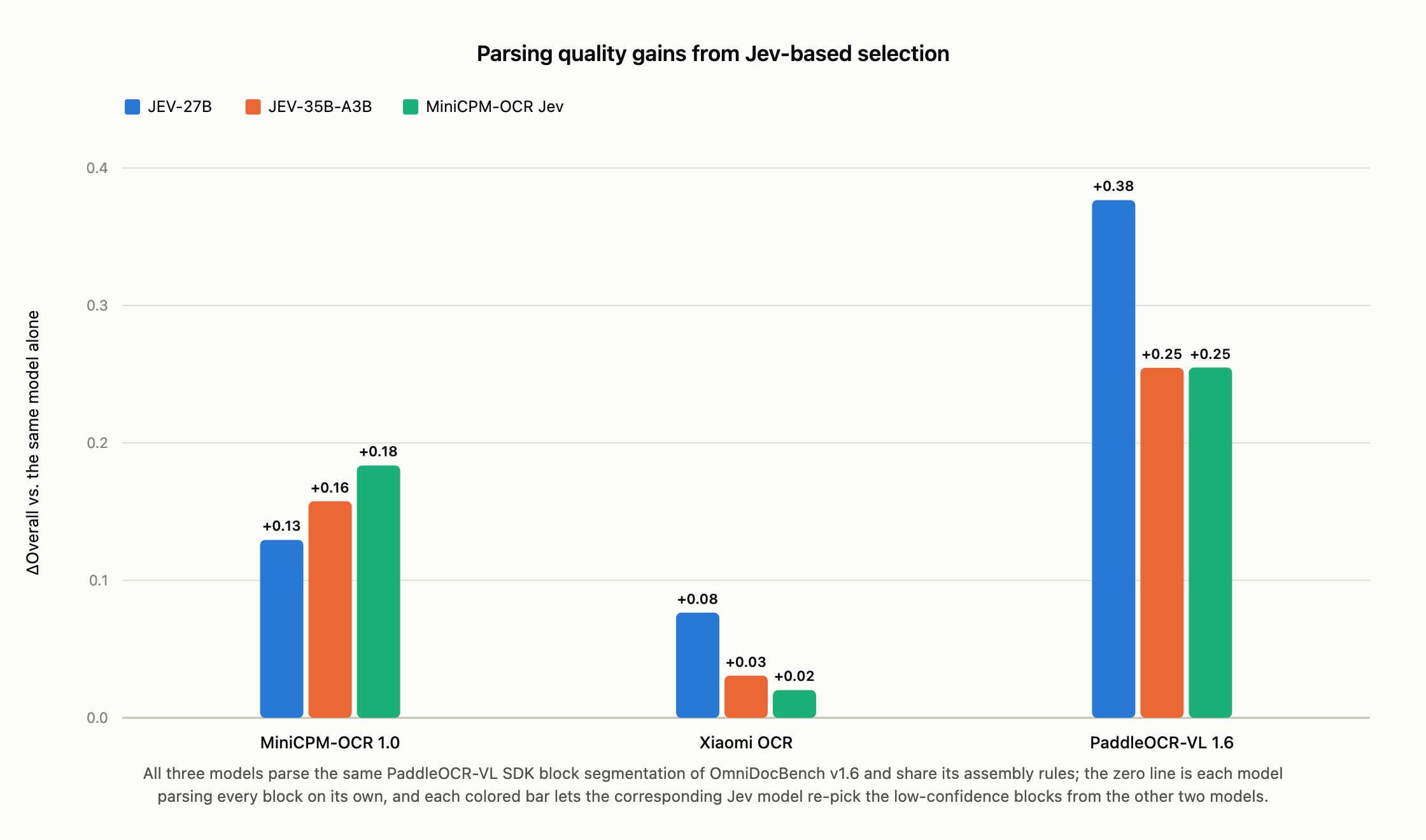
Candidates for the same region must share the crop and content boundaries. Jev selects among existing candidates, so quality is bounded by their coverage and correctness.
Examples
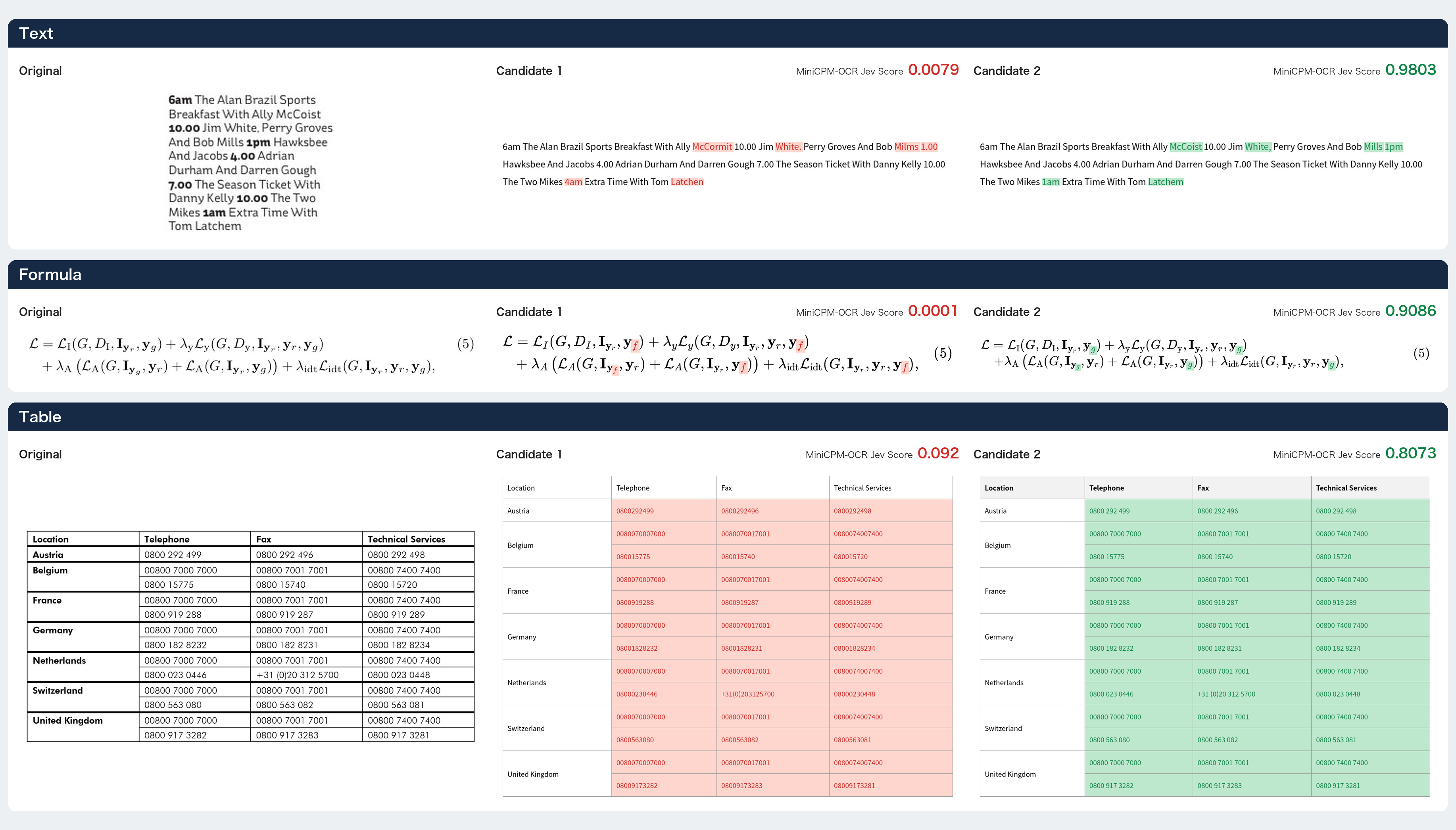
The figure below compares the original image with candidates 1 and 2, showing how MiniCPM-OCR Jev scores text, formula, and table candidates.
Quick start
| Deployment | Guide |
|---|---|
| Cloud API | Single-candidate scoring, best-of-N, batched best-of-N (stub — being written) |
| Docker / local SDK | Environment, rendering options, service startup |
| vLLM backend | Service configuration with and without a renderer |
| SGLang | Deployment guide |
| llama.cpp | GGUF deployment guide |
| Ollama | Deployment guide |
| FlagOS (multi-chip) | Deployment guide |
When a service has a built-in renderer (cloud API, Docker, SDK), check verdict before using
the score — only scored means model scoring actually ran. Fixed values returned for precheck,
rendering, or forward-pass failures must not be read as low model scores.
Fine-tuning
ms-swift guide: data format, binary classification head configuration, training commands, and JevOCRBench evaluation.
Related checkpoints
| Format | Hugging Face | ModelScope |
|---|---|---|
| BF16 (original) (this repo) | 🤗 | ModelScope |
| GGUF (llama.cpp) | 🤗 | ModelScope |
| AWQ W4A16 | 🤗 | ModelScope |
| GPTQ W4A16 | 🤗 | ModelScope |
Jev works on candidates from any parser. The companion parser is MiniCPM-OCR 1.0.
FAQ
Installation, model downloads, GPU memory, input formats, and unexpected outputs: FAQ.
License
Model weights, code, and documentation are released under the Apache License 2.0.