| | --- |
| | pipeline_tag: image-text-to-text |
| | datasets: |
| | - openbmb/RLAIF-V-Dataset |
| | library_name: transformers |
| | language: |
| | - multilingual |
| | tags: |
| | - minicpm-v |
| | - vision |
| | - ocr |
| | - multi-image |
| | - video |
| | - custom_code |
| | --- |
| | |
| | <h1>A GPT-4V Level MLLM for Single Image, Multi Image and Video on Your Phone</h1> |
| |
|
| | [GitHub](https://github.com/OpenBMB/MiniCPM-V) | [Demo](http://120.92.209.146:8887/)</a> |
| |
|
| |
|
| | ## MiniCPM-V 2.6 |
| |
|
| | **MiniCPM-V 2.6** is the latest and most capable model in the MiniCPM-V series. The model is built on SigLip-400M and Qwen2-7B with a total of 8B parameters. It exhibits a significant performance improvement over MiniCPM-Llama3-V 2.5, and introduces new features for multi-image and video understanding. Notable features of MiniCPM-V 2.6 include: |
| |
|
| | - 🔥 **Leading Performance.** |
| | MiniCPM-V 2.6 achieves an average score of 65.2 on the latest version of OpenCompass, a comprehensive evaluation over 8 popular benchmarks. **With only 8B parameters, it surpasses widely used proprietary models like GPT-4o mini, GPT-4V, Gemini 1.5 Pro, and Claude 3.5 Sonnet** for single image understanding. |
| |
|
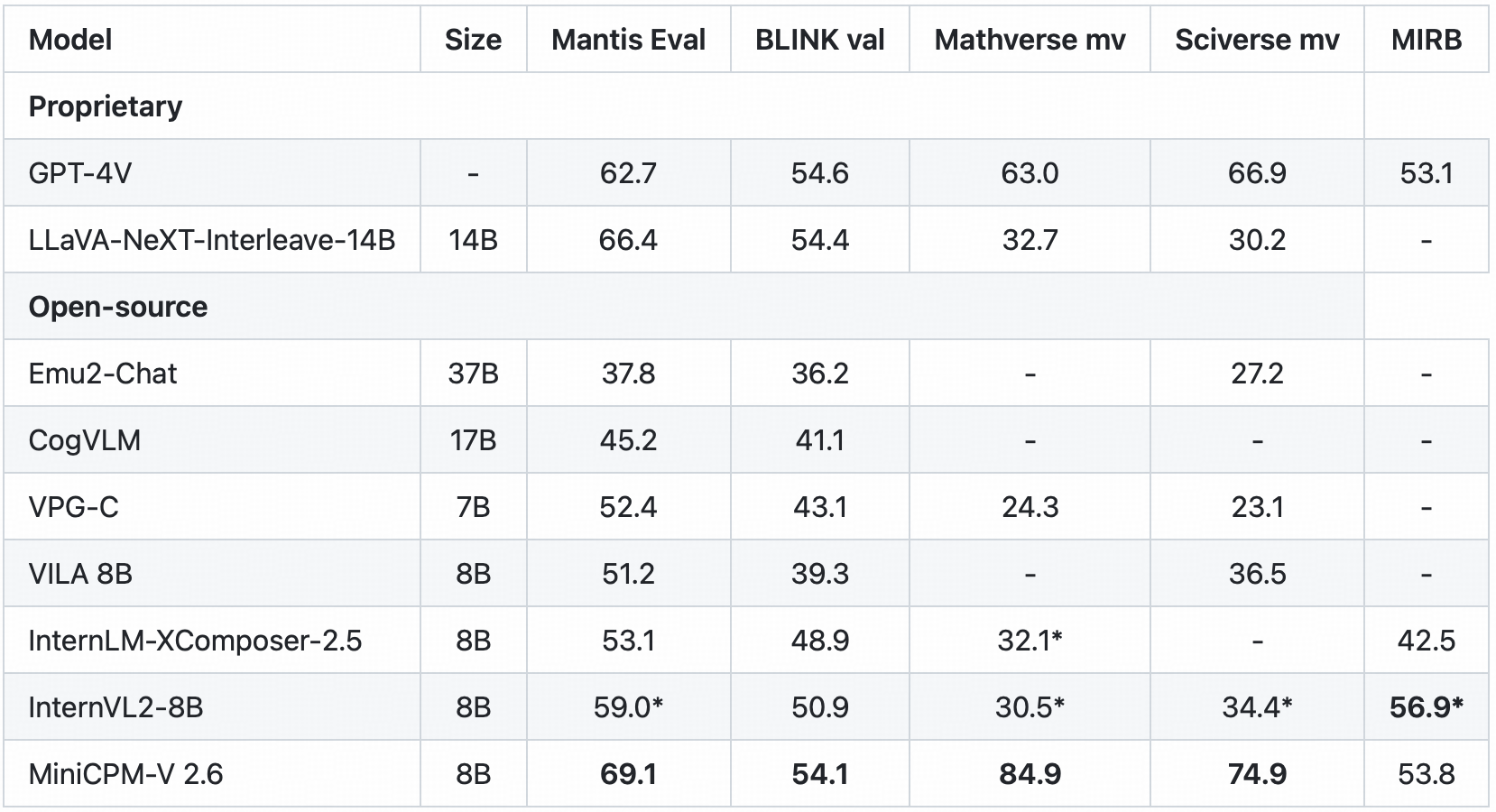
| | - 🖼️ **Multi Image Understanding and In-context Learning.** MiniCPM-V 2.6 can also perform **conversation and reasoning over multiple images**. It achieves **state-of-the-art performance** on popular multi-image benchmarks such as Mantis-Eval, BLINK, Mathverse mv and Sciverse mv, and also shows promising in-context learning capability. |
| |
|
| | - 🎬 **Video Understanding.** MiniCPM-V 2.6 can also **accept video inputs**, performing conversation and providing dense captions for spatial-temporal information. It outperforms **GPT-4V, Claude 3.5 Sonnet and LLaVA-NeXT-Video-34B** on Video-MME with/without subtitles. |
| |
|
| | - 💪 **Strong OCR Capability and Others.** |
| | MiniCPM-V 2.6 can process images with any aspect ratio and up to 1.8 million pixels (e.g., 1344x1344). It achieves **state-of-the-art performance on OCRBench, surpassing proprietary models such as GPT-4o, GPT-4V, and Gemini 1.5 Pro**. |
| | Based on the the latest [RLAIF-V](https://github.com/RLHF-V/RLAIF-V/) and [VisCPM](https://github.com/OpenBMB/VisCPM) techniques, it features **trustworthy behaviors**, with significantly lower hallucination rates than GPT-4o and GPT-4V on Object HalBench, and supports **multilingual capabilities** on English, Chinese, German, French, Italian, Korean, etc. |
| |
|
| | - 🚀 **Superior Efficiency.** |
| | In addition to its friendly size, MiniCPM-V 2.6 also shows **state-of-the-art token density** (i.e., number of pixels encoded into each visual token). **It produces only 640 tokens when processing a 1.8M pixel image, which is 75% fewer than most models**. This directly improves the inference speed, first-token latency, memory usage, and power consumption. As a result, MiniCPM-V 2.6 can efficiently support **real-time video understanding** on end-side devices such as iPad. |
| |
|
| | - 💫 **Easy Usage.** |
| | MiniCPM-V 2.6 can be easily used in various ways: (1) [llama.cpp](https://github.com/OpenBMB/llama.cpp/blob/minicpmv-main/examples/llava/README-minicpmv2.6.md) and [ollama](https://github.com/OpenBMB/ollama/tree/minicpm-v2.6) support for efficient CPU inference on local devices, (2) [int4](https://huggingface.co/openbmb/MiniCPM-V-2_6-int4) and [GGUF](https://huggingface.co/openbmb/MiniCPM-V-2_6-gguf) format quantized models in 16 sizes, (3) [vLLM](https://github.com/OpenBMB/MiniCPM-V/tree/main?tab=readme-ov-file#inference-with-vllm) support for high-throughput and memory-efficient inference, (4) fine-tuning on new domains and tasks, (5) quick local WebUI demo setup with [Gradio](https://github.com/OpenBMB/MiniCPM-V/tree/main?tab=readme-ov-file#chat-with-our-demo-on-gradio) and (6) online web [demo](http://120.92.209.146:8887). |
| |
|
| | ### Evaluation <!-- omit in toc --> |
| | <div align="center"> |
| | <img src="https://github.com/OpenBMB/MiniCPM-V/raw/main/assets/radar_final.png" width=66% /> |
| | </div> |
| | |
| | #### Single image results on OpenCompass, MME, MMVet, OCRBench, MMMU, MathVista, MMB, AI2D, TextVQA, DocVQA, HallusionBench, Object HalBench: |
| |
|
| |
|
| | <div align="center"> |
| |
|
| |  |
| |
|
| | </div> |
| |
|
| | <sup>*</sup> We evaluate this benchmark using chain-of-thought prompting. |
| | |
| | <sup>+</sup> Token Density: number of pixels encoded into each visual token at maximum resolution, i.e., # pixels at maximum resolution / # visual tokens. |
| | |
| | Note: For proprietary models, we calculate token density based on the image encoding charging strategy defined in the official API documentation, which provides an upper-bound estimation. |
| | |
| | |
| | |
| | #### Multi-image results on Mantis Eval, BLINK Val, Mathverse mv, Sciverse mv, MIRB: |
| | |
| | <div align="center"> |
| | |
| |  |
| | |
| | </div> |
| | <sup>*</sup> We evaluate the officially released checkpoint by ourselves. |
| |
|
| |
|
| |
|
| | #### Video results on Video-MME and Video-ChatGPT: |
| |
|
| | <div align="center"> |
| | <!--  --> |
| | |
| |  |
| |
|
| | </div> |
| |
|
| |
|
| | <details> |
| | <summary>Click to view few-shot results on TextVQA, VizWiz, VQAv2, OK-VQA.</summary> |
| | <div align="center"> |
| | |
| |  |
| |
|
| | </div> |
| | * denotes zero image shot and two additional text shots following Flamingo. |
| |
|
| | <sup>+</sup> We evaluate the pretraining ckpt without SFT. |
| | </details> |
| |
|
| | ### Examples <!-- omit in toc --> |
| |
|
| | <div style="display: flex; flex-direction: column; align-items: center;"> |
| | <img src="https://github.com/OpenBMB/MiniCPM-V/raw/main/assets/minicpmv2_6/multi_img-bike.png" alt="Bike" style="margin-bottom: -20px;"> |
| | <img src="https://github.com/OpenBMB/MiniCPM-V/raw/main/assets/minicpmv2_6/multi_img-menu.png" alt="Menu" style="margin-bottom: -20px;"> |
| | <img src="https://github.com/OpenBMB/MiniCPM-V/raw/main/assets/minicpmv2_6/multi_img-code.png" alt="Code" style="margin-bottom: -20px;"> |
| | <img src="https://github.com/OpenBMB/MiniCPM-V/raw/main/assets/minicpmv2_6/ICL-Mem.png" alt="Mem" style="margin-bottom: -20px;"> |
| | <img src="https://github.com/OpenBMB/MiniCPM-V/raw/main/assets/minicpmv2_6/multiling-medal.png" alt="medal" style="margin-bottom: 10px;"> |
| | </div> |
| | <details> |
| | <summary>Click to view more cases.</summary> |
| | <div style="display: flex; flex-direction: column; align-items: center;"> |
| | <img src="https://github.com/OpenBMB/MiniCPM-V/raw/main/assets/minicpmv2_6/ICL-elec.png" alt="elec" style="margin-bottom: -20px;"> |
| | <img src="https://github.com/OpenBMB/MiniCPM-V/raw/main/assets/minicpmv2_6/multiling-olympic.png" alt="Menu" style="margin-bottom: 10px;"> |
| | </div> |
| | </details> |
| | |
| | We deploy MiniCPM-V 2.6 on end devices. The demo video is the raw screen recording on a iPad Pro without edition. |
| |
|
| | <div style="display: flex; justify-content: center;"> |
| | <img src="https://github.com/OpenBMB/MiniCPM-V/raw/main/assets/gif_cases/ai.gif" width="48%" style="margin: 0 10px;"/> |
| | <img src="https://github.com/OpenBMB/MiniCPM-V/raw/main/assets/gif_cases/beer.gif" width="48%" style="margin: 0 10px;"/> |
| | </div> |
| | <div style="display: flex; justify-content: center; margin-top: 20px;"> |
| | <img src="https://github.com/OpenBMB/MiniCPM-V/raw/main/assets/gif_cases/ticket.gif" width="48%" style="margin: 0 10px;"/> |
| | <img src="https://github.com/OpenBMB/MiniCPM-V/raw/main/assets/gif_cases/wfh.gif" width="48%" style="margin: 0 10px;"/> |
| | </div> |
| | |
| | <div style="text-align: center;"> |
| | <video controls autoplay src="https://cdn-uploads.huggingface.co/production/uploads/64abc4aa6cadc7aca585dddf/mXAEFQFqNd4nnvPk7r5eX.mp4"></video> |
| | <!-- <video controls autoplay src="https://cdn-uploads.huggingface.co/production/uploads/64abc4aa6cadc7aca585dddf/fEWzfHUdKnpkM7sdmnBQa.mp4"></video> --> |
| |
|
| | </div> |
| |
|
| |
|
| |
|
| | ## Demo |
| | Click here to try the Demo of [MiniCPM-V 2.6](http://120.92.209.146:8887/). |
| |
|
| |
|
| | ## Usage |
| | Inference using Huggingface transformers on NVIDIA GPUs. Requirements tested on python 3.10: |
| | ``` |
| | Pillow==10.1.0 |
| | torch==2.1.2 |
| | torchvision==0.16.2 |
| | transformers==4.40.0 |
| | sentencepiece==0.1.99 |
| | decord |
| | ``` |
| |
|
| | ```python |
| | # test.py |
| | import torch |
| | from PIL import Image |
| | from transformers import AutoModel, AutoTokenizer |
| | |
| | model = AutoModel.from_pretrained('openbmb/MiniCPM-V-2_6', trust_remote_code=True, |
| | attn_implementation='sdpa', torch_dtype=torch.bfloat16) # sdpa or flash_attention_2, no eager |
| | model = model.eval().cuda() |
| | tokenizer = AutoTokenizer.from_pretrained('openbmb/MiniCPM-V-2_6', trust_remote_code=True) |
| | |
| | image = Image.open('xx.jpg').convert('RGB') |
| | question = 'What is in the image?' |
| | msgs = [{'role': 'user', 'content': [image, question]}] |
| | |
| | res = model.chat( |
| | image=None, |
| | msgs=msgs, |
| | tokenizer=tokenizer |
| | ) |
| | print(res) |
| | |
| | ## if you want to use streaming, please make sure sampling=True and stream=True |
| | ## the model.chat will return a generator |
| | res = model.chat( |
| | image=None, |
| | msgs=msgs, |
| | tokenizer=tokenizer, |
| | sampling=True, |
| | stream=True |
| | ) |
| | |
| | generated_text = "" |
| | for new_text in res: |
| | generated_text += new_text |
| | print(new_text, flush=True, end='') |
| | ``` |
| |
|
| | ### Chat with multiple images |
| | <details> |
| | <summary> Click to show Python code running MiniCPM-V 2.6 with multiple images input. </summary> |
| | |
| | ```python |
| | import torch |
| | from PIL import Image |
| | from transformers import AutoModel, AutoTokenizer |
| | |
| | model = AutoModel.from_pretrained('openbmb/MiniCPM-V-2_6', trust_remote_code=True, |
| | attn_implementation='sdpa', torch_dtype=torch.bfloat16) # sdpa or flash_attention_2, no eager |
| | model = model.eval().cuda() |
| | tokenizer = AutoTokenizer.from_pretrained('openbmb/MiniCPM-V-2_6', trust_remote_code=True) |
| | |
| | image1 = Image.open('image1.jpg').convert('RGB') |
| | image2 = Image.open('image2.jpg').convert('RGB') |
| | question = 'Compare image 1 and image 2, tell me about the differences between image 1 and image 2.' |
| | |
| | msgs = [{'role': 'user', 'content': [image1, image2, question]}] |
| | |
| | answer = model.chat( |
| | image=None, |
| | msgs=msgs, |
| | tokenizer=tokenizer |
| | ) |
| | print(answer) |
| | ``` |
| | </details> |
| |
|
| | ### In-context few-shot learning |
| | <details> |
| | <summary> Click to view Python code running MiniCPM-V 2.6 with few-shot input. </summary> |
| |
|
| | ```python |
| | import torch |
| | from PIL import Image |
| | from transformers import AutoModel, AutoTokenizer |
| | |
| | model = AutoModel.from_pretrained('openbmb/MiniCPM-V-2_6', trust_remote_code=True, |
| | attn_implementation='sdpa', torch_dtype=torch.bfloat16) # sdpa or flash_attention_2, no eager |
| | model = model.eval().cuda() |
| | tokenizer = AutoTokenizer.from_pretrained('openbmb/MiniCPM-V-2_6', trust_remote_code=True) |
| | |
| | question = "production date" |
| | image1 = Image.open('example1.jpg').convert('RGB') |
| | answer1 = "2023.08.04" |
| | image2 = Image.open('example2.jpg').convert('RGB') |
| | answer2 = "2007.04.24" |
| | image_test = Image.open('test.jpg').convert('RGB') |
| | |
| | msgs = [ |
| | {'role': 'user', 'content': [image1, question]}, {'role': 'assistant', 'content': [answer1]}, |
| | {'role': 'user', 'content': [image2, question]}, {'role': 'assistant', 'content': [answer2]}, |
| | {'role': 'user', 'content': [image_test, question]} |
| | ] |
| | |
| | answer = model.chat( |
| | image=None, |
| | msgs=msgs, |
| | tokenizer=tokenizer |
| | ) |
| | print(answer) |
| | ``` |
| | </details> |
| |
|
| | ### Chat with video |
| | <details> |
| | <summary> Click to view Python code running MiniCPM-V 2.6 with video input. </summary> |
| |
|
| | ```python |
| | import torch |
| | from PIL import Image |
| | from transformers import AutoModel, AutoTokenizer |
| | from decord import VideoReader, cpu # pip install decord |
| | |
| | model = AutoModel.from_pretrained('openbmb/MiniCPM-V-2_6', trust_remote_code=True, |
| | attn_implementation='sdpa', torch_dtype=torch.bfloat16) # sdpa or flash_attention_2, no eager |
| | model = model.eval().cuda() |
| | tokenizer = AutoTokenizer.from_pretrained('openbmb/MiniCPM-V-2_6', trust_remote_code=True) |
| | |
| | MAX_NUM_FRAMES=64 # if cuda OOM set a smaller number |
| | |
| | def encode_video(video_path): |
| | def uniform_sample(l, n): |
| | gap = len(l) / n |
| | idxs = [int(i * gap + gap / 2) for i in range(n)] |
| | return [l[i] for i in idxs] |
| | |
| | vr = VideoReader(video_path, ctx=cpu(0)) |
| | sample_fps = round(vr.get_avg_fps() / 1) # FPS |
| | frame_idx = [i for i in range(0, len(vr), sample_fps)] |
| | if len(frame_idx) > MAX_NUM_FRAMES: |
| | frame_idx = uniform_sample(frame_idx, MAX_NUM_FRAMES) |
| | frames = vr.get_batch(frame_idx).asnumpy() |
| | frames = [Image.fromarray(v.astype('uint8')) for v in frames] |
| | print('num frames:', len(frames)) |
| | return frames |
| | |
| | video_path ="video_test.mp4" |
| | frames = encode_video(video_path) |
| | question = "Describe the video" |
| | msgs = [ |
| | {'role': 'user', 'content': frames + [question]}, |
| | ] |
| | |
| | # Set decode params for video |
| | params={} |
| | params["use_image_id"] = False |
| | params["max_slice_nums"] = 2 # use 1 if cuda OOM and video resolution > 448*448 |
| | |
| | answer = model.chat( |
| | image=None, |
| | msgs=msgs, |
| | tokenizer=tokenizer, |
| | **params |
| | ) |
| | print(answer) |
| | ``` |
| | </details> |
| |
|
| |
|
| | Please look at [GitHub](https://github.com/OpenBMB/MiniCPM-V) for more detail about usage. |
| |
|
| |
|
| | ## Inference with llama.cpp<a id="llamacpp"></a> |
| | MiniCPM-V 2.6 can run with llama.cpp. See our fork of [llama.cpp](https://github.com/OpenBMB/llama.cpp/tree/minicpm-v2.5/examples/minicpmv) for more detail. |
| |
|
| |
|
| | ## Int4 quantized version |
| | Download the int4 quantized version for lower GPU memory (7GB) usage: [MiniCPM-V-2_6-int4](https://huggingface.co/openbmb/MiniCPM-V-2_6-int4). |
| |
|
| |
|
| | ## License |
| | #### Model License |
| | * The code in this repo is released under the [Apache-2.0](https://github.com/OpenBMB/MiniCPM/blob/main/LICENSE) License. |
| | * The usage of MiniCPM-V series model weights must strictly follow [MiniCPM Model License.md](https://github.com/OpenBMB/MiniCPM/blob/main/MiniCPM%20Model%20License.md). |
| | * The models and weights of MiniCPM are completely free for academic research. After filling out a ["questionnaire"](https://modelbest.feishu.cn/share/base/form/shrcnpV5ZT9EJ6xYjh3Kx0J6v8g) for registration, MiniCPM-V 2.6 weights are also available for free commercial use. |
| |
|
| |
|
| | #### Statement |
| | * As an LMM, MiniCPM-V 2.6 generates contents by learning a large mount of multimodal corpora, but it cannot comprehend, express personal opinions or make value judgement. Anything generated by MiniCPM-V 2.6 does not represent the views and positions of the model developers |
| | * We will not be liable for any problems arising from the use of the MinCPM-V models, including but not limited to data security issues, risk of public opinion, or any risks and problems arising from the misdirection, misuse, dissemination or misuse of the model. |
| |
|
| | ## Key Techniques and Other Multimodal Projects |
| |
|
| | 👏 Welcome to explore key techniques of MiniCPM-V 2.6 and other multimodal projects of our team: |
| |
|
| | [VisCPM](https://github.com/OpenBMB/VisCPM/tree/main) | [RLHF-V](https://github.com/RLHF-V/RLHF-V) | [LLaVA-UHD](https://github.com/thunlp/LLaVA-UHD) | [RLAIF-V](https://github.com/RLHF-V/RLAIF-V) |
| |
|
| | ## Citation |
| |
|
| | If you find our work helpful, please consider citing our papers 📝 and liking this project ❤️! |
| |
|
| | ```bib |
| | @article{yao2024minicpm, |
| | title={MiniCPM-V: A GPT-4V Level MLLM on Your Phone}, |
| | author={Yao, Yuan and Yu, Tianyu and Zhang, Ao and Wang, Chongyi and Cui, Junbo and Zhu, Hongji and Cai, Tianchi and Li, Haoyu and Zhao, Weilin and He, Zhihui and others}, |
| | journal={arXiv preprint arXiv:2408.01800}, |
| | year={2024} |
| | } |
| | ``` |


