


MiniCPM-V 4.6
Collection
A Pocket-Sized MLLM for Ultra-Efficient Image and Video Understanding on Your Phone • 11 items • Updated • 13
A Pocket-Sized MLLM for Ultra-Efficient Image and Video Understanding on Your Phone
GitHub | MiniCPM Wiki(Chinese) | CookBook | Demo | Feishu (Lark)
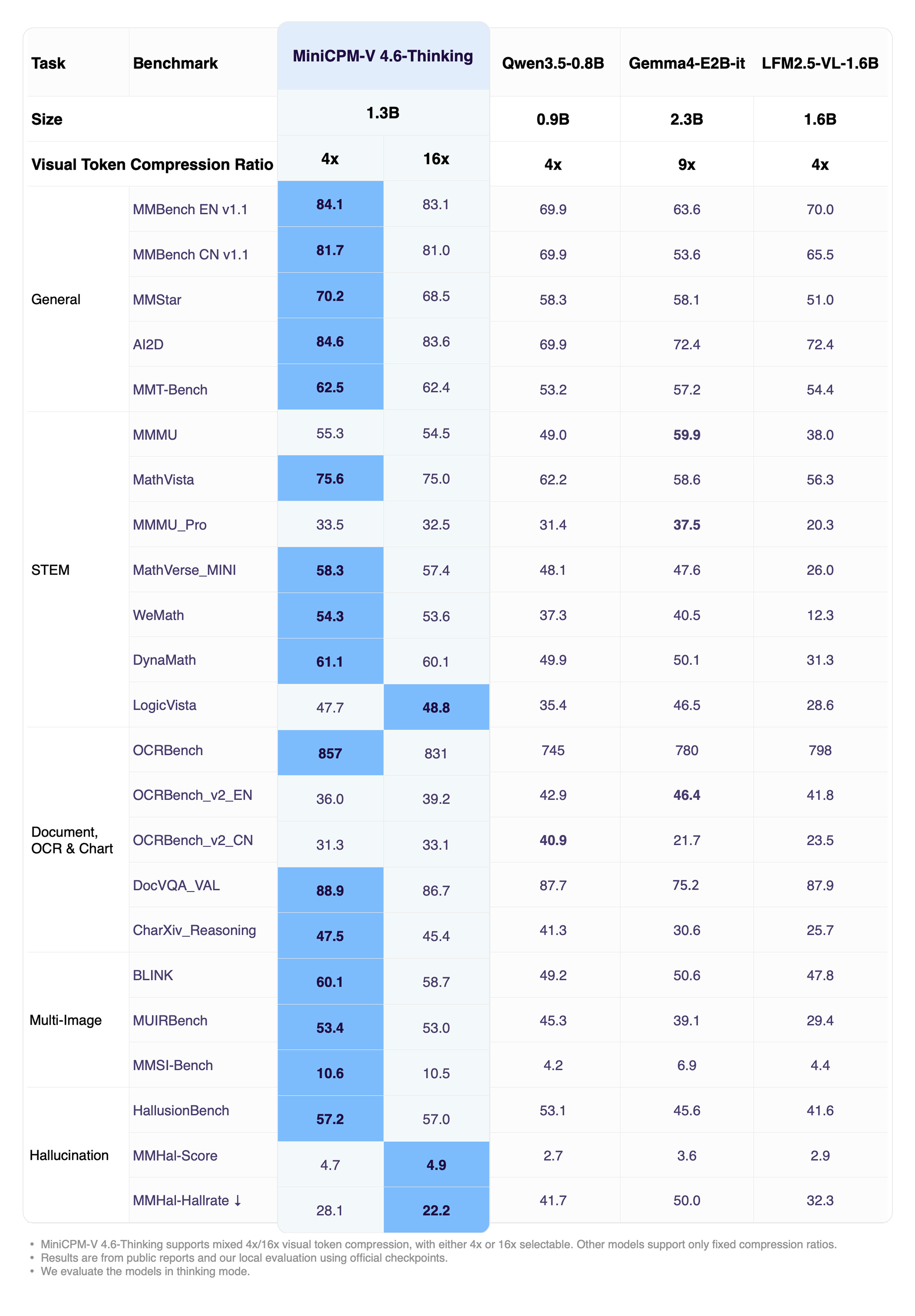
MiniCPM-V 4.6 Thinking is the long chain-of-thought reasoning variant of MiniCPM-V 4.6. It generates an explicit reasoning trace before producing the final answer, substantially boosting performance on complex multimodal reasoning, math, and OCR-heavy tasks, while keeping the same edge-friendly architecture (SigLIP2-400M vision encoder + Qwen3.5-0.8B LLM) and the mixed 4x/16x visual token compression of MiniCPM-V 4.6.
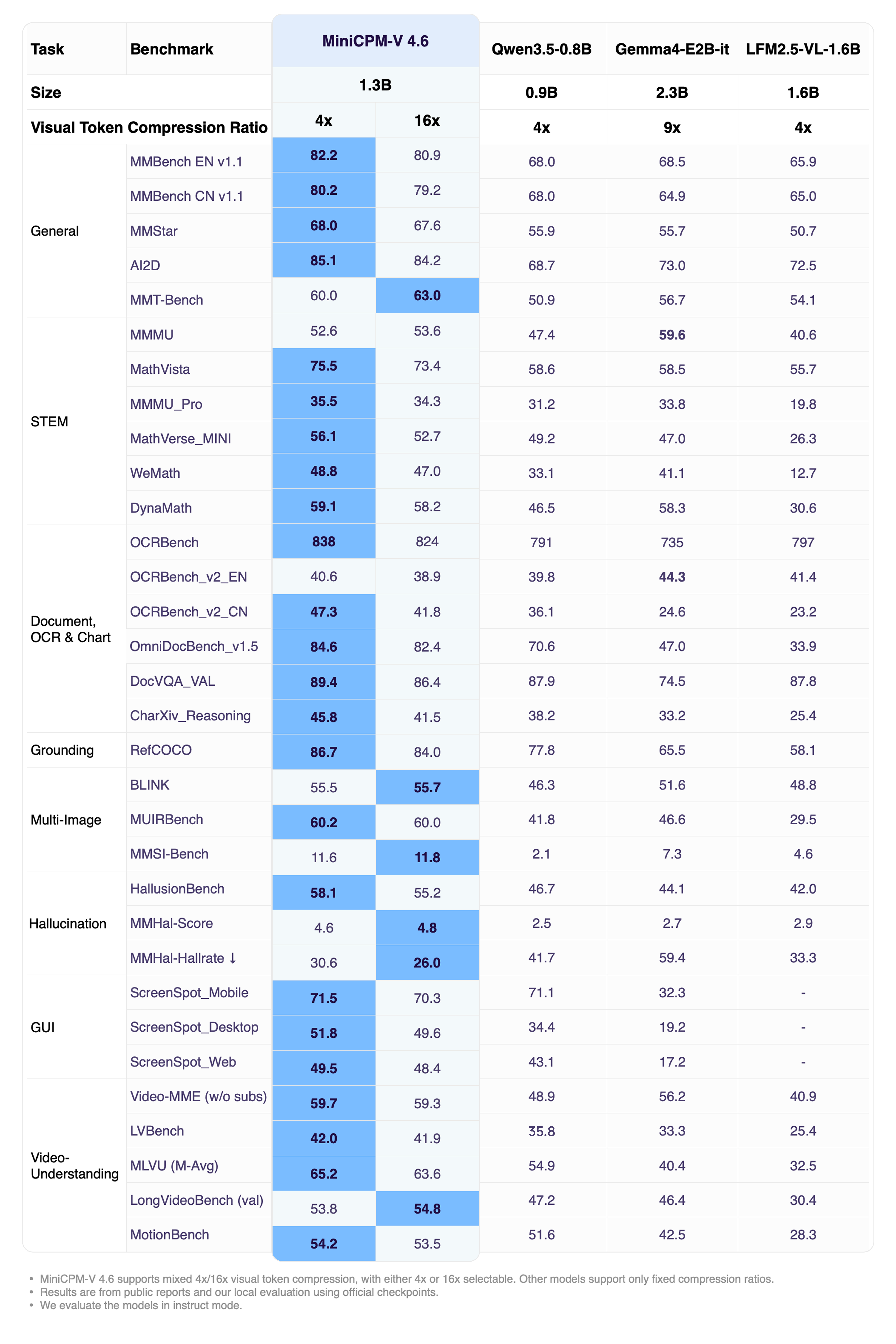
Overall Performance (Thinking)
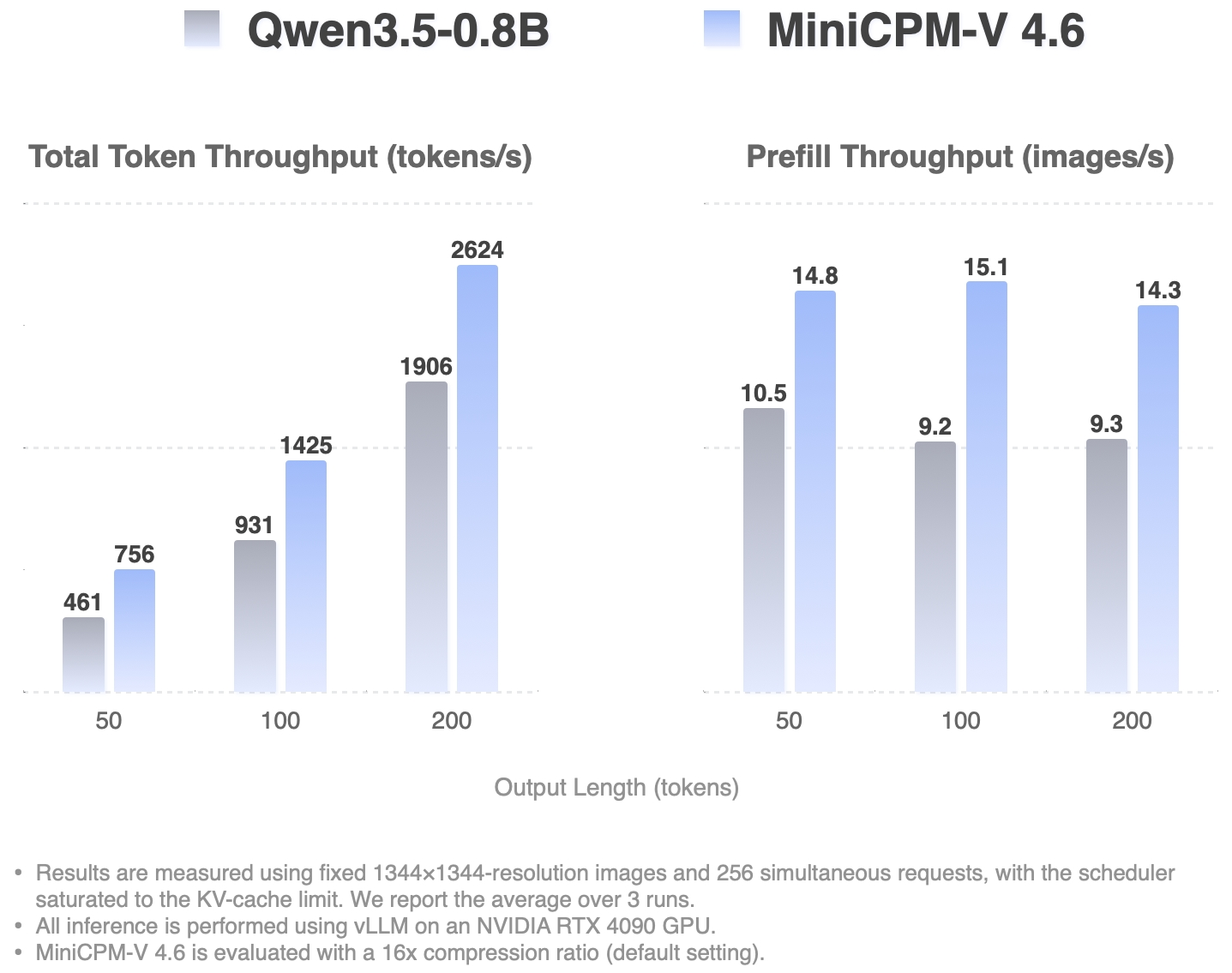
High-Concurrency Throughput
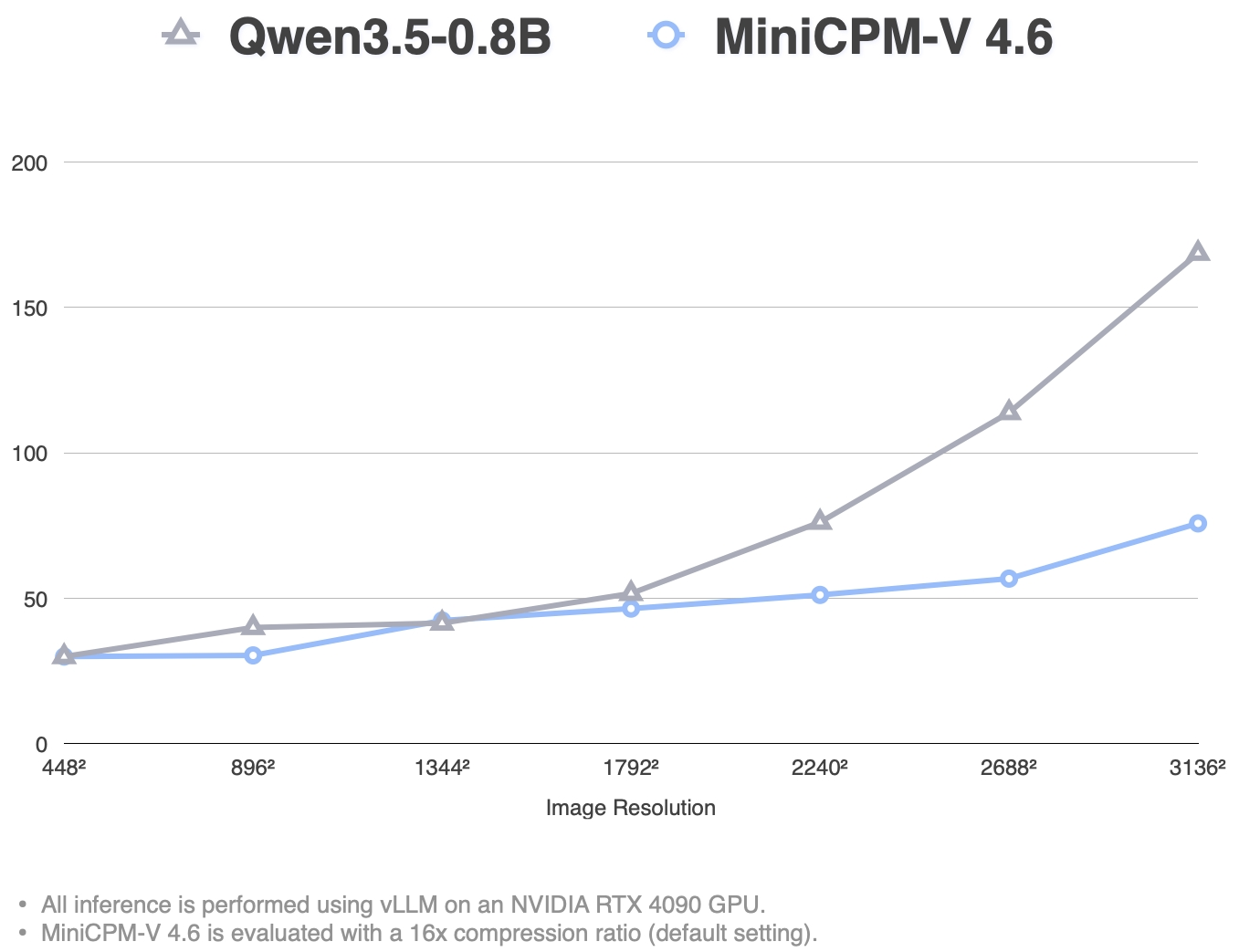
Single Request TTFT (ms)
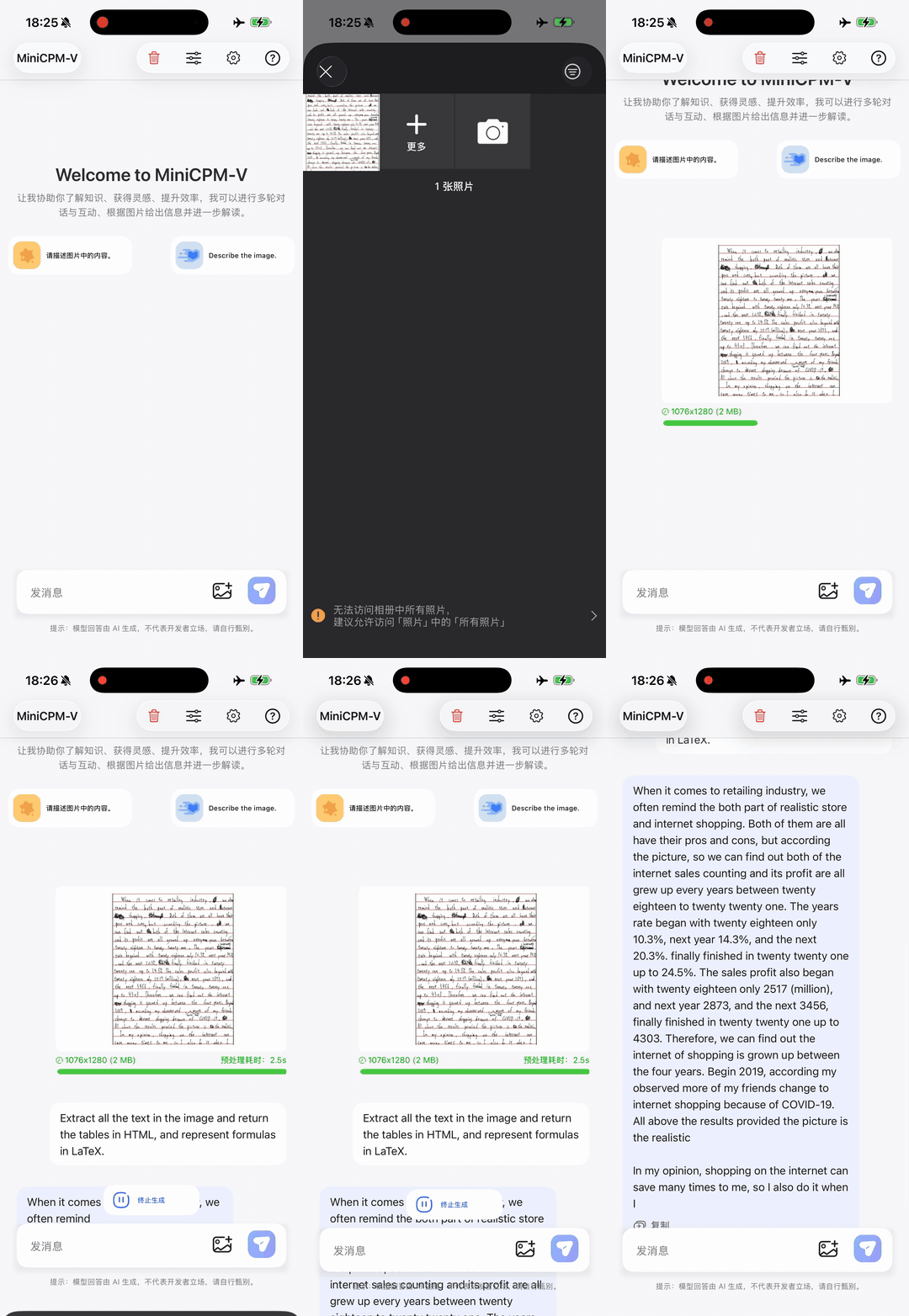
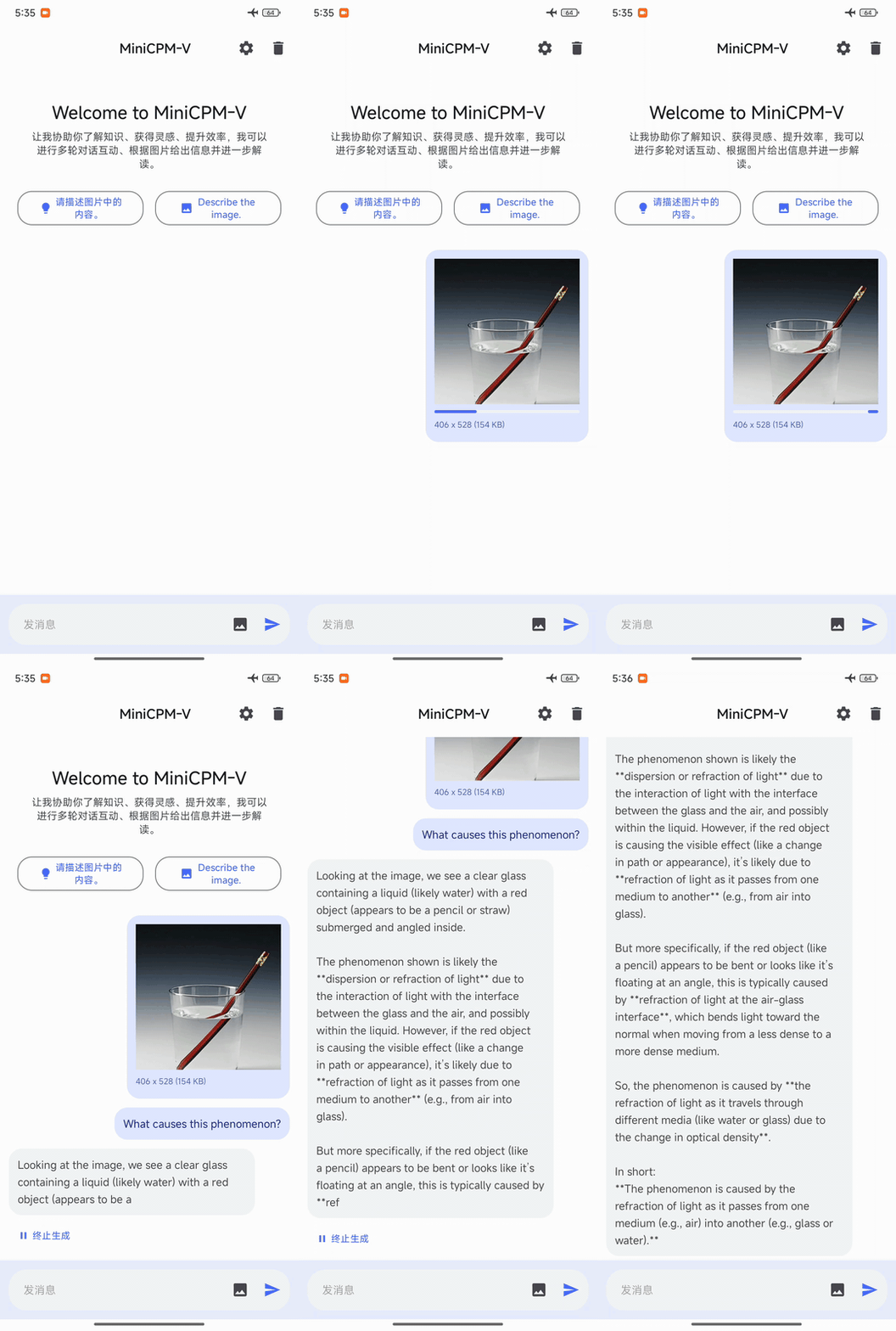
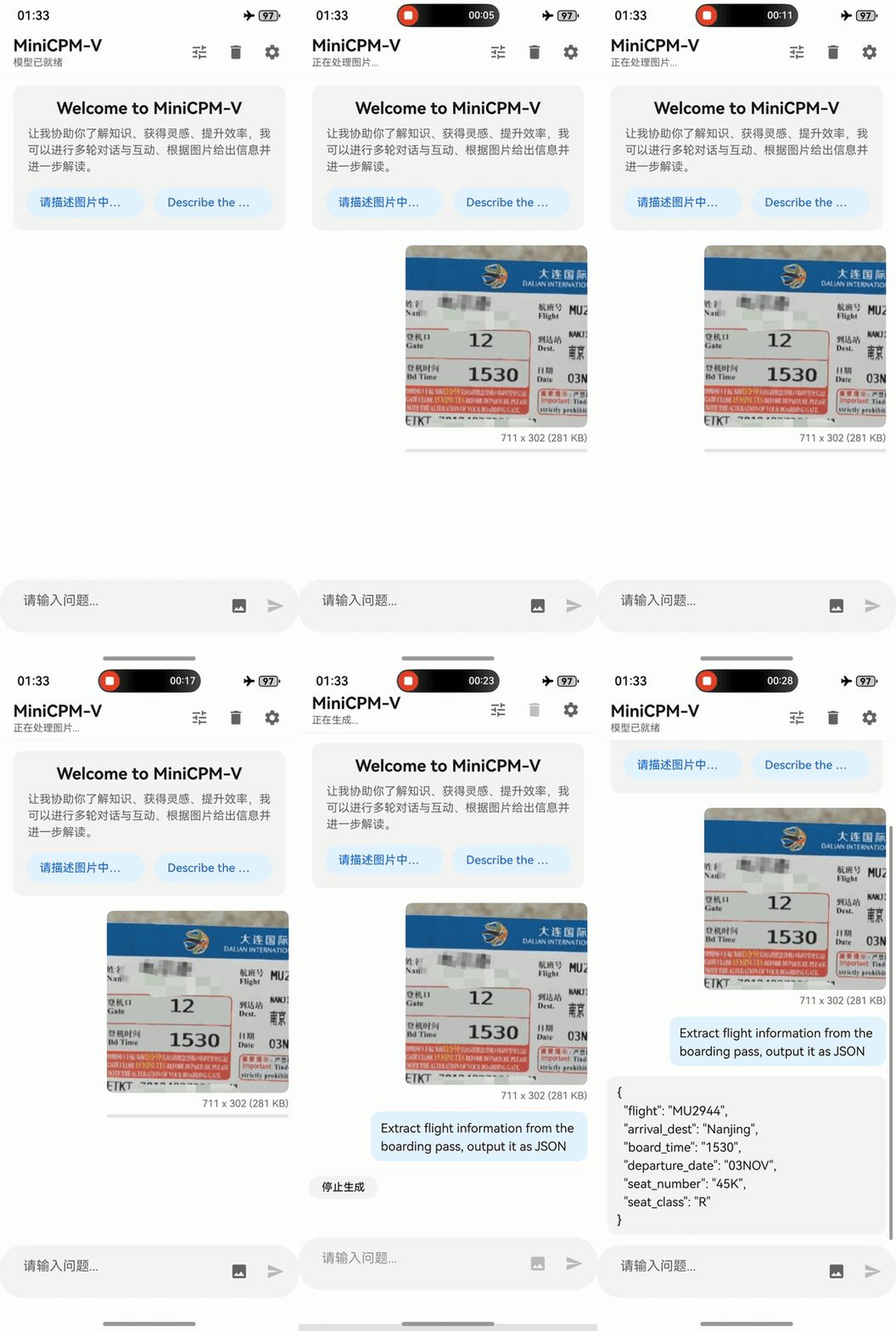
MiniCPM-V 4.6 can be deployed across three mainstream end-side platforms — iOS, Android and HarmonyOS. The clips below are raw screen recordings on phone devices without edition.
| iPhone iPhone 17 Pro Max |
Android Redmi K70 |
HarmonyOS HUAWEI nova 14 |
 |
 |
 |
pip install "transformers[torch]>=5.7.0" torchvision torchcodec
Note on CUDA compatibility:
torchcodec(used for video decoding) may have compatibility issues with certain CUDA versions. For example,torch>=2.11bundles CUDA 13.1 by default, while environments with CUDA 12.x may encounter errors such asRuntimeError: Could not load libtorchcodec. Two workarounds:
- Replace
torchcodecwithPyAV— supports both image and video inference without CUDA version constraints:pip install "transformers[torch]>=5.7.0" torchvision av- Pin the CUDA version when installing torch to match your environment (e.g. CUDA 12.8):
pip install "transformers>=5.7.0" torchvision torchcodec --index-url https://download.pytorch.org/whl/cu128
from transformers import AutoModelForImageTextToText, AutoProcessor

model_id = "openbmb/MiniCPM-V-4.6-Thinking"

processor = AutoProcessor.from_pretrained(model_id)
model = AutoModelForImageTextToText.from_pretrained(
    model_id, torch_dtype="auto", device_map="auto"
)

# Flash Attention 2 is recommended for better acceleration and memory saving,
# especially in multi-image and video scenarios.
# model = AutoModelForImageTextToText.from_pretrained(
#     model_id,
#     torch_dtype=torch.bfloat16,
#     attn_implementation="flash_attention_2",
#     device_map="auto",
# )
messages = [
    {
        "role": "user",
        "content": [
            {"type": "image", "url": "https://huggingface.co/datasets/openbmb/DemoCase/resolve/main/refract.png"},
            {"type": "text", "text": "What causes this phenomenon?"},
        ],
    }
]

downsample_mode = "16x"  # Using `downsample_mode="4x"` for Finer Detail

inputs = processor.apply_chat_template(
    messages, tokenize=True, add_generation_prompt=True,
    return_dict=True, return_tensors="pt",
    downsample_mode=downsample_mode,
    max_slice_nums=36,
).to(model.device)

generated_ids = model.generate(**inputs, downsample_mode=downsample_mode, max_new_tokens=512)
generated_ids_trimmed = [
    out_ids[len(in_ids):] for in_ids, out_ids in zip(inputs.input_ids, generated_ids)
]
output_text = processor.batch_decode(
    generated_ids_trimmed, skip_special_tokens=True, clean_up_tokenization_spaces=False
)
print(output_text[0])
messages = [
    {
        "role": "user",
        "content": [
            {"type": "video", "url": "https://huggingface.co/datasets/openbmb/DemoCase/resolve/main/football.mp4"},
            {"type": "text", "text": "Describe this video in detail. Follow the timeline and focus on on-screen text, interface changes, main actions, and scene changes."},
        ],
    }
]

downsample_mode = "16x"  # Using `downsample_mode="4x"` for Finer Detail

inputs = processor.apply_chat_template(
    messages, tokenize=True, add_generation_prompt=True,
    return_dict=True, return_tensors="pt",
    downsample_mode=downsample_mode,
    max_num_frames=128,
    stack_frames=1,
    max_slice_nums=1,
    use_image_id=False,
).to(model.device)

generated_ids = model.generate(**inputs, downsample_mode=downsample_mode, max_new_tokens=2048)
generated_ids_trimmed = [
    out_ids[len(in_ids):] for in_ids, out_ids in zip(inputs.input_ids, generated_ids)
]
output_text = processor.batch_decode(
    generated_ids_trimmed, skip_special_tokens=True, clean_up_tokenization_spaces=False
)
print(output_text[0])
You can customize image/video processing by passing additional parameters to apply_chat_template:
| Parameter | Default | Applies to | Description |
|---|---|---|---|
downsample_mode |
"16x" |
Image & Video | Visual token downsampling. "16x" merges tokens for efficiency; "4x" keeps 4× more tokens for finer detail. Must also be passed to generate(). |
max_slice_nums |
9 |
Image & Video | Maximum number of slices when splitting a high-resolution image. Higher values preserve more detail for large images. Recommended: 36 for image, 1 for video. |
max_num_frames |
128 |
Video only | The max_num_frames parameter dynamically controls the temporal context length and prevents VRAM overflow: Short Videos (duration ≤ max_num_frames sec): The processor defaults to 1 FPS, capturing second-by-second details without hitting the upper limit. Long Videos (duration > max_num_frames sec): The processor automatically switches to uniform sampling, selecting exactly max_num_frames evenly spaced across the entire timeline. |
stack_frames |
1 |
Video only | Total sample points per second. 1 = main frame only (no stacking). N (N>1) = 1 main frame + N−1 sub-frames per second; the sub-frames are composited into a grid image and interleaved with main frames. Recommended setting is 1 for short videos, and 3 or 5 for long videos. |
use_image_id |
True |
Image & Video | Whether to prepend <image_id>N</image_id> tags before each image/frame placeholder. Set True for image, False for video. |
Note:
downsample_modemust be passed to bothapply_chat_template(for correct placeholder count) andgenerate(for the vision encoder). All other parameters only need to be passed toapply_chat_template.
transformers serve
Hugging Face Transformers includes a lightweight OpenAI-compatible server for quick testing and moderate-load deployment.
pip install "transformers[serving]>=5.7.0"
Start the server:
transformers serve openbmb/MiniCPM-V-4.6-Thinking --port 8000 --host 0.0.0.0 --continuous-batching
Send a request:
curl -s http://localhost:8000/v1/chat/completions \
  -H 'Content-Type: application/json' \
  -d '{
    "model": "openbmb/MiniCPM-V-4.6-Thinking",
    "messages": [{
      "role": "user",
      "content": [
        {"type": "image_url", "image_url": {"url": "https://huggingface.co/datasets/openbmb/DemoCase/resolve/main/refract.png"}},
        {"type": "text", "text": "What causes this phenomenon?"}
      ]
    }]
  }'
Tool calling example:
curl -s http://localhost:8000/v1/chat/completions -H 'Content-Type: application/json' -d '{
  "model": "openbmb/MiniCPM-V-4.6-Thinking",
  "messages": [{"role": "user", "content": [
    {"type": "text", "text": "the weather of Beijing"}
  ]}],
  "tools": [{
    "type": "function",
    "function": {
      "name": "get_weather",
      "description": "Get the current weather for a given location",
      "parameters": {
        "type": "object",
        "properties": {
          "location": {"type": "string", "description": "City name"}
        },
        "required": ["location"]
      }
    }
  }]
}'
The model returns a natural-language explanation followed by a structured block embedded in the content field. Note that a dedicated tool call parser for this format has not yet been added to the transformers library, so the tool calls need to be extracted manually via regex for now.
{
    "id": "f4f09c7d-8045-4cb1-ade9-07aa5dee637d",
    "choices": [
        {
            "finish_reason": "stop",
            "index": 0,
            "message": {
                "content": "I need to check the current weather for Beijing, so I will call the get_weather function.\n\n<tool_call>\n<function=get_weather>\n<parameter=location>\nBeijing\n</parameter>\n</function>\n</tool_call>",
                "role": "assistant"
            }
        }
    ],
    "created": 1778748859,
    "model": "openbmb/MiniCPM-V-4.6-Thinking@main",
    "object": "chat.completion",
    "usage": {
        "completion_tokens": 47,
        "prompt_tokens": 283,
        "total_tokens": 330
    }
}
In some cases, the model might output escaped newline characters \n as string literals instead of actual newlines. To render the text correctly, especially in UI layers, you can use the following utility function. This function carefully replaces literal \n with real newlines while protecting scenarios where \n has specific semantic meaning.
Utility Function:
import re

_PATTERN = re.compile(
    r'(```[\s\S]*?```'       # fenced code blocks
    r'|`[^`]+`'              # inline code
    r'|\$\$[\s\S]*?\$\$'     # display math
    r'|\$[^$]+\$'            # inline math
    r'|\\\([\s\S]*?\\\)'     # \(...\)
    r'|\\\[[\s\S]*?\\\]'     # \[...\]
    r')'
    r'|(?<!\\)(?:\\r\\n|\\[nr])'
)

def normalize_response_text(text: str) -> str:
    """
    Lightweight post-processing: Converts literal '\\n' to actual newlines,
    while protecting code blocks, inline code, and LaTeX commands.
    """
    if not isinstance(text, str) or "\\" not in text:
        return text
    return _PATTERN.sub(lambda m: m.group(1) or '\n', text)
We have adapted MiniCPM-V 4.6 for deployment on iOS, Android, and HarmonyOS platforms, with all edge adaptation code fully open-sourced. Developers can reproduce the on-device experience in just a few steps. Visit our edge deployment repository for platform-specific build guides, or go to the download page to try pre-built apps directly.
MiniCPM-V 4.6 supports multiple inference and training frameworks. Below are quick-start commands for each. For full details, see our Cookbook.
vllm serve openbmb/MiniCPM-V-4.6-Thinking \
  --port 8000 \
  --enable-auto-tool-choice \
  --tool-call-parser qwen3_coder \
  --default-chat-template-kwargs '{"enable_thinking": true}'
Note:
--enable-auto-tool-choiceand--tool-call-parser qwen3_coderenable tool/function calling support. If you don't need tool use, you can omit these flags and simply runvllm serve openbmb/MiniCPM-V-4.6-Thinking.
curl -s http://localhost:8000/v1/chat/completions -H 'Content-Type: application/json' -d '{
  "model": "openbmb/MiniCPM-V-4.6-Thinking",
  "messages": [{"role": "user", "content": [
    {"type": "image_url", "image_url": {"url": "https://huggingface.co/datasets/openbmb/DemoCase/resolve/main/refract.png"}},
    {"type": "text", "text": "What causes this phenomenon?"}
  ]}]
}'
Tool calling example:
curl -s http://localhost:8000/v1/chat/completions -H 'Content-Type: application/json' -d '{
  "model": "openbmb/MiniCPM-V-4.6-Thinking",
  "messages": [{"role": "user", "content": [
    {"type": "text", "text": "北京的天气"}
  ]}],
  "tools": [{
    "type": "function",
    "function": {
      "name": "get_weather",
      "description": "Get the current weather for a given location",
      "parameters": {
        "type": "object",
        "properties": {
          "location": {"type": "string", "description": "City name"}
        },
        "required": ["location"]
      }
    }
  }]
}'
python -m sglang.launch_server --model openbmb/MiniCPM-V-4.6-Thinking --port 30000
curl -s http://localhost:30000/v1/chat/completions -H 'Content-Type: application/json' -d '{
  "model": "openbmb/MiniCPM-V-4.6-Thinking",
  "messages": [{"role": "user", "content": [
    {"type": "image_url", "image_url": {"url": "https://huggingface.co/datasets/openbmb/DemoCase/resolve/main/refract.png"}},
    {"type": "text", "text": "What causes this phenomenon?"}
  ]}]
}'
llama-server -m MiniCPM-V-4.6-Q4_K_M.gguf --port 8080
curl -s http://localhost:8080/v1/chat/completions -H 'Content-Type: application/json' -d '{
  "model": "MiniCPM-V-4.6",
  "messages": [{"role": "user", "content": [
    {"type": "image_url", "image_url": {"url": "https://huggingface.co/datasets/openbmb/DemoCase/resolve/main/refract.png"}},
    {"type": "text", "text": "What causes this phenomenon?"}
  ]}]
}'
ollama run minicpm-v-4.6-thinking
In the interactive session, paste an image path or URL directly to chat with the model.
llamafactory-cli train examples/train_lora/minicpmv4_6_lora_sft.yaml
swift sft --model_type minicpm-v-4_6 --dataset <your-dataset>
👏 Welcome to explore key techniques of MiniCPM-o/V and other multimodal projects of our team:
Technical Reports: MiniCPM-o 4.5 | MiniCPM-V 4.5 | MiniCPM-o 2.6 | MiniCPM-Llama3-V 2.5 | MiniCPM-V 2.0
Other Multimodal Projects: VisCPM | RLPR | RLHF-V | LLaVA-UHD | RLAIF-V | LLaVA-UHD-v4
If you find our model/code/paper helpful, please consider citing our papers 📝 and staring us ⭐️!
@proceedings{yu2025minicpmv45cookingefficient,
      title={MiniCPM-V 4.5: Cooking Efficient MLLMs via Architecture, Data, and Training Recipe},
      author={Tianyu Yu and Zefan Wang and Chongyi Wang and Fuwei Huang and Wenshuo Ma and Zhihui He and Tianchi Cai and Weize Chen and Yuxiang Huang and Yuanqian Zhao and others},
      year={2025},
      url={https://arxiv.org/abs/2509.18154},
}

@article{yao2024minicpm,
  title={MiniCPM-V: A GPT-4V Level MLLM on Your Phone},
  author={Yao, Yuan and Yu, Tianyu and Zhang, Ao and Wang, Chongyi and Cui, Junbo and Zhu, Hongji and Cai, Tianchi and Li, Haoyu and Zhao, Weilin and He, Zhihui and others},
  journal={arXiv preprint arXiv:2408.01800},
  year={2024}
}