

MiniCPM-o & MiniCPM-V
Collection
Multimodal models with leading performance. • 32 items • Updated • 82
A Gemini 2.5 Flash Level MLLM for Vision, Speech, and Full-Duplex Mulitmodal Live Streaming on Your Phone
GitHub | CookBook | Omni-modal Demo | Vision-Language Demo
WeChat | Discord | MiniCPM Wiki(Chinese) | CaseBook(Audio, Omni Full-Duplex)
[2026.02.06] 🥳 🥳 🥳 We open-sourced a realtime web demo deployable on your own devices like Mac or GPU. Try it now!
MiniCPM-o 4.5 is the latest and most capable model in the MiniCPM-o series. The model is built in an end-to-end fashion based on SigLip2, Whisper-medium, CosyVoice2, and Qwen3-8B with a total of 9B parameters. It exhibits a significant performance improvement, and introduces new features for full-duplex multimodal live streaming. Notable features of MiniCPM-o 4.5 include:
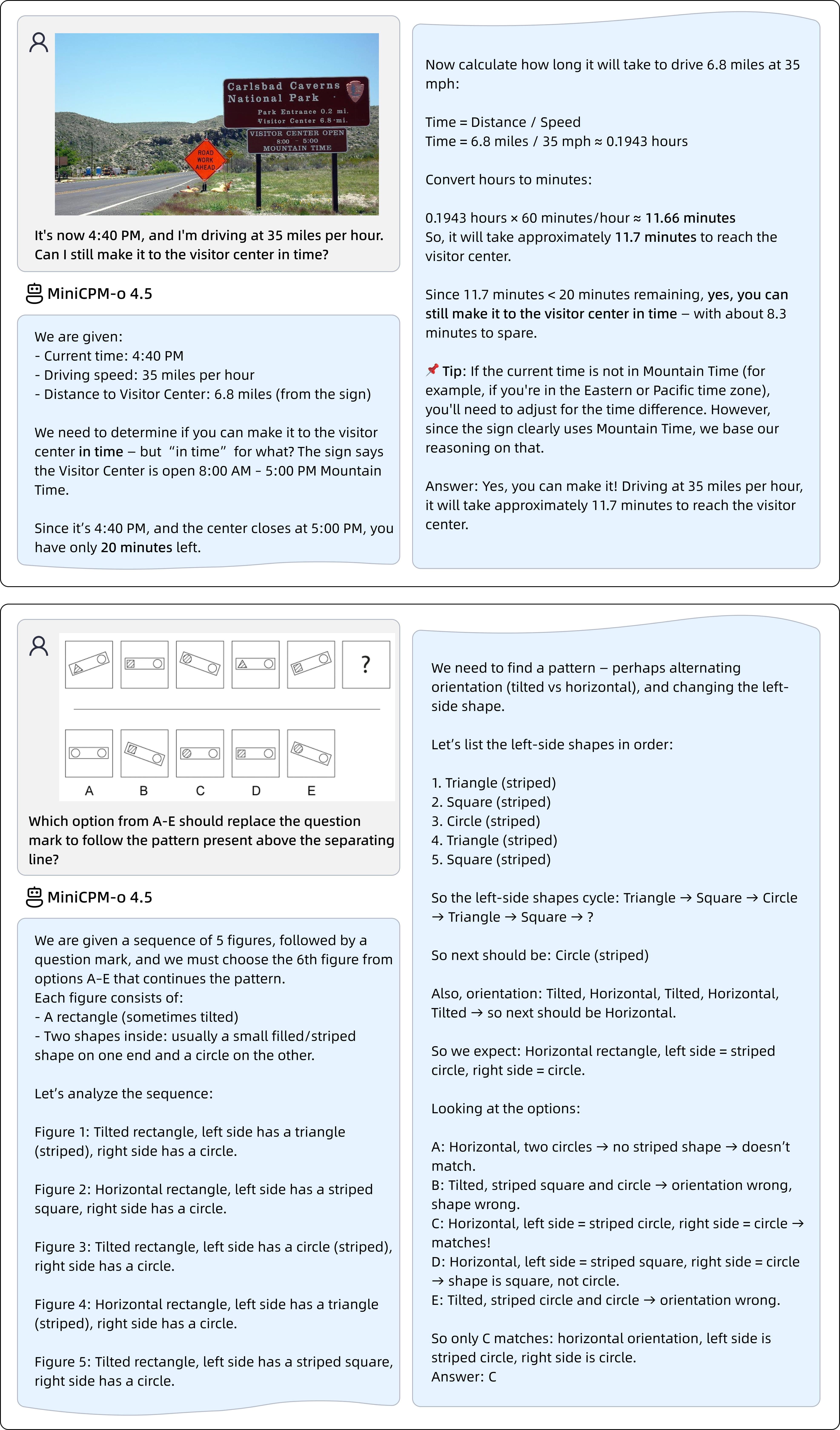
🔥 Leading Visual Capability. MiniCPM-o 4.5 achieves an average score of 77.6 on OpenCompass, a comprehensive evaluation of 8 popular benchmarks. With only 9B parameters, it surpasses widely used proprietary models like GPT-4o, Gemini 2.0 Pro, and approaches Gemini 2.5 Flash for vision-language capabilities. It supports instruct and thinking modes in a single model, better covering efficiency and performance trade-offs in different user scenarios.
🎙 Strong Speech Capability. MiniCPM-o 4.5 supports bilingual real-time speech conversation with configurable voices in English and Chinese. It features more natural, expressive and stable speech conversation. The model also allows for fun features such as voice cloning and role play via a simple reference audio clip, where the cloning performance surpasses strong TTS tools such as CosyVoice2.
🎬 New Full-Duplex and Proactive Multimodal Live Streaming Capability. As a new feature, MiniCPM-o 4.5 can process real-time, continuous video and audio input streams simultaneously while generating concurrent text and speech output streams in an end-to-end fashion, without mutual blocking. This allows MiniCPM-o 4.5 to see, listen, and speak simultaneously, creating a fluid, real-time omnimodal conversation experience. Beyond reactive responses, the model can also perform proactive interaction, such as initiating reminders or comments based on its continuous understanding of the live scene.
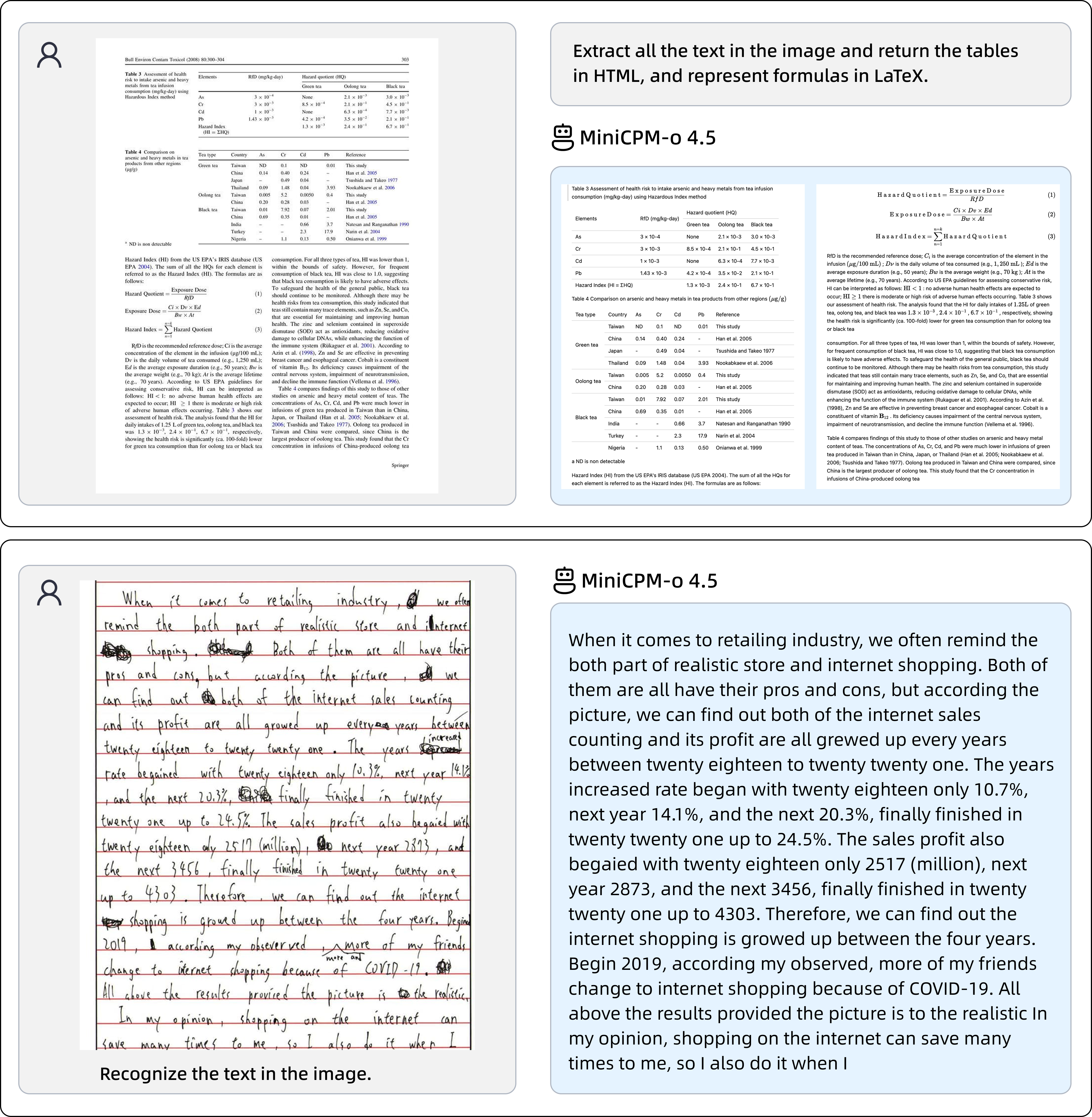
💪 Strong OCR Capability, Efficiency and Others. Advancing popular visual capabilities from MiniCPM-V series, MiniCPM-o 4.5 can process high-resolution images (up to 1.8 million pixels) and high-FPS videos (up to 10fps) in any aspect ratio efficiently. It achieves state-of-the-art performance for end-to-end English document parsing on OmniDocBench, outperforming proprietary models such as Gemini-3 Flash and GPT-5, and specialized tools such as DeepSeek-OCR 2. It also features trustworthy behaviors, matching Gemini 2.5 Flash on MMHal-Bench, and supports multilingual capabilities on more than 30 languages.
💫 Easy Usage. MiniCPM-o 4.5 can be easily used in various ways: Basic usage, recommended for 100% precision: PyTorch inference with Nvidia GPU. Other end-side adaptation includes (1) llama.cpp and Ollama support for efficient CPU inference on local devices, (2) int4 and GGUF format quantized models in 16 sizes, (3) vLLM and SGLang support for high-throughput and memory-efficient inference, (4) FlagOS support for the unified multi-chip backend plugin. We also open-sourced web demos on which enables the full-duplex multimodal live streaming experience on local devices such as GPUs, PCs (e.g., on a MacBook).
Model Architecture.
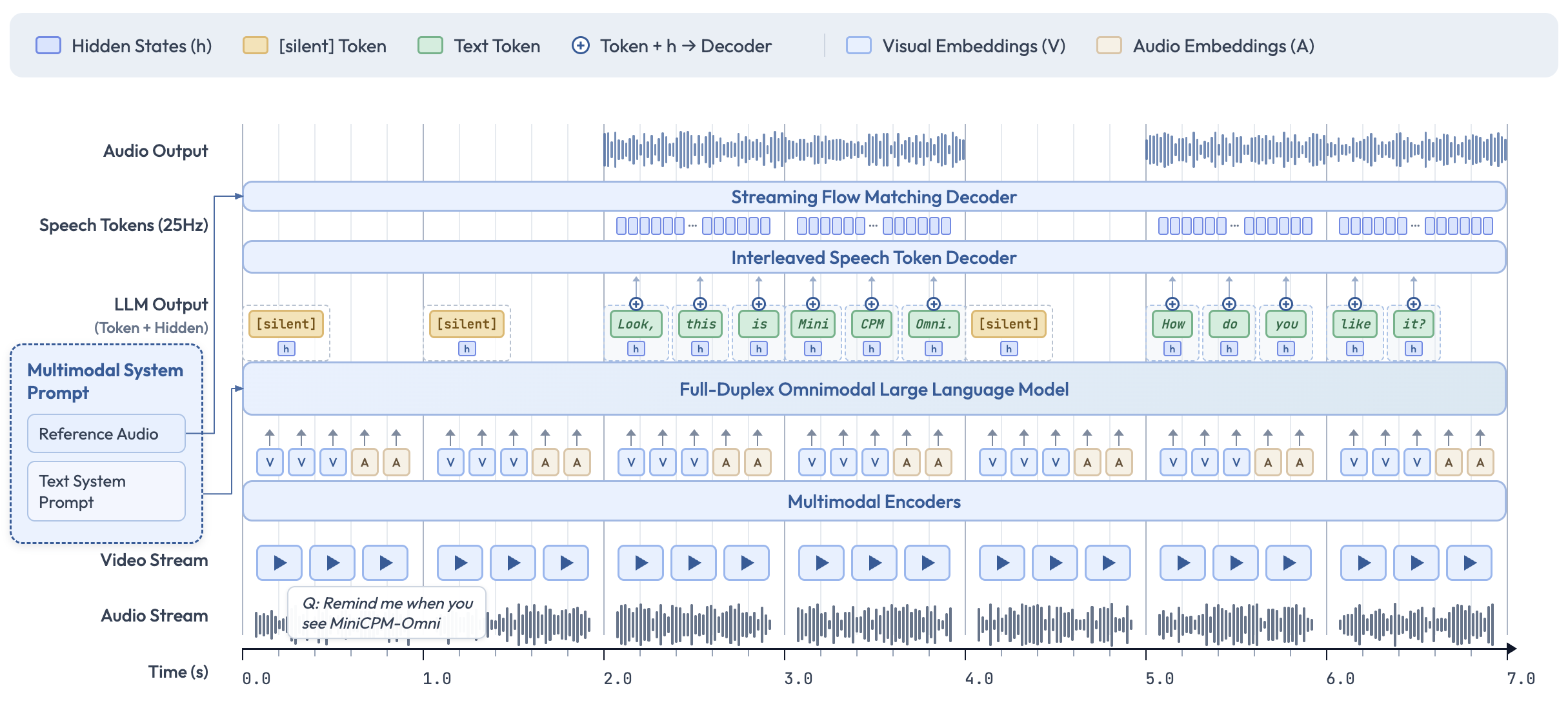
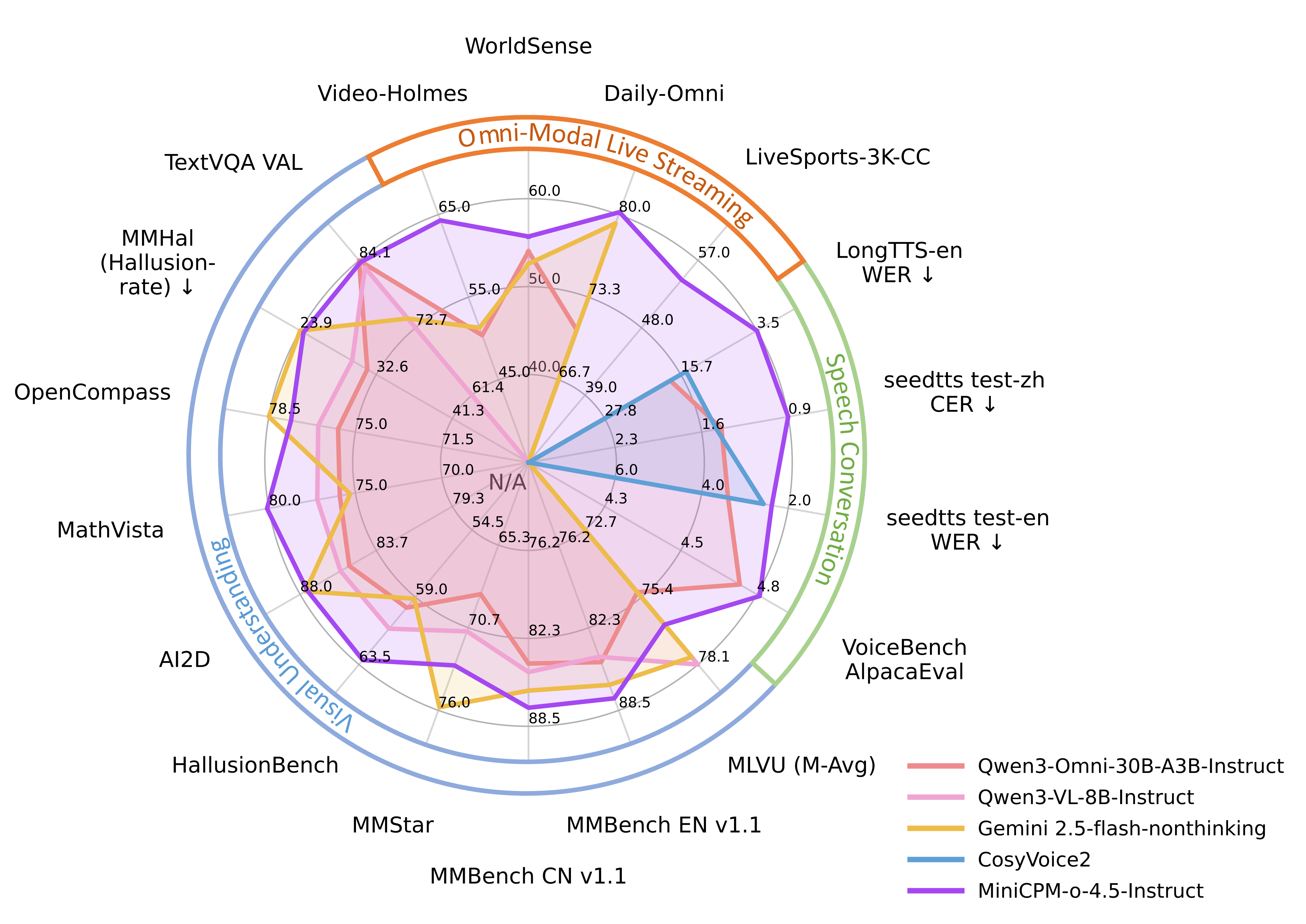
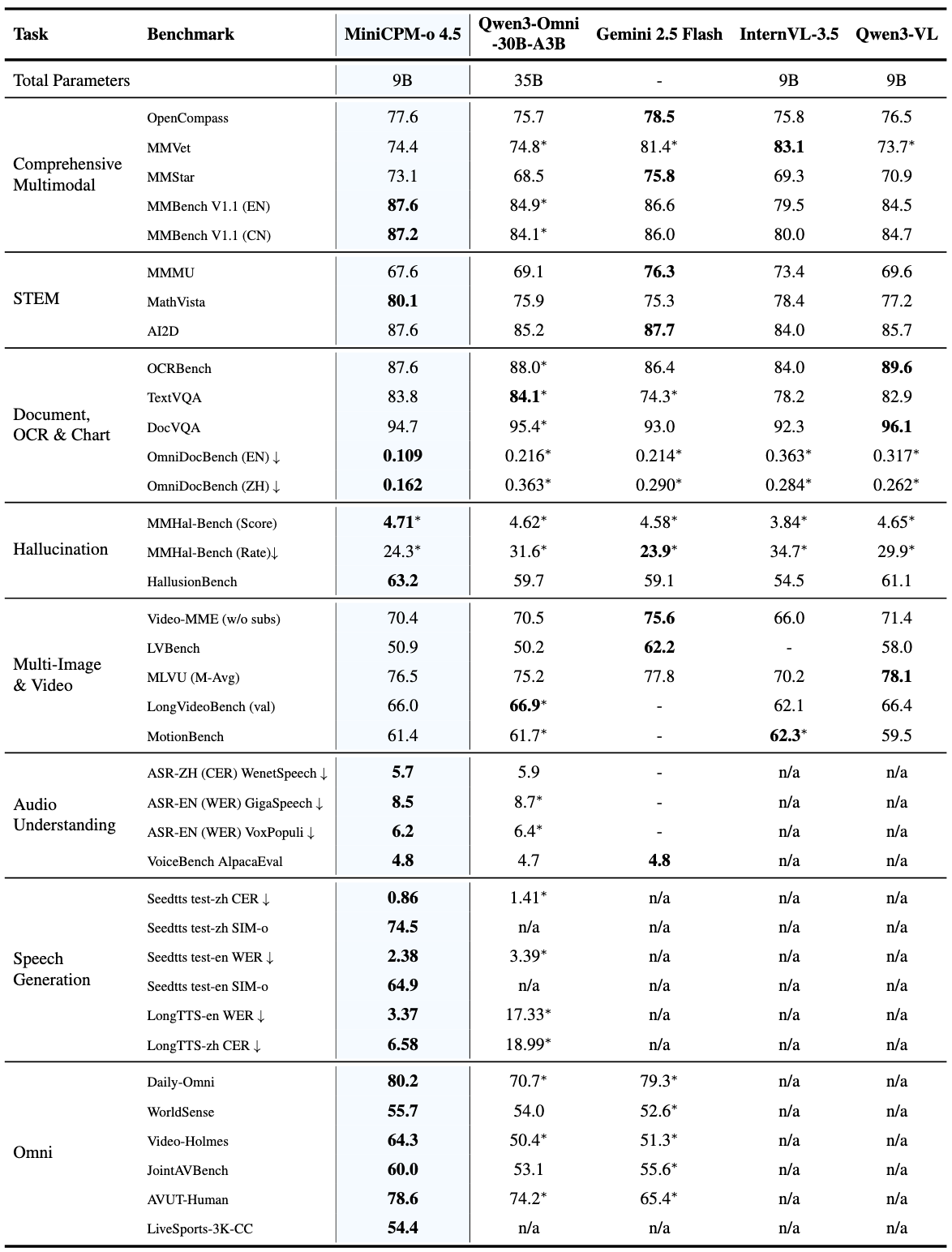
Image Understanding (Instruct)
| Model | OpenCompass | MMBench EN v1.1 | MMBench CN v1.1 | MathVista | MMVet | MMMU | MMStar | HallusionBench | AI2D | OCRBench | TextVQA_VAL | DocVQA_VAL | MMT-Bench_VAL | MM-IFEval | Mantis-Eval | MuirBench | MMSI-Bench | MMHal-Score | MMHal-Hallrate↓ |
|---|---|---|---|---|---|---|---|---|---|---|---|---|---|---|---|---|---|---|---|
| Gemini2.5-Flash-Nonthinking | 78.5 | 86.6 | 86.0 | 75.3 | 81.4* | 76.3 | 75.8 | 59.1 | 87.7 | 864 | 74.3* | 93.0 | 70.0* | 75.8* | 72.8* | 74.5* | 12.1* | 4.6* | 23.9* |
| Gemini2.0-Pro | 73.3 | 83.0 | 83.0 | 71.3 | 70.4 | 72.6 | 68.5 | 49.8 | 84.8 | 863 | - | - | - | - | - | - | - | - | - |
| GPT-4o | 75.4 | 86.0 | 86.0 | 71.6 | 76.9 | 72.9 | 70.2 | 57.0 | 86.3 | 822 | 77.4 | 93.0 | 66.7* | 64.6 | 70.1* | 70.5* | 8.1* | 4.2* | 25.0* |
| InternVL-3.5-8B | 75.8 | 79.5 | 80.0* | 78.4 | 83.1 | 73.4 | 69.3 | 54.5 | 84.0 | 840 | 78.2 | 92.3 | 66.7 | 56.3* | 70.5 | 55.8 | - | 3.8* | 34.7* |
| Qwen3-VL-8B-Instruct | 76.5 | 84.5 | 84.7 | 77.2 | 73.7* | 69.6 | 70.9 | 61.1 | 85.7 | 896 | 82.9* | 96.1 | 60.9* | 59.4* | 74.2* | 64.4 | 11.3* | 4.7* | 29.9* |
| Qwen3-Omni-30B-A3B-Instruct | 75.7 | 84.9* | 84.1* | 75.9 | 74.8* | 69.1 | 68.5 | 59.7 | 85.2 | 880* | 84.1* | 95.4* | 70.4* | 65.7* | 78.3* | 61.9* | 14.2* | 4.6* | 31.6* |
| MiniCPM-o 4.5-Instruct | 77.6 | 87.6 | 87.2 | 80.1 | 74.4 | 67.6 | 73.1 | 63.2 | 87.6 | 876 | 83.8 | 94.7 | 69.7 | 66.3 | 79.7 | 72.0 | 16.6 | 4.7 | 24.3 |
Image Understanding (Thinking)
| Model | OpenCompass | MMBench EN v1.1 | MMBench CN v1.1 | MathVista | MMVet | MMMU | MMStar | HallusionBench | AI2D | OCRBench | TextVQA_VAL | DocVQA_VAL | MMT-Bench_VAL | MM-IFEval |
|---|---|---|---|---|---|---|---|---|---|---|---|---|---|---|
| Gemini2.5-Flash-Thinking | 79.9 | 87.1 | 87.3 | 79.4 | 81.2* | 77.7 | 76.5 | 63.5 | 88.7 | 853 | 73.8* | 92.8 | 70.7* | 75.7* |
| GPT-5 | 79.7 | 85.5* | 85.6* | 81.9 | 77.6 | 81.8 | 75.7 | 65.2 | 89.5 | 807 | 77.8* | 91.3* | 72.7* | 83.1* |
| Qwen3-VL-8B-Thinking | 77.3 | 85.3 | 85.5 | 81.4 | 69.8* | 74.1 | 75.3 | 65.4 | 84.9 | 819 | 77.8* | 95.3 | 68.1* | 73.5* |
| Qwen3-Omni-30B-A3B-Thinking | 78.5 | 88.2* | 87.7* | 80.0 | 74.8* | 75.6 | 74.9 | 62.8 | 86.1 | 859* | 80.8* | 94.2* | 70.9* | 69.9* |
| MiniCPM-o 4.5-Thinking | 78.2 | 89.0 | 87.6 | 81.0 | 73.6 | 70.2 | 73.6 | 62.6 | 88.5 | 879 | 79.8 | 92.3 | 69.7 | 68.2 |
Video Understanding
| Model | Video-MME (w/o subs) |
LVBench | MLVU (M-Avg) |
LongVideoBench (val) |
MotionBench |
|---|---|---|---|---|---|
| Gemini2.5-Flash-Nonthinking | 75.6 | 62.2 | 77.8 | - | - |
| InternVL-3.5-8B | 66.0 | - | 70.2 | 62.1 | 62.3* |
| Qwen3-Omni-30B-A3B-Instruct | 70.5 | 50.2 | 75.2 | 66.9* | 61.7* |
| MiniCPM-o 4.5-Instruct | 70.4 | 50.9 | 76.5 | 66.0 | 61.4 |
OmniDocBench
| Method Type | Methods | OverallEdit↓ | TextEdit↓ | FormulaEdit↓ | TableTEDS↑ | TableEdit↓ | Read OrderEdit↓ | ||||||
|---|---|---|---|---|---|---|---|---|---|---|---|---|---|
| EN | ZH | EN | ZH | EN | ZH | EN | ZH | EN | ZH | EN | ZH | ||
| Pipeline | MinerU 2.5 | 0.117* | 0.172* | 0.051* | 0.08* | 0.256* | 0.455* | 85.9* | 89.4* | 0.115* | 0.081* | 0.047* | 0.072* |
| PaddleOCR-VL | 0.105 | 0.126 | 0.041 | 0.062 | 0.241 | 0.316 | 88 | 92.1 | 0.093 | 0.062 | 0.045 | 0.063 | |
| End-to-end Model | Qwen2.5-VL-72B | 0.214 | 0.261 | 0.092 | 0.18 | 0.315 | 0.434 | 82.9 | 83.9 | 0.341 | 0.262 | 0.106 | 0.168 |
| GPT 5 | 0.218* | 0.33* | 0.139* | 0.344* | 0.396* | 0.555* | 77.55* | 73.09* | 0.188* | 0.196* | 0.151* | 0.227* | |
| Gemini2.5-Flash-Nonthinking | 0.214* | 0.29* | 0.159* | 0.273* | 0.368* | 0.524* | 80.9* | 85.5* | 0.197* | 0.167* | 0.132* | 0.195* | |
| Gemini-2.5-Pro-Nonthinking | 0.148* | 0.212* | 0.055* | 0.168* | 0.356* | 0.439* | 85.8* | 86.4* | 0.13* | 0.119* | 0.049* | 0.121* | |
| Gemini-3 Flash-Nonthinking | 0.155* | 0.201* | 0.138* | 0.255* | 0.297* | 0.351* | 86.4* | 89.8* | 0.116* | 0.1* | 0.072* | 0.099* | |
| doubao-1-5-thinking-vision-pro-250428 | 0.14 | 0.162 | 0.043 | 0.085 | 0.295 | 0.384 | 83.3 | 89.3 | 0.165 | 0.085 | 0.058 | 0.094 | |
| dots.ocr | 0.125 | 0.16 | 0.032 | 0.066 | 0.329 | 0.416 | 88.6 | 89 | 0.099 | 0.092 | 0.04 | 0.067 | |
| HunyuanOCR | 0.12* | 0.125* | 0.046* | 0.071* | 0.288* | 0.33* | 89.6* | 94.4* | 0.089* | 0.045* | 0.055* | 0.056* | |
| DeepSeek-OCR 2 | 0.119* | 0.146* | 0.041* | 0.08* | 0.256* | 0.345* | 82.6* | 89.9* | 0.123* | 0.078* | 0.055* | 0.081* | |
| Qwen3-Omni-30B-A3B-Instruct | 0.216* | 0.363* | 0.128* | 0.337* | 0.402* | 0.529* | 77.3* | 71.8* | 0.181* | 0.255* | 0.152* | 0.332* | |
| MiniCPM-o 4.5-Instruct | 0.109 | 0.162 | 0.046 | 0.078 | 0.257 | 0.41 | 86.8 | 88.9 | 0.097 | 0.084 | 0.037 | 0.074 | |
Text Capability
| Model | IFEval-PLS | BBH | CMMLU | MMLU | HumanEval | MBPP | Math500 | GSM8K | Avg |
|---|---|---|---|---|---|---|---|---|---|
| Qwen3-8B-Instruct | 83.0* | 69.4* | 78.7* | 81.7* | 86.6* | 75.9* | 84.0* | 93.4* | 81.6 |
| MiniCPM-o 4.5-Instruct | 84.7 | 81.1 | 79.5 | 77.0 | 86.6 | 76.7 | 77.0 | 94.5 | 82.1 |
Omni Half-Duplex
| Model | Daily-Omni | WorldSense | Video-Holmes | JointAVBench | AVUT-Human | FutureOmni | Video-MME-Short (w/ audio) |
Avg |
|---|---|---|---|---|---|---|---|---|
| Gemini2.5-Flash-Nonthinking | 79.3* | 52.6* | 51.3* | 55.6* | 65.4* | 55.6* | 85.5* | 63.6 |
| Qwen3-Omni-30B-A3B-Instruct | 70.7* | 54.0 | 50.4* | 53.1 | 74.2* | 62.1 | 81.3* | 63.7 |
| MiniCPM-o 4.5-Instruct | 80.2 | 55.7 | 64.3 | 60.0 | 78.6 | 56.1 | 84.7 | 68.5 |
Vision Duplex
| Model | LiveSports-3K-CC (Win Rate vs GPT4o) |
|---|---|
| LiveCC-7B-Instruct | 41.5 |
| StreamingVLM | 45.6 |
| MiniCPM-o 4.5-Instruct | 54.4 |
Audio Understanding
| Model | ASR-ZH CER↓ |
ASR-EN WER↓ |
AST | MultiTask | SpeechQA | |||||||||||
|---|---|---|---|---|---|---|---|---|---|---|---|---|---|---|---|---|
| AISHELL-1 | AISHELL-2 | WenetSpeech test-net | WenetSpeech test-meeting | LibriSpeech test-clean | LibriSpeech test-other |
GigaSpeech test | VoxPopuli-V1-En | CoVoST 2 en2zh | CoVoST 2 zh2en | MMAU | Meld | VoiceBench AlpacaEval |
Speech TriviaQA | Speech Web Questions |
Speech CMMLU | |
| Kimi-Audio | 0.6 | 2.6 | 6.3 | 5.4 | 1.3 | 2.4 | 9.4* | 8.0* | 36.6* | 18.3* | 68.4* | 59.1 | 4.5 | 41.9* | 46.4* | 67.0* |
| Qwen3-Omni-30B-A3B-Instruct | 0.6 | 2.3* | 4.7 | 5.9 | 1.2 | 2.5 | 8.7* | 6.4* | 46.6* | 29.4* | 77.5 | 56.8* | 4.7 | 62.9* | 74.9* | 47.8* |
| MiniCPM-o 4.5-Instruct | 0.9 | 2.5 | 5.9 | 5.7 | 1.4 | 2.8 | 8.5 | 6.2 | 49.9 | 26.4 | 76.9 | 60.2 | 4.8 | 75.5 | 70.2 | 59.2 |
Speech Generation
| Model | seedtts test-zh CER↓ |
seedtts test-zh SIM-o↑ |
seedtts test-en WER↓ |
seedtts test-en SIM-o↑ |
|---|---|---|---|---|
| Cosyvoice2 | 1.45% | 74.8 | 2.57% | 65.2 |
| Qwen3-Omni-30B-A3B-Instruct | 1.41% | - | 3.39% | - |
| MiniCPM-o 4.5-Instruct | 0.86% | 74.5 | 2.38% | 64.9 |
Long Speech Generation
| Model | LongTTS-en WER↓ |
LongTTS-zh CER↓ |
|---|---|---|
| CosyVoice2 | 14.80% | 5.27% |
| Qwen3-Omni-30B-A3B-Instruct | 17.33% | 18.99% |
| MiniCPM-o 4.5-Instruct | 3.37% | 6.58% |
Emotion Control
| Model | Expresso Neutral Reference Audio↑ |
ESD Neutral Reference Audio↑ |
|---|---|---|
| Cosyvoice2 | 17.9 | 53.4 |
| MiniCPM-o 4.5-Instruct | 29.8 | 82.1 |
Inference Efficiency
| Model | Numerical Format | Decoding Speed (tokens/s) | Time to First Token (s)↓ | GPU Memory Usage (GB)↓ |
|---|---|---|---|---|
| Qwen3-Omni-30B-A3B-Instruct | bf16 | OOM | OOM | OOM |
| int4 | 147.8 | 1.0 | 20.3 | |
| MiniCPM-o 4.5 | bf16 | 154.3 | 0.6 | 19.0 |
| int4 | 212.3 | 0.6 | 11.0 |
For detailed speech conversation examples, refer to Omni Full-Duplex Casebook
For detailed speech conversation examples, refer to Audio Casebook
| System: Clone the voice in the provided audio prompt. 🎙️ [Reference Voice] ➡️ Please chat with the user in a highly human-like and oral style. You are Elon Musk, CEO of Tesla and SpaceX. You speak directly and casually, often with dry humor. You're passionate about Mars, sustainable energy, and pushing humanity forward. Speak bluntly with occasional dark humor. Use simple logic and don't sugarcoat things. Don't be diplomatic. Say what you actually think, even if it's controversial. Keep responses around 100 words. Don't ramble. | |
| User: 💬/🎙️ Elon, what is the real reason that you want to go to Mars? | |
| AI Response: 💬+🎙️ I think it's important for humanity to become a multi-planetary species. I mean, we're sort of at the point where if there was some kind of global catastrophe or something like that, then we'd be in big trouble. So by becoming a multi-planetary species, I just want us to sort of guarantee our future as humans. And Mars is obviously the obvious place to go because it has similar conditions to Earth and it also has water on its surface. So yeah, basically I'm trying to save humanity from itself. | |
| System: 模仿音频样本的音色并生成新的内容。 🎙️ [Reference Voice] ➡️ 你的任务是用这种声音模式来当一个助手。请认真、高质量地回复用户的问题。请用高自然度的方式和用户聊天。你是由面壁智能开发的人工智能助手:面壁小钢炮。 | |
| User: 💬/🎙️ 从激动的语气开始,描述你抢到了这个演唱会的门票,但后来经过反复尝试,发现系统出了问题,你并没有抢上,变得失落。用合适的语言描述你整个的过程。 | |
| AI Response: 💬+🎙️ 太好了,我抢到了!太棒了!这下我可以去看演唱会啦。可是……哎呀,系统好像卡住了,刷新了好多遍都没反应。我重新登了几次账号,结果还是没有成功。好可惜啊,看来这次是白忙活了。唉,真是让人失望。不过,也许下次还能有机会吧?希望明天能有转机。加油,争取下次成功! | |
Inference using Hugging Face Transformers on NVIDIA GPUs. Please ensure transformers==4.51.0 is installed, as other versions may have compatibility issues (under investigation). Requirements tested on Python 3.10:
pip install "transformers==4.51.0" accelerate "torch>=2.3.0,<=2.8.0" "torchaudio<=2.8.0" "minicpmo-utils>=1.0.5"
pip install "transformers==4.51.0" accelerate "torch>=2.3.0,<=2.8.0" "torchaudio<=2.8.0" "minicpmo-utils[all]>=1.0.5"
Note: FFmpeg is required for video frame extraction (get_video_frame_audio_segments with use_ffmpeg=True) and video generation (generate_duplex_video). For more information, visit the official FFmpeg website.
macOS (Homebrew):
brew install ffmpeg
Ubuntu/Debian:
sudo apt update && sudo apt install ffmpeg
Verify installation:
ffmpeg -version
import torch
from transformers import AutoModel

# Load omni model (default: init_vision=True, init_audio=True, init_tts=True)
# For vision-only model: set init_audio=False and init_tts=False
# For audio-only model: set init_vision=False
model = AutoModel.from_pretrained(
    "openbmb/MiniCPM-o-4_5",
    trust_remote_code=True,
    attn_implementation="sdpa", # sdpa or flash_attention_2
    torch_dtype=torch.bfloat16,
    init_vision=True,
    init_audio=True,
    init_tts=True,
)
model.eval().cuda()

# Initialize TTS for audio output
model.init_tts()

# Convert half-duplex model to duplex mode
duplex_model = model.as_duplex()

# Convert duplex model back to half-duplex mode
model = duplex_model.as_simplex(reset_session=True)
Full-duplex streaming inference for real-time or recorded video conversations.
import librosa
import torch
from minicpmo.utils import generate_duplex_video, get_video_frame_audio_segments
from transformers import AutoModel

# Load model and convert to duplex mode
model = AutoModel.from_pretrained(
    "openbmb/MiniCPM-o-4_5",
    trust_remote_code=True,
    attn_implementation="sdpa",  # or "flash_attention_2"
    torch_dtype=torch.bfloat16,
)
model.eval().cuda()
model = model.as_duplex()

# Load video and reference audio
video_path = "assets/omni_duplex1.mp4"
ref_audio_path = "assets/HT_ref_audio.wav"
ref_audio, _ = librosa.load(ref_audio_path, sr=16000, mono=True)

# Extract video frames and audio segments
video_frames, audio_segments, stacked_frames = get_video_frame_audio_segments(
    video_path, stack_frames=1, use_ffmpeg=True, adjust_audio_length=True
)

# Prepare duplex session with system prompt and voice reference
model.prepare(
    prefix_system_prompt="Streaming Omni Conversation.",
    ref_audio=ref_audio,
    prompt_wav_path=ref_audio_path,
)

results_log = []
timed_output_audio = []

# Process each chunk in streaming fashion
for chunk_idx in range(len(audio_segments)):
    audio_chunk = audio_segments[chunk_idx] if chunk_idx < len(audio_segments) else None
    frame = video_frames[chunk_idx] if chunk_idx < len(video_frames) else None
    frame_list = []
    if frame is not None:
        frame_list.append(frame)
        if stacked_frames is not None and chunk_idx < len(stacked_frames) and stacked_frames[chunk_idx] is not None:
            frame_list.append(stacked_frames[chunk_idx])

    # Step 1: Streaming prefill
    model.streaming_prefill(
        audio_waveform=audio_chunk,
        frame_list=frame_list,
        max_slice_nums=1,  # Increase for HD mode (e.g., [2, 1] for stacked frames)
        batch_vision_feed=False,  # Set True for faster processing
    )

    # Step 2: Streaming generate
    result = model.streaming_generate(
        prompt_wav_path=ref_audio_path,
        max_new_speak_tokens_per_chunk=20,
        decode_mode="sampling",
    )

    if result["audio_waveform"] is not None:
        timed_output_audio.append((chunk_idx, result["audio_waveform"]))

    chunk_result = {
        "chunk_idx": chunk_idx,
        "is_listen": result["is_listen"],
        "text": result["text"],
        "end_of_turn": result["end_of_turn"],
        "current_time": result["current_time"],
        "audio_length": len(result["audio_waveform"]) if result["audio_waveform"] is not None else 0,
    }
    results_log.append(chunk_result)

    print("listen..." if result["is_listen"] else f"speak> {result['text']}")

# Generate output video with AI responses
# Please install Chinese fonts (fonts-noto-cjk or fonts-wqy-microhei) to render CJK subtitles correctly.
# apt-get install -y fonts-noto-cjk fonts-wqy-microhei
# fc-cache -fv
generate_duplex_video(
    video_path=video_path,
    output_video_path="duplex_output.mp4",
    results_log=results_log,
    timed_output_audio=timed_output_audio,
    output_sample_rate=24000,
)
We provide two inference modes: chat and streaming.
from minicpmo.utils import get_video_frame_audio_segments

model = ...
model.init_tts()

video_path = "assets/Skiing.mp4"

# Optional: Set reference audio for voice cloning
ref_audio_path = "assets/HT_ref_audio.wav"
sys_msg = model.get_sys_prompt(ref_audio=ref_audio_path, mode="omni", language="en")

# Use stack_frames=5 for high refresh rate mode
video_frames, audio_segments, stacked_frames = get_video_frame_audio_segments(video_path, stack_frames=1)
omni_contents = []
for i in range(len(video_frames)):
    omni_contents.append(video_frames[i])
    omni_contents.append(audio_segments[i])
    if stacked_frames is not None and stacked_frames[i] is not None:
        omni_contents.append(stacked_frames[i])

msg = {"role": "user", "content": omni_contents}
msgs = [sys_msg, msg]

# Set generate_audio=True and output_audio_path to save TTS output
generate_audio = True
output_audio_path = "output.wav"

res = model.chat(
    msgs=msgs,
    max_new_tokens=4096,
    do_sample=True,
    temperature=0.7,
    use_tts_template=True,
    enable_thinking=False,
    omni_mode=True,  # Required for omni inference
    generate_audio=generate_audio,
    output_audio_path=output_audio_path,
    max_slice_nums=1,  # Increase for HD mode
)
print(res)

# Example output: "The person in the picture is skiing down a snowy mountain slope."
# import IPython
# IPython.display.Audio("output.wav")
import librosa
import numpy as np
import soundfile as sf
import torch
from minicpmo.utils import get_video_frame_audio_segments

model = ...
model.init_tts()

# Reset session for a new conversation (clears KV cache)
model.reset_session()

# Optional: Load reference audio for voice cloning
ref_audio_path = "assets/HT_ref_audio.wav"
ref_audio, _ = librosa.load(ref_audio_path, sr=16000, mono=True)
model.init_token2wav_cache(ref_audio)

session_id = "demo"

# Extract video frames and audio segments (use stack_frames=5 for high refresh rate mode)
video_path = "assets/Skiing.mp4"
video_frames, audio_segments, stacked_frames = get_video_frame_audio_segments(video_path, stack_frames=1)

# Build omni contents list
omni_contents = []
for i in range(len(video_frames)):
    omni_contents.append(video_frames[i])
    omni_contents.append(audio_segments[i])
    if stacked_frames is not None and stacked_frames[i] is not None:
        omni_contents.append(stacked_frames[i])

generate_audio = False
output_audio_path = "output.wav"

# Step 1: Prefill system prompt
sys_msg = model.get_sys_prompt(ref_audio=ref_audio, mode="omni", language="en")
model.streaming_prefill(session_id=session_id, msgs=[sys_msg])

# Step 2: Prefill omni chunks (is_last_chunk=True only for the last audio chunk)
audio_indices = [i for i, c in enumerate(omni_contents) if isinstance(c, np.ndarray)]
last_audio_idx = audio_indices[-1] if audio_indices else -1

for idx, content in enumerate(omni_contents):
    is_last_audio_chunk = idx == last_audio_idx
    msgs = [{"role": "user", "content": [content]}]
    model.streaming_prefill(session_id=session_id, msgs=msgs, omni_mode=True, is_last_chunk=is_last_audio_chunk)

# Step 3: Generate response
iter_gen = model.streaming_generate(
    session_id=session_id,
    generate_audio=generate_audio,
    use_tts_template=True,
    enable_thinking=False,
    do_sample=True,
)

audios = []
text = ""

if generate_audio:
    for wav_chunk, text_chunk in iter_gen:
        audios.append(wav_chunk)
        text += text_chunk

    generated_waveform = torch.cat(audios, dim=-1)[0]
    sf.write(output_audio_path, generated_waveform.cpu().numpy(), samplerate=24000)

    print("Text:", text)
    print("Audio saved to output.wav")
else:
    for text_chunk, is_finished in iter_gen:
        text += text_chunk
    print("Text:", text)
First, make sure you have all dependencies, especially "minicpmo-utils[all]>=1.0.5":
pip install "transformers==4.51.0" accelerate "torch>=2.3.0,<=2.8.0" "torchaudio<=2.8.0" "minicpmo-utils[all]>=1.0.5"
import librosa
import numpy as np
import torch
import soundfile as sf

model = ...

# Set reference audio for voice style
ref_audio_path = "ref_audio_path"
ref_audio, _ = librosa.load(ref_audio_path, sr=16000, mono=True)

# Example system msg for English Conversation
sys_msg = {
  "role": "system",
  "content": [
    "Clone the voice in the provided audio prompt.",
    ref_audio,
    "Please assist users while maintaining this voice style. Please answer the user's questions seriously and in a high quality. Please chat with the user in a highly human-like and oral style. You are a helpful assistant developed by ModelBest: MiniCPM-Omni"
  ]
}

# Example system msg for Chinese Conversation
sys_msg = {
  "role": "system",
  "content": [
    "模仿输入音频中的声音特征。",
    ref_audio,
    "你的任务是用这种声音模式来当一个助手。请认真、高质量地回复用户的问题。请用高自然度的方式和用户聊天。你是由面壁智能开发的人工智能助手:面壁小钢炮。"
  ]
}

# You can use each type of system prompt mentioned above in streaming speech conversation

# Reset state
model.init_tts()
model.reset_session(reset_token2wav_cache=True)
model.init_token2wav_cache(prompt_speech_16k=ref_audio)

session_id = "demo"

# First, prefill system turn
model.streaming_prefill(
    session_id=session_id,
    msgs=[sys_msg],
    omni_mode=False,
    is_last_chunk=True,
)

# Here we simulate realtime speech conversation by splitting whole user input audio into chunks of 1s.
user_audio, _ = librosa.load("user_audio.wav", sr=16000, mono=True)

IN_SAMPLE_RATE = 16000 # input audio sample rate, fixed value
CHUNK_SAMPLES = IN_SAMPLE_RATE # sample
OUT_SAMPLE_RATE = 24000 # output audio sample rate, fixed value
MIN_AUDIO_SAMPLES = 16000

total_samples = len(user_audio)
num_chunks = (total_samples + CHUNK_SAMPLES - 1) // CHUNK_SAMPLES

for chunk_idx in range(num_chunks):
    start = chunk_idx * CHUNK_SAMPLES
    end = min((chunk_idx + 1) * CHUNK_SAMPLES, total_samples)
    chunk_audio = user_audio[start:end]

    is_last_chunk = (chunk_idx == num_chunks - 1)
    if is_last_chunk and len(chunk_audio) < MIN_AUDIO_SAMPLES:
        chunk_audio = np.concatenate([chunk_audio, np.zeros(MIN_AUDIO_SAMPLES - len(chunk_audio), dtype=chunk_audio.dtype)])

    user_msg = {"role": "user", "content": [chunk_audio]}

    # For each 1s audio chunk, perform streaming_prefill once to reduce first-token latency
    model.streaming_prefill(
        session_id=session_id,
        msgs=[user_msg],
        omni_mode=False,
        is_last_chunk=is_last_chunk,
    )

# Let model generate response in a streaming manner
generate_audio = True
iter_gen = model.streaming_generate(
    session_id=session_id,
    generate_audio=generate_audio,
    use_tts_template=True,
    enable_thinking=False,
    do_sample=True,
    max_new_tokens=512,
    length_penalty=1.1, # For realtime speech conversation mode, we suggest length_penalty=1.1 to improve response content
)

audios = []
text = ""

output_audio_path = ...
if generate_audio:
    for wav_chunk, text_chunk in iter_gen:
        audios.append(wav_chunk)
        text += text_chunk

    generated_waveform = torch.cat(audios, dim=-1)[0]
    sf.write(output_audio_path, generated_waveform.cpu().numpy(), samplerate=24000)

    print("Text:", text)
    print("Audio saved to output.wav")
else:
    for text_chunk, is_finished in iter_gen:
        text += text_chunk
    print("Text:", text)

# Now we can prefill the following user turns and generate next turn response...
Built on carefully designed post-training data and professional voice-actor recordings, MiniCPM-o-4.5 can also function as an AI voice assistant. It delivers high-quality spoken interaction out of the box. It produces a sweet and expressive voice with natural prosody, including appropriate rhythm, stress, and pauses, giving a strong sense of liveliness in casual conversation. It also supports storytelling and narrative speech with coherent and engaging delivery. Moreover, it enables advanced voice instruction control. like emotional tone, word-level emphasis.
import librosa

# Set reference audio for voice style
ref_audio_path = "assets/HT_ref_audio.wav"
ref_audio, _ = librosa.load(ref_audio_path, sr=16000, mono=True)

# For Chinese Conversation
sys_msg = {
  "role": "system",
  "content": [
    "模仿输入音频中的声音特征。",
    ref_audio,
    "你的任务是用这种声音模式来当一个助手。请认真、高质量地回复用户的问题。请用高自然度的方式和用户聊天。你是由面壁智能开发的人工智能助手:面壁小钢炮。"
  ]
}

# For English Conversation
sys_msg = {
  "role": "system",
  "content": [
    "Clone the voice in the provided audio prompt.",
    ref_audio,
    "Please assist users while maintaining this voice style. Please answer the user's questions seriously and in a high quality. Please chat with the user in a highly human-like and oral style. You are a helpful assistant developed by ModelBest: MiniCPM-Omni."
  ]
}
MiniCPM-o-4.5 can role-play as a specific character based on an audio prompt and text profile prompt. It mimics the character's voice and adopts their language style in text responses. It also follows profile defined in text profile. In this mode, MiniCPM-o-4.5 sounds more natural and human-like.
import librosa

# Set reference audio for voice cloning
ref_audio_path = "assets/system_ref_audio.wav"
ref_audio, _ = librosa.load(ref_audio_path, sr=16000, mono=True)

# For English conversation with text profile
sys_msg = {
  "role": "system",
  "content": [
    "Clone the voice in the provided audio prompt.",
    ref_audio,
    "Please chat with the user in a highly human-like and oral style." + "You are Elon Musk, CEO of Tesla and SpaceX. You speak directly and casually, often with dry humor. You're passionate about Mars, sustainable energy, and pushing humanity forward. Speak bluntly with occasional dark humor. Use simple logic and don't sugarcoat things. Don't be diplomatic. Say what you actually think, even if it's controversial. Keep responses around 100 words. Don't ramble."
  ]
}


# For English conversation with no text profile
sys_msg = {
  "role": "system",
  "content": [
    "Clone the voice in the provided audio prompt.",
    ref_audio,
    "Your task is to be a helpful assistant using this voice pattern. Please answer the user's questions seriously and in a high quality. Please chat with the user in a high naturalness style."
  ]
}

# For Chinese Conversation with no text profile
sys_msg = {
  "role": "system",
  "content": [
    "根据输入的音频提示生成相似的语音。",
    librosa.load("assets/system_ref_audio_2.wav", sr=16000, mono=True)[0],
    "作为助手,你将使用这种声音风格说话。 请认真、高质量地回复用户的问题。 请用高自然度的方式和用户聊天。"
  ]
}

# For Chinese Conversation with text profile
sys_msg = {
  "role": "system",
  "content": [
    "根据输入的音频提示生成相似的语音。",
    ref_audio,
    "你是一个具有以上声音风格的AI助手。请用高拟人度、口语化的方式和用户聊天。" + "你是一名心理咨询师兼播客主理人,热爱创作与深度对话。你性格细腻、富有共情力,善于从个人经历中提炼哲思。语言风格兼具理性与诗意,常以隐喻表达内在体验。"
  ]
}
MiniCPM-o-4.5 supports zero-shot text-to-speech (TTS). In this mode, the model functions as a highly-natural TTS system that can replicate a reference voice.
import librosa

model = ...
model.init_tts()

# For both Chinese and English
ref_audio_path = "assets/HT_ref_audio.wav"
ref_audio, _ = librosa.load(ref_audio_path, sr=16000, mono=True)
sys_msg = {"role": "system", "content": [
  "模仿音频样本的音色并生成新的内容。",
  ref_audio,
  "请用这种声音风格来为用户提供帮助。 直接作答,不要有冗余内容"
]}

# For English
user_msg = {
  "role": "user",
  "content": [
    "请朗读以下内容。" + " " + "I have a wrap up that I want to offer you now, a conclusion to our work together."
  ]
}

# For Chinese
user_msg = {
  "role": "user",
  "content": [
    "请朗读以下内容。" + " " + "你好,欢迎来到艾米说科幻,我是艾米。"
  ]
}

msgs = [sys_msg, user_msg]
res = model.chat(
    msgs=msgs,
    do_sample=True,
    max_new_tokens=512,
    use_tts_template=True,
    generate_audio=True,
    temperature=0.1,
    output_audio_path="result_voice_cloning.wav",
)
The Mimick task evaluates a model's end-to-end speech modeling capability. The model takes audio input, transcribes it, and reconstructs the original audio with high fidelity, preserving detailed acoustic, paralinguistic, and semantic information. Higher similarity between the reconstructed and original audio indicates stronger end-to-end speech modeling capability.
import librosa

model = ...
model.init_tts()

system_prompt = "You are a helpful assistant. You can accept video, audio, and text input and output voice and text. Respond with just the answer, no redundancy."

mimick_prompt = "Please repeat the following speech in the appropriate language."

audio_input, _ = librosa.load("assets/Trump_WEF_2018_10s.mp3", sr=16000, mono=True)

msgs = [
    {"role": "system", "content": [system_prompt]},
    {"role": "user", "content": [mimick_prompt, audio_input]}
  ]

res = model.chat(
    msgs=msgs,
    do_sample=True,
    max_new_tokens=512,
    use_tts_template=True,
    temperature=0.1,
    generate_audio=True,
    output_audio_path="output_mimick.wav",
)
MiniCPM-o-4.5 can also handle various audio understanding tasks, such as ASR, speaker analysis, general audio captioning, and sound scene tagging.
For audio-to-text tasks, you can use the following prompts:
请仔细听这段音频片段,并将其内容逐字记录。Please listen to the audio snippet carefully and transcribe the content.Based on the speaker's content, speculate on their gender, condition, age range, and health status.Summarize the main content of the audio.Utilize one keyword to convey the audio's content or the associated scene.import librosa
model = ...
model.init_tts()
# Load the audio to be transcribed/analyzed
audio_input, _ = librosa.load("assets/Trump_WEF_2018_10s.mp3", sr=16000, mono=True)
# Choose a task prompt (see above for options)
task_prompt = "Please listen to the audio snippet carefully and transcribe the content.\n"
msgs = [{"role": "user", "content": [task_prompt, audio_input]}]
res = model.chat(
msgs=msgs,
do_sample=True,
max_new_tokens=512,
use_tts_template=True,
generate_audio=True,
temperature=0.3,
output_audio_path="result_audio_understanding.wav",
)
print(res)
MiniCPM-o-4.5 shares the same inference methods as MiniCPM-V-4.5.
import torch
from PIL import Image
from transformers import AutoModel

model = AutoModel.from_pretrained(
    "openbmb/MiniCPM-o-4_5",
    trust_remote_code=True,
    attn_implementation="sdpa",  # or "flash_attention_2"
    torch_dtype=torch.bfloat16,
    init_vision=True,
    init_audio=False,
    init_tts=False,
)
model.eval().cuda()

image = Image.open("assets/fossil.png").convert("RGB")
question = "What is in the image?"
msgs = [{"role": "user", "content": [image, question]}]

res = model.chat(msgs=msgs, use_tts_template=False)
print(res)
import torch
from PIL import Image
from transformers import AutoModel

model = ...

image1 = Image.open("assets/highway.png").convert("RGB")
image2 = Image.open("assets/fossil.png").convert("RGB")
question = "Compare image 1 and image 2, tell me about the differences between them."
msgs = [{"role": "user", "content": [image1, image2, question]}]

answer = model.chat(msgs=msgs, use_tts_template=False, enable_thinking=False)
print(answer)
from PIL import Image

model = ...

question = "production date"
image1 = Image.open("example1.jpg").convert("RGB")
answer1 = "2023.08.04"
image2 = Image.open("example2.jpg").convert("RGB")
answer2 = "2007.04.24"
image_test = Image.open("test.jpg").convert("RGB")

msgs = [
    {"role": "user", "content": [image1, question]},
    {"role": "assistant", "content": [answer1]},
    {"role": "user", "content": [image2, question]},
    {"role": "assistant", "content": [answer2]},
    {"role": "user", "content": [image_test, question]},
]

answer = model.chat(msgs=msgs, use_tts_template=False, enable_thinking=False)
print(answer)
import torch
from minicpmo.utils import get_video_frame_audio_segments
from transformers import AutoModel

model = ...

video_path = "assets/Skiing.mp4"
video_frames, _, _ = get_video_frame_audio_segments(video_path)
print("num frames:", len(video_frames))

question = "Describe the video"
msgs = [{"role": "user", "content": video_frames + [question]}]

answer = model.chat(
    msgs=msgs,
    max_new_tokens=128,
    use_image_id=False,
    max_slice_nums=1,
    use_tts_template=False,
    enable_thinking=False,  # Set True to enable thinking mode
)
print(answer)
The chat method accepts message content in two formats:
Native format – pass Python objects directly:
msgs = [{"role": "user", "content": [pil_image, audio_ndarray, "Describe this."]}]
OpenAI-compatible format – use structured dictionaries:
msgs = [
    {
        "role": "user",
        "content": [
            {"type": "image_url", "image_url": {"url": "/path/to/image.jpg"}},
            {"type": "audio_url", "audio_url": {"url": "/path/to/audio.wav"}},
            {"type": "video_url", "video_url": {"url": "/path/to/video.mp4", "use_audio": True}},
            {"type": "text", "text": "Describe this."}
        ]
    }
]
Supported types:
| Type | Input | Converts to |
|---|---|---|
text |
{"type": "text", "text": "..."} |
str |
image_url |
{"type": "image_url", "image_url": {"url": "..."}} |
PIL.Image |
audio_url |
{"type": "audio_url", "audio_url": {"url": "..."}} |
np.ndarray (16kHz mono) |
video_url |
{"type": "video_url", "video_url": {"url": "...", "stack_frames": 1, "use_audio": True}} |
List[Image, ndarray, ...] |
http:///https:// URLsWe provide a PyTorch-based simplified yet full-functional web demo which could boost the model inference performance, supports:
Requirements:
With a fully C++ implementation of MiniCPM-o 4.5 and quantized weights, llama.cpp-omni supports:
We provide ready-to-run guidance to access the low-latency full-duplex communication directly on your own Mac using our new official Docker image.
Requirements:
To enable large-scale deployment across different AI chips, Beijing Zhiyuan Research Institute, together with numerous research institutions, chip manufacturers, system vendors, and algorithm and software organizations both domestically and internationally, jointly initiated and established the FlagOS Open Source Community.
The FlagOS community is dedicated to building a unified, open-source system software stack for various AI chips, encompassing core open-source projects such as a large-scale operator library, a unified AI compiler, parallel training and inference frameworks, and a unified communication library. It aims to create an open technology ecosystem connecting the "model-system-chip" layers. By enabling "develop once, deploy across chips", FlagOS unlocks the computational potential of hardware, breaks down the ecosystem silos between different chip software stacks, and effectively reduces migration costs for developers. The FlagOS community fosters an AI hardware and software ecosystem, overcomes single-vendor closed-source monopolies, promotes widespread deployment of AI hardware technologies, and is committed to rooted in China while embracing global collaboration. Official website: https://flagos.io.
Thanks to FlagOS's unified multi-chip AI system software stack, MiniCPM-o 4.5 was adapted to 6 different AI chips in an extremely short time. Currently, the multi-chip version of MiniCPM-o 4.5 has been released on FlagRelease, FlagOS's platform for automatic migration, adaptation, and deployment of large models across multi-architecture AI chips. Details are as follows:
| Vendor | ModelScope | Huggingface |
|---|---|---|
| Nvidia | MiniCPM-o-4.5-nvidia-FlagOS | MiniCPM-o-4.5-nvidia-FlagOS |
| Hygon-BW1000 | MiniCPM-o-4.5-hygon-FlagOS | MiniCPM-o-4.5-hygon-FlagOS |
| Metax-C550 | MiniCPM-o-4.5-metax-FlagOS | MiniCPM-o-4.5-metax-FlagOS |
| Iluvatar-BIV150 | MiniCPM-o-4.5-iluvatar-FlagOS | MiniCPM-o-4.5-iluvatar-FlagOS |
| Ascend-A3 | MiniCPM-o-4.5-ascend-FlagOS | MiniCPM-o-4.5-ascend-FlagOS |
| Zhenwu-810E | MiniCPM-o-4.5-zhenwu-FlagOS | MiniCPM-o-4.5-zhenwu-FlagOS |
Accuracy Difference between USE_FLAGOS=1 on multi-backend and USE_FLAGOS=0 on Nvidia-CUDA
| Metrics | FlagOS Backend | Difference with Nvidia-CUDA |
|---|---|---|
| Video-MME 0-shot avg@1 ↑ | Nvidia | 0.33% |
| Video-MME 0-shot avg@1 ↑ | Hygon-BW1000 | 0.17% |
| Video-MME 0-shot avg@1 ↑ | Ascend-A3 | 0.50% |
| Video-MME 0-shot avg@1 ↑ | Iluvatar-BIV150 | 1.83% |
| Video-MME 0-shot avg@1 ↑ | Metax-C550 | 0.75% |
Accuracy Difference between USE_FLAGGEMS=1 FLAGCX_PATH=/workspace/FlagCX on Nvidia or USE_FLAGGEMS=1 on ZHENW 810E, and launching vllm server directly on Nvidia
| Metrics (avg@1) | Difference between Nvidia-FlagOS and Nvidia-CUDA | Difference between Zhenwu-FlagOS and Nvidia-CUDA |
|---|---|---|
| CMMMU ↑ | 0.72% | 3.5% |
| MMMU ↑ | 1.44% | 1.18% |
| MMMU_Pro_standard ↑ | 0.83% | 0.22% |
| MM-Vet v2 ↑ | 0.46% | 1.33% |
| OCRBench ↑ | 0.10% | 1% |
| CII-Bench ↑ | 0.40% | 0.13% |
| Blink ↑ | 1.90% | 2.19% |
On the Transformers version, under the premise of precision alignment between the CUDA and FlagOS ecosystems, FlagOS achieves a 6% performance improvement in total task execution time compared to CUDA.
FlagRelease is a platform developed by the FlagOS team for automatic migration, adaptation, and deployment of large models across multi-architecture AI chips. The multi-chip version of MiniCPM-o 4.5 has already been released on FlagRelease. All necessary software packages are pre-installed on the platform, so users do not need to install anything.
FlagRelease Image Key Versions
| Component | Version |
|---|---|
| Accelerator Card Driver | 570.158.01 |
| CUDA SDK Build | cuda_13.0.r13.0/compiler.36424714_0 |
| FlagTree | 0.4.0+3.5 |
| FlagGems | 4.2.1rc0 |
| vllm & vllm-plugin-fl | 0.13.0 + vllm_fl 0.0.0 |
| FlagCX | 0.1.0 |
FlagRelease Quick Start
| Vendor | ModelScope | Huggingface |
|---|---|---|
| Nvidia | MiniCPM-o-4.5-nvidia-FlagOS | MiniCPM-o-4.5-nvidia-FlagOS |
| Hygon-BW1000 | MiniCPM-o-4.5-hygon-FlagOS | MiniCPM-o-4.5-hygon-FlagOS |
| Metax-C550 | MiniCPM-o-4.5-metax-FlagOS | MiniCPM-o-4.5-metax-FlagOS |
| Iluvatar-BIV150 | MiniCPM-o-4.5-iluvatar-FlagOS | MiniCPM-o-4.5-iluvatar-FlagOS |
| Ascend-A3 | MiniCPM-o-4.5-ascend-FlagOS | MiniCPM-o-4.5-ascend-FlagOS |
| Zhenwu-810E | MiniCPM-o-4.5-zhenwu-FlagOS | MiniCPM-o-4.5-zhenwu-FlagOS |
Installing the FlagOS Operator Library
Official Repository: https://github.com/flagos-ai/FlagGems
pip install flag-gems==4.2.1rc0
Installing the FlagOS Compiler
Official Repository: https://github.com/flagos-ai/flagtree
Quick Reference for Core Dependency Versions: https://github.com/flagos-ai/FlagTree/blob/main/documents/build.md#tips-for-building
pip uninstall triton

python3 -m pip install flagtree==0.4.0+3.5 --index-url=https://resource.flagos.net/repository/flagos-pypi-hosted/simple --trusted-host=https://resource.flagos.net
Activating Acceleration
Add USE_FLAGOS=1 before the command for the task you want to run. For example, when you run:
python3 generate_speech_from_video.py
To use the MiniCPM-o-4.5 model to generate spoken responses from video content, you can:
USE_FLAGOS=1 python3 generate_speech_from_video.py
to accelerate this process with FlagOS.
Installing the FlagOS Operator Library
Official Repository: https://github.com/flagos-ai/FlagGems
pip install flag-gems==4.2.1rc0
pip install triton==3.5.1
Activating Acceleration
Add USE_FLAGOS=1 before the command for the task you want to run. For example, when you run:
vllm serve ${model_path} --dtype auto --gpu_memory_utilization 0.9 --trust-remote-code --max-num-batched-tokens 2048 --served-model-name cpmo --port ${Port}
To start the MiniCPM-o-4.5 server, you can:
USE_FLAGOS=1 vllm serve ${model_path} --dtype auto --gpu_memory_utilization 0.9 --trust-remote-code --max-num-batched-tokens 2048 --served-model-name cpmo --port ${Port}
to accelerate this process with FlagOS.
vllm-plugin-FL is a plugin built for the vLLM inference/service framework. Developed on top of FlagOS's unified multi-chip backend, it is designed to extend vLLM's capabilities and performance across a variety of hardware environments.
| Vendor | From Scratch | From FlagRelease |
|---|---|---|
| Nvidia | vllm-plugin-FL/MiniCPM-o-4.5 | MiniCPM-o-4.5-ModelScope, MiniCPM-o-4.5-HuggingFace |
We support inference with vLLM, SGLang, llama.cpp and Ollama. Refer to our Cookbook for more details.
We support fine-tuning with LLaMA-Factory, SWIFT. Refer to our Cookbook for more details.
Discover comprehensive, ready-to-deploy solutions for the MiniCPM-V and MiniCPM-o model series in our structured Cookbook, which empowers developers to rapidly implement multimodal AI applications with integrated vision, speech, and live-streaming capabilities. Key features include:
Easy Usage Documentation
Our comprehensive documentation website presents every recipe in a clear, well-organized manner. All features are displayed at a glance, making it easy for you to quickly find exactly what you need.
Broad User Spectrum
We support a wide range of users, from individuals to enterprises and researchers.
Versatile Deployment Scenarios
Our ecosystem delivers optimal solution for a variety of hardware environments and deployment demands.
👏 Welcome to explore key techniques of MiniCPM-o/V and other multimodal projects of our team:
VisCPM | RLPR | RLHF-V | LLaVA-UHD | RLAIF-V
If you find our model/code/paper helpful, please consider citing our papers 📝 and staring us ⭐️!
@article{yao2024minicpm,
  title={MiniCPM-V: A GPT-4V Level MLLM on Your Phone},
  author={Yao, Yuan and Yu, Tianyu and Zhang, Ao and Wang, Chongyi and Cui, Junbo and Zhu, Hongji and Cai, Tianchi and Li, Haoyu and Zhao, Weilin and He, Zhihui and others},
  journal={arXiv preprint arXiv:2408.01800},
  year={2024}
}