Instructions to use opendatalab/ChartVerse-4B with libraries, inference providers, notebooks, and local apps. Follow these links to get started.
- Libraries
- Transformers
How to use opendatalab/ChartVerse-4B with Transformers:
# Use a pipeline as a high-level helper from transformers import pipeline pipe = pipeline("image-text-to-text", model="opendatalab/ChartVerse-4B") messages = [ { "role": "user", "content": [ {"type": "image", "url": "https://huggingface.co/datasets/huggingface/documentation-images/resolve/main/p-blog/candy.JPG"}, {"type": "text", "text": "What animal is on the candy?"} ] }, ] pipe(text=messages)# Load model directly from transformers import AutoProcessor, AutoModelForImageTextToText processor = AutoProcessor.from_pretrained("opendatalab/ChartVerse-4B") model = AutoModelForImageTextToText.from_pretrained("opendatalab/ChartVerse-4B") messages = [ { "role": "user", "content": [ {"type": "image", "url": "https://huggingface.co/datasets/huggingface/documentation-images/resolve/main/p-blog/candy.JPG"}, {"type": "text", "text": "What animal is on the candy?"} ] }, ] inputs = processor.apply_chat_template( messages, add_generation_prompt=True, tokenize=True, return_dict=True, return_tensors="pt", ).to(model.device) outputs = model.generate(**inputs, max_new_tokens=40) print(processor.decode(outputs[0][inputs["input_ids"].shape[-1]:])) - Notebooks
- Google Colab
- Kaggle
- Local Apps
- vLLM
How to use opendatalab/ChartVerse-4B with vLLM:
Install from pip and serve model
# Install vLLM from pip: pip install vllm # Start the vLLM server: vllm serve "opendatalab/ChartVerse-4B" # Call the server using curl (OpenAI-compatible API): curl -X POST "http://localhost:8000/v1/chat/completions" \ -H "Content-Type: application/json" \ --data '{ "model": "opendatalab/ChartVerse-4B", "messages": [ { "role": "user", "content": [ { "type": "text", "text": "Describe this image in one sentence." }, { "type": "image_url", "image_url": { "url": "https://cdn.britannica.com/61/93061-050-99147DCE/Statue-of-Liberty-Island-New-York-Bay.jpg" } } ] } ] }'Use Docker
docker model run hf.co/opendatalab/ChartVerse-4B
- SGLang
How to use opendatalab/ChartVerse-4B with SGLang:
Install from pip and serve model
# Install SGLang from pip: pip install sglang # Start the SGLang server: python3 -m sglang.launch_server \ --model-path "opendatalab/ChartVerse-4B" \ --host 0.0.0.0 \ --port 30000 # Call the server using curl (OpenAI-compatible API): curl -X POST "http://localhost:30000/v1/chat/completions" \ -H "Content-Type: application/json" \ --data '{ "model": "opendatalab/ChartVerse-4B", "messages": [ { "role": "user", "content": [ { "type": "text", "text": "Describe this image in one sentence." }, { "type": "image_url", "image_url": { "url": "https://cdn.britannica.com/61/93061-050-99147DCE/Statue-of-Liberty-Island-New-York-Bay.jpg" } } ] } ] }'Use Docker images
docker run --gpus all \ --shm-size 32g \ -p 30000:30000 \ -v ~/.cache/huggingface:/root/.cache/huggingface \ --env "HF_TOKEN=<secret>" \ --ipc=host \ lmsysorg/sglang:latest \ python3 -m sglang.launch_server \ --model-path "opendatalab/ChartVerse-4B" \ --host 0.0.0.0 \ --port 30000 # Call the server using curl (OpenAI-compatible API): curl -X POST "http://localhost:30000/v1/chat/completions" \ -H "Content-Type: application/json" \ --data '{ "model": "opendatalab/ChartVerse-4B", "messages": [ { "role": "user", "content": [ { "type": "text", "text": "Describe this image in one sentence." }, { "type": "image_url", "image_url": { "url": "https://cdn.britannica.com/61/93061-050-99147DCE/Statue-of-Liberty-Island-New-York-Bay.jpg" } } ] } ] }' - Docker Model Runner
How to use opendatalab/ChartVerse-4B with Docker Model Runner:
docker model run hf.co/opendatalab/ChartVerse-4B
# Load model directly
from transformers import AutoProcessor, AutoModelForImageTextToText
processor = AutoProcessor.from_pretrained("opendatalab/ChartVerse-4B")
model = AutoModelForImageTextToText.from_pretrained("opendatalab/ChartVerse-4B")
messages = [
{
"role": "user",
"content": [
{"type": "image", "url": "https://huggingface.co/datasets/huggingface/documentation-images/resolve/main/p-blog/candy.JPG"},
{"type": "text", "text": "What animal is on the candy?"}
]
},
]
inputs = processor.apply_chat_template(
messages,
add_generation_prompt=True,
tokenize=True,
return_dict=True,
return_tensors="pt",
).to(model.device)
outputs = model.generate(**inputs, max_new_tokens=40)
print(processor.decode(outputs[0][inputs["input_ids"].shape[-1]:]))ChartVerse-4B is an efficient Vision Language Model (VLM) specialized for complex chart reasoning, developed as part of the opendatalab/ChartVerse project. For more details about our method, datasets, and full model series, please visit our Project Page.
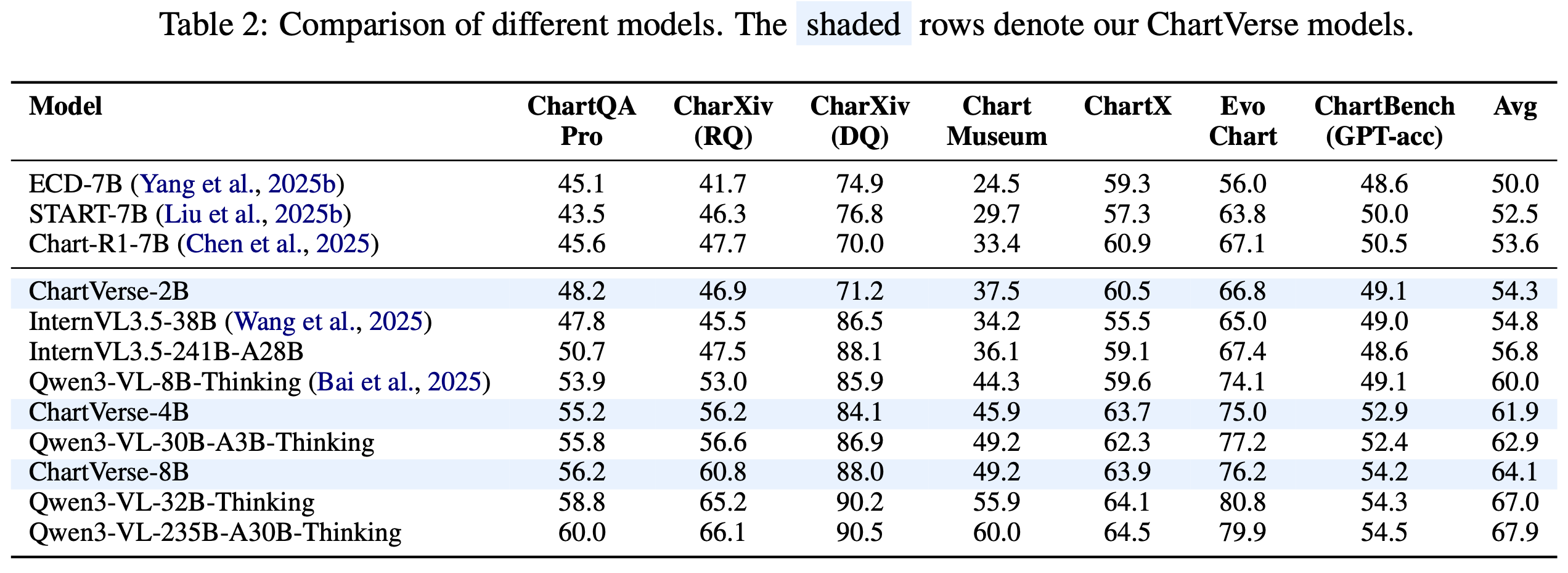
A key highlight is that ChartVerse-4B significantly outperforms Qwen3-VL-8B-Thinking (60.0%) despite using only half the parameters, demonstrating that data quality triumphs over model scale.
🔥 Highlights
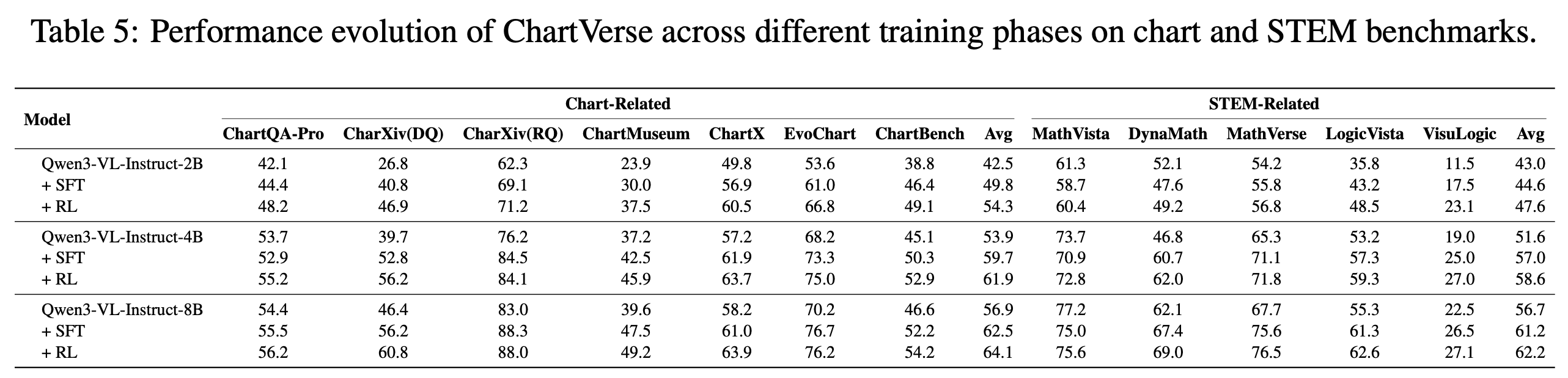
- Data Quality > Model Scale: 4B parameters achieving 61.9% average score, surpassing Qwen3-VL-8B-Thinking (60.0%)
- Efficient Performance: Delivers 8B-level performance with 4B parameters
- High-Quality Training: Trained on ChartVerse-SFT-600K and ChartVerse-RL-40K with rigorous truth-anchored QA synthesis
- Strong Reasoning: Equipped with Chain-of-Thought reasoning for complex multi-step chart analysis
📊 Model Performance
Overall Results
SFT vs RL Performance
📚 Training Data
ChartVerse-SFT-600K
- 412K unique high-complexity charts
- 603K QA pairs with 3.9B tokens of CoT reasoning
- Rollout Posterior Entropy: 0.44 (highest among all datasets)
- Truth-anchored answer verification via code execution
ChartVerse-RL-40K
- 40K highest-difficulty samples
- Filtered by failure rate: 0 < r(Q) < 1
- Ensures "hard but solvable" training signal
🏋️ Training Details
Supervised Fine-Tuning (SFT):
- Framework: LLaMA-Factory
- Dataset: ChartVerse-SFT-600K
- Learning rate: 1.0 × 10⁻⁵
- Global batch size: 128
- Context length: 22,000 tokens
Reinforcement Learning (RL):
- Framework: veRL
- Dataset: ChartVerse-RL-40K
- Algorithm: GSPO
- Learning rate: 1.0 × 10⁻⁶
- Rollout samples: 16 per prompt
🚀 Quick Start
from transformers import Qwen3VLForConditionalGeneration, AutoProcessor
from qwen_vl_utils import process_vision_info
from PIL import Image
# 1. Load Model
model_path = "opendatalab/ChartVerse-4B"
model = Qwen3VLForConditionalGeneration.from_pretrained(
model_path, torch_dtype="auto", device_map="auto"
)
processor = AutoProcessor.from_pretrained(model_path)
# 2. Prepare Input
image_path = "path/to/your/chart.png"
query = "Which region demonstrates the greatest proportional variation in annual revenue compared to its typical revenue level?"
messages = [
{
"role": "user",
"content": [
{"type": "image", "image": image_path},
{"type": "text", "text": query},
],
}
]
# 3. Inference
text = processor.apply_chat_template(messages, tokenize=False, add_generation_prompt=True)
image_inputs, video_inputs = process_vision_info(messages)
inputs = processor(
text=[text],
images=image_inputs,
padding=True,
return_tensors="pt",
).to("cuda")
generated_ids = model.generate(**inputs, max_new_tokens=16384)
output_text = processor.batch_decode(
generated_ids, skip_special_tokens=True, clean_up_tokenization_spaces=False
)
print(output_text[0])
📖 Citation
@misc{liu2026chartversescalingchartreasoning,
title={ChartVerse: Scaling Chart Reasoning via Reliable Programmatic Synthesis from Scratch},
author={Zheng Liu and Honglin Lin and Chonghan Qin and Xiaoyang Wang and Xin Gao and Yu Li and Mengzhang Cai and Yun Zhu and Zhanping Zhong and Qizhi Pei and Zhuoshi Pan and Xiaoran Shang and Bin Cui and Conghui He and Wentao Zhang and Lijun Wu},
year={2026},
eprint={2601.13606},
archivePrefix={arXiv},
primaryClass={cs.CV},
url={https://arxiv.org/abs/2601.13606},
}
📄 License
This model is released under the Apache 2.0 License.
🙏 Acknowledgements
- Base model: Qwen3-VL-4B-Instruct
- Training frameworks: LLaMA-Factory, veRL
- Evaluation: VLMEvalKit
- Downloads last month
- 21
# Use a pipeline as a high-level helper from transformers import pipeline pipe = pipeline("image-text-to-text", model="opendatalab/ChartVerse-4B") messages = [ { "role": "user", "content": [ {"type": "image", "url": "https://huggingface.co/datasets/huggingface/documentation-images/resolve/main/p-blog/candy.JPG"}, {"type": "text", "text": "What animal is on the candy?"} ] }, ] pipe(text=messages)