

File size: 14,503 Bytes
94dc8f8 95a3a3d 94dc8f8 95a3a3d 94dc8f8 95a3a3d b2b3c92 95a3a3d ad37a63 95a3a3d ad37a63 95a3a3d ad37a63 f67eade ad37a63 44064d7 f67eade 44064d7 f67eade 44064d7 f67eade 44064d7 f67eade 44064d7 f67eade 44064d7 f67eade 44064d7 f67eade 44064d7 ad37a63 44064d7 f67eade 44064d7 f67eade ad37a63 95a3a3d ad37a63 95a3a3d ad37a63 95a3a3d ad37a63 95a3a3d ad37a63 f67eade 95a3a3d f67eade ad37a63 95a3a3d ad37a63 95a3a3d ad37a63 95a3a3d ad37a63 95a3a3d ad37a63 f67eade ad37a63 95a3a3d ad37a63 95a3a3d ad37a63 95a3a3d ad37a63 95a3a3d ad37a63 95a3a3d f41a1d9 95a3a3d f41a1d9 95a3a3d 86da5ac f67eade f41a1d9 95a3a3d f41a1d9 95a3a3d f41a1d9 95a3a3d f41a1d9 95a3a3d f41a1d9 95a3a3d 94dc8f8 95a3a3d 94dc8f8 95a3a3d 94dc8f8 95a3a3d 94dc8f8 95a3a3d 94dc8f8 95a3a3d 94dc8f8 95a3a3d c38817a f67eade 94dc8f8 f67eade 94dc8f8 95a3a3d 94dc8f8 95a3a3d 94dc8f8 95a3a3d 94dc8f8 95a3a3d f67eade 95a3a3d 94dc8f8 95a3a3d c38817a f67eade c38817a 95a3a3d c38817a 95a3a3d 94dc8f8 95a3a3d c38817a 95a3a3d f67eade 95a3a3d f41a1d9 95a3a3d 86da5ac 95a3a3d | 1 2 3 4 5 6 7 8 9 10 11 12 13 14 15 16 17 18 19 20 21 22 23 24 25 26 27 28 29 30 31 32 33 34 35 36 37 38 39 40 41 42 43 44 45 46 47 48 49 50 51 52 53 54 55 56 57 58 59 60 61 62 63 64 65 66 67 68 69 70 71 72 73 74 75 76 77 78 79 80 81 82 83 84 85 86 87 88 89 90 91 92 93 94 95 96 97 98 99 100 101 102 103 104 105 106 107 108 109 110 111 112 113 114 115 116 117 118 119 120 121 122 123 124 125 126 127 128 129 130 131 132 133 134 135 136 137 138 139 140 141 142 143 144 145 146 147 148 149 150 151 152 153 154 155 156 157 158 159 160 161 162 163 164 165 166 167 168 169 170 171 172 173 174 175 176 177 178 179 180 181 182 183 184 185 186 187 188 189 190 191 192 193 194 195 196 197 198 199 200 201 202 203 204 205 206 207 208 209 210 211 212 213 214 215 216 217 218 219 220 221 222 223 224 225 226 227 228 229 230 231 232 233 234 235 236 237 238 239 240 241 242 243 244 245 246 247 248 249 250 251 252 253 254 255 256 257 258 259 260 261 262 263 264 265 266 267 268 269 270 271 272 273 274 275 276 277 278 279 280 281 282 283 284 285 286 287 288 289 290 291 292 293 294 | ---
license: apache-2.0
library_name: peft
tags:
- ui-grounding
- screen-grounding
- browser-agent
- claude-computer-use
- codex
- browser-use
- skyvern
- hybrid-ai
- compound-ai
- specialist-model
- lora
- peft
- mlx
- gguf
- ollama
- apple-silicon
- qwen3-vl
- gpt-4v-alternative
- cost-effective-ai
base_model: Qwen/Qwen3-VL-2B-Instruct
pipeline_tag: image-text-to-text
language:
- en
datasets:
- OS-Copilot/OS-Atlas-Data
- agentsea/wave-ui
---
<p align="center">
<img src="https://raw.githubusercontent.com/renezander030/browserground/main/assets/banner-v03.png" alt="browserground v0.3 — local UI-grounding specialist for hybrid AI agents. MLX 4-bit, npm, pip, Ollama. ScreenSpot-v2 60%. Strict JSON output."/>
</p>
# browserground — Qwen3-VL-2B LoRA for hybrid AI agents (v0.3)
> **The local UI-grounding specialist for hybrid AI agents.** Drop in a screenshot + text target, get a strict JSON bbox. 2B params. MLX-native. Apache 2.0.
---
## TL;DR — when to use browserground (and when to use UI-TARS-MLX instead)
If you're on Apple Silicon with ≥16 GB RAM and you need **generic, max-accuracy UI grounding**, use **[mlx-community/UI-TARS-1.5-7B-4bit](https://huggingface.co/mlx-community/UI-TARS-1.5-7B-4bit)**. It's the obvious default — ~94% on ScreenSpot-v2, MLX-native, drops into `mlx-vlm` directly. ByteDance research-lab compute, you couldn't reproduce it on a budget.
browserground is for two narrower jobs:
### 1. The recipe for *your product's* custom UI grounder
UI-TARS is a finished model. You can use it; you can't easily extend it. The training pipeline is closed, the data mix is proprietary, the base is non-trivial to swap.
browserground is the opposite — it's a **template**. Open base (Qwen3-VL-2B), open training scripts, open data mix. Total recipe cost: **$5 of L40S time + 26k examples + a public LoRA**. Swap in your dashboard's screenshots / your customer app / your internal tooling → ship a domain-trained grounder over a weekend. The 60% generic ScreenSpot-v2 score isn't the deliverable; the *recipe* is. A 60-point baseline on generic screens often becomes 85-95% on your own product's narrow surface because the test distribution finally matches the training distribution.
### 2. The smallest viable slot in a multi-model stack
| Model | Disk @ 4-bit | RAM at inference |
|---|---:|---:|
| UI-TARS-1.5-7B-MLX | ~4 GB | ~5-6 GB |
| **browserground 4-bit MLX** | **~1 GB** | **~2 GB** |
2 GB matters when you're on an 8 GB Mac, or when your agent already runs a 7B planner + an OCR model + an embedding model and you need a small grounder in the same RAM budget. Plus strict JSON output (100% parseable, no regex on prose) — small win, but real.
**A direct head-to-head benchmark of browserground vs UI-TARS-1.5-7B-MLX on the same Apple Silicon hardware is forthcoming.**
### When NOT to pick browserground
- You're on a Mac with ≥16 GB RAM and want max generic accuracy → use [UI-TARS-1.5-7B-MLX](https://huggingface.co/mlx-community/UI-TARS-1.5-7B-4bit)
- You're not going to fine-tune for your product, and accuracy is the only thing that matters → use UI-TARS-1.5-7B-MLX
- You need a complete agent toolkit, not a piece → look at ByteDance's full UI-TARS stack
### When to pick browserground
- You want to ship a **custom UI grounder trained on your product's screenshots** without spending lab-scale money — use the recipe in this repo as a template
- You're squeezing into a tight RAM budget (8 GB Mac, multi-model hybrid stack)
- You want a CLI / npm / pip / Ollama distribution layer with daemon, HTTP REST, batch, confidence-routed cloud fallback, eval-on-your-data — and you specifically want it on top of an open recipe you can re-run
Full per-split numbers (60% breakdown): mobile-app buttons 78%, text-labelled targets ~74%, icon-only ~41%. On labelled-button-heavy workloads (the common browser case), real-world accuracy is closer to the high end. Icons get fixed in v0.4 with more icon-rich training data.
---
## The hybrid AI argument — for people new to this pattern
Today, most AI agents route **every** screenshot to a cloud frontier model (GPT-4V, Claude Vision, Gemini) just to find click coordinates. That's a $0.01–0.05 multimodal call adding 800ms–2s of latency, repeated 20–50× per agent run. Cost and latency compound. Screenshots full of private UI leave your machine.
A general 200B-parameter LLM is overkill for "where is the Submit button?" — that's a narrow vision task. The right shape is a **hybrid one**: cheap fast specialist local models for the dedicated tasks they handle better, and the cloud LLM only for the planning and reasoning it's uniquely good at.
That's exactly what browserground is — the click-grounding specialist.
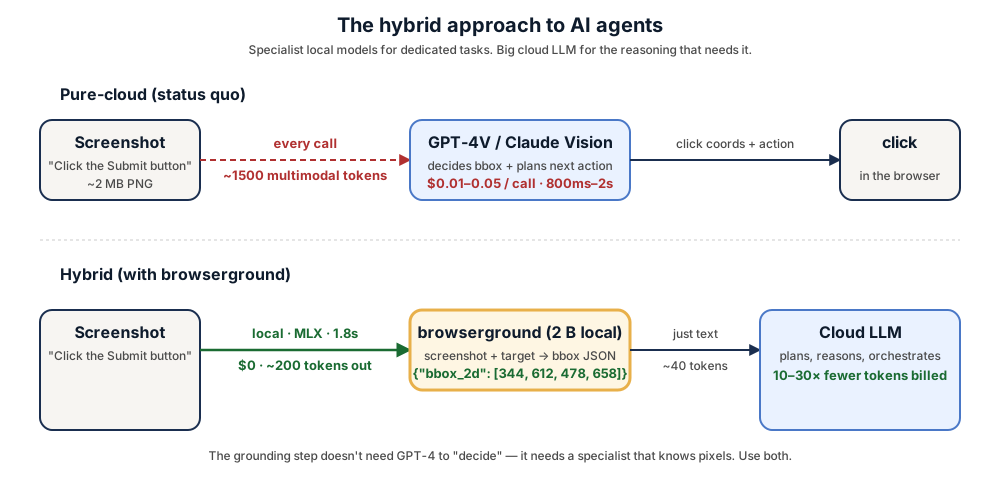
| | Pure-cloud (status quo) | Hybrid (+ browserground + confidence routing) |
|---|---|---|
| Per-screenshot cost on the common case | $0.01–0.05 | **$0** (local), cloud only on low-confidence escalations |
| Tokens billed by cloud per step | 1500+ multimodal | **~40 text** on the local path |
| Screenshots leave machine | yes | **no** for the local path |
| Rate limits | yes | **no** for the local path |
## Three packaged builds
| Build | Use it for | Install |
|---|---|---|
| **MLX 4-bit** ([renezander030/browserground-mlx](https://huggingface.co/renezander030/browserground-mlx)) | Apple Silicon, fastest | `npm install -g browserground` (auto) or `pip install "browserground[mlx]"` |
| **GGUF Q4_K_M + f16 mmproj** ([renezander030/browserground-gguf](https://huggingface.co/renezander030/browserground-gguf)) | Ollama, llama.cpp | `ollama run renezander030/browserground` |
| **PEFT LoRA** (this repo) | `transformers`, training, fine-tuning | `pip install "browserground[transformers]"` |
## What it does
Given a screenshot and a target description (`"submit form button"`, `"the red Sign Up link"`, `"the second profile picture from the left"`), this LoRA-fine-tuned Qwen3-VL-2B emits a strict JSON object:
```json
{"bbox_2d": [x1, y1, x2, y2]}
```
— the pixel coordinates of the element to click. **100% format compliance** on the held-out evaluation. Drop it into any browser-agent / screen-automation pipeline that needs to ground language → click target.
With `--confidence`, output extends to:
```json
{"bbox_2d": [x1, y1, x2, y2], "confidence": 0.92, "alternatives": [{"bbox_2d": [...]}]}
```
## Full results on ScreenSpot-v2
Point-grounding accuracy, 300 held-out items (100 per split: mobile / desktop / web). A hit = predicted bbox center falls inside the ground-truth bbox.
| Model | Params | Overall | Mobile | Desktop | Web | Format-OK |
|---|---:|---:|---:|---:|---:|---:|
| GPT-5.4 (cloud frontier) ¹ | — | 85.4% | — | — | — | — |
| SeeClick (Qwen-VL-Chat) | 9.6B | 55.1% | — | — | — | — |
| ShowUI-2B | 2B | 75.5% | — | — | — | — |
| UI-TARS-2B-SFT (ByteDance) | 2B | 89.5% | — | — | — | — |
| OS-Atlas-Base-7B | 7B | ~91% | — | — | — | — |
| **browserground v0.3** | **2B** | **60.0%** | **78.0%** | **44.0%** | **58.0%** | **100%** |
| Qwen3-VL-2B-Instruct (zero-shot baseline) | 2B | 6.3% | 7.0% | 6.0% | 6.0% | 100% |
¹ GPT-5.4 score is on the harder **ScreenSpot-Pro** benchmark — no public ScreenSpot-v2 number for the 2026 cloud generation. Open-source numbers in the table use v2 throughout.
- **+10× over zero-shot baseline** on the same benchmark (6.3% → 60.0%)
- **Beats SeeClick (9.6B) at 4.8× smaller** — 2B params, +5 pp accuracy
- **100% strict-JSON format compliance** — no markdown fences, no `<ref>` tokens, parseable every time
## Quick start
### npm CLI
```bash
npm install -g browserground
browserground parse screenshot.png --target "Submit button"
# {"bbox_2d": [344, 612, 478, 658]}
```
Daemon, HTTP server, batch, confidence, eval — all in the CLI. See the [GitHub README](https://github.com/renezander030/browserground) for the full surface.
### Python
```bash
pip install "browserground[mlx]" # Apple Silicon (recommended)
pip install "browserground[transformers]" # everywhere else
```
```python
from browserground import ground, click_xy
res = ground("screenshot.png", "the green Subscribe button")
print(res["bbox_2d"])
x, y = click_xy("screenshot.png", "the back arrow")
```
### Ollama
```bash
ollama pull renezander030/browserground
ollama run renezander030/browserground "Locate: Submit button" /path/to/screen.png
```
### From this LoRA directly (transformers)
```python
from transformers import AutoProcessor, Qwen3VLForConditionalGeneration
from peft import PeftModel
import torch
from PIL import Image
processor = AutoProcessor.from_pretrained("Qwen/Qwen3-VL-2B-Instruct")
model = Qwen3VLForConditionalGeneration.from_pretrained(
"Qwen/Qwen3-VL-2B-Instruct", dtype=torch.bfloat16, device_map="auto"
)
model = PeftModel.from_pretrained(model, "renezander030/browserground")
model = model.merge_and_unload(); model.eval()
img = Image.open("screenshot.png").convert("RGB")
messages = [
{"role": "system", "content": [{"type": "text", "text":
'You are a UI-grounding model. Given a screenshot and a target description, '
'output the bounding box of the SINGLE UI element to click. Output ONLY a JSON '
'object: {"bbox_2d": [x1, y1, x2, y2]} with pixel coordinates, origin at top-left.'}]},
{"role": "user", "content": [
{"type": "image", "image": img},
{"type": "text", "text": "Locate the element described: Submit button"},
]},
]
prompt = processor.apply_chat_template(messages, tokenize=False, add_generation_prompt=True)
inputs = processor(text=[prompt], images=[[img]], return_tensors="pt").to(model.device)
out = model.generate(**inputs, max_new_tokens=64, do_sample=False)
print(processor.tokenizer.decode(out[0, inputs.input_ids.shape[1]:], skip_special_tokens=True))
```
## What would it take to reach UI-TARS-level accuracy (~89-90%)?
The gap is **compute + data**, not architecture. Concrete recipe to close it:
| Lever | v0.3 (this) | v0.5+ target |
|---|---|---|
| Training records | 26k | 250k–500k (10–20× more) |
| Epochs | 1 | 3–5 |
| Adapter size | LoRA rank 32 (1.6% of base) | rank 128 or full fine-tune |
| Icon-rich data | thin | balanced — closes the 41% icon split |
| Training stages | SFT only | SFT → DPO with preference data |
| Compute spend | $2.20 | ~$200–500 |
This is reproducible — the training scripts in `imgparse-tier1` are the template. The current v0.3 is the *recipe-validated* milestone at the cheap end of the spectrum.
## Training recipe (v0.2 LoRA — what's in this repo)
v0.3 is the same underlying LoRA as v0.2 — what shipped in v0.3 is **packaging**: MLX 4-bit, GGUF, Ollama, PyPI, browser-use + Skyvern adapters, batch / confidence / HTTP daemon / eval CLI surfaces.
- **Base**: `Qwen/Qwen3-VL-2B-Instruct`
- **Method**: LoRA rank 32, alpha 64, dropout 0.05, on all 7 linear modules of the LM (q/k/v/o/gate/up/down)
- **Trainable params**: 34.9 M (1.6% of base)
- **Data mix (26k examples)**:
- OS-Atlas-Data desktop_domain (macOS): 6k
- OS-Atlas-Data mobile_domain (aw_mobile, Android): 6k
- OS-Atlas-Data mobile_domain (UIBert): 6k
- agentsea/wave-ui (web-platform-filtered): 8k
- **Hyperparams**: bf16, LR 1e-4, cosine schedule, batch 1 × grad-accum 8 (effective batch 8), 1 epoch, gradient checkpointing on
- **Hardware**: 1× RTX A6000 48 GB (RunPod Secure Cloud)
- **Wall time**: ~4.5 hr training + ~5 min eval
Full training scripts (private repo, request access): [renezander030/imgparse-tier1](https://github.com/renezander030/imgparse-tier1).
## Use cases
- **Claude Computer Use / Claude Code** screen-grounding tool calls
- **OpenAI Codex CLI** screen-grounding extension
- **browser-use** click-targeting (drop-in adapter in [GitHub plugins/browser-use/](https://github.com/renezander030/browserground/tree/main/plugins/browser-use))
- **Skyvern** local-first grounding with cloud fallback (adapter in [GitHub plugins/skyvern/](https://github.com/renezander030/browserground/tree/main/plugins/skyvern))
- **Custom agent stacks** that need a $0/call grounding step for the common-case calls instead of GPT-4V per screenshot
- **Self-hosted compound-AI systems** with a routing layer (specialist model for grounding, general LLM for planning)
## Limitations & next
- **Icon UI accuracy (~41%) lags text UI (~74%)** — icons under-represented in the 26k training mix; planned for v0.4
- **Web and desktop accuracy** lag mobile — more web/desktop training data in v0.4
- **No mouse-action prediction** — this model only locates; doesn't decide click vs hover vs type. Pair with an action predictor for full computer-use loops
- **English-only training data**
- **MLX latency numbers are targets** until v0.4 independent benchmarks
## Work with me
This adapter is a public reference of the recipe I deliver to freelance clients: small, fast, structured-output local specialists that slot into compound-AI agent stacks and cut cloud-LLM bills without losing capability.
If you need one of these, I can build it:
- a **UI-grounding model trained on your own product's screenshots** — your dashboard, your app, your customer interfaces — for higher recall on the elements your agents actually click
- a **hybrid agent architecture** that routes narrow tasks (grounding, OCR, classification, embedding, extraction) to local specialist models and reserves cloud frontier LLMs for the reasoning that actually needs them
- an **on-prem agent deployment** — Apple Silicon (MLX), CUDA box, or your existing K8s — with no screenshots leaving your infrastructure
- a **confidence-routed harness** that tells you when the local model is actually good enough to keep the call out of the cloud bill in production
Reach out: <https://renezander.com>
## Citation
```bibtex
@misc{browserground-2026,
title = {browserground: Qwen3-VL-2B LoRA for hybrid AI agent UI grounding},
author = {Zander, René},
year = {2026},
url = {https://huggingface.co/renezander030/browserground}
}
```
## License
Apache 2.0, same as the base model `Qwen/Qwen3-VL-2B-Instruct`.
## Acknowledgements
- `Qwen/Qwen3-VL-2B-Instruct` base
- `OS-Copilot/OS-Atlas-Data` training data
- `agentsea/wave-ui` web slice
- `OS-Copilot/ScreenSpot-v2` evaluation set
|