
Spaces:
Runtime error

Runtime error
| import asyncio | |
| import os | |
| import threading | |
| from threading import Event | |
| from typing import Optional | |
| import discord | |
| import gradio as gr | |
| from discord import Permissions | |
| from discord.ext import commands | |
| from discord.utils import oauth_url | |
| import gradio_client as grc | |
| from gradio_client.utils import QueueError | |
| event = Event() | |
| DISCORD_TOKEN = os.getenv("DISCORD_TOKEN") | |
| async def wait(job): | |
| while not job.done(): | |
| await asyncio.sleep(0.2) | |
| ## GRADIO UI API LINK ## | |
| def get_client(session: Optional[str] = None) -> grc.Client: | |
| client = grc.Client("https://cryptoscoutv1-cryptoscout-crewai-coinsearchv2.hf.space/", hf_token=os.getenv("HF_TOKEN")) | |
| if session: | |
| client.session_hash = session | |
| return client | |
| def truncate_response(response: str) -> str: | |
| ending = "...\nTruncating response to 2000 characters due to discord api limits." | |
| if len(response) > 2000: | |
| return response[: 2000 - len(ending)] + ending | |
| else: | |
| return response | |
| intents = discord.Intents.default() | |
| intents.message_content = True | |
| bot = commands.Bot(command_prefix="/", intents=intents) | |
| ## BOT COMMANDS ## | |
| async def on_ready(): | |
| print(f"Logged in as {bot.user} (ID: {bot.user.id})") | |
| synced = await bot.tree.sync() | |
| print(f"Synced commands: {', '.join([s.name for s in synced])}.") | |
| event.set() | |
| print("------") | |
| # Generate OAuth URL when the bot is ready | |
| permissions = Permissions(326417525824) | |
| url = oauth_url(bot.user.id, permissions=permissions) | |
| print(f"Add this bot to your server by clicking this link: {url}") | |
| thread_to_client = {} | |
| thread_to_user = {} | |
| ## /echo command to return the llm repsonse ## | |
| async def chat(ctx, symbol: str): # Remove the optional parameter CoinName | |
| if len(symbol) > 5: | |
| await ctx.send("The symbol should be at most 5 characters long.") | |
| return | |
| if ctx.author.id == bot.user.id: | |
| return | |
| try: | |
| # Acknowledge the command immediately | |
| await ctx.send(f"Generating report for - {symbol}. Please wait 2-3 minutes.") | |
| loop = asyncio.get_running_loop() | |
| client = await loop.run_in_executor(None, get_client, None) | |
| job = client.submit(symbol, api_name="/predict") | |
| await wait(job) | |
| try: | |
| job.result() | |
| response = job.outputs()[-1] | |
| await ctx.send(f"```{truncate_response(response)}```") # Send the LLM response | |
| except QueueError: | |
| await ctx.send("The gradio space powering this bot is really busy! Please try again later!") | |
| except Exception as e: | |
| print(f"{e}") | |
| async def help_command(ctx): | |
| help_message = """ | |
| **How to Use This Bot** | |
| - Use `/echo your_message` to interact with the bot. | |
| - Your message will be processed, and you will get a response. | |
| - If you need any assistance, contact the server admins. | |
| """ | |
| await ctx.send(help_message) | |
| async def on_message(message): | |
| if message.author.bot: | |
| return | |
| if message.content.startswith(bot.command_prefix): | |
| await bot.process_commands(message) | |
| def run_bot(): | |
| if not DISCORD_TOKEN: | |
| print("DISCORD_TOKEN NOT SET") | |
| event.set() | |
| else: | |
| bot.run(DISCORD_TOKEN) | |
| threading.Thread(target=run_bot).start() | |
| event.wait() | |
| if not DISCORD_TOKEN: | |
| welcome_message = """ | |
| ## You have not specified a DISCORD_TOKEN, which means you have not created a bot account. Please follow these steps: | |
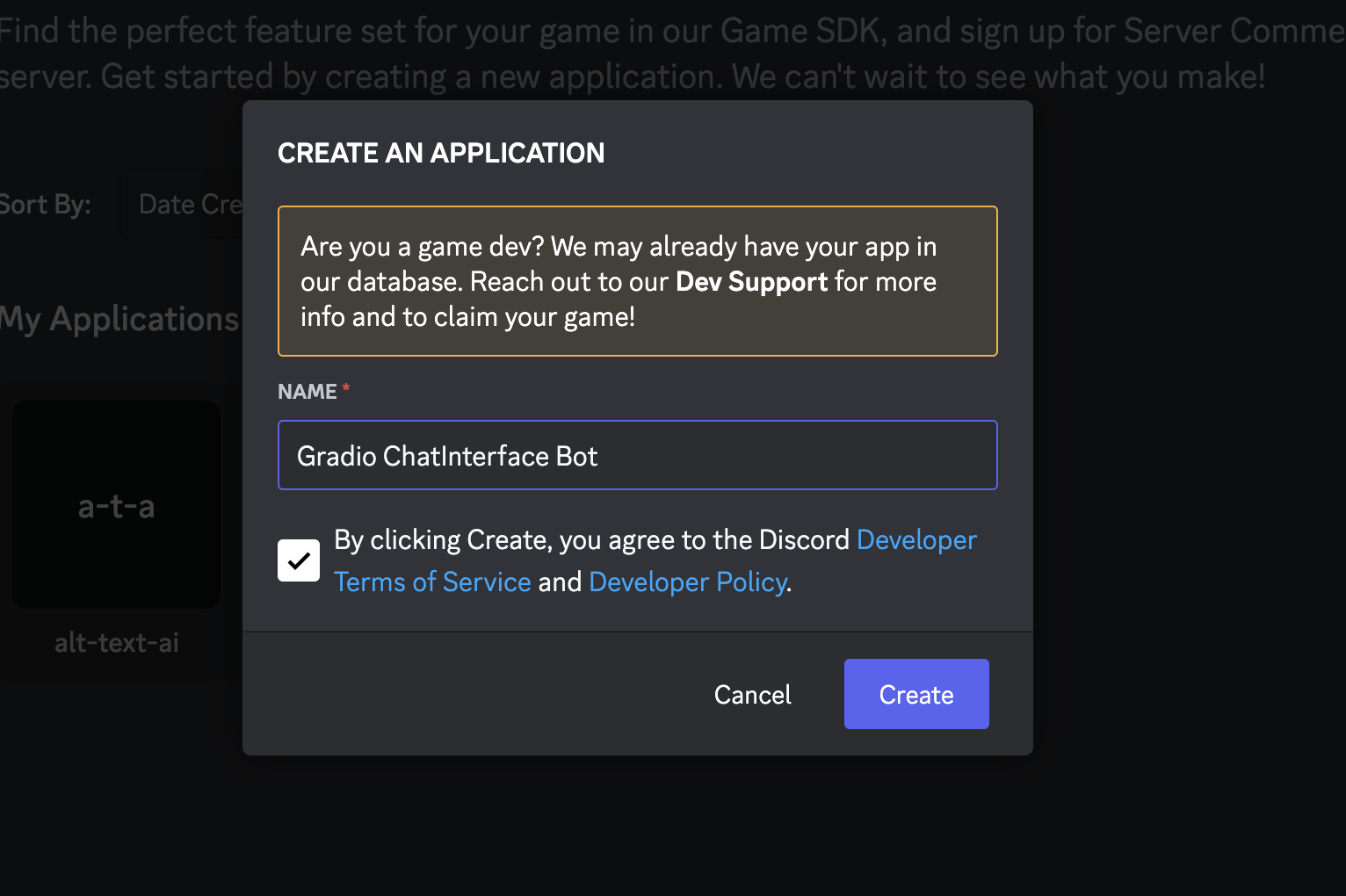
| ### 1. Go to https://discord.com/developers/applications and click 'New Application' | |
| ### 2. Give your bot a name 🤖 | |
|  | |
| ## 3. In Settings > Bot, click the 'Reset Token' button to get a new token. Write it down and keep it safe 🔐 | |
| 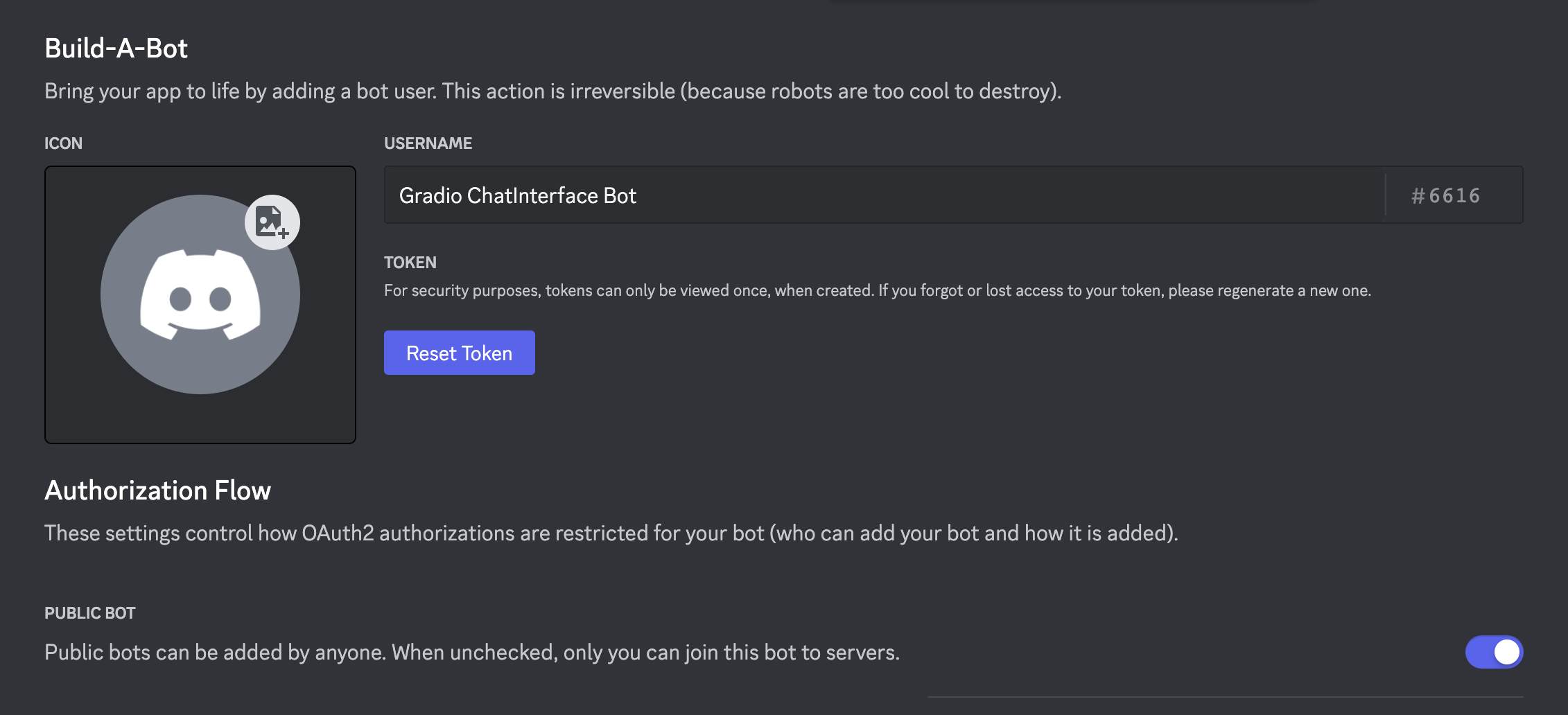 | |
| ## 4. Optionally make the bot public if you want anyone to be able to add it to their servers | |
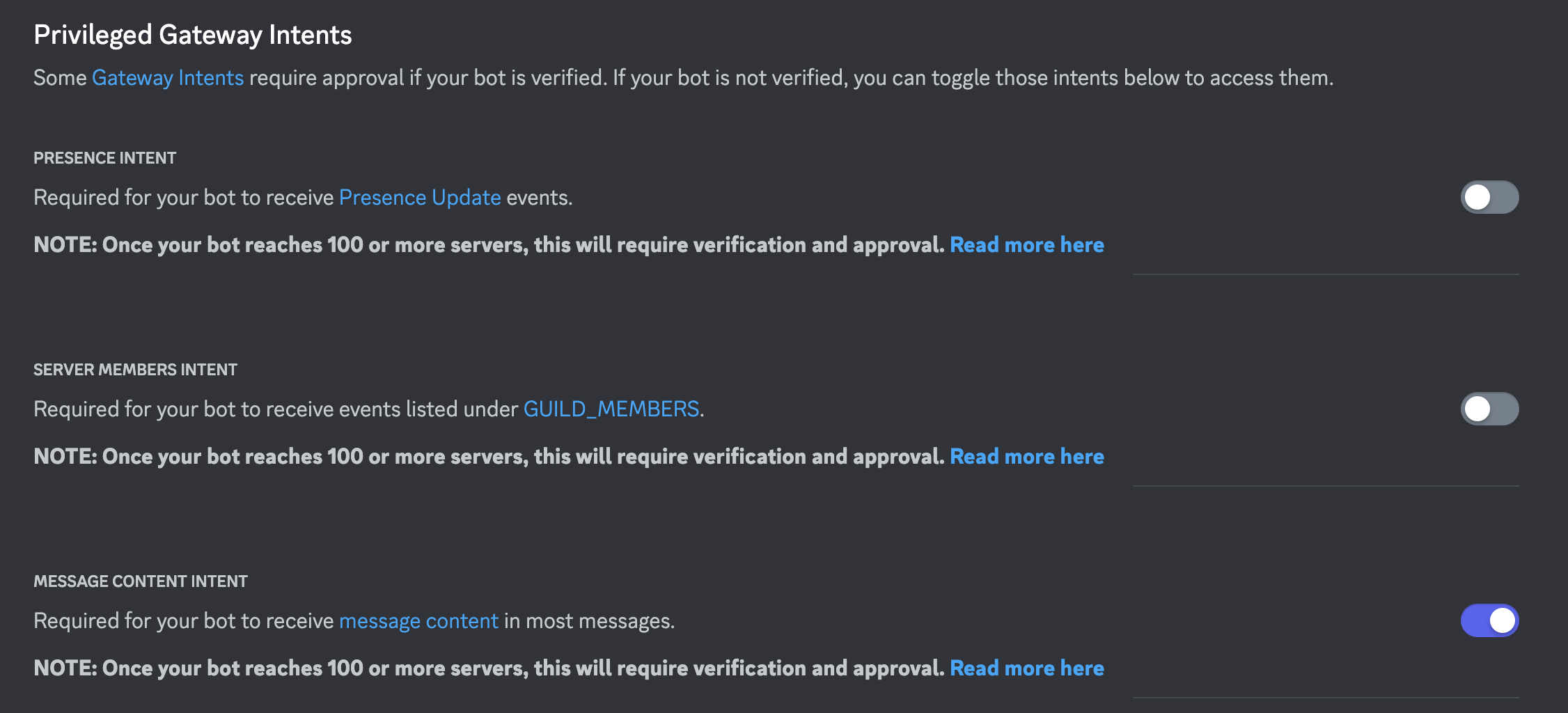
| ## 5. Scroll down and enable 'Message Content Intent' under 'Priviledged Gateway Intents' | |
|  | |
| ## 6. Save your changes! | |
| ## 7. The token from step 3 is the DISCORD_TOKEN. Rerun the deploy_discord command, e.g client.deploy_discord(discord_bot_token=DISCORD_TOKEN, ...), or add the token as a space secret manually. | |
| """ | |
| else: | |
| permissions = Permissions(326417525824) | |
| url = oauth_url(bot.user.id, permissions=permissions) | |
| welcome_message = f""" | |
| ## Add this bot to your server by clicking this link: | |
| {url} | |
| ## How to use it? | |
| The bot can be triggered via `!echo` followed by your text prompt. | |
| ## Enabling slash commands | |
| If you are the owner of this bot, call the `!sync` command from your discord server. | |
| This will allow anyone in your server to call the bot via `/echo`. | |
| This is known as a slash command and is a nicer experience than calling the bot via `!echo`. | |
| After calling `!sync`, it may take a few minutes for `/echo` to be recognized as a valid command | |
| in your server. | |
| ⚠️ Note ⚠️: It is best to create a separate bot per command if you intend to use slash commands. Also make sure | |
| none of your bots have matching command names. | |
| """ | |
| with gr.Blocks() as demo: | |
| gr.Markdown( | |
| f""" | |
| # Cryptoscout-crewai-coinsearch | |
| {welcome_message} | |
| """ | |
| ) | |
| demo.launch() |