
Spaces:
Sleeping


VisionCoder OpenEnv | Screenshot-to-HTML with Multi-Agent RL
Scaler × Meta PyTorch Hackathon 2026 | Solo submission by @amaljoe88
Themes covered: Multi-Agent Interactions, (Super) Long-Horizon Planning & Instruction Following, Self-Improvement
The Problem
Turn a screenshot into working HTML. It sounds simple but it forces a model to do two hard things at once: understand what the UI looks like visually and express that understanding in code. A single LLM call tends to produce structurally valid HTML that looks nothing like the reference. Headings are present, a button is present but the layout is wrong, colors are off, nothing is positioned correctly.
The deeper problem: the model can't see its own output. It generates HTML blindly, has no way to compare what it produced against the target, and has no feedback loop to improve.
We turned this into a reinforcement learning problem. The agent generates HTML, a real browser renders it, a reward function computes visual similarity to the reference, and the agent iterates. The environment runs as an HTTP API compatible with the OpenEnv standard.
The Environment
OpenEnv-Compatible HTTP API
POST /reset?difficulty=easy|medium|hard  →  { session_id, screenshot_b64 }
POST /step   { html, session_id }         →  { reward, render_low, render_full, done }
POST /render { html }                     →  { image_b64 }
Every HTML submission is rendered by a headless Chromium at two resolutions: 320×240 (low-res, passed back to the Developer each turn) and 640×480 (full-res, used by the Critic and reward computation). Episodes run for up to n(=5) steps.
Composite Reward Function
The reward is a weighted sum of 8 sub-scores, each measuring a different aspect of visual and structural similarity.
Fun Fact: The weights asssigned to each reward were tuned using an auto research style approach (similar to Andrej Karpathy's) - an AI agent loops through a large set of candidate weight combinations parallely and compares the reward ranking against human quality judgements to find the best correlation.
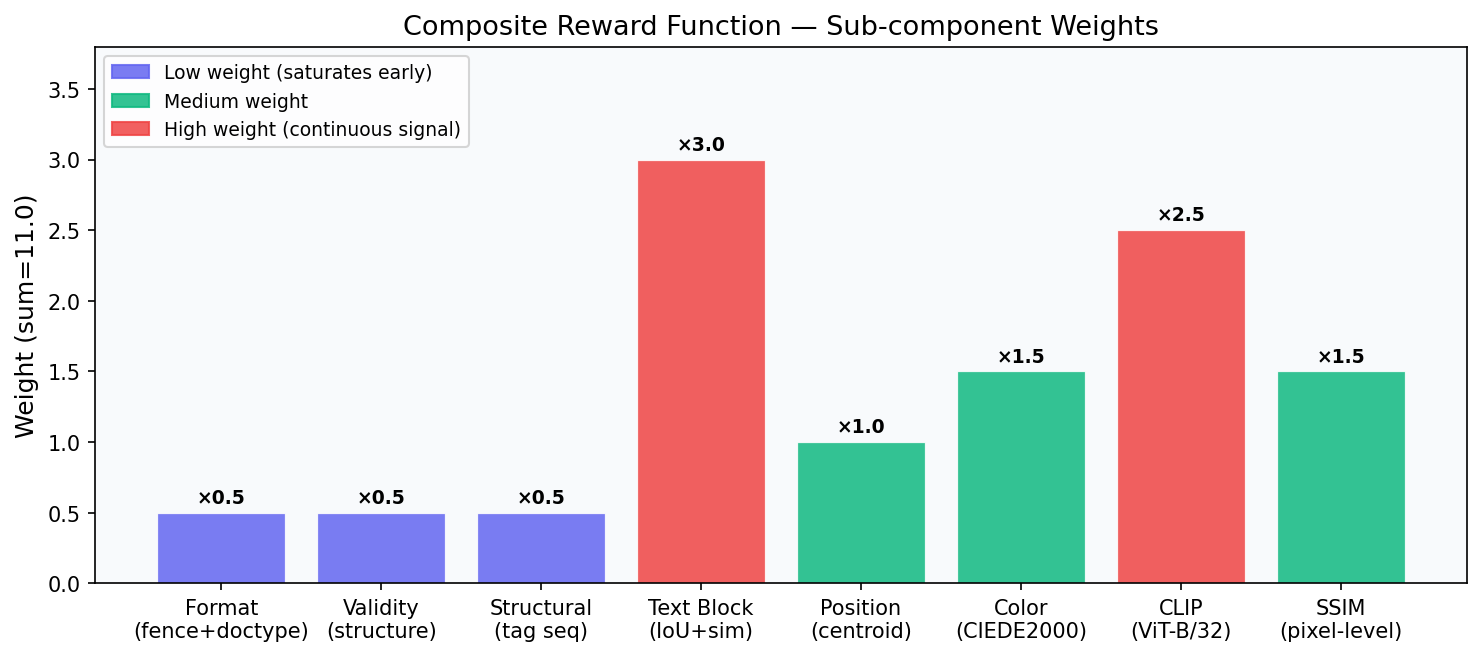
| Reward | Weight | What it measures |
|---|---|---|
format |
0.5 | Has ```html fence + <!DOCTYPE html> |
validity |
0.5 | Structural completeness (html/head/body, diverse tags) |
structural |
0.5 | Tag-sequence similarity + inline-style property coverage |
text_block |
3.0 | Hungarian-matched text block IoU + text similarity |
position |
1.0 | Hungarian-matched centroid distance |
color |
1.5 | Spatial CIEDE2000 on reference non-white pixels |
clip |
2.5 | CLIP ViT-B/32 cosine similarity, renormalised (threshold 0.65) |
ssim |
1.5 | Pixel-level SSIM (skimage, 320×240 RGB) |
Low-weight rewards (format, validity, structural) saturate early, a structurally complete page already scores near 1.0 on these regardless of visual quality. The high-weight rewards (text_block, clip, ssim) stay discriminative all the way to near-perfect renders. This keeps the gradient signal alive even when the model is already producing good output.
Does the Reward Reflect Human Judgement?
We validated the final reward function against human-labelled quality levels across 15 reference pages (5 per difficulty). For each reference, we tested 7 variants ranging from blank to perfect:
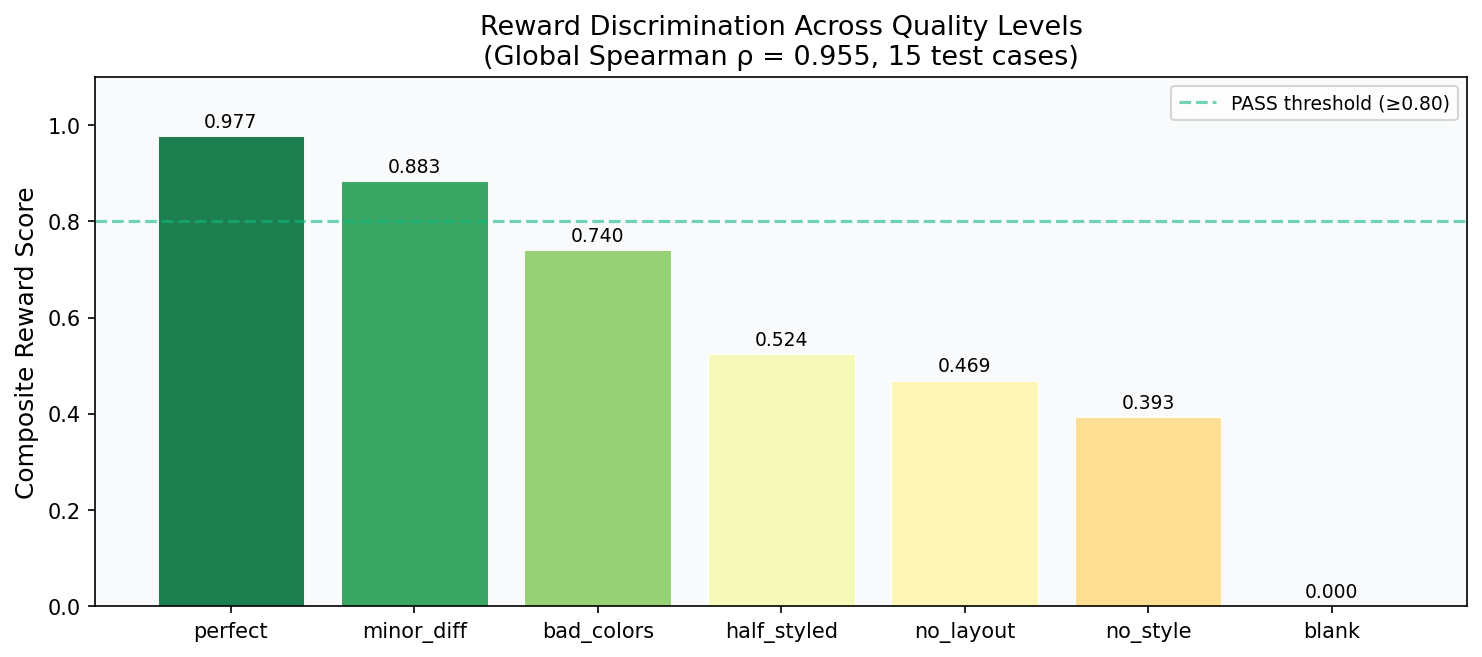
Global Spearman ρ = 0.955 — the reward ranking matches human quality judgement on most of the test cases. The chart above shows the reward correctly ordering all 7 levels with clear gaps between them.
Browse all 15 test case renders with per-sub-reward breakdowns in the interactive demo.
The grid below shows sampled renders from three tasks alongside their reward scores. Each row shows a reference and three variants at different quality levels, ordered from best to worst:
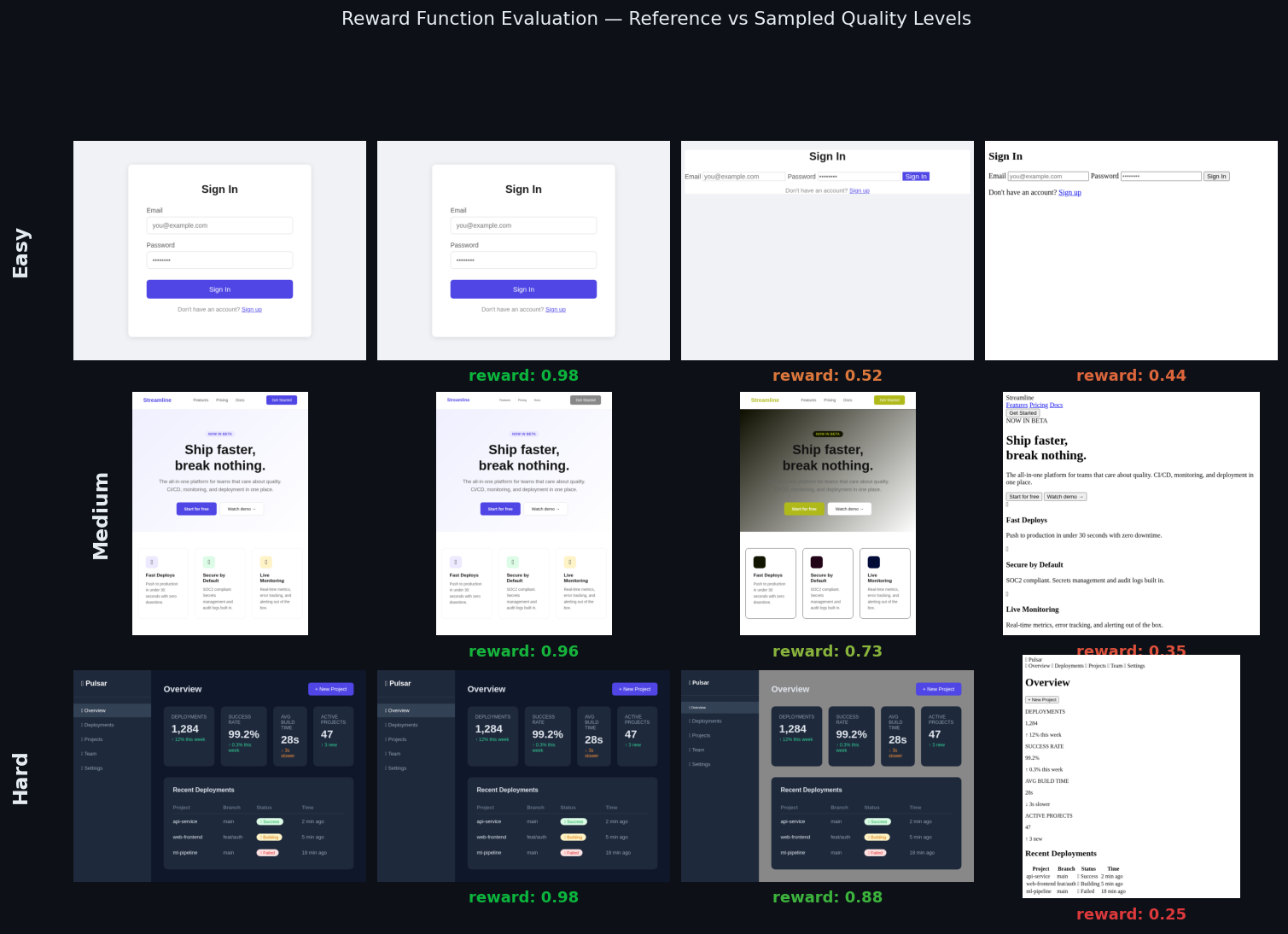
Content Multiplier: We noticed strong correlation with human judgement for most pages, but blank renders were receiving rewards of ~0.3 due to sub-rewards like
formatandvaliditythat don't require visual content. To fix this, we applied a content multiplier: if the predicted render has fewer than 0.5% non-white pixels while the reference has content, the total reward is forced to 0. A blank page which typically means something prevented rendering (a JavaScript error, a malformed tag, or the model failing to generate HTML at all) now gets the worst possible reward and is correctly treated as a major failure signal.
The Multi-Agent Architecture
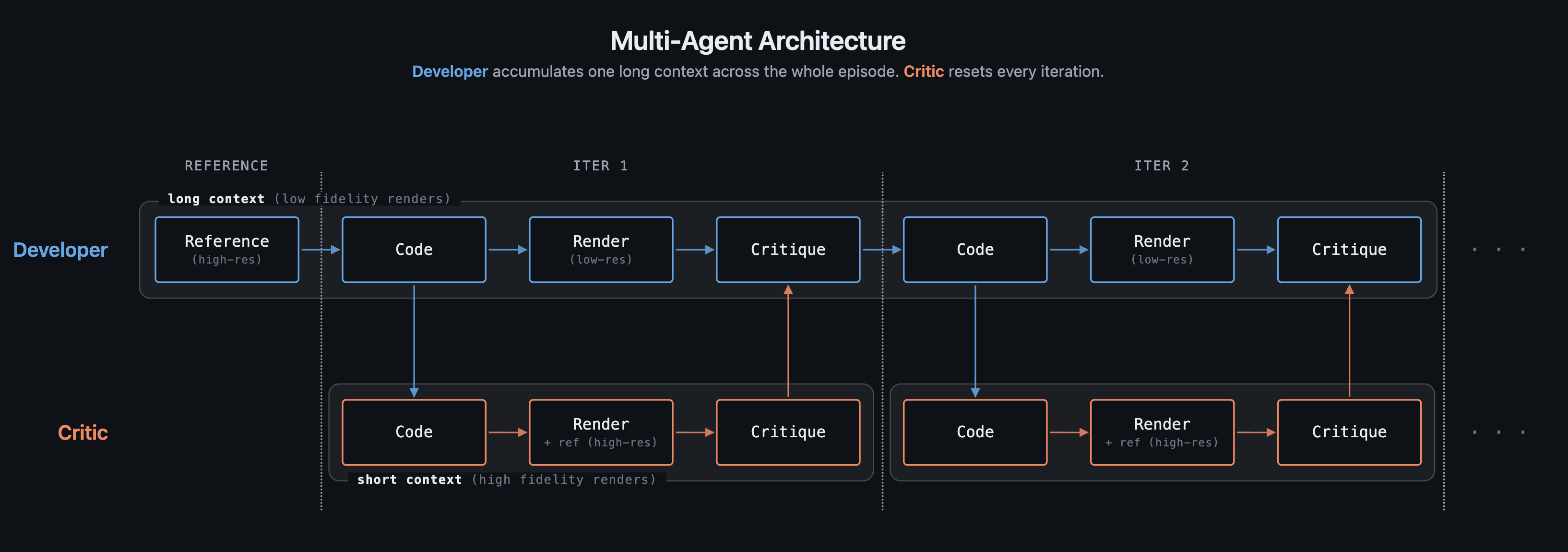
Why Two Agents?
A single agent can generate HTML and receive a reward. But the reward is a single number: it tells the model how bad the output is, not what is wrong or which selector to fix. Without visual feedback, the model improvises changes at random and often regresses.
The Critic solves this. It looks at both the reference and the current render side by side, reads the HTML source, and produces specific CSS fix instructions. The Developer reads those fixes and applies them in the next step; no guessing required.
Why Not Just Pass Everything to One Model?
Context cost. Vision models encode images as sequences of tokens; the number of tokens scales with pixel count:
| Image | Resolution | Visual tokens |
|---|---|---|
| Low-res render | 320×240 | ~256 |
| Full-res render / reference | 640×480 | ~1,024 |
| Full HD (hypothetical) | 1920×1080 | ~9,800 |
With full-HD inputs, two images alone would cost ~19,600 tokens exhausting the context budget of a typical consumer GPU before a single token of HTML is generated. Even at our working resolution, giving the Developer both high-res images every step would double its context cost per step across the entire episode and this cost increases quadratically with higher resolutions.
What the Critic Produces
[+] HIGH | LAYOUT — products grid is 1-column; reference shows 3-column
    → FIX: `.products { display: grid; grid-template-columns: repeat(3, 1fr); gap: 24px; }`

[+] MEDIUM | COLOR — nav background is white; reference shows dark navy
    → FIX: `nav { background-color: #0f172a; }`
This is fundamentally different from abstract feedback ("the layout is wrong"). The Developer reads the → FIX: line and applies it to the exact CSS selector, no interpretation required.
Self-Improvement Over an Episode
Each developer step sees the HTML code generated so far alongside reviews from the critic model and its low-resolution renders (to maintain a manageable context size).
The graph below shows what happens with and without the Critic over a 5-step episode:
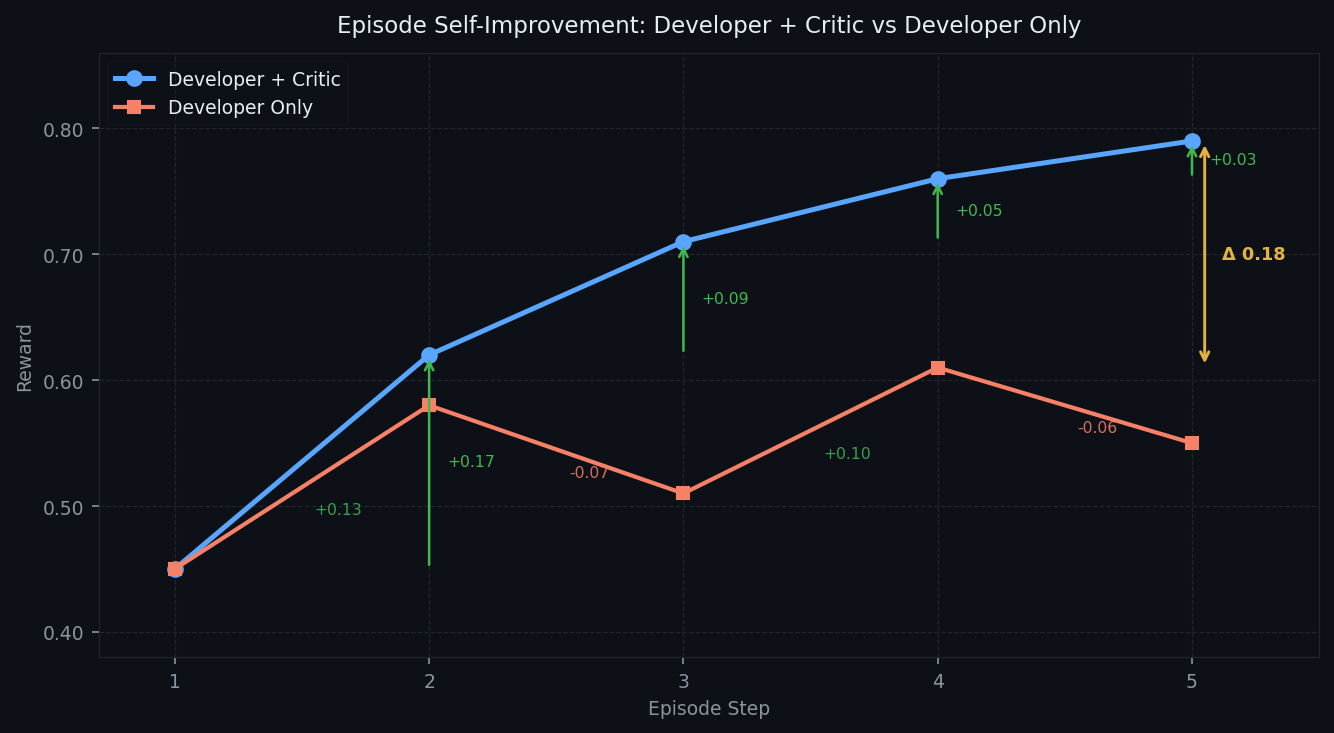
Without structured feedback, the Developer oscillates: it makes changes that sometimes improve and sometimes regress the reward. With the Critic providing selector-specific fixes, the reward climbs monotonically. By step 5, Developer + Critic has opened a Δ0.18 gap over Developer Only.
RL Training: Full-Episode GRPO
Full-Episode Training
Full-episode GRPO samples K complete trajectories, scores each one by total episode reward, and applies group-relative advantage to every token in the trajectory. Reward shaping is also used to add additional intermediate rewards (difference in rewards between each iteration):
R_total(t) = R_terminal + λ · Σ(r_s - r_{s-1}  for s = t..n)

R_terminal = environment score at final step n    ← main signal
r_s - r_{s-1} = per-step improvement delta        ← shaped signal
λ = 0.2                                           ← keeps shaped signal subordinate
for each task:
    sample K=4 full trajectories (different temperatures/seeds)
    score each: R_terminal_k + shaped improvement deltas
    advantage: A_t = (G_t - mean_k) / std_k
    update: ∇ log π(a_t | s_t) · A_t  for all tokens in trajectory
Training Configuration
- Base model:
Qwen/Qwen3.5-2B(unified vision+text) - LoRA: rank=16, α=32, 0.49% trainable parameters (10.9M / 2.2B)
- Optimizer: AdamW, lr=2e-5, max_grad_norm=1.0
- Hardware: 2× NVIDIA A100 80GB PCIe
- Episodes: 20 × 4 rollouts = 80 trajectories
Training Curve
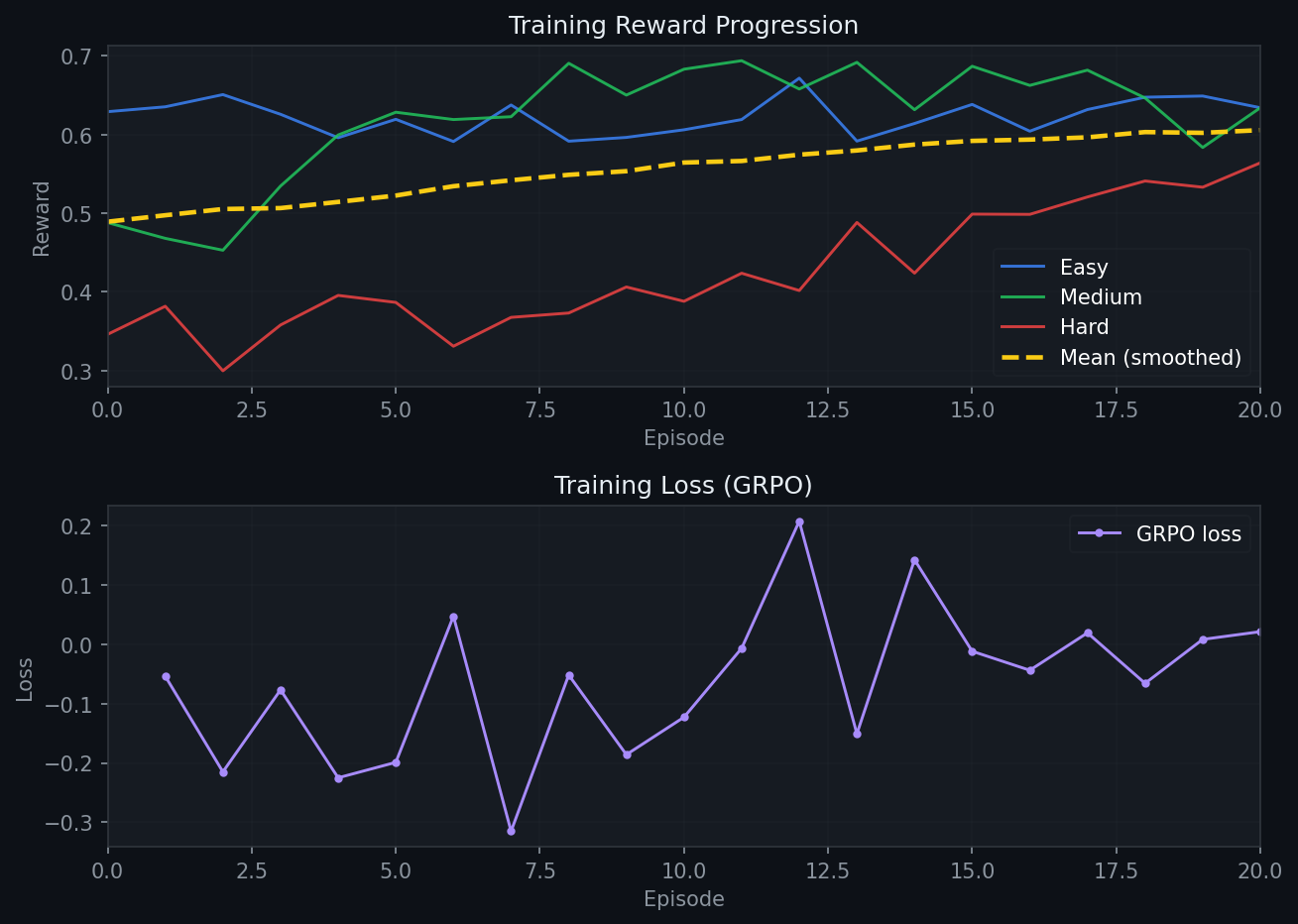
The three difficulty tracks tell different stories:
Easy (blue) starts at 0.629. Simple login forms and single-column layouts are already within reach of the base model. There is very little headroom left, so the curve shows mostly small fluctuations with a slight upward drift. The model is already close to its ceiling on these tasks at baseline.
Medium (green) starts at 0.488 and ends at 0.634 (+0.146). Multi-column grids and landing pages require the Critic's feedback to land correctly. The reward climbs early as the model learns to apply CSS fixes more precisely.
Hard (red) shows the clearest improvement: 0.346 → 0.564 (+0.218). Complex dashboards and Kanban boards depend on deeply nested flex/grid structures where small CSS errors collapse entire layout regions. At baseline, the model struggles to reconstruct these. With GRPO reinforcing the Critic's CSS fix patterns, it learns which selectors control which regions and how to fix them efficiently. The performance keeps on climbing even at 20 iterations and shows potential for more improvement. Hard tasks benefit the most because they have the most to gain.
RL Training Results: Base vs Trained 2B
Scores at iteration 0 (untrained) vs iteration 20 (after GRPO training), from https://raw.githubusercontent.com/amaljoe/vision-coder-openenv/main/assets/train.jsonl:
| Difficulty | Base (iter 0) | Trained (iter 20) | Delta |
|---|---|---|---|
| easy | 0.629 | 0.634 | +0.005 |
| medium | 0.488 | 0.634 | +0.146 |
| hard | 0.346 | 0.564 | +0.218 |
| mean | 0.488 | 0.611 | +0.123 |
+25.2% overall improvement from 20 iterations of full-episode GRPO on 2× A100 80GB (~2h). The pattern matches the training curve: easy was already near its ceiling, medium gained meaningfully, and hard improved the most. The Critic's structured feedback is most valuable precisely where the task is most complex.
Reproduce
Run the Environment
pip install -e .
uvicorn openenv.server.app:app --host 0.0.0.0 --port 7860
Run Inference
export API_BASE_URL=https://router.huggingface.co/v1
export MODEL_NAME=Qwen/Qwen3.5-35B-A3B
export HF_TOKEN=hf_...
python inference.py
Run RL Training
python train.py --phase combined --episodes 20 --k-rollouts 4 \
  --model Qwen/Qwen3.5-2B --checkpoint-dir checkpoints/run1
Run Test Suite
Run the test suite to generate rewards for the test set. These rewards can be visualised in the interactive demo.
python tests/test_rewards.py --render  # first run (needs Playwright)
python tests/test_rewards.py           # subsequent runs (uses cached renders)
Links
- HF Space with Interactive Demo: amaljoe88/vision-coder-openenv
- GitHub: amaljoe/vision-coder-openenv