
Spaces:
Build error

Build error
| title: vuenHackathon | |
| app_file: app.py | |
| sdk: gradio | |
| sdk_version: 5.41.0 | |
| # 🎥 AI Video Chat Assistant with RAG Knowledge System | |
| An intelligent, multi-modal chatbot that can analyze video content, answer your questions, and remember past interactions using a sophisticated Retrieval-Augmented Generation (RAG) system. | |
|  | |
| --- | |
| ## ✨ Features | |
| - **Intelligent Video Analysis**: Upload a video, and the assistant will use the Gemini 1.5 Flash model to understand its content. | |
| - **Multi-Modal Chat**: Ask questions about the uploaded video, and receive detailed, context-aware answers. | |
| - **Persistent Memory**: | |
| - **Short-Term Memory**: Uses **ChromaDB** to remember the conversation history within a single session. | |
| - **Long-Term Knowledge**: Uses a **FAISS Vector Store** to create a persistent, searchable knowledge base from all interactions (video analyses, Q&A), enabling cross-session insights. | |
| - **RAG-Powered Context**: Follow-up questions are enhanced with relevant context retrieved from both the current conversation and the long-term knowledge base. | |
| - **Interactive UI**: A user-friendly interface built with **Gradio**, featuring distinct sections for video interaction and knowledge base management. | |
| - **Robust Backend**: Powered by **FastAPI**, providing a scalable and efficient API. | |
| - **Debugging & Management**: The UI includes tools to directly query the knowledge base, add test data, and view system statistics. | |
| --- | |
| ## 🏗️ Architecture | |
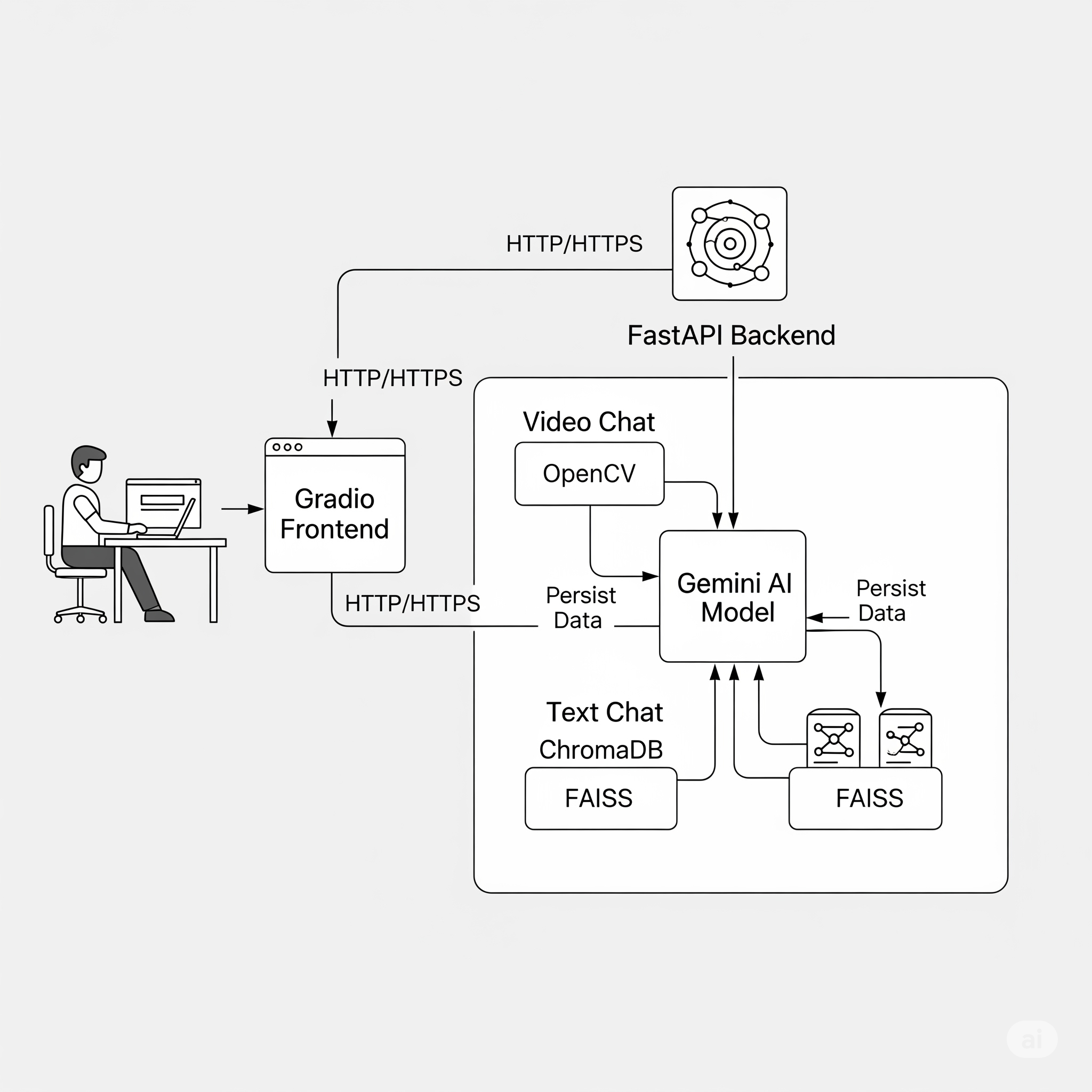
| The application operates on a decoupled frontend-backend model. The Gradio UI serves as a pure client, making HTTP requests to the FastAPI backend, which houses all the AI logic, data processing, and state management. | |
| The core of the architecture is its **Dual-Memory System**: | |
| 1. **ChromaDB for Conversational Context**: Provides fast, session-specific memory. It answers the question, "What have we been talking about *right now*?". | |
| 2. **FAISS for Enduring Knowledge**: Creates a permanent, long-term knowledge base from key insights. It answers the question, "What has the assistant learned from *all past interactions*?". | |
| ### System Flow Diagram | |
| This diagram illustrates how a user request flows through the system, interacting with the dual-memory stores and the Gemini AI model. | |
|  | |
| ## ⚙️ Setup and Installation | |
| Follow these steps to get the application running on your local machine. | |
| ### 1. Prerequisites | |
| - Python 3.8 or higher | |
| - Git | |
| ### 2. Clone the Repository | |
| ```bash | |
| git clone [https://github.com/your-username/ai-video-chat-assistant.git](https://github.com/your-username/ai-video-chat-assistant.git) | |
| cd ai-video-chat-assistant | |
| ``` | |
| ### 3. Create a Virtual Environment | |
| It's highly recommended to use a virtual environment. | |
| ```bash | |
| # For Windows | |
| python -m venv venv | |
| venv\Scripts\activate | |
| # For macOS/Linux | |
| python3 -m venv venv | |
| source venv/bin/activate | |
| ``` | |
| ### 4. Install Dependencies | |
| Install all the required packages from the `requirements.txt` file. | |
| ```bash | |
| pip install -r requirements.txt | |
| ``` | |
| ### 5. Set Up Environment Variables | |
| Create a file named `.env` in the root directory of the project. This file will hold your Gemini API key. | |
| ``` | |
| # .env | |
| GEMINI_API_KEY="YOUR_GEMINI_API_KEY_HERE" | |
| ``` | |
| --- | |
| ## 🚀 Running the Application | |
| Once the setup is complete, you can start the application with a single command: | |
| ```bash | |
| python app/main.py | |
| ``` | |
| You will see output indicating that the FastAPI backend and Gradio frontend are running: | |
| ``` | |
| 🚀 Starting AI Video Chat Assistant... | |
| 📊 FastAPI Backend: [http://127.0.0.1:8000](http://127.0.0.1:8000) | |
| 🎨 Gradio Frontend: [http://127.0.0.1:7860](http://127.0.0.1:7860) | |
| 🧠 RAG System: with RAG Integration | |
| ====================================================================== | |
| ``` | |
| - Open your web browser and navigate to **`http://127.0.0.1:7860`** to use the application. | |
| --- | |
| ## 📖 How to Use | |
| 1. **Upload a Video**: Click the "🎬 Click to Upload Video" button and select a video file. | |
| 2. **Ask a Question**: Once the video is uploaded, the text box will become active. Type a question about the video (e.g., "What is happening in this video?") and press Enter or click "Send 🚀". | |
| 3. **Chat**: The AI will respond. You can ask follow-up questions. The system will remember the context of the current conversation. | |
| 4. **Explore the Knowledge Base**: | |
| - Click the **"🧠 Knowledge Base"** tab. | |
| - **Search**: Type a query into the search box to find relevant information from all past interactions. | |
| - **Debug**: Use the **"🎯 Add Test Data"** button to populate the RAG store for testing and **"📊 Show Stats"** to see its current state. | |
| 5. **Start a New Conversation**: Click the **"🔄 New Conversation"** button to clear the current state and start fresh with a new session ID. | |
| --- | |
| ## 📡 API Endpoints | |
| The FastAPI backend exposes several endpoints. You can test them at `http://127.0.0.1:8000/docs`. | |
| | Method | Endpoint | Description | | |
| |--------|------------------------|-----------------------------------------------------------------------------| | |
| | `POST` | `/chat/video` | Main endpoint to chat with a video. Requires a video file and a prompt. | | |
| | `POST` | `/chat/text` | Handles text-only follow-up questions. | | |
| | `POST` | `/rag/query` | Directly queries the FAISS RAG knowledge base. | | |
| | `GET` | `/rag/stats` | Retrieves comprehensive statistics about the RAG system. | | |
| | `POST` | `/rag/debug` | Adds pre-defined test data to the RAG vector store. | | |
| | `POST` | `/rag/reinitialize` | Forces a re-initialization of the RAG vector store. | | |
| | `GET` | `/health` | A simple health check endpoint to verify system status. | | |
| --- | |
| ## 🧪 Debugging and Testing | |
| The project includes standalone scripts for testing the RAG system independently. | |
| - **`scripts/debug_rag.py`**: A comprehensive test suite that checks imports, adds data, runs test queries, and offers an interactive query mode. Run it with `python scripts/debug_rag.py`. | |
| - **`scripts/query_rag.py`**: A simple script to perform a similarity search on the RAG vector store. Modify the `query` variable inside the script and run with `python scripts/query_rag.py`. | |