| --- |
| title: BentoPDF |
| sdk: docker |
| app_port: 7860 |
| --- |
| |
| <p align="center"><img src="public/images/favicon-no-bg.svg" width="80"></p> |
| <h1 align="center">BentoPDF</h1> |
| <p align="center"> |
| <a href="https://www.digitalocean.com/?refcode=d93c189ef6d0&utm_campaign=Referral_Invite&utm_medium=Referral_Program&utm_source=badge"> |
| <img src="https://web-platforms.sfo2.cdn.digitaloceanspaces.com/WWW/Badge%203.svg" alt="DigitalOcean Referral Badge"> |
| </a> |
| </p> |
| |
| **BentoPDF** is a powerful, privacy-first, client-side PDF toolkit that is self hostable and allows you to manipulate, edit, merge, and process PDF files directly in your browser. No server-side processing is required, ensuring your files remain secure and private. |
|
|
| [](https://github.com/alam00000/bentopdf/pkgs/container/bentopdf) [](https://ko-fi.com/alio01)  |
| [](https://github.com/sponsors/alam00000) |
|
|
|  |
|
|
| --- |
|
|
| ## Table of Contents |
|
|
| - [Join Us on Discord](#-join-us-on-discord) |
| - [Documentation](#-documentation) |
| - [Licensing](#-licensing) |
| - [Stargazers over time](#-stargazers-over-time) |
| - [Thank You to Our Sponsors](#-thank-you-to-our-sponsors) |
| - [Why BentoPDF?](#-why-bentopdf) |
| - [Features / Tools Supported](#️-features--tools-supported) |
| - [Organize & Manage PDFs](#organize--manage-pdfs) |
| - [Edit & Modify PDFs](#edit--modify-pdfs) |
| - [Convert to PDF](#convert-to-pdf) |
| - [Convert from PDF](#convert-from-pdf) |
| - [Secure & Optimize PDFs](#secure--optimize-pdfs) |
| - [Translations](#-translations) |
| - [Getting Started](#-getting-started) |
| - [Prerequisites](#prerequisites) |
| - [Quick Start](#-quick-start) |
| - [Static Hosting](#static-hosting-using-netlify-vercel-and-github-pages) |
| - [Self-Hosting Locally](#-self-hosting-locally) |
| - [Docker Compose / Podman Compose](#-run-with-docker-compose--podman-compose-recommended) |
| - [Podman Quadlet](#-podman-quadlet-systemd-integration) |
| - [Simple Mode](#-simple-mode-for-internal-use) |
| - [Custom Branding](#-custom-branding) |
| - [WASM Configuration](#wasm-configuration) |
| - [Air-Gapped / Offline Deployment](#air-gapped--offline-deployment) |
| - [Security Features](#-security-features) |
| - [Digital Signature CORS Proxy](#digital-signature-cors-proxy-required) |
| - [Version Management](#-version-management) |
| - [Development Setup](#-development-setup) |
| - [Tech Stack & Background](#️-tech-stack--background) |
| - [Roadmap](#️-roadmap) |
| - [Contributing](#-contributing) |
| - [Special Thanks](#special-thanks) |
|
|
| --- |
|
|
| ## 📢 Join Us on Discord |
|
|
| [](https://discord.gg/Bgq3Ay3f2w) |
|
|
| Have questions, feature requests, or want to chat with the community? Join our Discord server! |
|
|
| --- |
|
|
| ## 📚 Documentation |
|
|
| [](https://bentopdf.com/docs/) |
|
|
| Visit our [Documentation](https://bentopdf.com/docs/) for: |
|
|
| - **Getting Started** guide |
| - **Tools Reference** (50+ tools) |
| - **Self-Hosting** guides (Docker, Vercel, Netlify, Cloudflare, AWS, Hostinger, Nginx, Apache) |
| - **Contributing** guide |
| - **Commercial License** details |
|
|
| --- |
|
|
| ## 📜 Licensing |
|
|
| BentoPDF is **dual-licensed** to fit your needs: |
|
|
| | License | Best For | Price | |
| | -------------- | -------------------------------------------- | ------------------ | |
| | **AGPL-3.0** | Open-source projects with public source code | **Free** | |
| | **Commercial** | Proprietary / closed-source applications | **$49** (lifetime) | |
|
|
| <p align="center"> |
| <a href="https://buy.polar.sh/polar_cl_ThDfffbl733x7oAodcIryCzhlO57ZtcWPq6HJ1qMChd"> |
| <img src="https://img.shields.io/badge/🚀_Get_Commercial_License-$49_Lifetime-6366f1?style=for-the-badge&labelColor=1f2937" alt="Get Commercial License"> |
| </a> |
| </p> |
| |
| > **One-time purchase** · **Unlimited devices & users** · **Lifetime updates** · **No AGPL obligations** |
|
|
| 📖 For more details, see our [Licensing Page](https://bentopdf.com/licensing.html) |
|
|
| ### AGPL Components (Pre-configured via CDN) |
|
|
| BentoPDF does **not** bundle AGPL-licensed processing libraries in its source code, but **pre-configures CDN URLs** so all features work out of the box with zero setup: |
|
|
| | Component | License | Features Enabled | |
| | ---------------------- | -------- | --------------------------------------------------------------------------------------------------- | |
| | **PyMuPDF** | AGPL-3.0 | PDF to Text/Markdown/SVG/DOCX, Extract Images/Tables, EPUB/MOBI/XPS conversion, Compression, Deskew | |
| | **Ghostscript** | AGPL-3.0 | PDF/A Conversion, Font to Outline | |
| | **CoherentPDF (CPDF)** | AGPL-3.0 | Merge, Split by Bookmarks, Table of Contents, PDF to/from JSON, Attachments | |
|
|
| > [!TIP] |
| > **Zero-config by default.** WASM modules are loaded at runtime from jsDelivr CDN. No manual configuration is needed. For custom deployments (air-gapped, self-hosted), see [WASM Configuration](#wasm-configuration) below. |
|
|
| <hr> |
|
|
| ## ⭐ Stargazers over time |
|
|
| [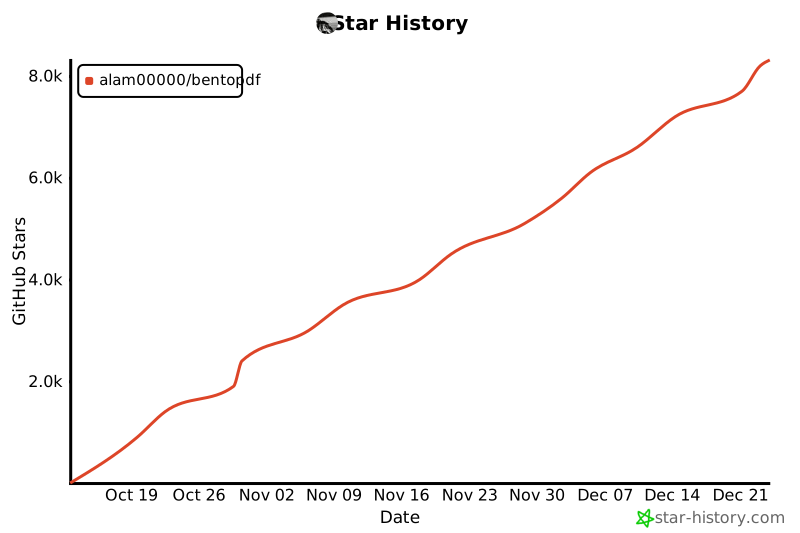](https://star-history.com/#alam00000/bentopdf&Date) |
|
|
| --- |
|
|
| ## 💖 Thank You to Our Sponsors |
|
|
| We're incredibly grateful to all our sponsors and supporters who help keep BentoPDF free and open source! |
|
|
| [](https://github.com/sponsors/alam00000) |
| [](https://ko-fi.com/alio01) |
|
|
| <!-- sponsors --> |
| <!-- sponsors --> |
|
|
| --- |
|
|
| ## ✨ Why BentoPDF? |
|
|
| - **Privacy First**: All processing happens in your browser. Your files are never uploaded to a server, guaranteeing 100% privacy. |
| - **No Limits**: Manipulate as many files as you want, as often you want. There are no restrictions or upload limits. |
| - **High Performance**: Built with modern web technologies, BentoPDF is fast and efficient, handling even large PDF files with ease. |
| - **Completely Free**: BentoPDF is a free and open-source tool for everyone. |
|
|
| --- |
|
|
| ## 🛠️ Features / Tools Supported |
|
|
| BentoPDF offers a comprehensive suite of tools to handle all your PDF needs. |
|
|
| ### Organize & Manage PDFs |
|
|
| | Tool Name | Description | |
| | :--------------------------- | :------------------------------------------------------------------------------------------------------ | |
| | **Merge PDFs** | Combine multiple PDF files into one. Preserves Bookmarks. | |
| | **Split PDFs** | Extract specific pages or divide a document into smaller files. | |
| | **Organize Pages** | Reorder, duplicate, or delete pages with a simple drag-and-drop interface. | |
| | **Extract Pages** | Save a specific range of pages as a new PDF. | |
| | **Delete Pages** | Remove unwanted pages from your document. | |
| | **Rotate PDF** | Rotate individual or all pages in a document. | |
| | **Rotate by Custom Degrees** | Rotate pages by any custom angle. | |
| | **N-Up PDF** | Combine multiple pages onto a single page. | |
| | **View PDF** | A powerful, integrated PDF viewer. | |
| | **Alternate & Mix Pages** | Merge pages by alternating pages from each PDF. Preserves Bookmarks. | |
| | **Posterize PDF** | Split a PDF into multiple smaller pages for print. | |
| | **PDF Multi Tool** | Merge, Split, Organize, Delete, Rotate, Add Blank Pages, Extract and Duplicate in an unified interface. | |
| | **PDF Booklet** | Rearrange pages for double-sided booklet printing. Fold and staple to create a booklet. | |
| | **Add Attachments** | Embed one or more files into your PDF. | |
| | **Extract Attachments** | Extract all embedded files from PDF(s) as a ZIP. | |
| | **Edit Attachments** | View or remove attachments in your PDF. | |
| | **Divide Pages** | Divide pages horizontally or vertically. | |
| | **Combine to Single Page** | Stitch all pages into one continuous scroll. | |
| | **Add Blank Page** | Insert an empty page anywhere in your PDF. | |
| | **Reverse Pages** | Flip the order of all pages in your document. | |
| | **View Metadata** | Inspect the hidden properties of your PDF. | |
| | **PDFs to ZIP** | Package multiple PDF files into a ZIP archive. | |
| | **Compare PDFs** | Compare two PDFs side by side. | |
|
|
| ### Edit & Modify PDFs |
|
|
| | Tool Name | Description | |
| | :------------------------ | :---------------------------------------------------------------------------------------------------------------------------------------------------------------------------------------------- | |
| | **PDF Editor** | Annotate, highlight, redact, comment, add shapes/images, search, and view PDFs. | |
| | **Create Fillable Forms** | Create professional fillable PDF forms with text fields, checkboxes, dropdowns, radio buttons, signatures, and more. Fully compliant with PDF standards for compatibility with all PDF viewers. | |
| | **PDF Form Filler** | Fill in forms directly in the browser. Also supports XFA forms. | |
| | **Add Page Numbers** | Easily add page numbers with customizable formatting. | |
| | **Add Watermark** | Add text or image watermarks to protect your documents. | |
| | **Header & Footer** | Add customizable headers and footers. | |
| | **Crop PDF** | Crop specific pages or the entire document. | |
| | **Deskew PDF** | Automatically straighten tilted scanned pages using OpenCV. | |
| | **Font to Outline** | Convert all fonts to vector outlines for consistent rendering across all devices. | |
| | **Invert Colors** | Invert the colors of your PDF pages for better readability. | |
| | **Change Background** | Modify the background color of your PDF. | |
| | **Change Text Color** | Change the color of text content within the PDF. | |
| | **Flatten PDF** | Flatten form fields and annotations into static content. | |
| | **Remove Annotations** | Remove comments, highlights, and other annotations. | |
| | **Remove Blank Pages** | Auto detect and remove blank pages in a PDF. | |
| | **Edit Bookmarks** | Add, Edit, Create, Import and Export PDF Bookmarks. | |
| | **Add Stamps** | Add image stamps to your PDF using the annotation toolbar. | |
| | **Table of Contents** | Generate a table of contents page from PDF bookmarks. | |
| | **Redact Content** | Permanently remove sensitive content from your PDFs. | |
| | **Scanner Effect** | Make your PDF look like a scanned document. | |
| | **Adjust Colors** | Fine-tune brightness, contrast, saturation and more. | |
|
|
| ### Automate |
|
|
| | Tool Name | Description | |
| | :----------------------- | :--------------------------------------------------------------- | |
| | **PDF Workflow Builder** | Build custom PDF processing pipelines with a visual node editor. | |
|
|
| ### Convert to PDF |
|
|
| | Tool Name | Description | |
| | :-------------------- | :----------------------------------------------------------------------------------------------------- | |
| | **Image to PDF** | Convert JPG, PNG, BMP, GIF, TIFF, PNM, PGM, PBM, PPM, PAM, JXR, JPX, JP2, PSD, SVG, HEIC, WebP to PDF. | |
| | **JPG to PDF** | Convert JPG, JPEG, and JPEG2000 (JP2/JPX) images to PDF. | |
| | **PNG to PDF** | Convert PNG images to PDF. | |
| | **WebP to PDF** | Convert WebP images to PDF. | |
| | **SVG to PDF** | Convert SVG images to PDF. | |
| | **BMP to PDF** | Convert BMP images to PDF. | |
| | **HEIC to PDF** | Convert HEIC images to PDF. | |
| | **TIFF to PDF** | Convert TIFF images to PDF. | |
| | **PSD to PDF** | Convert Adobe Photoshop (PSD) files to PDF. | |
| | **Word to PDF** | Convert Word documents (DOCX, DOC, ODT, RTF) to PDF. | |
| | **Excel to PDF** | Convert Excel spreadsheets (XLSX, XLS, ODS, CSV) to PDF. | |
| | **PowerPoint to PDF** | Convert PowerPoint presentations (PPTX, PPT, ODP) to PDF. | |
| | **ODT to PDF** | Convert OpenDocument Text files to PDF. | |
| | **ODS to PDF** | Convert OpenDocument Spreadsheet (ODS) files to PDF. | |
| | **ODP to PDF** | Convert OpenDocument Presentation (ODP) files to PDF. | |
| | **ODG to PDF** | Convert OpenDocument Graphics (ODG) files to PDF. | |
| | **RTF to PDF** | Convert Rich Text Format documents to PDF. | |
| | **CSV to PDF** | Convert CSV spreadsheet files to PDF. | |
| | **Markdown to PDF** | Write or paste Markdown and export it as a beautifully formatted PDF. | |
| | **Text to PDF** | Convert plain text files into a PDF. | |
| | **JSON to PDF** | Convert JSON files to PDF. | |
| | **XML to PDF** | Convert XML documents to PDF. | |
| | **EPUB to PDF** | Convert EPUB e-books to PDF. | |
| | **MOBI to PDF** | Convert MOBI e-books to PDF. | |
| | **FB2 to PDF** | Convert FictionBook (FB2) e-books to PDF. | |
| | **CBZ to PDF** | Convert comic book archives (CBZ/CBR) to PDF. | |
| | **XPS to PDF** | Convert XPS/OXPS documents to PDF. | |
| | **Email to PDF** | Convert email files (EML, MSG) to PDF. Supports Outlook exports. | |
| | **Pages to PDF** | Convert Apple Pages documents to PDF. | |
| | **WPD to PDF** | Convert WordPerfect documents (WPD) to PDF. | |
| | **WPS to PDF** | Convert WPS Office documents to PDF. | |
| | **PUB to PDF** | Convert Microsoft Publisher (PUB) files to PDF. | |
| | **VSD to PDF** | Convert Microsoft Visio (VSD, VSDX) files to PDF. | |
|
|
| ### Convert from PDF |
|
|
| | Tool Name | Description | |
| | :------------------- | :----------------------------------------------------------------------------- | |
| | **PDF to Image** | Convert PDF pages to JPG, PNG, WebP, BMP, or TIFF formats. | |
| | **PDF to JPG** | Convert each PDF page into a JPG image. | |
| | **PDF to PNG** | Convert each PDF page into a PNG image. | |
| | **PDF to WebP** | Convert each PDF page into a WebP image. | |
| | **PDF to BMP** | Convert each PDF page into a BMP image. | |
| | **PDF to TIFF** | Convert each PDF page into a TIFF image. | |
| | **PDF to SVG** | Convert each page into a scalable vector graphic (SVG) for perfect quality. | |
| | **PDF to Greyscale** | Convert a color PDF into a black-and-white version. | |
| | **PDF to Text** | Extract text from PDF files and save as plain text (.txt). | |
| | **PDF to JSON** | Convert PDF files to JSON format. | |
| | **PDF to CSV** | Extract tables from PDF and convert to CSV format. | |
| | **PDF to Excel** | Extract tables from PDF and convert to Excel (XLSX) format. | |
| | **Extract Tables** | Extract tables from PDF files and export as CSV, JSON, or Markdown. | |
| | **OCR PDF** | Make scanned PDFs searchable and copyable using Optical Character Recognition. | |
|
|
| ### Secure & Optimize PDFs |
|
|
| | Tool Name | Description | |
| | :---------------------- | :--------------------------------------------------------------------------------------------------------- | |
| | **Compress PDF** | Reduce file size while maintaining quality. | |
| | **Repair PDF** | Attempt to repair and recover data from a corrupted PDF. | |
| | **Encrypt PDF** | Add a password to protect your PDF from unauthorized access. | |
| | **Decrypt PDF** | Remove password protection from a PDF (password required). | |
| | **Change Permissions** | Set or modify user permissions for printing, copying, and editing. | |
| | **Sign PDF** | Draw, type, or upload your signature. | |
| | **Digital Signature** | Add cryptographic digital signatures using X.509 certificates (PFX/PEM). Private key never leaves browser. | |
| | **Validate Signature** | Verify digital signatures, check certificate validity, and confirm document integrity. | |
| | **Redact Content** | Permanently remove sensitive content from your PDFs. | |
| | **Edit Metadata** | View and modify PDF metadata (author, title, keywords, etc.). | |
| | **Remove Metadata** | Strip all metadata from your PDF for privacy. | |
| | **Linearize PDF** | Optimize PDF for fast web viewing. | |
| | **Sanitize PDF** | Remove metadata, annotations, scripts, and more. | |
| | **Fix Page Size** | Standardize all pages to a uniform size. | |
| | **Page Dimensions** | Analyze page size, orientation, and units. | |
| | **Remove Restrictions** | Remove password protection and security restrictions associated with digitally signed PDF files. | |
|
|
| --- |
|
|
| ## 🌍 Translations |
|
|
| BentoPDF is available in multiple languages: |
|
|
| | Language | Status | |
| | ------------------- | ------------------------------------------------------------------------------------------------------------------------- | |
| | English | [](public/locales/en/common.json) | |
| | Chinese | [](public/locales/zh/common.json) | |
| | Traditional Chinese | [](public/locales/zh-TW/common.json) | |
| | French | [](public/locales/fr/common.json) | |
| | German | [](public/locales/de/common.json) | |
| | Indonesian | [](public/locales/id/common.json) | |
| | Italian | [](public/locales/it/common.json) | |
| | Portuguese | [](public/locales/pt/common.json) | |
| | Turkish | [](public/locales/tr/common.json) | |
| | Vietnamese | [](public/locales/vi/common.json) | |
|
|
| Want to help translate BentoPDF into your language? Check out our [Translation Guide](TRANSLATION.md)! |
|
|
| --- |
|
|
| ## 🚀 Getting Started |
|
|
| You can run BentoPDF locally for development or personal use. |
|
|
| ### Prerequisites |
|
|
| - [Node.js](https://nodejs.org/) (v18 or higher recommended) |
| - [npm](https://www.npmjs.com/) (or yarn/pnpm) |
| - [Docker](https://www.docker.com/) & [Docker Compose](https://docs.docker.com/compose/install/) (for containerized setup) |
|
|
| ### 🚀 Quick Start |
|
|
| Run BentoPDF instantly from GitHub Container Registry (Recommended): |
|
|
| ```bash |
| docker run -p 3000:8080 ghcr.io/alam00000/bentopdf:latest |
| ``` |
|
|
| Open your browser at: http://localhost:3000 |
|
|
| <details> |
| <summary><b>Alternative: Using Docker Hub or Podman</b></summary> |
|
|
| **Docker Hub:** |
|
|
| ```bash |
| docker run -p 3000:8080 bentopdfteam/bentopdf:latest |
| ``` |
|
|
| **Podman (GHCR):** |
|
|
| ```bash |
| podman run -p 3000:8080 ghcr.io/alam00000/bentopdf:latest |
| ``` |
|
|
| **Podman (Docker Hub):** |
|
|
| ```bash |
| podman run -p 3000:8080 docker.io/bentopdfteam/bentopdf:latest |
| ``` |
|
|
| > [!NOTE] |
| > All `docker` commands in this documentation work with Podman by replacing `docker` with `podman`. |
|
|
| </details> |
|
|
| ### Static Hosting using Netlify, Vercel, and GitHub Pages |
|
|
| It is very straightforward to host your own instance of BentoPDF using a static web page hosting service. Plus, services such as Netlify, Vercel, and GitHub Pages all offer a free tier for getting started. See [Static Hosting](https://github.com/alam00000/bentopdf/blob/main/STATIC-HOSTING.md) for details. |
|
|
| ### 🏠 Self-Hosting Locally |
|
|
| Since BentoPDF is fully client-side, all processing happens in the user's browser and no server-side processing is required. This means you can host BentoPDF as simple static files on any web server or hosting platform. |
|
|
| **Download from Releases (Recommended):** |
|
|
| The easiest way to self-host is to download the pre-built distribution file from our [GitHub releases](https://github.com/alam00000/bentopdf/releases). Each release includes a `dist-{version}.zip` file that contains all necessary files for self-hosting. |
|
|
| 1. Go to [BentoPDF Releases](https://github.com/alam00000/bentopdf/releases) |
| 2. Download the latest `dist-{version}.zip` file |
| 3. Extract the zip file |
| 4. Serve the extracted folder with your preferred web server |
|
|
| **Serve the extracted folder (requires Node.js):** |
|
|
| ```bash |
| # Navigate to the extracted folder |
| cd dist-1.7.3 # Replace with your version |
| |
| # Start a local server |
| npx http-server -c-1 |
| ``` |
|
|
| The website will be accessible at: `http://localhost:8080/` |
|
|
| > [!NOTE] |
| > The `-c-1` flag disables caching for development. |
|
|
| **Build from Source (Advanced):** |
|
|
| If you prefer to build from source: |
|
|
| ```bash |
| # Clone the repository |
| git clone https://github.com/alam00000/bentopdf.git |
| cd bentopdf |
| |
| # Install dependencies |
| npm install |
| |
| # Build the project |
| npm run build |
| |
| # Package the distribution for hosting (optional) |
| npm run package |
| |
| # Preview the build locally |
| npm run preview |
| |
| # The website will be accessible at: http://localhost:4173/ |
| |
| ``` |
|
|
| **Compression Modes:** |
|
|
| BentoPDF supports different compression modes for optimized builds: |
|
|
| ```bash |
| # Gzip only (smallest Docker image size) |
| npm run build:gzip |
| docker build --build-arg COMPRESSION_MODE=g -t bentopdf:gzip . |
| |
| # Brotli only (best compression ratio) |
| npm run build:brotli |
| docker build --build-arg COMPRESSION_MODE=b -t bentopdf:brotli . |
| |
| # No compression (fastest build time) |
| npm run build:original |
| docker build --build-arg COMPRESSION_MODE=o -t bentopdf:original . |
| |
| # All formats (default, maximum browser compatibility) |
| npm run build:all |
| docker build --build-arg COMPRESSION_MODE=all -t bentopdf:all . |
| ``` |
|
|
| | Mode | Files Kept | Use Case | |
| | ----- | ----------- | --------------------------------- | |
| | `g` | `.gz` only | Standard nginx or minimal size | |
| | `b` | `.br` only | Modern CDN with Brotli support | |
| | `o` | originals | Development or custom compression | |
| | `all` | all formats | Maximum compatibility (default) | |
|
|
| **CDN Optimization:** |
|
|
| BentoPDF can use jsDelivr CDN to serve large WASM files (LibreOffice, Ghostscript, PyMuPDF) for improved performance and reduced bandwidth costs: |
|
|
| ```bash |
| # Production build with CDN (Recommended) |
| VITE_USE_CDN=true npm run build |
| |
| # Standard build with local files only |
| npm run build |
| ``` |
|
|
| **How it works:** |
|
|
| - When `VITE_USE_CDN=true`: Browser loads WASM files from jsDelivr CDN (fast, global delivery) |
| - Local files are **always included** as automatic fallback |
| - If CDN fails then it falls back to local files |
|
|
| <h3 id="wasm-configuration">⚙️ WASM Configuration</h3> |
|
|
| Advanced PDF features (PyMuPDF, Ghostscript, CoherentPDF) are pre-configured to load from jsDelivr CDN via environment variables. This means **all features work out of the box** — no manual setup needed. |
|
|
| The default URLs are set in `.env.production`: |
|
|
| ```bash |
| VITE_WASM_PYMUPDF_URL=https://cdn.jsdelivr.net/npm/@bentopdf/pymupdf-wasm@0.11.14/ |
| VITE_WASM_GS_URL=https://cdn.jsdelivr.net/npm/@bentopdf/gs-wasm/assets/ |
| VITE_WASM_CPDF_URL=https://cdn.jsdelivr.net/npm/coherentpdf/dist/ |
| ``` |
|
|
| To override via Docker build args: |
|
|
| ```bash |
| docker build \ |
| --build-arg VITE_WASM_PYMUPDF_URL=https://your-server.com/pymupdf/ \ |
| --build-arg VITE_WASM_GS_URL=https://your-server.com/gs/ \ |
| --build-arg VITE_WASM_CPDF_URL=https://your-server.com/cpdf/ \ |
| -t bentopdf . |
| ``` |
|
|
| To disable a module (require manual user config via Advanced Settings), set its variable to an empty string. |
|
|
| Users can also override these defaults per-browser via **Advanced Settings** in the UI — user overrides take priority over the environment defaults. |
|
|
| > [!IMPORTANT] |
| > These URLs are baked into the JavaScript at **build time**. The WASM files themselves are downloaded by the **user's browser** at runtime — Docker does not download them during the build. |
|
|
| <h3 id="air-gapped--offline-deployment">🔒 Air-Gapped / Offline Deployment</h3> |
|
|
| For networks with no internet access (government, healthcare, financial, etc.), you need to prepare everything on a machine **with** internet, then transfer the bundle into the isolated network. |
|
|
| #### Automated Script (Recommended) |
|
|
| The included `prepare-airgap.sh` script automates the entire process — downloading WASM packages, building the Docker image, exporting everything into a self-contained bundle with a setup script. |
|
|
| ```bash |
| git clone https://github.com/alam00000/bentopdf.git |
| cd bentopdf |
| |
| # Interactive mode — prompts for all options |
| bash scripts/prepare-airgap.sh |
| |
| # Or fully automated |
| bash scripts/prepare-airgap.sh --wasm-base-url https://internal.example.com/wasm |
| ``` |
|
|
| This produces a bundle directory containing: |
|
|
| ``` |
| bentopdf-airgap-bundle/ |
| bentopdf.tar # Docker image |
| *.tgz # WASM packages (PyMuPDF, Ghostscript, CoherentPDF) |
| setup.sh # Setup script for the air-gapped side |
| README.md # Instructions |
| ``` |
|
|
| **Transfer the bundle** into the air-gapped network via USB, internal artifact repo, or approved method. Then run the included setup script: |
|
|
| ```bash |
| cd bentopdf-airgap-bundle |
| bash setup.sh |
| ``` |
|
|
| The setup script loads the Docker image, extracts WASM files, and optionally starts the container. |
|
|
| <details> |
| <summary><strong>Script options</strong></summary> |
|
|
| | Flag | Description | Default | |
| | ----------------------- | ------------------------------------------------ | --------------------------------- | |
| | `--wasm-base-url <url>` | Where WASMs will be hosted internally | _(required, prompted if missing)_ | |
| | `--image-name <name>` | Docker image tag | `bentopdf` | |
| | `--output-dir <path>` | Output bundle directory | `./bentopdf-airgap-bundle` | |
| | `--simple-mode` | Enable Simple Mode | off | |
| | `--base-url <path>` | Subdirectory base URL (e.g. `/pdf/`) | `/` | |
| | `--language <code>` | Default UI language (e.g. `fr`, `de`) | _(none)_ | |
| | `--brand-name <name>` | Custom brand name | _(none)_ | |
| | `--brand-logo <path>` | Logo path relative to `public/` | _(none)_ | |
| | `--footer-text <text>` | Custom footer text | _(none)_ | |
| | `--dockerfile <path>` | Dockerfile to use | `Dockerfile` | |
| | `--skip-docker` | Skip Docker build and export | off | |
| | `--skip-wasm` | Skip WASM download (reuse existing `.tgz` files) | off | |
|
|
| </details> |
|
|
| > [!IMPORTANT] |
| > WASM files must be served from the **same origin** as the BentoPDF app. Web Workers use `importScripts()` which cannot load scripts cross-origin. For example, if BentoPDF runs at `https://internal.example.com`, the WASM base URL should also be `https://internal.example.com/wasm`. |
|
|
| #### Manual Steps |
|
|
| <details> |
| <summary>If you prefer to do it manually without the script</summary> |
|
|
| **Step 1: Download the WASM packages** (on a machine with internet) |
|
|
| ```bash |
| npm pack @bentopdf/pymupdf-wasm@0.11.14 |
| npm pack @bentopdf/gs-wasm |
| npm pack coherentpdf |
| ``` |
|
|
| **Step 2: Build the Docker image with internal URLs** |
|
|
| ```bash |
| git clone https://github.com/alam00000/bentopdf.git |
| cd bentopdf |
| |
| docker build \ |
| --build-arg VITE_WASM_PYMUPDF_URL=https://internal-server.example.com/wasm/pymupdf/ \ |
| --build-arg VITE_WASM_GS_URL=https://internal-server.example.com/wasm/gs/ \ |
| --build-arg VITE_WASM_CPDF_URL=https://internal-server.example.com/wasm/cpdf/ \ |
| -t bentopdf . |
| ``` |
|
|
| **Step 3: Export the Docker image** |
|
|
| ```bash |
| docker save bentopdf -o bentopdf.tar |
| ``` |
|
|
| **Step 4: Transfer into the air-gapped network** |
|
|
| Copy these files via USB drive, internal artifact repository, or approved transfer method: |
|
|
| - `bentopdf.tar` — the Docker image |
| - `bentopdf-pymupdf-wasm-0.11.14.tgz` — PyMuPDF WASM package |
| - `bentopdf-gs-wasm-*.tgz` — Ghostscript WASM package |
| - `coherentpdf-*.tgz` — CoherentPDF WASM package |
|
|
| **Step 5: Set up inside the air-gapped network** |
|
|
| ```bash |
| # Load the Docker image |
| docker load -i bentopdf.tar |
| |
| # Extract the WASM packages |
| mkdir -p ./wasm/pymupdf ./wasm/gs ./wasm/cpdf |
| tar xzf bentopdf-pymupdf-wasm-0.11.14.tgz -C ./wasm/pymupdf --strip-components=1 |
| tar xzf bentopdf-gs-wasm-*.tgz -C ./wasm/gs --strip-components=1 |
| tar xzf coherentpdf-*.tgz -C ./wasm/cpdf --strip-components=1 |
| |
| # Run BentoPDF |
| docker run -d -p 3000:8080 --restart unless-stopped bentopdf |
| ``` |
|
|
| Make sure the WASM files are accessible at the URLs you configured in Step 2. |
|
|
| </details> |
|
|
| > [!NOTE] |
| > If you're building from source instead of Docker, set the variables in `.env.production` before running `npm run build`: |
| > |
| > ```bash |
| > VITE_WASM_PYMUPDF_URL=https://internal-server.example.com/wasm/pymupdf/ |
| > VITE_WASM_GS_URL=https://internal-server.example.com/wasm/gs/ |
| > VITE_WASM_CPDF_URL=https://internal-server.example.com/wasm/cpdf/ |
| > ``` |
| |
| **Subdirectory Hosting:** |
| |
| BentoPDF can also be hosted from a subdirectory (e.g., `example.com/tools/bentopdf/`): |
| |
| ```bash |
| |
| # Example: |
| # 1. Build the app with the specific BASE_URL. BASE_URL must have a trailing and leading slash. The BASE_URL can be any url of your choice. Here we are using /tools/bentopdf/ as an example. |
|
|
| BASE_URL=/tools/bentopdf/ npm run build |
| |
| # 2. Create the nested directory structure inside serve-test (or any folder of your choice for local testing. In case of production, create the nested directory structure inside the root directory) |
| mkdir -p serve-test/tools/bentopdf |
| |
| # 3. Copy all files from the 'dist' folder into that nested directory |
| cp -r dist/* serve-test/tools/bentopdf/ |
| |
| # 4. Serve the 'serve-test' folder |
| npx serve serve-test |
| ``` |
| |
| The website can be accessible at: `http://localhost:3000/tools/bentopdf/` |
| |
| The `npm run package` command creates a `dist-{version}.zip` file that you can use for self-hosting. |
| |
| **Docker Subdirectory Deployment:** |
| |
| BentoPDF's Docker image also supports the `BASE_URL` build argument for subdirectory deployments: |
|
|
| ```bash |
| # Build for subdirectory deployment |
| docker build --build-arg BASE_URL=/bentopdf/ -t bentopdf . |
| |
| # Run the container |
| docker run -p 3000:8080 bentopdf |
| |
| # The app will be accessible at http://localhost:3000/bentopdf/ |
| ``` |
|
|
| **Default Language:** |
|
|
| Set the default UI language at build time. Users can still switch languages — this only changes the initial default. Supported: `en`, `ar`, `be`, `fr`, `de`, `es`, `zh`, `zh-TW`, `vi`, `tr`, `id`, `it`, `pt`, `nl`, `da`. |
|
|
| ```bash |
| docker build --build-arg VITE_DEFAULT_LANGUAGE=fr -t bentopdf . |
| ``` |
|
|
| **Combined with Simple Mode:** |
|
|
| ```bash |
| # Build with both BASE_URL and SIMPLE_MODE |
| docker build \ |
| --build-arg BASE_URL=/tools/pdf/ \ |
| --build-arg SIMPLE_MODE=true \ |
| -t bentopdf-simple . |
| |
| docker run -p 3000:8080 bentopdf-simple |
| ``` |
|
|
| > [!IMPORTANT] |
| > |
| > - Always include trailing slashes in `BASE_URL` (e.g., `/bentopdf/` not `/bentopdf`) |
| > - The default value is `/` for root deployment |
| |
| ### 🚀 Run with Docker Compose / Podman Compose (Recommended) |
| |
| For a more robust setup with auto-restart capabilities: |
| |
| 1. **Download the repo and create a `docker-compose.yml` file or use the one given in repo**: |
| |
| ```yaml |
| services: |
| bentopdf: |
| image: ghcr.io/alam00000/bentopdf:latest # Recommended |
| # image: bentopdfteam/bentopdf:latest # Alternative: Docker Hub |
| container_name: bentopdf |
| ports: |
| - '3000:8080' |
| restart: unless-stopped |
| ``` |
| |
| 2. **Start the application**: |
|
|
| ```bash |
| # Docker Compose |
| docker-compose up -d |
| |
| # Podman Compose |
| podman-compose up -d |
| ``` |
|
|
| The application will be available at `http://localhost:3000`. |
|
|
| ### 🐧 Podman Quadlet (Systemd Integration) |
|
|
| For Linux production deployments, you can run BentoPDF as a systemd service using [Podman Quadlet](https://docs.podman.io/en/latest/markdown/podman-systemd.unit.5.html). |
|
|
| Create `~/.config/containers/systemd/bentopdf.container`: |
|
|
| ```ini |
| [Unit] |
| Description=BentoPDF - Privacy-first PDF toolkit |
| After=network-online.target |
| |
| [Container] |
| Image=ghcr.io/alam00000/bentopdf:latest |
| ContainerName=bentopdf |
| PublishPort=3000:8080 |
| AutoUpdate=registry |
| |
| [Service] |
| Restart=always |
| |
| [Install] |
| WantedBy=default.target |
| ``` |
|
|
| Then enable and start: |
|
|
| ```bash |
| systemctl --user daemon-reload |
| systemctl --user enable --now bentopdf |
| ``` |
|
|
| For detailed Quadlet configuration, see [Self-Hosting Docker Guide](https://bentopdf.com/docs/self-hosting/docker). |
|
|
| ### 🏢 Simple Mode for Internal Use |
|
|
| For organizations that want a clean, distraction-free interface focused solely on PDF tools, BentoPDF supports a **Simple Mode** that hides all branding and marketing content. |
|
|
| **What Simple Mode does:** |
|
|
| - Hides navigation, hero section, features, FAQ, testimonials, and footer |
| - Shows only the essential PDF tools |
| - Updates page title to "PDF Tools" |
| - Perfect for internal company tools and educational institutions |
|
|
| For more details, see [SIMPLE_MODE.md](SIMPLE_MODE.md). |
|
|
| ### 🎨 Custom Branding |
|
|
| Replace the default BentoPDF logo, name, and footer text with your own. Branding is configured via environment variables at **build time** and works across all deployment methods (Docker, static hosting, air-gapped VMs). |
|
|
| | Variable | Description | Default | |
| | ------------------ | --------------------------------------- | --------------------------------------- | |
| | `VITE_BRAND_NAME` | Brand name shown in header and footer | `BentoPDF` | |
| | `VITE_BRAND_LOGO` | Path to logo file relative to `public/` | `images/favicon-no-bg.svg` | |
| | `VITE_FOOTER_TEXT` | Custom footer/copyright text | `© 2026 BentoPDF. All rights reserved.` | |
|
|
| **Docker:** |
|
|
| ```bash |
| docker build \ |
| --build-arg VITE_BRAND_NAME="AcmePDF" \ |
| --build-arg VITE_BRAND_LOGO="images/acme-logo.svg" \ |
| --build-arg VITE_FOOTER_TEXT="© 2026 Acme Corp. Internal use only." \ |
| -t acmepdf . |
| ``` |
|
|
| **Building from source:** |
|
|
| Place your logo in the `public/` folder, then build: |
|
|
| ```bash |
| VITE_BRAND_NAME="AcmePDF" \ |
| VITE_BRAND_LOGO="images/acme-logo.svg" \ |
| VITE_FOOTER_TEXT="© 2026 Acme Corp. Internal use only." \ |
| npm run build |
| ``` |
|
|
| Or set the values in `.env.production` before building. |
|
|
| > [!TIP] |
| > Branding works in both full mode and Simple Mode. You can combine it with other build-time options like `SIMPLE_MODE`, `BASE_URL`, and `VITE_DEFAULT_LANGUAGE`. |
|
|
| ### 🔒 Security Features |
|
|
| BentoPDF runs as a non-root user using nginx-unprivileged for enhanced security: |
|
|
| - **Non-Root Execution**: Container runs with minimal privileges using nginx-unprivileged |
| - **Port 8080**: Uses high port number to avoid requiring root privileges |
| - **Security Best Practices**: Follows Principle of Least Privilege |
|
|
| #### Basic Usage |
|
|
| ```bash |
| docker build -t bentopdf . |
| docker run -p 8080:8080 bentopdf |
| ``` |
|
|
| #### Custom User ID (PUID/PGID) |
|
|
| For environments that require running as a specific non-root user (e.g., NAS devices, Kubernetes with security contexts), use the non-root Dockerfile: |
|
|
| ```bash |
| # Build the non-root image |
| docker build -f Dockerfile.nonroot -t bentopdf-nonroot . |
| |
| # Run with custom UID/GID |
| docker run -d -p 3000:8080 -e PUID=1000 -e PGID=1000 bentopdf-nonroot |
| ``` |
|
|
| | Variable | Description | Default | |
| | -------- | ------------------ | ------- | |
| | `PUID` | User ID to run as | `1000` | |
| | `PGID` | Group ID to run as | `1000` | |
|
|
| > [!NOTE] |
| > The standard `Dockerfile` uses `nginx-unprivileged` (UID 101) and is recommended for most deployments. Use `Dockerfile.nonroot` only when you need a specific UID/GID. |
|
|
| For detailed security configuration, see [SECURITY.md](SECURITY.md). |
|
|
| ### Digital Signature CORS Proxy (Required) |
|
|
| The **Digital Signature** tool uses a signing library that may need to fetch certificate chain data from certificate authority provider. Since many certificate servers don't include CORS headers, a proxy is required for this feature to work in the browser. |
|
|
| **When is the proxy needed?** |
|
|
| - Only when using the Digital Signature tool |
| - Only if your certificate requires fetching issuer certificates from external URLs |
| - Self-signed certificates typically don't need this |
|
|
| **Deploying the CORS Proxy (Cloudflare Workers):** |
|
|
| 1. **Navigate to the cloudflare directory:** |
|
|
| ```bash |
| cd cloudflare |
| ``` |
|
|
| 2. **Login to Cloudflare (if not already):** |
|
|
| ```bash |
| npx wrangler login |
| ``` |
|
|
| 3. **Deploy the worker:** |
|
|
| ```bash |
| npx wrangler deploy |
| ``` |
|
|
| 4. **Note your worker URL** (e.g., `https://bentopdf-cors-proxy.your-subdomain.workers.dev`) |
|
|
| 5. **Set the environment variable when building:** |
| ```bash |
| VITE_CORS_PROXY_URL=https://your-worker-url.workers.dev npm run build |
| ``` |
|
|
| #### Production Security Features |
|
|
| The CORS proxy includes several security measures: |
|
|
| | Feature | Description | |
| | ----------------------- | ------------------------------------------------------------------------- | |
| | **URL Restrictions** | Only allows certificate URLs (`.crt`, `.cer`, `.pem`, `/certs/`, `/ocsp`) | |
| | **Private IP Blocking** | Blocks requests to localhost, 10.x, 192.168.x, 172.16-31.x | |
| | **File Size Limit** | Rejects files larger than 10MB | |
| | **Rate Limiting** | 60 requests per IP per minute (requires KV) | |
| | **HMAC Signatures** | Optional client-side signing (limited protection) | |
|
|
| #### Enabling Rate Limiting (Recommended) |
|
|
| Rate limiting requires Cloudflare KV storage: |
|
|
| ```bash |
| cd cloudflare |
| |
| # Create KV namespace |
| npx wrangler kv namespace create "RATE_LIMIT_KV" |
| |
| # Copy the returned ID and add to wrangler.toml: |
| # [[kv_namespaces]] |
| # binding = "RATE_LIMIT_KV" |
| # id = "YOUR_ID_HERE" |
| |
| # Redeploy |
| npx wrangler deploy |
| ``` |
|
|
| **Free tier limits:** 100,000 reads/day, 1,000 writes/day (~300-500 signatures/day) |
|
|
| #### HMAC Signature Verification (Optional) |
|
|
| > [!WARNING] |
| > Client-side secrets can be extracted from bundled JavaScript. For production deployments with sensitive requirements, use your own backend server to proxy requests instead of embedding secrets in frontend code. |
|
|
| BentoPDF uses client-side HMAC as a deterrent against casual abuse, but accepts this tradeoff due to its fully client-side architecture. To enable: |
|
|
| ```bash |
| # Generate a secret |
| openssl rand -hex 32 |
| |
| # Set on Cloudflare Worker |
| npx wrangler secret put PROXY_SECRET |
| |
| # Set in build environment |
| VITE_CORS_PROXY_SECRET=your-secret npm run build |
| ``` |
|
|
| ### 📦 Version Management |
|
|
| BentoPDF supports semantic versioning with multiple container tags available: |
|
|
| **GitHub Container Registry (Recommended):** |
|
|
| - **Latest**: `ghcr.io/alam00000/bentopdf:latest` |
| - **Specific Version**: `ghcr.io/alam00000/bentopdf:1.0.0` |
| - **Version with Prefix**: `ghcr.io/alam00000/bentopdf:v1.0.0` |
|
|
| **Docker Hub:** |
|
|
| - **Latest**: `bentopdfteam/bentopdf:latest` |
| - **Specific Version**: `bentopdfteam/bentopdf:1.0.0` |
| - **Version with Prefix**: `bentopdfteam/bentopdf:v1.0.0` |
|
|
| #### Quick Release |
|
|
| ```bash |
| # Release a patch version (0.0.1 → 0.0.2) |
| npm run release |
| |
| # Release a minor version (0.0.1 → 0.1.0) |
| npm run release:minor |
| |
| # Release a major version (0.0.1 → 1.0.0) |
| npm run release:major |
| ``` |
|
|
| For detailed release instructions, see [RELEASE.md](RELEASE.md). |
|
|
| ### 🚀 Development Setup |
|
|
| #### Option 1: Run with npm |
|
|
| 1. **Clone the Repository**: |
|
|
| ```bash |
| git clone https://github.com/alam00000/bentopdf.git |
| cd bentopdf |
| ``` |
|
|
| 2. **Install Dependencies**: |
|
|
| ```bash |
| npm install |
| ``` |
|
|
| 3. **Run the Development Server**: |
| ```bash |
| npm run dev |
| ``` |
| The application will be available at `http://localhost:5173`. |
|
|
| #### Option 2: Build and Run with Docker Compose |
|
|
| 1. **Clone the Repository**: |
|
|
| ```bash |
| git clone https://github.com/alam00000/bentopdf.git |
| cd bentopdf |
| ``` |
|
|
| 2. **Run with Docker Compose**: |
|
|
| ```bash |
| docker-compose -f docker-compose.dev.yml up -d |
| ``` |
|
|
| The application will be available at `http://localhost:3000`. |
|
|
| > [!NOTE] |
| > After making any local changes to the code, rebuild the Docker image using: |
|
|
| ```bash |
| docker-compose -f docker-compose.dev.yml up --build -d |
| ``` |
|
|
| This ensures your latest changes are applied inside the container. |
|
|
| --- |
|
|
| ## 🛠️ Tech Stack & Background |
|
|
| BentoPDF was originally built using **HTML**, **CSS**, and **vanilla JavaScript**. As the project grew, it was migrated to a modern stack for better maintainability and scalability: |
|
|
| - **Vite**: A fast build tool for modern web development. |
| - **TypeScript**: For type safety and an improved developer experience. |
| - **Tailwind CSS**: For rapid and consistent UI development. |
|
|
| > [!NOTE] |
| > Some parts of the codebase still use legacy structures from the original implementation. Contributors should expect gradual updates as testing and refactoring continue. |
|
|
| --- |
|
|
| ## 🗺️ Roadmap |
|
|
| ### Planned Features: |
|
|
| - **HTML to PDF**: Convert HTML files or web pages into PDF documents. |
| - **Markdown to PDF**: Enhanced support for converting `.md` files to PDF. |
| - **Convert to PDF/A**: Convert PDFs to the PDF/A archival format. |
| - **Edit PDF Content**: Directly edit text and other content within your PDF. |
| - **PDF to Office**: Converts PDF files into editable Word, Excel, and PowerPoint formats. |
| - **Office to PDF**: Converts Word, Excel, and PowerPoint documents into optimized PDFs. |
|
|
| Contributions and discussions on the roadmap are welcome! Join the conversation via [Discord](https://discord.gg/Bgq3Ay3f2w). |
|
|
| --- |
|
|
| ## 🤝 Contributing |
|
|
| We welcome contributions from the community! Here's how you can get started: |
|
|
| 1. **Fork the repository** and create your branch from `main`. |
| 2. Follow the **Getting Started** steps to set up your local environment. |
| 3. Make your changes and commit them with a clear message. |
| 4. **Open a Pull Request** and describe the changes you've made. |
|
|
| Have an idea for a new tool or an improvement? [Open an issue](https://github.com/alam00000/bentopdf/issues) to discuss it first. |
|
|
| ### 📖 Contributing to Documentation |
|
|
| Our documentation is built with [VitePress](https://vitepress.dev/). Here's how to contribute: |
|
|
| ```bash |
| # Install dependencies |
| npm install |
| |
| # Start docs dev server |
| npm run docs:dev |
| |
| # Build docs for production |
| npm run docs:build |
| |
| # Preview the built docs |
| npm run docs:preview |
| ``` |
|
|
| Documentation files are in the `docs/` folder: |
|
|
| - `docs/index.md` - Home page |
| - `docs/getting-started.md` - Getting started guide |
| - `docs/tools/` - Tools reference |
| - `docs/self-hosting/` - Self-hosting guides (Docker, Vercel, Netlify, Hostinger, etc.) |
| - `docs/contributing.md` - Contributing guide |
| - `docs/licensing.md` - Commercial license info |
|
|
| --- |
|
|
| ## Special Thanks |
|
|
| BentoPDF wouldn't be possible without the amazing open-source tools and libraries that power it. We'd like to extend our heartfelt thanks to the creators and maintainers of: |
|
|
| **Bundled Libraries:** |
|
|
| - **[PDFLib.js](https://pdf-lib.js.org/)** – For enabling powerful client-side PDF manipulation. |
| - **[PDF.js](https://mozilla.github.io/pdf.js/)** – For the robust PDF rendering engine in the browser. |
| - **[PDFKit](https://pdfkit.org/)** – For creating and editing PDFs with ease. |
| - **[EmbedPDF](https://github.com/embedpdf/embed-pdf-viewer)** – For seamless PDF editing in pure JS. |
| - **[Cropper.js](https://fengyuanchen.github.io/cropperjs/)** – For intuitive image cropping functionality. |
| - **[Vite](https://vitejs.dev/)** – For lightning-fast development and build tooling. |
| - **[Tailwind CSS](https://tailwindcss.com/)** – For rapid, flexible, and beautiful UI styling. |
| - **[qpdf](https://github.com/qpdf/qpdf)** and **[qpdf-wasm](https://github.com/neslinesli93/qpdf-wasm)** – For inspecting, repairing, and transforming PDF files. |
| - **[LibreOffice](https://www.libreoffice.org/)** – For powerful document conversion capabilities. |
|
|
| **AGPL Libraries (Pre-configured via CDN):** |
|
|
| - **[CoherentPDF (cpdf)](https://www.coherentpdf.com/)** – For content-preserving PDF operations. _(AGPL-3.0)_ |
| - **[PyMuPDF](https://github.com/pymupdf/PyMuPDF)** – For high-performance PDF manipulation and data extraction. _(AGPL-3.0)_ |
| - **[Ghostscript (GhostPDL)](https://github.com/ArtifexSoftware/ghostpdl)** – For PDF/A conversion and font outlining. _(AGPL-3.0)_ |
|
|
| > [!NOTE] |
| > AGPL-licensed libraries are not bundled in BentoPDF's source code. They are loaded at runtime from CDN (pre-configured) and can be overridden via environment variables or Advanced Settings. |
|
|
| Your work inspires and empowers developers everywhere. Thank you for making open-source amazing! |
|
|

