
Spaces:
Sleeping


A newer version of the Gradio SDK is available: 6.13.0
title: DeepSpaceSearch
emoji: 💬
colorFrom: yellow
colorTo: purple
sdk: gradio
sdk_version: 5.42.0
app_file: app.py
pinned: false
hf_oauth: true
hf_oauth_scopes:
  - inference-api
license: apache-2.0
short_description: Agentic Deep Research powered by smolagents and MCP servers
tags:
  - mcp-in-action-track-creative
DeepSpaceSearch 🔍
An agentic deep research application powered by smolagents, Model Context Protocol (MCP), Gradio, and the Hugging Face Inference API. DeepSpaceSearch integrates MCP servers for enhanced web search (Tavily), image analysis (Sa2VA), and file upload capabilities, enabling an intelligent AI agent to perform multi-step reasoning, analyze documents and images, and answer complex research questions.
Announcments
Features
- 🤖 Agentic AI: Built on smolagents'
CodeAgentframework for autonomous multi-step task execution - 🔌 MCP Integration: Leverages Model Context Protocol servers for extensible tool ecosystem
- 🔎 Tavily Search: High-quality web search powered by Tavily MCP server for real-time information retrieval
- 🖼️ Image Analysis: Advanced image understanding using Sa2VA (Segment Anything to Visual Answers) via MCP
- 📁 File Upload: Upload and analyze documents (PDF, DOCX, TXT, MD, JSON, CSV) and images (PNG, JPG, JPEG)
- 🎨 Image Generation: Generate images using FLUX.1-schnell through Hugging Face Spaces integration
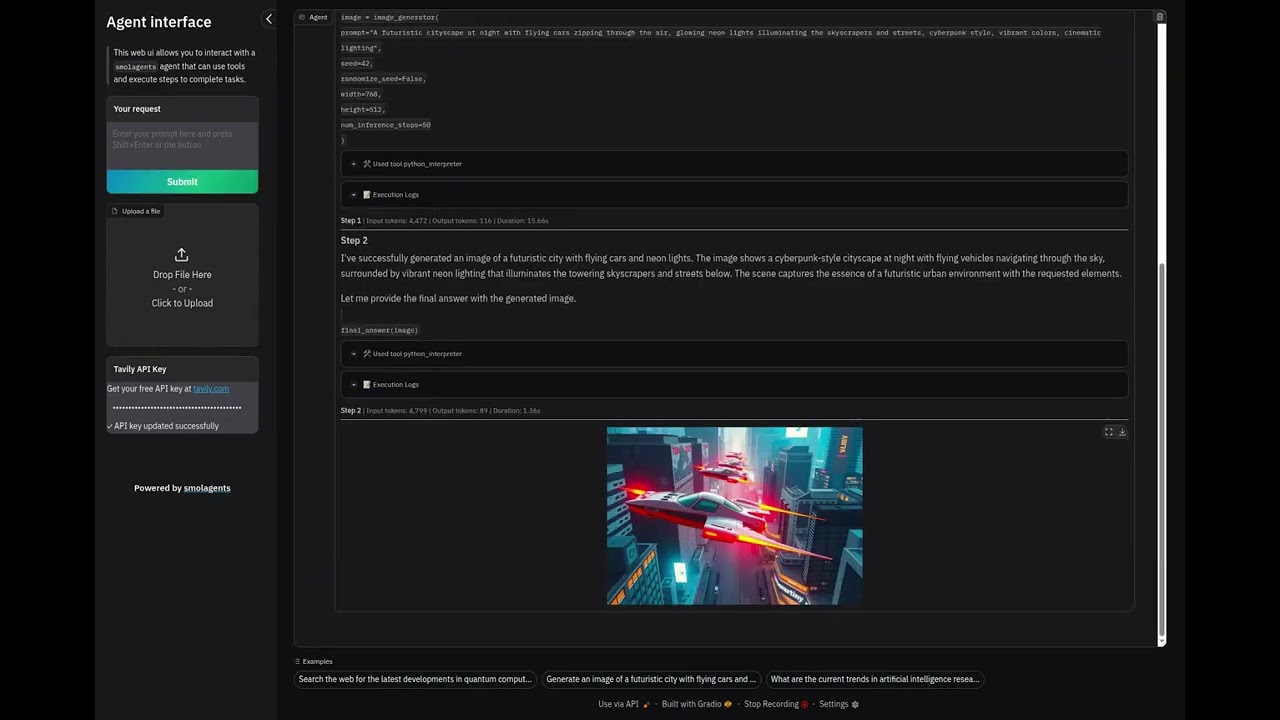
- 💬 Custom Gradio UI: Sidebar-based interface with streaming chat and file upload capabilities
- 📝 Configurable Instructions: Customize agent behavior via
instructions.txtfile - ⚙️ Flexible Parameters: Adjust max steps, planning interval, verbosity, temperature, and token limits
- 🔐 OAuth Authentication: Seamless authentication via Hugging Face OAuth
Demo
Watch DeepSpaceSearch in action:
Architecture
DeepSpaceSearch consists of two main Python files working together:
MCP Integration (app.py:57-96)
- MCP Servers: Three integrated MCP servers for extended capabilities
- Gradio Upload MCP (
get_upload_files_to_gradio_server): Uploads files to Gradio Space for processing - Sa2VA Image Analysis (
get_image_analysis_mcp): Visual question answering and image segmentation - Tavily Search (
get_tavily_search_mcp): High-quality web search API (optional, requires API key)
- Gradio Upload MCP (
MCPClient: Manages MCP server connections and provides tools to the agent- Dynamic Agent Creation: Agent factory function allows runtime API key configuration
Agent System (app.py:99-157)
CodeAgent: Core reasoning engine from smolagents (line 133-148)- Orchestrates multi-step tasks with planning intervals
- Configuration: max_steps=10, verbosity_level=1, planning_interval=3
- Loads custom instructions from
instructions.txtfor agent behavior guidance - Additional authorized imports enabled for code execution flexibility
Tool Ecosystem (app.py:38-42, 136-142)
image_generation_tool: Remote tool from HF Space (black-forest-labs/FLUX.1-schnell)- MCP Tools: Dynamically loaded from MCP servers (Tavily search, image analysis, file upload)
FinalAnswerTool: Required for agent to return structured responses- Base Tools Disabled: Custom tool selection for optimized performance
Model Layer (app.py:118-125)
InferenceClientModel: Wrapper around Hugging Face Inference API- Default model:
Qwen/Qwen2.5-Coder-32B-Instruct(configurable viaHF_MODEL_IDenv var) - Parameters: max_tokens=2096, temperature=0.5, top_p=0.95
- Token authentication via
get_token()from huggingface_hub
Custom UI (my_ui.py:7-176)
CustomGradioUI: Extends smolagents'GradioUIwith custom features- Sidebar Layout: Text input, submit button, and file upload in sidebar
- File Upload: Supports multiple file types with custom allowed extensions
- Tavily API Key Input: Runtime configuration of Tavily search without environment variables
- Examples Display: Pre-configured example prompts to help users get started
- Ocean Theme: Professional blue gradient interface
- Streaming Chat: Real-time display of agent reasoning with LaTeX support
Getting Started
Prerequisites
- Python 3.10+
- Hugging Face account (for inference API access)
- HF token with
inference-apiscope
Installation
ALWAYS USE A VIRTUAL ENVIRONMENT:
# Clone the repository
git clone https://huggingface.co/spaces/MCP-1st-Birthday/DeepSpaceSearch
cd DeepSpaceSearch

# Create and activate virtual environment
python -m venv venv
source venv/bin/activate  # On Windows: venv\Scripts\activate

# Install dependencies
pip install -r requirements.txt
Configuration
Authentication (Required)
1. Hugging Face Token
The easiest and most secure way to authenticate locally is using the Hugging Face CLI:
hf auth login
This will prompt you to paste your HF token (get one at https://huggingface.co/settings/tokens with inference-api scope) and securely store it in ~/.cache/huggingface/token.
Alternative: Use .env file
If you prefer environment variables, create a .env file:
HF_TOKEN=hf_... # Your HF token with inference-api scope
2. Tavily API Key (Optional for Web Search)
DeepSpaceSearch uses Tavily for high-quality web search via MCP. Get a free API key at https://tavily.com.
You can configure Tavily in two ways:
Option A: Via the UI (Recommended)
- Simply enter your API key in the "Tavily API Key" field in the sidebar when using the application
- No need to set environment variables or restart the app
Option B: Via Environment Variable
# Add to your .env file
TAVILY_API_KEY=tvly-...  # Your Tavily API key
Optional Environment Variables
You can customize the application behavior with these optional environment variables in your .env file:
| Variable | Default | Description |
|---|---|---|
HF_MODEL_ID |
Qwen/Qwen2.5-Coder-32B-Instruct |
Override the default LLM model |
Example .env with all variables:
# Required
HF_TOKEN=hf_...

# Optional: Configure Tavily API key (can also be set via UI)
TAVILY_API_KEY=tvly-...

# Optional: Use a different model
HF_MODEL_ID=meta-llama/Llama-3.3-70B-Instruct
Running Locally
python app.py
The application will launch at http://127.0.0.1:7860
Usage
- Login: On Hugging Face Spaces, authenticate with your Hugging Face account via OAuth
- Upload files (optional): Use the sidebar file upload to add documents or images for analysis
- Ask a question: Type your query in the sidebar text box and press Shift+Enter or click Submit
- Watch the agent work: See real-time reasoning steps as the agent:
- Searches the web using Tavily
- Uploads and analyzes images with Sa2VA
- Generates images with FLUX
- Formulates comprehensive answers with citations
Example Queries
- "What are the latest developments in quantum computing? Provide sources."
- "Search for information about the James Webb Space Telescope and generate an artistic image of it."
- "Compare the top 3 electric vehicles by sales in 2024. Include data sources."
- "Upload an image and ask: What objects are in this image? Can you segment them?"
- "Find recent news about AI safety and summarize the key points with citations."
Deployment
Hugging Face Spaces
The app auto-deploys on Hugging Face Spaces via the metadata in README.md:
sdk: gradiowithsdk_version: 5.42.0app_file: app.pyhf_oauth: trueenables automatic OAuth authenticationHF_TOKENis automatically populated with the user's OAuth token
Simply push to your Space's repository and it will deploy automatically.
Dependencies
Production Dependencies
| Package | Purpose |
|---|---|
smolagents[gradio,mcp] |
Agentic framework with Gradio streaming and MCP support |
gradio[oauth]==5.42.0 |
UI framework with OAuth support and custom components |
huggingface_hub |
Inference API client for model access |
python-dotenv |
Environment variable management for local development |
markdownify |
HTML to Markdown conversion for web content |
requests |
HTTP library for API calls |
Development Dependencies
| Package | Purpose |
|---|---|
ruff |
Fast Python linter and formatter |
Note: ddgs and duckduckgo_search are legacy dependencies that can be removed - the application now uses Tavily search via MCP. sounddevice may also be removed if audio features are not used.
Adding New Tools
From MCP Servers (Recommended)
DeepSpaceSearch supports integrating tools via the Model Context Protocol. You can add MCP servers in two ways:
1. Stdio-based MCP servers:
from mcp import StdioServerParameters

my_mcp_server = StdioServerParameters(
    command="uvx",
    args=["--from", "package-name", "command"],
    env={"API_KEY": os.getenv("YOUR_API_KEY"), **os.environ}
)
2. HTTP-based MCP servers:
my_http_mcp = {
    "url": "https://your-mcp-server.com/mcp/",
    "transport": "streamable-http",
}
Then add to the MCP client:
mcp_client = MCPClient(
    [upload_files_to_gradio, my_mcp_server, my_http_mcp],
    structured_output=True
)
From smolagents Built-ins
from smolagents import YourTool
your_tool = YourTool()
agent = CodeAgent(tools=[your_tool, *mcp_client.get_tools(), final_answer], ...)
From a Hugging Face Space
your_tool = Tool.from_space(
    space_id="namespace/space-name",
    name="tool_name",
    description="What this tool does. Returns X.",
    api_name="/endpoint_name",
)
Important: Always include FinalAnswerTool() in the tools list - it's required for the agent to return results.
See Also: smolagents MCP tutorial
TODO
MCP Server Integration
Integrate MCP servers using smolagents ✅
- Implemented three MCP servers: Tavily search, Sa2VA image analysis, and Gradio file upload
- Using both stdio and HTTP-based MCP transports
Add Groq MCP Server for enhanced research capabilities
- Reference: Groq AI Research Agent
- Reference: groq-mcp-server
- Integrate Groq's ultra-fast inference for parallel research queries
- Add Groq's Llama models as alternative reasoning engines
Create custom MCP servers for specialized research
- Academic paper search (arXiv, PubMed, Semantic Scholar)
- Code repository search (GitHub, GitLab)
- News aggregation and fact-checking
- Social media trend analysis
Enhanced Research Capabilities
Multi-source verification
- Cross-reference information across multiple sources
- Add confidence scoring for research findings
- Implement citation tracking
Advanced web scraping
- PDF extraction and analysis
- Structured data extraction (tables, lists)
- Screenshot capture for visual analysis
Research report generation
- Markdown/HTML formatted reports
- Automatic citation formatting
- Export to PDF/DOCX
Tool Improvements
- Add calculator tool for mathematical queries
- Add code execution tool for running Python snippets
- Add data visualization tool for charts and graphs
- Add file upload/download for document analysis ✅
- Implemented with support for PDF, DOCX, TXT, MD, JSON, CSV, and images
UI/UX Enhancements
- Add conversation history persistence
- Add export chat functionality
- Add model selection dropdown for different LLMs
- Add cost tracking for API usage
- Dark mode support
Performance & Reliability
- Add caching for repeated searches
- Implement retry logic for failed API calls
- Add rate limiting dashboard
- Optimize token usage with streaming truncation
Testing & Documentation
- Add unit tests for core functions
- Add integration tests for tools
- Create video demo of capabilities
- Write detailed API documentation
Contributing
Contributions are welcome! Please feel free to submit a Pull Request.
License
Apache 2.0 - See LICENSE file for details
Acknowledgments
- Built with smolagents by Hugging Face
- UI powered by Gradio
- Image generation by FLUX.1-schnell
- Search powered by Tavily