
Spaces:
Running


title: Aileen 3 Core - Information Foraging MCP Server
emoji: 👩🏻💼
colorFrom: purple
colorTo: blue
sdk: docker
pinned: false
license: cc-by-4.0
short_description: Use priors to surface novel insights in noisy communications
tags:
- building-mcp-track-enterprise
- building-mcp-track-customer
- anthropic
- gemini
- elevenlabs
Aileen 3 Core: Information Foraging MCP Server



"Information is surprises. You learn something when things don’t turn out the way you expected." ⸺ Roger Schank
♨️ Problem: The Noise-Signal Ratio
Professionals working at the intersection of regulation and technology drink from a firehose of information. Staying current requires monitoring hours of conferences, webinars, and podcasts.
Standard AI summarization fails here because it creates "flat" summaries that rehash what you already know. It treats every sentence as equally important.
✅ Solution: Expectation-Driven Analysis
Aileen 3 Core is a Model Context Protocol (MCP) server designed for Information Foraging. Grounded in cognitive science, it models "novelty" as prediction error.
Instead of asking "Summarize this video," Aileen 3 Core allows users to task a Large Language Model with: "Here is what I already know, and here is what I expect the speaker to say. Tell me only where they deviate from this baseline.". As part of a larger agentic AI system, the prior knowledge can even be derived from a memory bank.
💪 Key Capabilities
- ⛳️ Expectation-Driven Briefings: Uses Google Gemini to analyze audio/video against user-supplied priors (context, expectations, and knowledge gaps) to surface genuine surprises.
- 🔍 Context-Biased Transcription: Prevents hallucinations (e.g., confusing the German treaty "NOOTS" for "emergency state") by feeding media metadata as priors to the model.
- 🖼️ Visual Slide Extraction: Automatically detects, extracts, and, on request, translates slide stills from video feeds, treating slides as high-density information artifacts.
- 🔌 Universal MCP Support: Works with Claude Desktop, or any custom Agent.
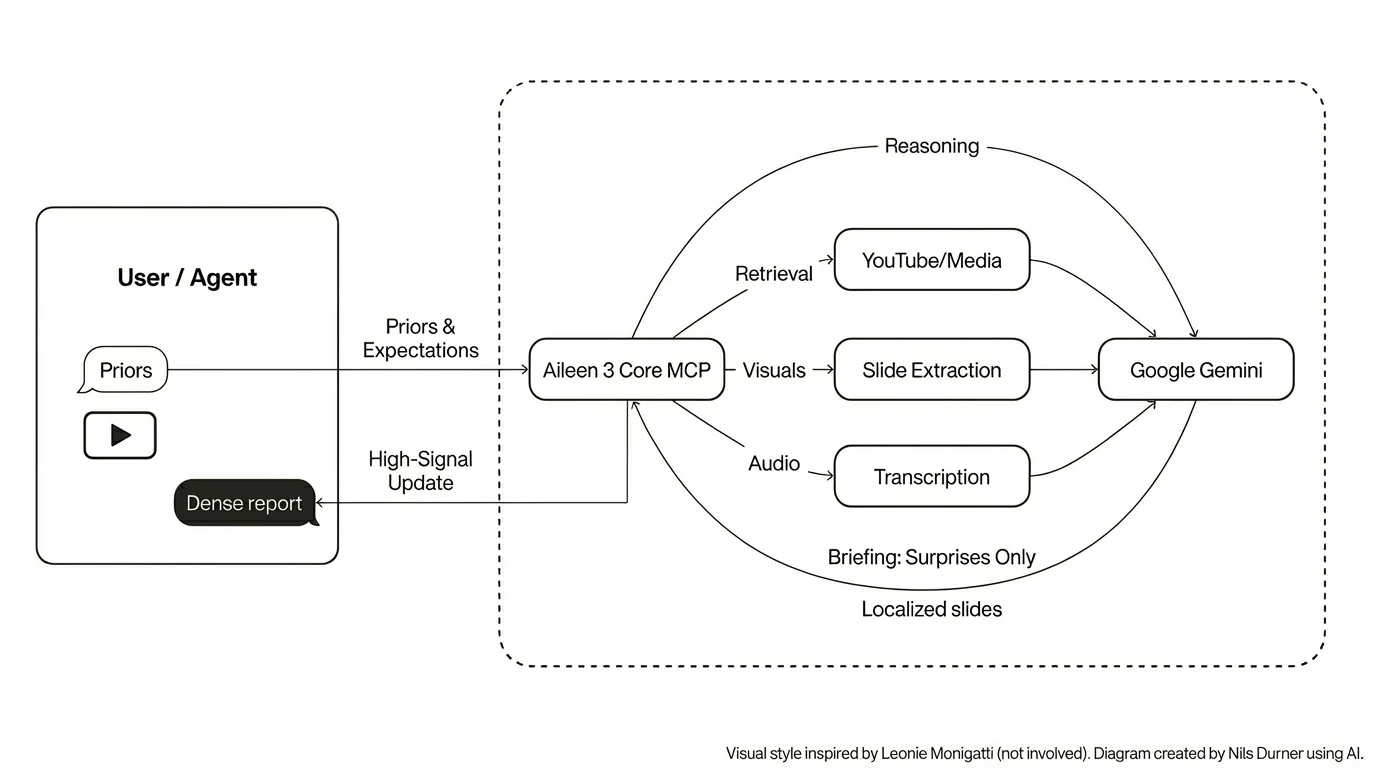
🏗️ Architecture
Aileen 3 Core exposes tools that bridge the gap between raw media and reasoning agents.
🚀 Quick Start: Claude Desktop
Aileen 3 Core is designed to be the "eyes and ears" for your local LLM client.
Install:
# Clone and install dependencies
pip install -e ./mcp
Obtain a Google Gemini API key: Google AI Studio
Configure
claude_desktop_config.json:. The Gemini API key will be read from the environment, so can also be set here:{ "mcpServers": { "aileen3-mcp": { "command": "python", "args": ["-m", "aileen3_mcp.server"], "env": { "GEMINI_API_KEY": "AI..." } } } }Restart Claude
The Haiku 4.5 model is sufficient for basic tasks. To make your plans fully transparent to the LLM, refer to "aileen3" explicitly in the prompt, e.g.:
Use aileen3 to translate slide 3 from YouTube video reference eXP-PvKcI9A to German.

🔍 Debugging
The message exchange and Claude-facing error messages can be read from Claude log files:
tail -n 20 -F ~/Library/Logs/Claude/mcp*.log
🧪 The Gradio Space (Interactive Demo)
We have built a custom Gradio 6 application that acts as a visual frontend for the MCP server. It demonstrates the pipeline step-by-step:
- Health Check: Verifies
ffmpeg,yt-dlp, and Gemini connectivity. - Hallucination Check: Demonstrates how lack of context leads to speech recognition errors.
- Context-biased Transcription: Fixes these errors by establishing priors.
- Expectation-driven Analysis: The core engine in action.
- Slide Translation: Extracting and localizing visual assets.
📘 MCP server overview
The MCP server is implemented in mcp/src/aileen3_mcp and exposes tools over stdio via aileen3_mcp.server. Google Gemini powers the analysis, transcription, and slide translation flows. Media retrieval is handled by yt-dlp and ffmpeg.
Environment prerequisites:
GEMINI_API_KEYset to a valid Gemini API keyffmpeg,deno,yt-dlpinstalled and onPATH
Optional configuration:
AILEEN3_ANALYSIS_MODELto override the default Gemini model used for expectation-driven analysis (defaults togemini-flash-latestfor straightforward experimentation on the free tier of Google AI Studio;gemini-3-pro-previewrecommended for accuracy).AILEEN3_CACHE_DIRto change the base cache directory (default:~/.cache/aileen3).AILEEN3_DEBUG=1to enable additional debug artefacts on disk.
⭐️ Example client integration
The companion project Aileen 3 Agent uses this MCP server via the google.adk McpToolset, spawning aileen3_mcp.server over stdio with:
command:sys.executableargs:["-m", "aileen3_mcp.server"]env: explicitly forwardingGEMINI_API_KEYinto the MCP processtimeout:1200seconds at the MCP transport level, to accommodate long-running video analysis and transcription jobs beyond the 30 seconds default
When integrating this MCP into your own agent or client:
- Set transport-level timeouts generously (10–20 minutes) and rely on the tools’
wait_secondsargument plus status polling for progress. - Ensure
GEMINI_API_KEY(and any optionalAILEEN3_*variables you use) are visible in the environment of the MCP server process, not just the client.
🛠️ MCP tools overview
All tools are registered in aileen3_mcp.server.make_app and exposed via a stdio MCP server for use by the Gradio demo, Claude Desktop, and other clients.
In short, the public tools are:
healthsearch_youtubestart_media_retrieval/get_media_retrieval_statusstart_slide_extraction/get_extracted_slidestranslate_slidestart_media_analysis/get_media_analysis_resultstart_media_transcription/get_media_transcription_result
These tools are designed to be called from an agentic AI system that:
- first chooses a media
source(optionally usingsearch_youtube) - then calls
start_media_retrieval - and finally uses the
referencetoken to drive analysis, transcription, or slide translation.
For detailed tool contracts (arguments, return payloads, and error shapes), see mcp/README.md.
🏆 Hackathon Context & Journey
Aileen 3 Core was built for the MCP's 1st Birthday - Hosted by Anthropic and Gradio and serves as the backbone for the Aileen 3 Agent (developed for the AI Agents Intensive Course with Google).
The required supplements - HuggingFace Space, demo video, and social media post - are behind the badges at the very top of this page.
📦 Local Development
# Build the Docker image
docker build -t aileen3-core .

# Run the Gradio interface
docker run -it -p 7860:7860 aileen3-core
🛡️ Security & privacy
- Your Gemini key is used only server-side to call Gemini models.
- Media is downloaded to cache for repeatability; clear ~/.cache/aileen3 to remove artefacts.
- No analytics or third-party telemetry included.
🚧 Limitations
translate_slidedoes currently not benefit from priors; translation quality could be improved that way- No AI safety guardrails (tone, style, anti prompt-injection, ...) included
- No cost control included
- Hallucination risk - Aileen may make mistakes.
- Remote MCP operating mode not tested; would rely on external access protection
👾 Troubleshooting
- Gemini 401 “API keys are not supported…”: use AI Studio key starting with “AI…”, not Vertex keys (“AQ…”).
- Long jobs: increase transport timeout (10–20 min) and leverage wait_seconds + polling get_* tools.
- YouTube access:
- ensure YouTube is reachable
- yt-dlp is recent
- if site JS protection breaks, install yt-dlp-ejs (see Space health check).