
Spaces:
Configuration error

Configuration error
| <div align="center"> | |
| <h1 align="center">MoneyPrinterTurbo 💸</h1> | |
| <p align="center"> | |
| <a href="https://github.com/harry0703/MoneyPrinterTurbo/stargazers"><img src="https://img.shields.io/github/stars/harry0703/MoneyPrinterTurbo.svg?style=for-the-badge" alt="Stargazers"></a> | |
| <a href="https://github.com/harry0703/MoneyPrinterTurbo/issues"><img src="https://img.shields.io/github/issues/harry0703/MoneyPrinterTurbo.svg?style=for-the-badge" alt="Issues"></a> | |
| <a href="https://github.com/harry0703/MoneyPrinterTurbo/network/members"><img src="https://img.shields.io/github/forks/harry0703/MoneyPrinterTurbo.svg?style=for-the-badge" alt="Forks"></a> | |
| <a href="https://github.com/harry0703/MoneyPrinterTurbo/blob/main/LICENSE"><img src="https://img.shields.io/github/license/harry0703/MoneyPrinterTurbo.svg?style=for-the-badge" alt="License"></a> | |
| </p> | |
| <br> | |
| <h3>简体中文 | <a href="README-en.md">English</a></h3> | |
| <div align="center"> | |
| <a href="https://trendshift.io/repositories/8731" target="_blank"><img src="https://trendshift.io/api/badge/repositories/8731" alt="harry0703%2FMoneyPrinterTurbo | Trendshift" style="width: 250px; height: 55px;" width="250" height="55"/></a> | |
| </div> | |
| <br> | |
| 只需提供一个视频 <b>主题</b> 或 <b>关键词</b> ,就可以全自动生成视频文案、视频素材、视频字幕、视频背景音乐,然后合成一个高清的短视频。 | |
| <br> | |
| <h4>Web界面</h4> | |
|  | |
| <h4>API界面</h4> | |
|  | |
| </div> | |
| ## 特别感谢 🙏 | |
| 由于该项目的 **部署** 和 **使用**,对于一些小白用户来说,还是 **有一定的门槛**,在此特别感谢 | |
| **录咖(AI智能 多媒体服务平台)** 网站基于该项目,提供的免费`AI视频生成器`服务,可以不用部署,直接在线使用,非常方便。 | |
| - 中文版:https://reccloud.cn | |
| - 英文版:https://reccloud.com | |
|  | |
| ## 感谢赞助 🙏 | |
| 感谢佐糖 https://picwish.cn 对该项目的支持和赞助,使得该项目能够持续的更新和维护。 | |
| 佐糖专注于**图像处理领域**,提供丰富的**图像处理工具**,将复杂操作极致简化,真正实现让图像处理更简单。 | |
|  | |
| ## 功能特性 🎯 | |
| - [x] 完整的 **MVC架构**,代码 **结构清晰**,易于维护,支持 `API` 和 `Web界面` | |
| - [x] 支持视频文案 **AI自动生成**,也可以**自定义文案** | |
| - [x] 支持多种 **高清视频** 尺寸 | |
| - [x] 竖屏 9:16,`1080x1920` | |
| - [x] 横屏 16:9,`1920x1080` | |
| - [x] 支持 **批量视频生成**,可以一次生成多个视频,然后选择一个最满意的 | |
| - [x] 支持 **视频片段时长** 设置,方便调节素材切换频率 | |
| - [x] 支持 **中文** 和 **英文** 视频文案 | |
| - [x] 支持 **多种语音** 合成,可 **实时试听** 效果 | |
| - [x] 支持 **字幕生成**,可以调整 `字体`、`位置`、`颜色`、`大小`,同时支持`字幕描边`设置 | |
| - [x] 支持 **背景音乐**,随机或者指定音乐文件,可设置`背景音乐音量` | |
| - [x] 视频素材来源 **高清**,而且 **无版权**,也可以使用自己的 **本地素材** | |
| - [x] 支持 **OpenAI**、**Moonshot**、**Azure**、**gpt4free**、**one-api**、**通义千问**、**Google Gemini**、**Ollama**、 | |
| **DeepSeek**、 **文心一言** 等多种模型接入 | |
| - 中国用户建议使用 **DeepSeek** 或 **Moonshot** 作为大模型提供商(国内可直接访问,不需要VPN。注册就送额度,基本够用) | |
| ### 后期计划 📅 | |
| - [ ] GPT-SoVITS 配音支持 | |
| - [ ] 优化语音合成,利用大模型,使其合成的声音,更加自然,情绪更加丰富 | |
| - [ ] 增加视频转场效果,使其看起来更加的流畅 | |
| - [ ] 增加更多视频素材来源,优化视频素材和文案的匹配度 | |
| - [ ] 增加视频长度选项:短、中、长 | |
| - [ ] 支持更多的语音合成服务商,比如 OpenAI TTS | |
| - [ ] 自动上传到YouTube平台 | |
| ## 视频演示 📺 | |
| ### 竖屏 9:16 | |
| <table> | |
| <thead> | |
| <tr> | |
| <th align="center"><g-emoji class="g-emoji" alias="arrow_forward">▶️</g-emoji> 《如何增加生活的乐趣》</th> | |
| <th align="center"><g-emoji class="g-emoji" alias="arrow_forward">▶️</g-emoji> 《金钱的作用》<br>更真实的合成声音</th> | |
| <th align="center"><g-emoji class="g-emoji" alias="arrow_forward">▶️</g-emoji> 《生命的意义是什么》</th> | |
| </tr> | |
| </thead> | |
| <tbody> | |
| <tr> | |
| <td align="center"><video src="https://github.com/harry0703/MoneyPrinterTurbo/assets/4928832/a84d33d5-27a2-4aba-8fd0-9fb2bd91c6a6"></video></td> | |
| <td align="center"><video src="https://github.com/harry0703/MoneyPrinterTurbo/assets/4928832/af2f3b0b-002e-49fe-b161-18ba91c055e8"></video></td> | |
| <td align="center"><video src="https://github.com/harry0703/MoneyPrinterTurbo/assets/4928832/112c9564-d52b-4472-99ad-970b75f66476"></video></td> | |
| </tr> | |
| </tbody> | |
| </table> | |
| ### 横屏 16:9 | |
| <table> | |
| <thead> | |
| <tr> | |
| <th align="center"><g-emoji class="g-emoji" alias="arrow_forward">▶️</g-emoji>《生命的意义是什么》</th> | |
| <th align="center"><g-emoji class="g-emoji" alias="arrow_forward">▶️</g-emoji>《为什么要运动》</th> | |
| </tr> | |
| </thead> | |
| <tbody> | |
| <tr> | |
| <td align="center"><video src="https://github.com/harry0703/MoneyPrinterTurbo/assets/4928832/346ebb15-c55f-47a9-a653-114f08bb8073"></video></td> | |
| <td align="center"><video src="https://github.com/harry0703/MoneyPrinterTurbo/assets/4928832/271f2fae-8283-44a0-8aa0-0ed8f9a6fa87"></video></td> | |
| </tr> | |
| </tbody> | |
| </table> | |
| ## 配置要求 📦 | |
| - 建议最低 CPU 4核或以上,内存 8G 或以上,显卡非必须 | |
| - Windows 10 或 MacOS 11.0 以上系统 | |
| ## 快速开始 🚀 | |
| 下载一键启动包,解压直接使用(路径不要有 **中文**、**特殊字符**、**空格**) | |
| ### Windows | |
| - 百度网盘(1.2.1 最新版本): https://pan.baidu.com/s/1pSNjxTYiVENulTLm6zieMQ?pwd=g36q 提取码: g36q | |
| 下载后,建议先**双击执行** `update.bat` 更新到**最新代码**,然后双击 `start.bat` 启动 | |
| 启动后,会自动打开浏览器(如果打开是空白,建议换成 **Chrome** 或者 **Edge** 打开) | |
| ### 其他系统 | |
| 还没有制作一键启动包,看下面的 **安装部署** 部分,建议使用 **docker** 部署,更加方便。 | |
| ## 安装部署 📥 | |
| ### 前提条件 | |
| - 尽量不要使用 **中文路径**,避免出现一些无法预料的问题 | |
| - 请确保你的 **网络** 是正常的,VPN需要打开`全局流量`模式 | |
| #### ① 克隆代码 | |
| ```shell | |
| git clone https://github.com/harry0703/MoneyPrinterTurbo.git | |
| ``` | |
| #### ② 修改配置文件 | |
| - 将 `config.example.toml` 文件复制一份,命名为 `config.toml` | |
| - 按照 `config.toml` 文件中的说明,配置好 `pexels_api_keys` 和 `llm_provider`,并根据 llm_provider 对应的服务商,配置相关的 | |
| API Key | |
| ### Docker部署 🐳 | |
| #### ① 启动Docker | |
| 如果未安装 Docker,请先安装 https://www.docker.com/products/docker-desktop/ | |
| 如果是Windows系统,请参考微软的文档: | |
| 1. https://learn.microsoft.com/zh-cn/windows/wsl/install | |
| 2. https://learn.microsoft.com/zh-cn/windows/wsl/tutorials/wsl-containers | |
| ```shell | |
| cd MoneyPrinterTurbo | |
| docker-compose up | |
| ``` | |
| > 注意:最新版的docker安装时会自动以插件的形式安装docker compose,启动命令调整为docker compose up | |
| #### ② 访问Web界面 | |
| 打开浏览器,访问 http://0.0.0.0:8501 | |
| #### ③ 访问API文档 | |
| 打开浏览器,访问 http://0.0.0.0:8080/docs 或者 http://0.0.0.0:8080/redoc | |
| ### 手动部署 📦 | |
| > 视频教程 | |
| - 完整的使用演示:https://v.douyin.com/iFhnwsKY/ | |
| - 如何在Windows上部署:https://v.douyin.com/iFyjoW3M | |
| #### ① 创建虚拟环境 | |
| 建议使用 [conda](https://conda.io/projects/conda/en/latest/user-guide/install/index.html) 创建 python 虚拟环境 | |
| ```shell | |
| git clone https://github.com/harry0703/MoneyPrinterTurbo.git | |
| cd MoneyPrinterTurbo | |
| conda create -n MoneyPrinterTurbo python=3.11 | |
| conda activate MoneyPrinterTurbo | |
| pip install -r requirements.txt | |
| ``` | |
| #### ② 安装好 ImageMagick | |
| - Windows: | |
| - 下载 https://imagemagick.org/script/download.php 选择Windows版本,切记一定要选择 **静态库** 版本,比如 | |
| ImageMagick-7.1.1-32-Q16-x64-**static**.exe | |
| - 安装下载好的 ImageMagick,**注意不要修改安装路径** | |
| - 修改 `配置文件 config.toml` 中的 `imagemagick_path` 为你的 **实际安装路径** | |
| - MacOS: | |
| ```shell | |
| brew install imagemagick | |
| ```` | |
| - Ubuntu | |
| ```shell | |
| sudo apt-get install imagemagick | |
| ``` | |
| - CentOS | |
| ```shell | |
| sudo yum install ImageMagick | |
| ``` | |
| #### ③ 启动Web界面 🌐 | |
| 注意需要到 MoneyPrinterTurbo 项目 `根目录` 下执行以下命令 | |
| ###### Windows | |
| ```bat | |
| conda activate MoneyPrinterTurbo | |
| webui.bat | |
| ``` | |
| ###### MacOS or Linux | |
| ```shell | |
| conda activate MoneyPrinterTurbo | |
| sh webui.sh | |
| ``` | |
| 启动后,会自动打开浏览器(如果打开是空白,建议换成 **Chrome** 或者 **Edge** 打开) | |
| #### ④ 启动API服务 🚀 | |
| ```shell | |
| python main.py | |
| ``` | |
| 启动后,可以查看 `API文档` http://127.0.0.1:8080/docs 或者 http://127.0.0.1:8080/redoc 直接在线调试接口,快速体验。 | |
| ## 语音合成 🗣 | |
| 所有支持的声音列表,可以查看:[声音列表](./docs/voice-list.txt) | |
| 2024-04-16 v1.1.2 新增了9种Azure的语音合成声音,需要配置API KEY,该声音合成的更加真实。 | |
| ## 字幕生成 📜 | |
| 当前支持2种字幕生成方式: | |
| - **edge**: 生成`速度快`,性能更好,对电脑配置没有要求,但是质量可能不稳定 | |
| - **whisper**: 生成`速度慢`,性能较差,对电脑配置有一定要求,但是`质量更可靠`。 | |
| 可以修改 `config.toml` 配置文件中的 `subtitle_provider` 进行切换 | |
| 建议使用 `edge` 模式,如果生成的字幕质量不好,再切换到 `whisper` 模式 | |
| > 注意: | |
| 1. whisper 模式下需要到 HuggingFace 下载一个模型文件,大约 3GB 左右,请确保网络通畅 | |
| 2. 如果留空,表示不生成字幕。 | |
| > 由于国内无法访问 HuggingFace,可以使用以下方法下载 `whisper-large-v3` 的模型文件 | |
| 下载地址: | |
| - 百度网盘: https://pan.baidu.com/s/11h3Q6tsDtjQKTjUu3sc5cA?pwd=xjs9 | |
| - 夸克网盘:https://pan.quark.cn/s/3ee3d991d64b | |
| 模型下载后解压,整个目录放到 `.\MoneyPrinterTurbo\models` 里面, | |
| 最终的文件路径应该是这样: `.\MoneyPrinterTurbo\models\whisper-large-v3` | |
| ``` | |
| MoneyPrinterTurbo | |
| ├─models | |
| │ └─whisper-large-v3 | |
| │ config.json | |
| │ model.bin | |
| │ preprocessor_config.json | |
| │ tokenizer.json | |
| │ vocabulary.json | |
| ``` | |
| ## 背景音乐 🎵 | |
| 用于视频的背景音乐,位于项目的 `resource/songs` 目录下。 | |
| > 当前项目里面放了一些默认的音乐,来自于 YouTube 视频,如有侵权,请删除。 | |
| ## 字幕字体 🅰 | |
| 用于视频字幕的渲染,位于项目的 `resource/fonts` 目录下,你也可以放进去自己的字体。 | |
| ## 常见问题 🤔 | |
| ### ❓如何使用免费的OpenAI GPT-3.5模型? | |
| [OpenAI宣布ChatGPT里面3.5已经免费了](https://openai.com/blog/start-using-chatgpt-instantly),有开发者将其封装成了API,可以直接调用 | |
| **确保你安装和启动了docker服务**,执行以下命令启动docker服务 | |
| ```shell | |
| docker run -p 3040:3040 missuo/freegpt35 | |
| ``` | |
| 启动成功后,修改 `config.toml` 中的配置 | |
| - `llm_provider` 设置为 `openai` | |
| - `openai_api_key` 随便填写一个即可,比如 '123456' | |
| - `openai_base_url` 改为 `http://localhost:3040/v1/` | |
| - `openai_model_name` 改为 `gpt-3.5-turbo` | |
| > 注意:该方式稳定性较差 | |
| ### ❓AttributeError: 'str' object has no attribute 'choices'` | |
| 这个问题是由于大模型没有返回正确的回复导致的。 | |
| 大概率是网络原因, 使用 **VPN**,或者设置 `openai_base_url` 为你的代理 ,应该就可以解决了。 | |
| 同时建议使用 **Moonshot** 或 **DeepSeek** 作为大模型提供商,这两个服务商在国内访问速度更快,更加稳定。 | |
| ### ❓RuntimeError: No ffmpeg exe could be found | |
| 通常情况下,ffmpeg 会被自动下载,并且会被自动检测到。 | |
| 但是如果你的环境有问题,无法自动下载,可能会遇到如下错误: | |
| ``` | |
| RuntimeError: No ffmpeg exe could be found. | |
| Install ffmpeg on your system, or set the IMAGEIO_FFMPEG_EXE environment variable. | |
| ``` | |
| 此时你可以从 https://www.gyan.dev/ffmpeg/builds/ 下载ffmpeg,解压后,设置 `ffmpeg_path` 为你的实际安装路径即可。 | |
| ```toml | |
| [app] | |
| # 请根据你的实际路径设置,注意 Windows 路径分隔符为 \\ | |
| ffmpeg_path = "C:\\Users\\harry\\Downloads\\ffmpeg.exe" | |
| ``` | |
| ### ❓ImageMagick的安全策略阻止了与临时文件@/tmp/tmpur5hyyto.txt相关的操作 | |
| 可以在ImageMagick的配置文件policy.xml中找到这些策略。 | |
| 这个文件通常位于 /etc/ImageMagick-`X`/ 或 ImageMagick 安装目录的类似位置。 | |
| 修改包含`pattern="@"`的条目,将`rights="none"`更改为`rights="read|write"`以允许对文件的读写操作。 | |
| ### ❓OSError: [Errno 24] Too many open files | |
| 这个问题是由于系统打开文件数限制导致的,可以通过修改系统的文件打开数限制来解决。 | |
| 查看当前限制 | |
| ```shell | |
| ulimit -n | |
| ``` | |
| 如果过低,可以调高一些,比如 | |
| ```shell | |
| ulimit -n 10240 | |
| ``` | |
| ### ❓Whisper 模型下载失败,出现如下错误 | |
| LocalEntryNotfoundEror: Cannot find an appropriate cached snapshotfolderfor the specified revision on the local disk and | |
| outgoing trafic has been disabled. | |
| To enablerepo look-ups and downloads online, pass 'local files only=False' as input. | |
| 或者 | |
| An error occured while synchronizing the model Systran/faster-whisper-large-v3 from the Hugging Face Hub: | |
| An error happened while trying to locate the files on the Hub and we cannot find the appropriate snapshot folder for the | |
| specified revision on the local disk. Please check your internet connection and try again. | |
| Trying to load the model directly from the local cache, if it exists. | |
| 解决方法:[点击查看如何从网盘手动下载模型](#%E5%AD%97%E5%B9%95%E7%94%9F%E6%88%90-) | |
| ## 反馈建议 📢 | |
| - 可以提交 [issue](https://github.com/harry0703/MoneyPrinterTurbo/issues) | |
| 或者 [pull request](https://github.com/harry0703/MoneyPrinterTurbo/pulls)。 | |
| ## 参考项目 📚 | |
| 该项目基于 https://github.com/FujiwaraChoki/MoneyPrinter 重构而来,做了大量的优化,增加了更多的功能。 | |
| 感谢原作者的开源精神。 | |
| ## 许可证 📝 | |
| 点击查看 [`LICENSE`](LICENSE) 文件 | |
| ## Star History | |
| [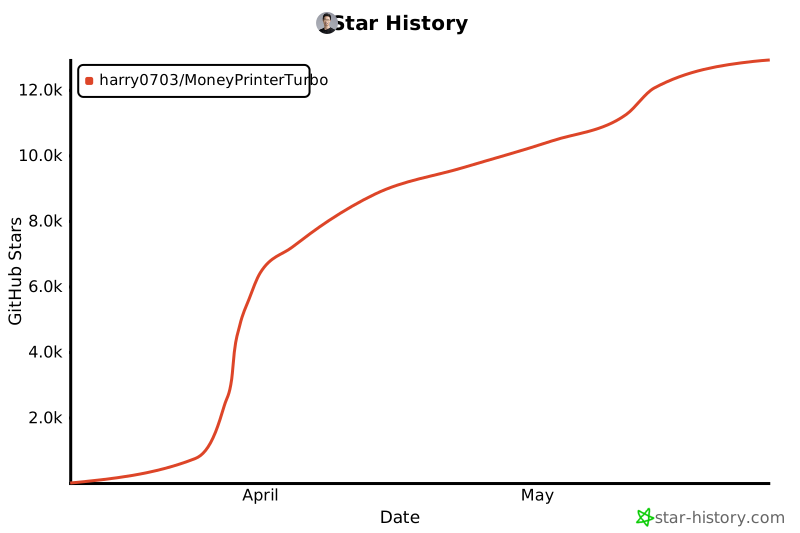](https://star-history.com/#harry0703/MoneyPrinterTurbo&Date) |