
Spaces:
Configuration error

Configuration error
| # VideoGrain: Modulating Space-Time Attention for Multi-Grained Video Editing (ICLR 2025) | |
| ## [<a href="https://knightyxp.github.io/VideoGrain_project_page/" target="_blank">Project Page</a>] | |
| [](https://arxiv.org/abs/2502.17258) | |
| [](https://huggingface.co/papers/2502.17258) | |
| [](https://knightyxp.github.io/VideoGrain_project_page/) | |
|  | |
| [](https://www.youtube.com/watch?v=XEM4Pex7F9E) | |
| ## Introduction | |
| VideoGrain is a zero-shot method for class-level, instance-level, and part-level video editing. | |
| - **Multi-grained Video Editing** | |
| - class-level: Editing objects within the same class (previous SOTA limited to this level) | |
| - instance-level: Editing each individual instance to distinct object | |
| - part-level: Adding new objects or modifying existing attributes at the part-level | |
| - **Training-Free** | |
| - Does not require any training/fine-tuning | |
| - **One-Prompt Multi-region Control & Deep investigations about cross/self attn** | |
| - modulating cross-attn for multi-regions control (visualizations available) | |
| - modulating self-attn for feature decoupling (clustering are available) | |
| <table class="center" border="1" cellspacing="0" cellpadding="5"> | |
| <tr> | |
| <td colspan="2" style="text-align:center;"><img src="assets/teaser/class_level.gif" style="width:250px; height:auto;"></td> | |
| <td colspan="2" style="text-align:center;"><img src="assets/teaser/instance_part.gif" style="width:250px; height:auto;"></td> | |
| <td colspan="2" style="text-align:center;"><img src="assets/teaser/2monkeys.gif" style="width:250px; height:auto;"></td> | |
| </tr> | |
| <tr> | |
| <!-- <td colspan="1" style="text-align:right; width:125px;"> </td> --> | |
| <td colspan="2" style="text-align:right; width:250px;"> class level</td> | |
| <td colspan="1" style="text-align:center; width:125px;">instance level</td> | |
| <td colspan="1" style="text-align:center; width:125px;">part level</td> | |
| <td colspan="2" style="text-align:center; width:250px;">animal instances</td> | |
| </tr> | |
| <tr> | |
| <td colspan="2" style="text-align:center;"><img src="assets/teaser/2cats.gif" style="width:250px; height:auto;"></td> | |
| <td colspan="2" style="text-align:center;"><img src="assets/teaser/soap-box.gif" style="width:250px; height:auto;"></td> | |
| <td colspan="2" style="text-align:center;"><img src="assets/teaser/man-text-message.gif" style="width:250px; height:auto;"></td> | |
| </tr> | |
| <tr> | |
| <td colspan="2" style="text-align:center; width:250px;">animal instances</td> | |
| <td colspan="2" style="text-align:center; width:250px;">human instances</td> | |
| <td colspan="2" style="text-align:center; width:250px;">part-level modification</td> | |
| </tr> | |
| </table> | |
| ## 📀 Demo Video | |
| [](https://www.youtube.com/watch?v=XEM4Pex7F9E "Demo Video of VideoGrain") | |
| <!-- https://github.com/user-attachments/assets/9bec92fc-21bd-4459-86fa-62404d8762bf --> | |
| ## 📣 News | |
| * **[2025/2/25]** Our VideoGrain is posted and recommended by Gradio on [LinkedIn](https://www.linkedin.com/posts/gradio_just-dropped-videograin-a-new-zero-shot-activity-7300094635094261760-hoiE) and [Twitter](https://x.com/Gradio/status/1894328911154028566), and recommended by [AK](https://x.com/_akhaliq/status/1894254599223017622). | |
| * **[2025/2/25]** Our VideoGrain is submited by AK to [HuggingFace-daily papers](https://huggingface.co/papers?date=2025-02-25), and rank [#1](https://huggingface.co/papers/2502.17258) paper of that day. | |
| * **[2025/2/24]** We release our paper on [arxiv](https://arxiv.org/abs/2502.17258), we also release [code](https://github.com/knightyxp/VideoGrain) and [full-data](https://drive.google.com/file/d/1dzdvLnXWeMFR3CE2Ew0Bs06vyFSvnGXA/view?usp=drive_link) on google drive. | |
| * **[2025/1/23]** Our paper is accepted to [ICLR2025](https://openreview.net/forum?id=SSslAtcPB6)! Welcome to **watch** 👀 this repository for the latest updates. | |
| ## 🍻 Setup Environment | |
| Our method is tested using cuda12.1, fp16 of accelerator and xformers on a single L40. | |
| ```bash | |
| # Step 1: Create and activate Conda environment | |
| conda create -n videograin python==3.10 | |
| conda activate videograin | |
| # Step 2: Install PyTorch, CUDA and Xformers | |
| conda install pytorch==2.3.1 torchvision==0.18.1 torchaudio==2.3.1 pytorch-cuda=12.1 -c pytorch -c nvidia | |
| pip install --pre -U xformers==0.0.27 | |
| # Step 3: Install additional dependencies with pip | |
| pip install -r requirements.txt | |
| ``` | |
| `xformers` is recommended to save memory and running time. | |
| </details> | |
| You may download all the base model checkpoints using the following bash command | |
| ```bash | |
| ## download sd 1.5, controlnet depth/pose v10/v11 | |
| bash download_all.sh | |
| ``` | |
| <details><summary>Click for ControlNet annotator weights (if you can not access to huggingface)</summary> | |
| You can download all the annotator checkpoints (such as DW-Pose, depth_zoe, depth_midas, and OpenPose, cost around 4G) from [baidu](https://pan.baidu.com/s/1sgBFLFkdTCDTn4oqHjGb9A?pwd=pdm5) or [google](https://drive.google.com/file/d/1qOsmWshnFMMr8x1HteaTViTSQLh_4rle/view?usp=drive_link) | |
| Then extract them into ./annotator/ckpts | |
| </details> | |
| ## ⚡️ Prepare all the data | |
| ### Provided data | |
| We have provided `all the video data and layout masks in VideoGrain` at following link. Please download unzip the data and put them in the `./data' root directory. | |
| ``` | |
| gdown https://drive.google.com/file/d/1dzdvLnXWeMFR3CE2Ew0Bs06vyFSvnGXA/view?usp=drive_link | |
| tar -zxvf videograin_data.tar.gz | |
| ``` | |
| ### Customize your own data | |
| **prepare video to frames** | |
| If the input video is mp4 file, using the following command to process it to frames: | |
| ```bash | |
| python image_util/sample_video2frames.py --video_path 'your video path' --output_dir './data/video_name' | |
| ``` | |
| **prepare layout masks** | |
| We segment videos using our ReLER lab's [SAM-Track](https://github.com/z-x-yang/Segment-and-Track-Anything). I suggest using the `app.py` in SAM-Track for `graio` mode to manually select which region in the video your want to edit. Here, we also provided an script ` image_util/process_webui_mask.py` to process masks from SAM-Track path to VideoGrain path. | |
| ## 🔥 VideoGrain Editing | |
| ### Inference | |
| **prepare config** | |
| VideoGrain is a training-free framework. To run VideoGrain, please prepare your config follow these steps: | |
| - 1. Replace your pretrained model path and controlnet path in your config. you can change the control_type to `dwpose` or `depth_zoe` or `depth` (midas). | |
| - 2. Prepare your video frames and layout masks (edit regions) using SAM-Track or SAM2 in dataset config. | |
| - 3. Change the `prompt`, and extract each `local prompt` in the editing prompts. the local prompt order should be same as layout masks order. | |
| - 4. Your can change flatten resolution with 1->64, 2->16, 4->8. (commonly, flatten at 64 worked best) | |
| - 5. To ensure temporal consistency, you can set `use_pnp: True` and `inject_step:5-10`. (Note that pnp>10 steps will be bad for multi-regions editing) | |
| - 6. If you want to visualize the cross attn weight, set `vis_cross_attn: True` | |
| - 7. If you want to cluster DDIM Inversion spatial temporal video feature, set `cluster_inversion_feature: True` | |
| ```bash | |
| bash test.sh | |
| #or | |
| CUDA_VISIBLE_DEVICES=0 accelerate launch test.py --config /path/to/the/config | |
| ``` | |
| <details><summary>The result is saved at `./result` . (Click for directory structure) </summary> | |
| ``` | |
| result | |
| ├── run_two_man | |
| │ ├── control # control conditon | |
| │ ├── infer_samples | |
| │ ├── input # the input video frames | |
| │ ├── masked_video.mp4 # check whether edit regions are accuratedly covered | |
| │ ├── sample | |
| │ ├── step_0 # result image folder | |
| │ ├── step_0.mp4 # result video | |
| │ ├── source_video.mp4 # the input video | |
| │ ├── visualization_denoise # cross attention weight | |
| │ ├── sd_study # cluster inversion feature | |
| ``` | |
| </details> | |
| Editing 16 frames video on an single L40, the GPU memory cost is at most 23GB memory. The RAM cost is very small, roughly around 4GB. | |
| ## Instance-level Video Editing | |
| ## ✏️ Citation | |
| If you think this project is helpful, please feel free to leave a star⭐️⭐️⭐️ and cite our paper: | |
| ```bibtex | |
| @article{yang2025videograin, | |
| title={VideoGrain: Modulating Space-Time Attention for Multi-grained Video Editing}, | |
| author={Yang, Xiangpeng and Zhu, Linchao and Fan, Hehe and Yang, Yi}, | |
| journal={arXiv preprint arXiv:2502.17258}, | |
| year={2025} | |
| } | |
| ``` | |
| ## 📞 Contact Authors | |
| Xiangpeng Yang [@knightyxp](https://github.com/knightyxp), email: knightyxp@gmail.com/Xiangpeng.Yang@student.uts.edu.au | |
| ## ✨ Acknowledgements | |
| - This code builds on [diffusers](https://github.com/huggingface/diffusers), and [FateZero](https://github.com/ChenyangQiQi/FateZero). Thanks for open-sourcing! | |
| - We would like to thank [AK(@_akhaliq)](https://x.com/_akhaliq/status/1894254599223017622) and Gradio team for recommendation! | |
| ## ⭐️ Star History | |
| [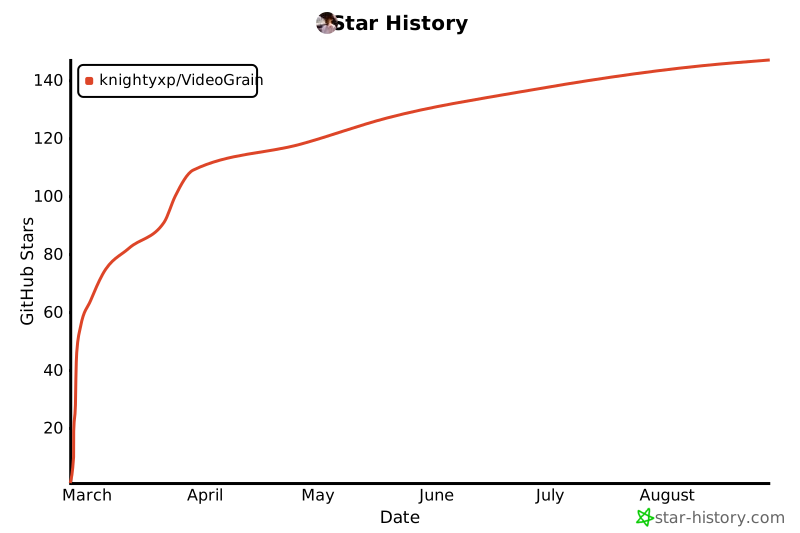](https://star-history.com/#knightyxp/VideoGrain&Date) | |