
Spaces:
Running

Running
| title: Code Review Agentic AI based on MCP | |
| emoji: 🛰️ | |
| colorFrom: indigo | |
| colorTo: blue | |
| sdk: docker | |
| app_file: Dockerfile | |
| pinned: false | |
| # Agentic AI Code Review in Pure Python - No Agentic Framework | |
| Agentic code review pipeline that plans, calls tools, and produces structured findings without any heavyweight framework. Implemented in plain Python using [uv](https://github.com/astral-sh/uv), [FastAPI](https://fastapi.tiangolo.com/), and a small footprint wrapper library [nmagents](https://github.com/alexcpn/noagent-ai). Deep code context comes from a Tree-Sitter-backed Model Context Protocol (MCP) server. | |
| ## What this repo demonstrates | |
| - End-to-end AI review loop in a few hundred lines of Python (`code_review_agent.py`) | |
| - Tool-augmented LLM via Tree-Sitter AST introspection from an MCP server | |
| - Deterministic step planning/execution with JSON repair and YAML logs | |
| - Works with OpenAI or any OpenAI-compatible endpoint (ollam,vllm) | |
| - Ships as a FastAPI service, CLI helper, and Docker image | |
| Demo https://alexcpn-code-review-agent.hf.space/ | |
| Using Tools https://alexcpn-treesitter-mcp.hf.space/mcp/ | |
| ## How it works | |
| - Fetch the PR diff, ask the LLM for a per-file review plan, then execute each step. | |
| - MCP server ([codereview_mcp_server](https://github.com/alexcpn/codereview_mcp_server)) exposes AST tools (definitions, call-sites, docstrings) using [Tree-Sitter](https://tree-sitter.github.io/tree-sitter/). | |
| - Minimal orchestration comes from [nmagents](https://github.com/alexcpn/noagent-ai) Command pattern: plan → optional tool calls → critique/patch suggestions → YAML logs. | |
| Models are effective with very detailed prompts instead of one-liners. Illustration prompt is [prompts/code_review_prompts.txt](prompts/code_review_prompts.txt) with context populated at place holders. | |
| Results are good if a task can be broken into steps and each step executed in place. This keeps the context tight. | |
| Models which gives good result are GPT 4.1 Nano, GPT 5 Nano. | |
| Also this will run with any OpenAI API comptatible model; Like ollam (with Microsoft phi3.5 model) and vllm (with Google gemma model) wtih a laptop GPU. | |
| Note that these small models are really not that good with complex tasks like this. | |
| ### Core flow (excerpt from `review_orchestrator.py`) | |
| ```python | |
| file_diffs = git_utils.get_pr_diff_url(repo_url, pr_number) | |
| response = call_llm_command.execute(context) # plan steps | |
| response_data, _ = parse_json_response_with_repair(...) # repair/parse plan | |
| tools = step.get("tools", []) | |
| if tools: | |
| tool_outputs = await execute_step_tools(step, ast_tool_call_command) | |
| step_context = load_prompt(diff_or_code_block=diff, tool_outputs=step.get("tool_results", "")) | |
| step_response = call_llm_command.execute(step_context) # execute each step | |
| ``` | |
| ## Prerequisites | |
| - Python 3.10+ | |
| - [uv](https://github.com/astral-sh/uv) installed | |
| - `.env` with `OPENAI_API_KEY=...` | |
| - Running MCP server with AST tools (e.g., [codereview_mcp_server](https://github.com/alexcpn/codereview_mcp_server)) reachable at `CODE_AST_MCP_SERVER_URL` | |
| # Setup | |
| ## Start the Code Review MCP server | |
| ```bash | |
| git clone https://github.com/alexcpn/codereview_mcp_server.git | |
| cd codereview_mcp_server | |
| uv run python http_server.py # serves MCP at http://127.0.0.1:7860/mcp/ | |
| ``` | |
| # Running Locally with Ray (Pure Ray) | |
| This is the simplest way to run the agent without Kubernetes complexity. | |
| ## Start Ray | |
| Start a local Ray cluster instance: | |
| ```bash | |
| uv run ray start --head | |
| # if there is problem with start up, kill old process | |
| ray stop --force | |
| ``` | |
| *Note: This starts Ray on your local machine. You can view the dashboard at http://127.0.0.1:8265* | |
| ## Run Redis with persistent storage: | |
| ``` | |
| docker run -d \ | |
| -p 6380:6379 \ | |
| --name redis-review \ | |
| -v $(pwd)/redis-data:/data \ | |
| redis \ | |
| redis-server --appendonly yes | |
| ``` | |
| To delete older jobs | |
| ``` | |
| redis-cli --scan --pattern "review:*" | xargs redis-cli del | |
| ``` | |
| ## Run the Agentic AI Webserver | |
| Note - see the .env (copy) file and create a .env file with the same variables but correct values | |
| ``` | |
| OPENAI_API_KEY=xxx | |
| REDIS_PORT=6380 | |
| AST_MCP_SERVER_URL=http://127.0.0.1:7860/mcp/ | |
| RAY_ADDRESS="auto" | |
| ``` | |
| ``` | |
| uv run web_server.py | |
| ``` | |
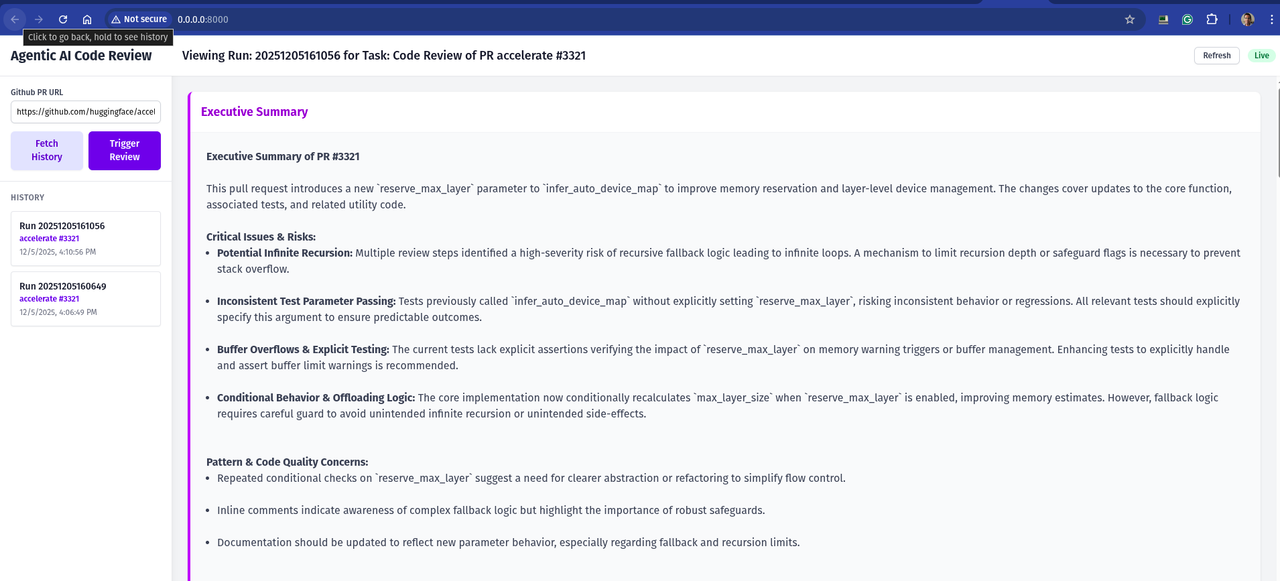
| This will start the web server on http://0.0.0.0:8000/ | |
| You will get a UI to trigger the review and see triggered reviews and steps | |
|  | |
| ## Deploying to Hugging Face Spaces | |
| This repository includes a configuration to deploy directly to Hugging Face Spaces (Docker SDK). | |
| 1. **Create a New Space**: | |
| - Go to [Hugging Face Spaces](https://huggingface.co/spaces). | |
| - Create a new Space. | |
| - Select **Docker** as the SDK. | |
| 2. **Upload Files**: | |
| - Upload the contents of this repository to your Space. | |
| - **Important**: You must tell Hugging Face to use `Dockerfile.hf` instead of the default `Dockerfile`. | |
| - You can do this by renaming `Dockerfile.hf` to `Dockerfile` in the Space, or by configuring the Space settings if supported. | |
| - *Recommendation*: Rename `Dockerfile` to `Dockerfile.local` and `Dockerfile.hf` to `Dockerfile` before pushing to the Space. | |
| 3. **Set Secrets**: | |
| - In your Space settings, go to **Settings > Variables and secrets**. | |
| - Add a new secret: `OPENAI_API_KEY` with your API key. | |
| 4. **Run**: | |
| - The Space will build and start. | |
| - Once running, you will see the web interface. | |
| --- | |
| ## References | |
| - [Model Context Protocol](https://github.com/modelcontextprotocol/specification) | |
| - [Tree-Sitter](https://tree-sitter.github.io/tree-sitter/) | |
| - [codereview_mcp_server](https://github.com/alexcpn/codereview_mcp_server) | |
| - [nmagents (noagent-ai)](https://github.com/alexcpn/noagent-ai) | |
| - [uv package manager](https://github.com/astral-sh/uv) | |