
Spaces:
Runtime error

Runtime error
| # Code Interpreter API | |
| A LangChain implementation of the ChatGPT Code Interpreter. | |
| Using CodeBoxes as backend for sandboxed python code execution. | |
| [CodeBox](https://github.com/shroominic/codebox-api/tree/main) is the simplest cloud infrastructure for your LLM Apps. | |
| You can run everything local except the LLM using your own OpenAI API Key. | |
| ## Features | |
| - Dataset Analysis, Stock Charting, Image Manipulation, .... | |
| - Internet access and auto Python package installation | |
| - Input `text + files` -> Receive `text + files` | |
| - Conversation Memory: respond based on previous inputs | |
| - Run everything local except the OpenAI API (OpenOrca or others maybe soon) | |
| - Use CodeBox API for easy scaling in production (coming soon) | |
| ## Installation | |
| Get your OpenAI API Key [here](https://platform.openai.com/account/api-keys) and install the package. | |
| ```bash | |
| pip install codeinterpreterapi | |
| ``` | |
| ## Usage | |
| Make sure to set the `OPENAI_API_KEY` environment variable (or use a `.env` file) | |
| ```python | |
| from codeinterpreterapi import CodeInterpreterSession | |
| async def main(): | |
| # create a session | |
| session = CodeInterpreterSession() | |
| await session.astart() | |
| # generate a response based on user input | |
| response = await session.generate_response( | |
| "Plot the bitcoin chart of 2023 YTD" | |
| ) | |
| # output the response (text + image) | |
| print("AI: ", response.content) | |
| for file in response.files: | |
| file.show_image() | |
| # terminate the session | |
| await session.astop() | |
| if __name__ == "__main__": | |
| import asyncio | |
| # run the async function | |
| asyncio.run(main()) | |
| ``` | |
| 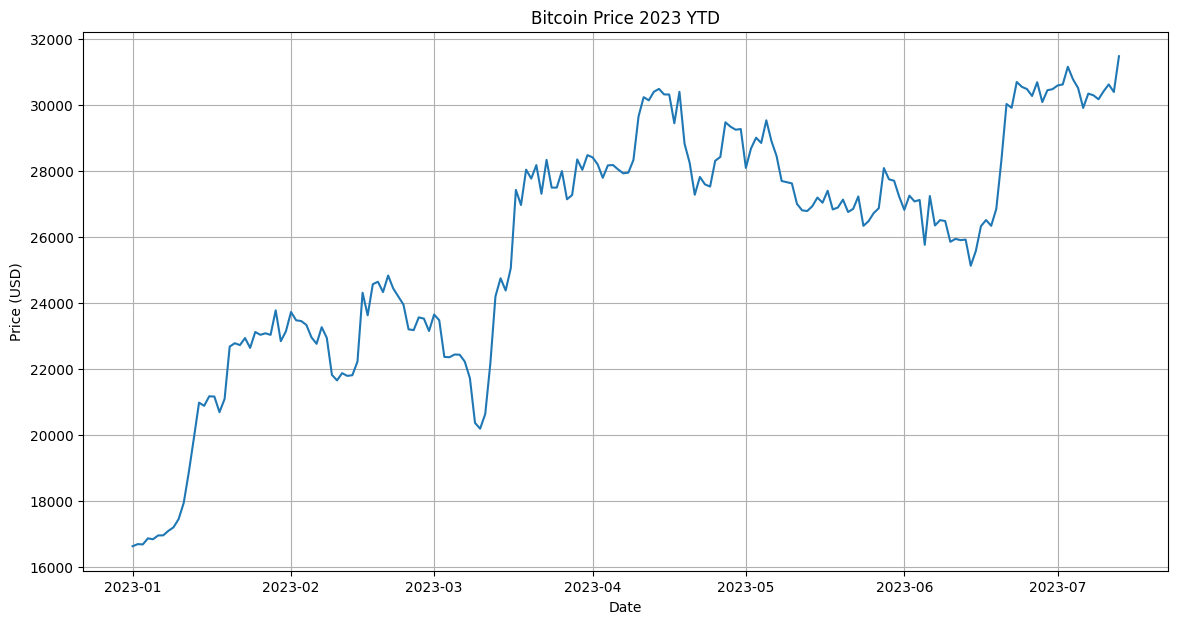 | |
| Bitcoin YTD Chart Output | |
| ## Dataset Analysis | |
| ```python | |
| from codeinterpreterapi import CodeInterpreterSession, File | |
| async def main(): | |
| # context manager for auto start/stop of the session | |
| async with CodeInterpreterSession() as session: | |
| # define the user request | |
| user_request = "Analyze this dataset and plot something interesting about it." | |
| files = [ | |
| File.from_path("examples/assets/iris.csv"), | |
| ] | |
| # generate the response | |
| response = await session.generate_response( | |
| user_request, files=files | |
| ) | |
| # output to the user | |
| print("AI: ", response.content) | |
| for file in response.files: | |
| file.show_image() | |
| if __name__ == "__main__": | |
| import asyncio | |
| asyncio.run(main()) | |
| ``` | |
| 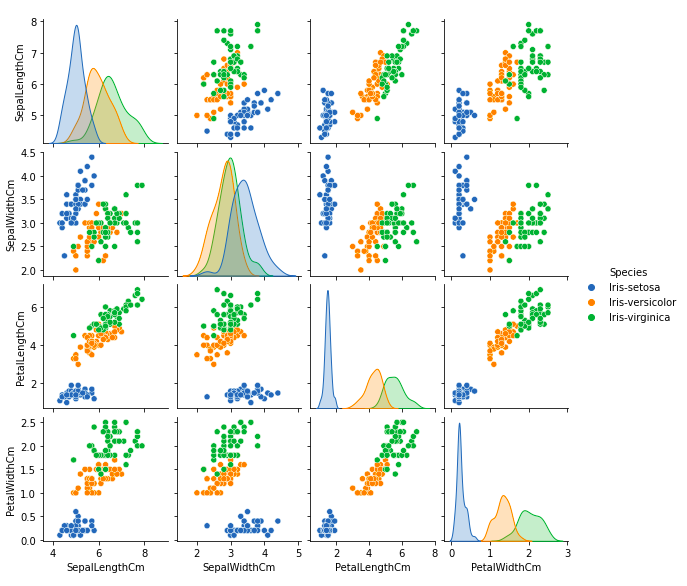 | |
| Iris Dataset Analysis Output | |
| ## Production | |
| In case you want to deploy to production, you can utilize the CodeBox API for seamless scalability. | |
| Please contact me if you are interested in this, as it is still in the early stages of development. | |
| ## Contributing | |
| There are some remaining TODOs in the code. | |
| So, if you want to contribute, feel free to do so. | |
| You can also suggest new features. Code refactoring is also welcome. | |
| Just open an issue or pull request and I will review it. | |
| Please also submit any bugs you find as an issue with a minimal code example or screenshot. | |
| This helps me a lot in improving the code. | |
| Thanks! | |
| ## Streamlit WebApp | |
| To start the web application created with streamlit: | |
| ```bash | |
| streamlit run frontend/app.py | |
| ``` | |
| ## License | |
| [MIT](https://choosealicense.com/licenses/mit/) | |
| ## Contact | |
| You can contact me at [contact@shroominic.com](mailto:contact@shroominic.com). | |
| But I prefer to use [Twitter](https://twitter.com/shroominic) or [Discord](https://gptassistant.app/community) DMs. | |
| ## Support this project | |
| If you would like to help this project with a donation, you can [click here](https://ko-fi.com/shroominic). | |
| Thanks, this helps a lot! ❤️ | |
| ## Star History | |
| <a href="https://star-history.com/#shroominic/codeinterpreter-api&Date"> | |
| <picture> | |
| <source media="(prefers-color-scheme: dark)" srcset="https://api.star-history.com/svg?repos=shroominic/codeinterpreter-api&type=Date&theme=dark" /> | |
| <source media="(prefers-color-scheme: light)" srcset="https://api.star-history.com/svg?repos=shroominic/codeinterpreter-api&type=Date" /> | |
| <img alt="Star History Chart" src="https://api.star-history.com/svg?repos=shroominic/codeinterpreter-api&type=Date" /> | |
| </picture> | |
| </a> | |