
Spaces:
Running


A newer version of the Gradio SDK is available: 6.20.0
title: PillPal
emoji: 💊
colorFrom: blue
colorTo: indigo
sdk: gradio
sdk_version: 6.16.0
python_version: '3.13'
app_file: server.py
pinned: false
license: mit
short_description: Photo a pill bottle, get a daily schedule + refill alert
models:
  - openbmb/MiniCPM-V-4.6
tags:
  - build-small-hackathon
  - backyard-ai
  - minicpm
  - vision
  - gradio
  - healthcare
💊 PillPal
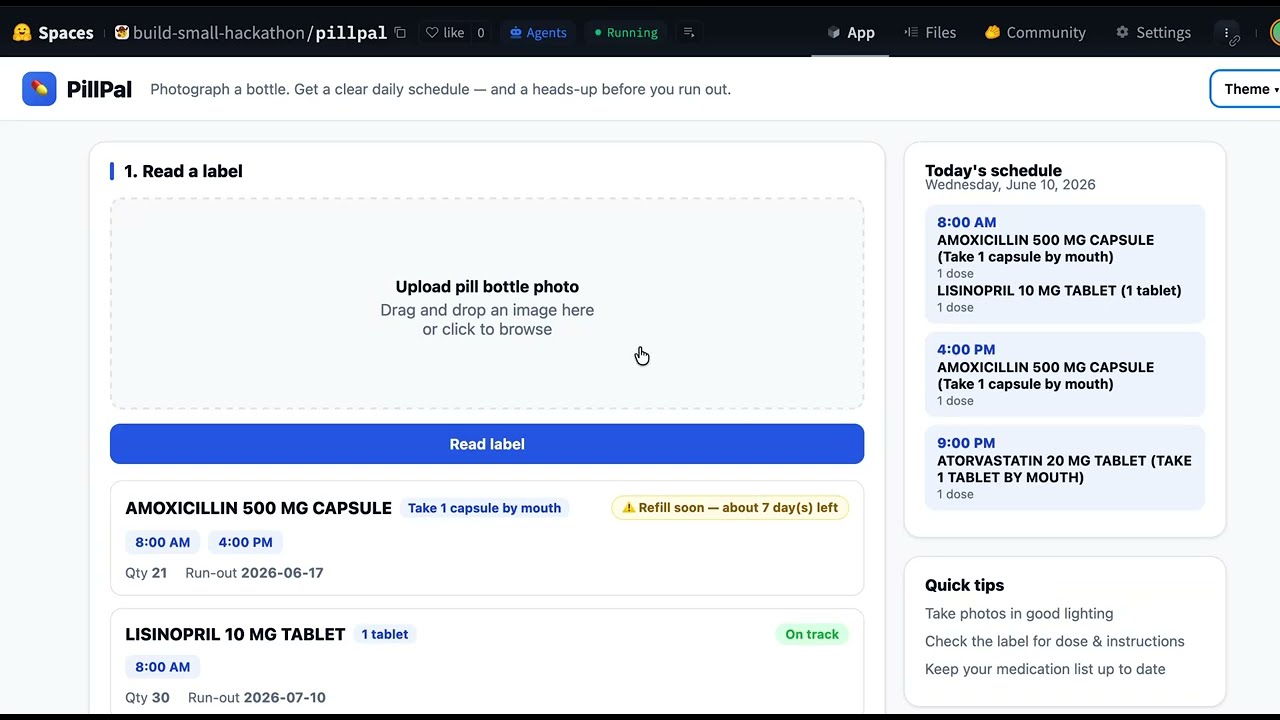
Photograph a pill bottle and get a clear daily schedule — plus a heads-up before you run out. A small vision model reads the label; everything else is plain, testable Python.
Built for the Build Small Hackathon · Backyard AI track — a real tool for a real person (a parent, neighbor, or anyone juggling medications).
Demo video
Model
- MiniCPM-V 4.6 (OpenBMB) via
the hosted MiniCPM-V API (
https://api.modelbest.cn/v1, OpenAI-compatible). The model has exactly one job: read the label and return JSON.
Targets the OpenBMB special award (built on MiniCPM models).
What we're targeting
Track: 🏡 Backyard AI — solve a real problem for someone you actually know.
| Target | Status | How |
|---|---|---|
| 🐝 OpenBMB special award | 🎯 | the label reader runs on MiniCPM-V 4.6 (OpenBMB) |
| 🎨 Off-Brand | ✅ | fully custom dashboard UI (upload → confirm → schedule), not default Gradio |
| 📡 Sharing is Caring | optional | could share a sample-label dataset / trace on the Hub |
| 🔌 Off the Grid | ✖️ n/a | uses the hosted MiniCPM-V API (switch PILLPAL_BACKEND=llama for a fully-offline run) |
| 🦙 Llama Champion | ✖️ n/a | not a Llama model (available via the llama backend if desired) |
| 🎯 Well-Tuned | ✖️ n/a | no fine-tuned model — uses MiniCPM-V as-is |
Why it fits the track
Medication mix-ups are a real, everyday problem. PillPal does one helpful thing well: turn a photo into a schedule and a refill warning. The AI is used narrowly (label → structured JSON); all the trust-critical logic — scheduling, run-out math — is deterministic Python you can unit-test, so it never invents dosing.
How it works
photo ─► MiniCPM-V reads the label ─► JSON ─► you confirm/correct ─► schedule + refill date
- Read — MiniCPM-V returns strict JSON:
drug_name, dose, frequency_text, quantity, refill_or_expiry_date. - Confirm — you check/correct the fields in the form.
- Schedule —
logic.pyturns the instruction into concrete times of day. - Refill —
logic.pyestimates the run-out date and warns if it's near.
- server.py —
gradio.Server: endpoints/read_label,/save_med,/delete_med,/clear_all,/state; serves the dashboard. - index.html — a custom dashboard UI (upload + read, confirm/correct form, today's schedule, light/dark theme).
- logic.py —
safe_parse,build_schedule,check_refill(the real work). - vision.py — label → JSON via the MiniCPM-V API (or local backends).
- storage.py — local JSON persistence (
meds.json).
Run locally
pip install -r requirements.txt
export PILLPAL_API_KEY=sk-...      # your MiniCPM-V API key (or use a Space secret)
python server.py
Without a key, the label reader shows a friendly "enter details manually" message
and the rest of the app still works. Use PILLPAL_MOCK=1 for canned label data.
Test
pytest -q # logic tests, fully offline
Config (env vars)
| Var | Default | Purpose |
|---|---|---|
PILLPAL_API_KEY |
(none — set it) | MiniCPM-V API key (provide via env / Space secret) |
PILLPAL_API_MODEL |
MiniCPM-V-4.6-Instruct |
or MiniCPM-V-4.6-Thinking |
PILLPAL_API_URL |
https://api.modelbest.cn/v1/chat/completions |
MiniCPM-V endpoint |
PILLPAL_BACKEND |
api |
transformers (local/ZeroGPU) or llama (offline llama.cpp) |
PILLPAL_MOCK |
0 |
1 = canned label data, skip the model |
PILLPAL_STORE |
meds.json |
where the medication list is saved |