


| <div align="center"> | |
| [English](../README.md) | 简体中文 | [繁體中文](README_zh-TW.md) | [日本語](README_ja-JP.md) | |
| <img src="./images/banner.png" width="320px" alt="PDF2ZH"/> | |
| <h2 id="title">PDFMathTranslate</h2> | |
| <p> | |
| <!-- PyPI --> | |
| <a href="https://pypi.org/project/pdf2zh/"> | |
| <img src="https://img.shields.io/pypi/v/pdf2zh"/></a> | |
| <a href="https://pepy.tech/projects/pdf2zh"> | |
| <img src="https://static.pepy.tech/badge/pdf2zh"></a> | |
| <a href="https://hub.docker.com/repository/docker/byaidu/pdf2zh"> | |
| <img src="https://img.shields.io/docker/pulls/byaidu/pdf2zh"></a> | |
| <!-- License --> | |
| <a href="./LICENSE"> | |
| <img src="https://img.shields.io/github/license/Byaidu/PDFMathTranslate"/></a> | |
| <a href="https://huggingface.co/spaces/reycn/PDFMathTranslate-Docker"> | |
| <img src="https://img.shields.io/badge/%F0%9F%A4%97-Online%20Demo-FF9E0D"/></a> | |
| <a href="https://www.modelscope.cn/studios/AI-ModelScope/PDFMathTranslate"> | |
| <img src="https://img.shields.io/badge/ModelScope-Demo-blue"></a> | |
| <a href="https://github.com/Byaidu/PDFMathTranslate/pulls"> | |
| <img src="https://img.shields.io/badge/contributions-welcome-green"/></a> | |
| <a href="https://gitcode.com/Byaidu/PDFMathTranslate/overview"> | |
| <img src="https://gitcode.com/Byaidu/PDFMathTranslate/star/badge.svg"></a> | |
| <a href="https://t.me/+Z9_SgnxmsmA5NzBl"> | |
| <img src="https://img.shields.io/badge/Telegram-2CA5E0?style=flat-squeare&logo=telegram&logoColor=white"/></a> | |
| </p> | |
| <a href="https://trendshift.io/repositories/12424" target="_blank"><img src="https://trendshift.io/api/badge/repositories/12424" alt="Byaidu%2FPDFMathTranslate | Trendshift" style="width: 250px; height: 55px;" width="250" height="55"/></a> | |
| </div> | |
| 科学 PDF 文档翻译及双语对照工具 | |
| - 📊 保留公式、图表、目录和注释 *([预览效果](#preview))* | |
| - 🌐 支持 [多种语言](./ADVANCED.md#language) 和 [诸多翻译服务](./ADVANCED.md#services) | |
| - 🤖 提供 [命令行工具](#usage),[图形交互界面](#gui),以及 [容器化部署](#docker) | |
| 欢迎在 [GitHub Issues](https://github.com/Byaidu/PDFMathTranslate/issues) 或 [Telegram 用户群](https://t.me/+Z9_SgnxmsmA5NzBl) | |
| 有关如何贡献的详细信息,请查阅 [贡献指南](https://github.com/Byaidu/PDFMathTranslate/wiki/Contribution-Guide---%E8%B4%A1%E7%8C%AE%E6%8C%87%E5%8D%97) | |
| <h2 id="updates">更新</h2> | |
| - [2025 年 2 月 22 日] 更好的发布 CI 和精心打包的 windows-amd64 exe (由 [@awwaawwa](https://github.com/awwaawwa) 提供) | |
| - [2024 年 12 月 24 日] 翻译器现在支持在 [Xinference](https://github.com/xorbitsai/inference) 上使用本地模型 _(由 [@imClumsyPanda](https://github.com/imClumsyPanda) 提供)_ | |
| - [2024 年 12 月 19 日] 现在支持非 PDF/A 文档,使用 `-cp` _(由 [@reycn](https://github.com/reycn) 提供)_ | |
| - [2024 年 12 月 13 日] 额外支持后端 _(由 [@YadominJinta](https://github.com/YadominJinta) 提供)_ | |
| - [2024 年 12 月 10 日] 翻译器现在支持 Azure 上的 OpenAI 模型 _(由 [@yidasanqian](https://github.com/yidasanqian) 提供)_ | |
| <h2 id="preview">预览</h2> | |
| <div align="center"> | |
| <img src="./images/preview.gif" width="80%"/> | |
| </div> | |
| <h2 id="demo">在线演示 🌟</h2> | |
| <h2 id="demo">在线服务 🌟</h2> | |
| 您可以通过以下演示尝试我们的应用程序: | |
| - [公共免费服务](https://pdf2zh.com/) 在线使用,无需安装 _(推荐)_。 | |
| - [沉浸式翻译 - BabelDOC](https://app.immersivetranslate.com/babel-doc/) 每月免费 1000 页 _(推荐)_ | |
| - [在 HuggingFace 上托管的演示](https://huggingface.co/spaces/reycn/PDFMathTranslate-Docker) | |
| - [在 ModelScope 上托管的演示](https://www.modelscope.cn/studios/AI-ModelScope/PDFMathTranslate) 无需安装。 | |
| 请注意演示的计算资源有限,请避免滥用它们。 | |
| <h2 id="install">安装和使用</h2> | |
| ### 方法 | |
| 针对不同的使用案例,我们提供不同的方法来使用我们的程序: | |
| <details open> | |
| <summary>1. UV 安装</summary> | |
| 1. 安装 Python (3.10 <= 版本 <= 3.12) | |
| 2. 安装我们的包: | |
| ```bash | |
| pip install uv | |
| uv tool install --python 3.12 pdf2zh | |
| ``` | |
| 3. 执行翻译,文件生成在 [当前工作目录](https://chatgpt.com/share/6745ed36-9acc-800e-8a90-59204bd13444): | |
| ```bash | |
| pdf2zh document.pdf | |
| ``` | |
| </details> | |
| <details> | |
| <summary>2. Windows exe</summary> | |
| 1. 从 [发布页面](https://github.com/Byaidu/PDFMathTranslate/releases) 下载 pdf2zh-version-win64.zip | |
| 2. 解压缩并双击 `pdf2zh.exe` 运行。 | |
| </details> | |
| <details> | |
| <summary id="gui">3. 图形用户界面</summary> | |
| 1. 安装 Python (3.10 <= 版本 <= 3.12) | |
| 2. 安装我们的包: | |
| ```bash | |
| pip install pdf2zh | |
| ``` | |
| 3. 在浏览器中开始使用: | |
| ```bash | |
| pdf2zh -i | |
| ``` | |
| 4. 如果您的浏览器没有自动启动,请访问 | |
| ```bash | |
| http://localhost:7860/ | |
| ``` | |
| <img src="./images/gui.gif" width="500"/> | |
| 有关更多详细信息,请参阅 [GUI 文档](./README_GUI.md)。 | |
| </details> | |
| <details> | |
| <summary id="docker">4. Docker</summary> | |
| 1. 拉取并运行: | |
| ```bash | |
| docker pull byaidu/pdf2zh | |
| docker run -d -p 7860:7860 byaidu/pdf2zh | |
| ``` | |
| 2. 在浏览器中打开: | |
| ``` | |
| http://localhost:7860/ | |
| ``` | |
| 对于云服务上的 docker 部署: | |
| <div> | |
| <a href="https://www.heroku.com/deploy?template=https://github.com/Byaidu/PDFMathTranslate"> | |
| <img src="https://www.herokucdn.com/deploy/button.svg" alt="部署" height="26"></a> | |
| <a href="https://render.com/deploy"> | |
| <img src="https://render.com/images/deploy-to-render-button.svg" alt="部署到 Koyeb" height="26"></a> | |
| <a href="https://zeabur.com/templates/5FQIGX?referralCode=reycn"> | |
| <img src="https://zeabur.com/button.svg" alt="在 Zeabur 上部署" height="26"></a> | |
| <a href="https://app.koyeb.com/deploy?type=git&builder=buildpack&repository=github.com/Byaidu/PDFMathTranslate&branch=main&name=pdf-math-translate"> | |
| <img src="https://www.koyeb.com/static/images/deploy/button.svg" alt="部署到 Koyeb" height="26"></a> | |
| </div> | |
| </details> | |
| <details> | |
| <summary>5. Zotero 插件</summary> | |
| 有关更多细节,请参见 [Zotero PDF2zh](https://github.com/guaguastandup/zotero-pdf2zh)。 | |
| </details> | |
| <details> | |
| <summary>6. 命令行</summary> | |
| 1. 已安装 Python(3.10 <= 版本 <= 3.12) | |
| 2. 安装我们的包: | |
| ```bash | |
| pip install pdf2zh | |
| ``` | |
| 3. 执行翻译,文件生成在 [当前工作目录](https://chatgpt.com/share/6745ed36-9acc-800e-8a90-59204bd13444): | |
| ```bash | |
| pdf2zh document.pdf | |
| ``` | |
| </details> | |
| > [!TIP] | |
| > | |
| > - 如果你使用 Windows 并在下载后无法打开文件,请安装 [vc_redist.x64.exe](https://aka.ms/vs/17/release/vc_redist.x64.exe) 并重试。 | |
| > | |
| > - 如果你无法访问 Docker Hub,请尝试在 [GitHub 容器注册中心](https://github.com/Byaidu/PDFMathTranslate/pkgs/container/pdfmathtranslate) 上使用该镜像。 | |
| > ```bash | |
| > docker pull ghcr.io/byaidu/pdfmathtranslate | |
| > docker run -d -p 7860:7860 ghcr.io/byaidu/pdfmathtranslate | |
| > ``` | |
| ### 无法安装? | |
| 当前程序在工作前需要一个 AI 模型 (`wybxc/DocLayout-YOLO-DocStructBench-onnx`),一些用户由于网络问题无法下载。如果你在下载此模型时遇到问题,我们提供以下环境变量的解决方法: | |
| ```shell | |
| set HF_ENDPOINT=https://hf-mirror.com | |
| ``` | |
| 对于 PowerShell 用户: | |
| ```shell | |
| $env:HF_ENDPOINT = https://hf-mirror.com | |
| ``` | |
| 如果此解决方案对您无效或您遇到其他问题,请参阅 [常见问题解答](https://github.com/Byaidu/PDFMathTranslate/wiki#-faq--%E5%B8%B8%E8%A7%81%E9%97%AE%E9%A2%98)。 | |
| <h2 id="usage">高级选项</h2> | |
| 在命令行中执行翻译命令,在当前工作目录下生成译文文档 `example-mono.pdf` 和双语对照文档 `example-dual.pdf`,默认使用 Google 翻译服务,更多支持的服务在[这里](https://github.com/Byaidu/PDFMathTranslate/blob/main/docs/ADVANCED.md#services))。 | |
| <img src="./images/cmd.explained.png" width="580px" alt="cmd"/> | |
| 在下表中,我们列出了所有高级选项供参考: | |
| | 选项 | 功能 | 示例 | | |
| | ------------ | ------------------------------------------------------------------------------------------------------------- | ---------------------------------------------- | | |
| | files | 本地文件 | `pdf2zh ~/local.pdf` | | |
| | links | 在线文件 | `pdf2zh http://arxiv.org/paper.pdf` | | |
| | `-i` | [进入 GUI](#gui) | `pdf2zh -i` | | |
| | `-p` | [部分文档翻译](https://github.com/Byaidu/PDFMathTranslate/blob/main/docs/ADVANCED.md#partial) | `pdf2zh example.pdf -p 1` | | |
| | `-li` | [源语言](https://github.com/Byaidu/PDFMathTranslate/blob/main/docs/ADVANCED.md#languages) | `pdf2zh example.pdf -li en` | | |
| | `-lo` | [目标语言](https://github.com/Byaidu/PDFMathTranslate/blob/main/docs/ADVANCED.md#languages) | `pdf2zh example.pdf -lo zh` | | |
| | `-s` | [翻译服务](https://github.com/Byaidu/PDFMathTranslate/blob/main/docs/ADVANCED.md#services) | `pdf2zh example.pdf -s deepl` | | |
| | `-t` | [多线程](https://github.com/Byaidu/PDFMathTranslate/blob/main/docs/ADVANCED.md#threads) | `pdf2zh example.pdf -t 1` | | |
| | `-o` | 输出目录 | `pdf2zh example.pdf -o output` | | |
| | `-f`, `-c` | [异常](https://github.com/Byaidu/PDFMathTranslate/blob/main/docs/ADVANCED.md#exceptions) | `pdf2zh example.pdf -f "(MS.*)"` | | |
| | `-cp` | 兼容模式 | `pdf2zh example.pdf --compatible` | | |
| | `--share` | 公开链接 | `pdf2zh -i --share` | | |
| | `--authorized` | [授权](https://github.com/Byaidu/PDFMathTranslate/blob/main/docs/ADVANCED.md#auth) | `pdf2zh -i --authorized users.txt [auth.html]` | | |
| | `--prompt` | [自定义提示](https://github.com/Byaidu/PDFMathTranslate/blob/main/docs/ADVANCED.md#prompt) | `pdf2zh --prompt [prompt.txt]` | | |
| | `--onnx` | [使用自定义 DocLayout-YOLO ONNX 模型] | `pdf2zh --onnx [onnx/model/path]` | | |
| | `--serverport` | [使用自定义 WebUI 端口] | `pdf2zh --serverport 7860` | | |
| | `--dir` | [批量翻译] | `pdf2zh --dir /path/to/translate/` | | |
| | `--config` | [配置文件](https://github.com/Byaidu/PDFMathTranslate/blob/main/docs/ADVANCED.md#cofig) | `pdf2zh --config /path/to/config/config.json` | | |
| | `--serverport` | [自定义 gradio 服务器端口] | `pdf2zh --serverport 7860` | | |
| | `--babeldoc`| 使用实验性后端 [BabelDOC](https://funstory-ai.github.io/BabelDOC/) 翻译 |`pdf2zh --babeldoc` -s openai example.pdf| | |
| 有关详细说明,请参阅我们的文档 [高级用法](./ADVANCED.md),以获取每个选项的完整列表。 | |
| <h2 id="downstream">二次开发 (API)</h2> | |
| 当前的 pdf2zh API 暂时已弃用。API 将在 [pdf2zh 2.0](https://github.com/Byaidu/PDFMathTranslate/issues/586)发布后重新提供。对于需要程序化访问的用户,请使用[BabelDOC](https://github.com/funstory-ai/BabelDOC)的 `babeldoc.high_level.async_translate` 函数。 | |
| API 暂时弃用意味着:相关代码暂时不会被移除,但不会提供技术支持,也不会修复 bug。 | |
| <!-- 对于下游应用程序,请参阅我们的文档 [API 详细信息](./APIS.md),以获取更多信息: | |
| - [Python API](./APIS.md#api-python),如何在其他 Python 程序中使用该程序 | |
| - [HTTP API](./APIS.md#api-http),如何与已安装该程序的服务器进行通信 --> | |
| <h2 id="todo">待办事项</h2> | |
| - [ ] 使用基于 DocLayNet 的模型解析布局,[PaddleX](https://github.com/PaddlePaddle/PaddleX/blob/17cc27ac3842e7880ca4aad92358d3ef8555429a/paddlex/repo_apis/PaddleDetection_api/object_det/official_categories.py#L81),[PaperMage](https://github.com/allenai/papermage/blob/9cd4bb48cbedab45d0f7a455711438f1632abebe/README.md?plain=1#L102),[SAM2](https://github.com/facebookresearch/sam2) | |
| - [ ] 修复页面旋转、目录、列表格式 | |
| - [ ] 修复旧论文中的像素公式 | |
| - [ ] 异步重试,除了 KeyboardInterrupt | |
| - [ ] 针对西方语言的 Knuth–Plass 算法 | |
| - [ ] 支持非 PDF/A 文件 | |
| - [ ] [Zotero](https://github.com/zotero/zotero) 和 [Obsidian](https://github.com/obsidianmd/obsidian-releases) 的插件 | |
| <h2 id="acknowledgement">致谢</h2> | |
| - [Immersive Translation](https://immersivetranslate.com) 为此项目的活跃贡献者提供每月的专业会员兑换码,详细信息请查看:[CONTRIBUTOR_REWARD.md](https://github.com/funstory-ai/BabelDOC/blob/main/docs/CONTRIBUTOR_REWARD.md) | |
| - 文档合并:[PyMuPDF](https://github.com/pymupdf/PyMuPDF) | |
| - 文档解析:[Pdfminer.six](https://github.com/pdfminer/pdfminer.six) | |
| - 文档提取:[MinerU](https://github.com/opendatalab/MinerU) | |
| - 文档预览:[Gradio PDF](https://github.com/freddyaboulton/gradio-pdf) | |
| - 多线程翻译:[MathTranslate](https://github.com/SUSYUSTC/MathTranslate) | |
| - 布局解析:[DocLayout-YOLO](https://github.com/opendatalab/DocLayout-YOLO) | |
| - 文档标准:[PDF Explained](https://zxyle.github.io/PDF-Explained/),[PDF Cheat Sheets](https://pdfa.org/resource/pdf-cheat-sheets/) | |
| - 多语言字体:[Go Noto Universal](https://github.com/satbyy/go-noto-universal) | |
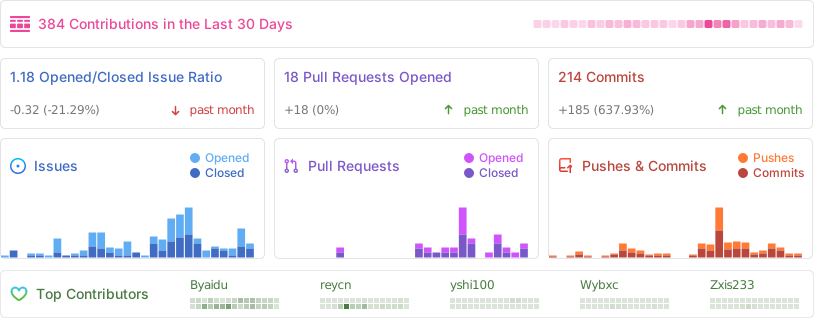
| <h2 id="contrib">贡献者</h2> | |
| <a href="https://github.com/Byaidu/PDFMathTranslate/graphs/contributors"> | |
| <img src="https://opencollective.com/PDFMathTranslate/contributors.svg?width=890&button=false" /> | |
| </a> | |
|  | |
| <h2 id="star_hist">星标历史</h2> | |
| <a href="https://star-history.com/#Byaidu/PDFMathTranslate&Date"> | |
| <picture> | |
| <source media="(prefers-color-scheme: dark)" srcset="https://api.star-history.com/svg?repos=Byaidu/PDFMathTranslate&type=Date&theme=dark" /> | |
| <source media="(prefers-color-scheme: light)" srcset="https://api.star-history.com/svg?repos=Byaidu/PDFMathTranslate&type=Date" /> | |
| <img alt="星标历史图表" src="https://api.star-history.com/svg?repos=Byaidu/PDFMathTranslate&type=Date"/> | |
| </picture> | |
| </a> | |