
Spaces:
Runtime error

Runtime error

| license: mit | |
| sdk: docker | |
| emoji: 🚀 | |
| colorFrom: purple | |
| colorTo: green | |
| sdk_version: 4.37.2 | |
| <p align="center"> | |
| <a href="#"> | |
| <img src="https://github.com/onuratakan/gpt-computer-assistant/assets/41792982/deeeb463-c161-4fc6-8407-71c3d8b7defe" alt="Logo" > | |
| </a> | |
| <br> | |
| <a href="#"> | |
| <img src="https://github.com/onuratakan/gpt-computer-assistant/assets/41792982/36714716-6990-40b0-84d5-cd7432811bcb" alt="Logo" > | |
| </a> | |
| <h3 align="center">GPT Computer Assistant</h3> | |
| <p align="center"> | |
| <a href="https://discord.gg/qApFmWMt8x"><img alt="Static Badge" src="https://img.shields.io/badge/Discord-Join?style=social&logo=discord" width=150></a> | |
| </p> | |
| <p align="center"> | |
| gpt-4o for windows, macos and ubuntu | |
| <br /> | |
| <a href="https://github.com/onuratakan/gpt-computer-assistant/wiki"><strong>Documentation</strong></a> | |
| . | |
| <a href="https://github.com/onuratakan/gpt-computer-assistant/#Capabilities"><strong>Explore the capabilities »</strong></a> | |
| <br /> | |
| </p> | |
| <br> | |
| <p align="center"> | |
| <a href="https://www.python.org/"> | |
| <img src="https://img.shields.io/badge/Made%20with-Python-1f425f.svg" alt="Made_with_python"> | |
| </a> | |
| . | |
| <img src="https://static.pepy.tech/personalized-badge/gpt-computer-assistant?period=total&units=international_system&left_color=grey&right_color=blue&left_text=PyPI%20Downloads" alt="pypi_downloads"> | |
| </p> | |
| <p align="center"> | |
| <a href="https://x.com/GPTCompAsst"><img alt="Static Badge" src="https://img.shields.io/twitter/follow/GPTCompAsst?style=social" width=160></a> | |
| </p> | |
| |ENGLISH|[简体中文](README.zh_CN.md)|[正體中文](README.zh_TW.md) | |
| # GPT Computer Assistant | |
| Hi, this is an alternative work for providing ChatGPT MacOS app to Windows and Linux. In this way this is a fresh and stable work. You can easily install as Python library for this time but we will prepare a pipeline for providing native install scripts (.exe). | |
| Powered by <a href="https://github.com/Upsonic/Tiger"><strong>Upsonic Tiger 🐅</strong></a> A function hub for llm agents. | |
| ## Installation and Run | |
| Needed >= Python 3.9 | |
| ```console | |
| pip3 install 'gpt-computer-assistant[base]' | |
| ``` | |
| ```console | |
| computerassistant | |
| ``` | |
| ### Wake Word | NEW | |
| <details> | |
| We have added Pvporcupine integration. To use it, you need to install an additional library: | |
| ```console | |
| pip3 install 'gpt-computer-assistant[wakeword]' | |
| ``` | |
| After that, please enter your [Pvporcupine](https://picovoice.ai/) API key and enable the wake word feature. | |
| </details> | |
| <p align="center"> | |
| <br> | |
| <br> | |
| <br> | |
| </p> | |
| <p align="center"> | |
| <a href="#"> | |
| <img src="https://github.com/onuratakan/gpt-computer-assistant/assets/41792982/5c6b7063-3d9b-4ea6-befa-ce15d69fcd43" alt="Logo" > | |
| </a> | |
| </p> | |
| ### Agent Infrastructure | |
| With this way you can create `crewai` agents and using it into gpt-computer-assistant gui and tools. | |
| ```console | |
| pip3 install 'gpt-computer-assistant[base]' | |
| pip3 install 'gpt-computer-assistant[agentic]' | |
| ``` | |
| ```python | |
| from gpt_computer_assistant import Agent, start | |
| manager = Agent( | |
| role='Project Manager', | |
| goal='understands project needs and assist coder', | |
| backstory="""You're a manager at a large company.""", | |
| ) | |
| coder = Agent( | |
| role='Senior Python Coder', | |
| goal='writing python scripts and copying to clipboard', | |
| backstory="""You're a python developer at a large company.""", | |
| ) | |
| start() | |
| ``` | |
| <p align="center"> | |
| <a href="#"> | |
| <img src="https://github.com/onuratakan/gpt-computer-assistant/assets/41792982/c78f3460-6660-4da6-8941-a8ac5cfc1191" alt="Logo" > | |
| </a> | |
| </p> | |
| ### Adding Custom Tools | |
| Now you are able to add custom tools that run in the agentic infra and assistant processes. | |
| ```python | |
| from gpt_computer_assistant import Tool, start | |
| @Tool | |
| def sum_tool(first_number: int, second_number: int) -> str: | |
| """Useful for when you need to sum two numbers together.""" | |
| return first_number + second_number | |
| start() | |
| ``` | |
| <p align="center"> | |
| <a href="#"> | |
| <img src="https://github.com/onuratakan/gpt-computer-assistant/assets/41792982/65b5fe7c-c0e1-40e9-9447-f41cd4f369a3" alt="Logo" > | |
| </a> | |
| </p> | |
| ### API | NEW | |
| Now you can use your GPT Computer Assistant remotely! GUI still active, for this there is few steps: | |
| ```console | |
| pip3 install 'gpt-computer-assistant[base]' | |
| pip3 install 'gpt-computer-assistant[api]' | |
| ``` | |
| ```console | |
| computerassistant --api | |
| ``` | |
| ```python | |
| from gpt_computer_assistant.remote import remote | |
| output = remote.input("Hi, how are you today?", screen=False, talk=False) | |
| print(output) | |
| remote.just_screenshot() | |
| remote.talk("TTS test") | |
| # Other Functionalities | |
| remote.reset_memory() | |
| remote.profile("default") | |
| remote.enable_predefined_agents() | |
| remote.disable_predefined_agents() | |
| remote.enable_online_tools() | |
| remote.disable_online_tools() | |
| ``` | |
| <p align="center"> | |
| <br> | |
| <br> | |
| <br> | |
| <br> | |
| <br> | |
| </p> | |
| <p align="center"> | |
| <br> | |
| <br> | |
| <br> | |
| </p> | |
| https://github.com/onuratakan/gpt-computer-assistant/assets/41792982/26ae3624-e619-44d6-9b04-f39cf1ac1f8f | |
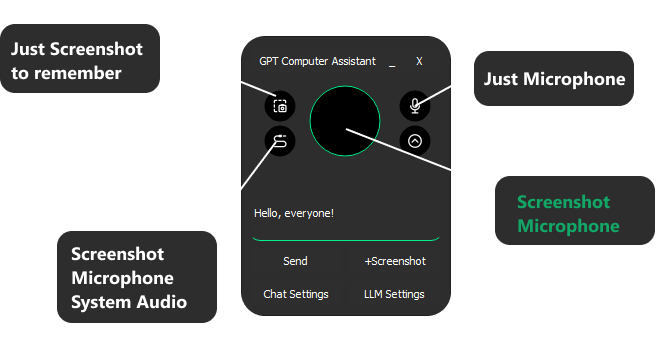
| ## Usage | |
|  | |
| ### Use cases | |
| <table> | |
| <tr> | |
| <td><img src="https://github.com/onuratakan/gpt-computer-assistant/assets/41792982/b4a4f11e-5588-4656-b5d7-b612a9a2855b" alt="Take Meeting Notes" width="500"/></td> | |
| <td><img src="https://github.com/onuratakan/gpt-computer-assistant/assets/41792982/49eeac70-b33a-4ec4-8125-64127621ed62" alt="Daily Assistant" width="500"/></td> | |
| </tr> | |
| <tr> | |
| <td><img src="https://github.com/onuratakan/gpt-computer-assistant/assets/41792982/10b69a18-033c-4d81-8ac9-f4e3c65b59c3" alt="Read Docs" width="500"/></td> | |
| <td><img src="https://github.com/onuratakan/gpt-computer-assistant/assets/41792982/0f483bae-ffaf-4311-8653-c0dc64fb5ebe" alt="Coding Assistant" width="500"/></td> | |
| </tr> | |
| </table> | |
| ## Roadmap | |
| | Feature | Status | Target Release | | |
| |---------------------------------|--------------|----------------| | |
| | Clear Chat History | Completed | Q2 2024 | | |
| | Long Audios Support (Split 20mb) | Completed | Q2 2024 | | |
| | Text Inputs | Completed | Q2 2024 | | |
| | Just Text Mode (Mute Speech) | Completed | Q2 2024 | | |
| | Added profiles (Different Chats) | Completed | Q2 2024 | | |
| | More Feedback About Assistant Status | Completed | Q2 2024 | | |
| | Local Model Vision and Text (With Ollama, and vision models) | Completed | Q2 2024 | | |
| | **Our Customizable Agent Infrastructure** | Completed | Q2 2024 | | |
| | Supporting Groq Models | Completed | Q2 2024 | | |
| | **Adding Custom Tools** | Completed | Q2 2024 | | |
| | Click on something on the screen (text and icon) | Completed | Q2 2024 | | |
| | New UI | Completed | Q2 2024 | | |
| | Native Applications, exe, dmg | Failed (Agentic Infra libraries not supported for now) | Q2 2024 | | |
| | **Collaborated Speaking Different Voice Models on long responses.** | Completed | Q2 2024 | | |
| | **Auto Stop Recording, when you complate talking** | Completed | Q2 2024 | | |
| | **Wakeup Word** | Completed | Q2 2024 | | |
| | **Continuously Conversations** | Completed | Q2 2024 | | |
| | **Adding more capability on device** | Planned | Q2 2024 | | |
| | DeepFace Integration (Facial Recognition) | Planned | Q2 2024 | | |
| ## Capabilities | |
| At this time we have many infrastructure elements. We just aim to provide whole things that already in ChatGPT app. | |
| | Capability | Status | | |
| |------------------------------------|----------------------------------| | |
| | **Screen Read** | OK | | |
| | **Click to and Text or Icon in the screen** | OK | | |
| | **Move to and Text or Icon in the screen** | OK | | |
| | **Typing Something** | OK | | |
| | **Pressing to Any Key** | OK | | |
| | **Scrolling** | OK | | |
| | **Microphone** | OK | | |
| | **System Audio** | OK | | |
| | **Memory** | OK | | |
| | **Open and Close App** | OK | | |
| | **Open a URL** | OK | | |
| | **Clipboard** | OK | | |
| | **Search Engines** | OK | | |
| | **Writing and running Python** | OK | | |
| | **Writing and running SH** | OK | | |
| | **Using your Telegram Account** | OK | | |
| | **Knowledge Management** | OK | | |
| | **[Add more tool](https://github.com/onuratakan/gpt-computer-assistant/blob/master/gpt_computer_assistant/standard_tools.py)** | ? | | |
| ### Predefined Agents | |
| If you enable it your assistant will work with these teams: | |
| | Team Name | Status | | |
| |------------------------------------|----------------------------------| | |
| | **search_on_internet_and_report_team** | OK | | |
| | **generate_code_with_aim_team_** | OK | | |
| | **[Add your own one](https://github.com/onuratakan/gpt-computer-assistant/blob/master/gpt_computer_assistant/teams.py)** | ? | | |
| <a href="#"> | |
| <img src="https://github.com/onuratakan/gpt-computer-assistant/assets/41792982/ba590bf8-6059-4cb6-8c4e-6d105ce4edd2" alt="Logo" > | |
| </a> | |
| ## Contributors | |
| <a href="https://github.com/onuratakan/gpt-computer-assistant/graphs/contributors"> | |
| <img src="https://contrib.rocks/image?repo=onuratakan/gpt-computer-assistant" /> | |
| </a> |