

title: PaddleOCR
emoji: 👀
colorFrom: green
colorTo: yellow
sdk: docker
pinned: false
license: mit
PaddleOCRFastAPI

A simple way to deploy PaddleOCR based on FastAPI.
Support Version
| PaddleOCR | Branch |
|---|---|
| v2.5 | paddleocr-v2.5 |
| v2.7 | paddleocr-v2.7 |
Features
- Local path image recognition
- Base64 data recognition
- Upload file recognition
Deployment Methods
Deploy Directly
Copy the project to the deployment path
git clone https://github.com/cgcel/PaddleOCRFastAPI.gitThe master branch is the most recent version of PaddleOCR supported by the project. To install a specific version, clone the branch with the corresponding version number.
(Optional) Create new virtual environment to avoid dependency conflicts
Install required dependencies
pip3 install -r requirements.txtRun FastAPI
uvicorn main:app --host 0.0.0.0
Docker Deployment
Test completed in Centos 7, Ubuntu 20.04, Ubuntu 22.04, Windows 10, Windows 11, requires Docker to be installed.
Copy the project to the deployment path
git clone https://github.com/cgcel/PaddleOCRFastAPI.gitThe master branch is the most recent version of PaddleOCR supported by the project. To install a specific version, clone the branch with the corresponding version number.
Building a Docker Image
cd PaddleOCRFastAPI
# 手工下载模型,避免程序第一次运行时自动下载,实现完全离线,加快启动速度
cd pp-ocrv4/ && sh download_det_cls_rec.sh

# 返回Dockfile所在目录,开始build
cd ..
# 使用宿主机网络
# 可直接使用宿主机上的代理设置,例如在build时,用宿主机上的代理
# docker build -t paddleocrfastapi:latest --network host --build-arg HTTP_PROXY=http://127.0.0.1:8888 --build-arg HTTPS_PROXY=http://127.0.0.1:8888 .
docker build -t paddleocrfastapi:latest --network host .
Edit
docker-compose.ymlversion: "3" services: paddleocrfastapi: container_name: paddleocrfastapi # Custom Container Name image: paddleocrfastapi:lastest # Customized Image Name & Label in Step 2 environment: - TZ=Asia/Hong_Kong - OCR_LANGUAGE=ch # support 80 languages. refer to https://github.com/Mushroomcat9998/PaddleOCR/blob/main/doc/doc_en/multi_languages_en.md#language_abbreviations ports: - "8000:8000" # Customize the service exposure port, 8000 is the default FastAPI port, do not modify restart: unless-stoppedCreate the Docker container and run
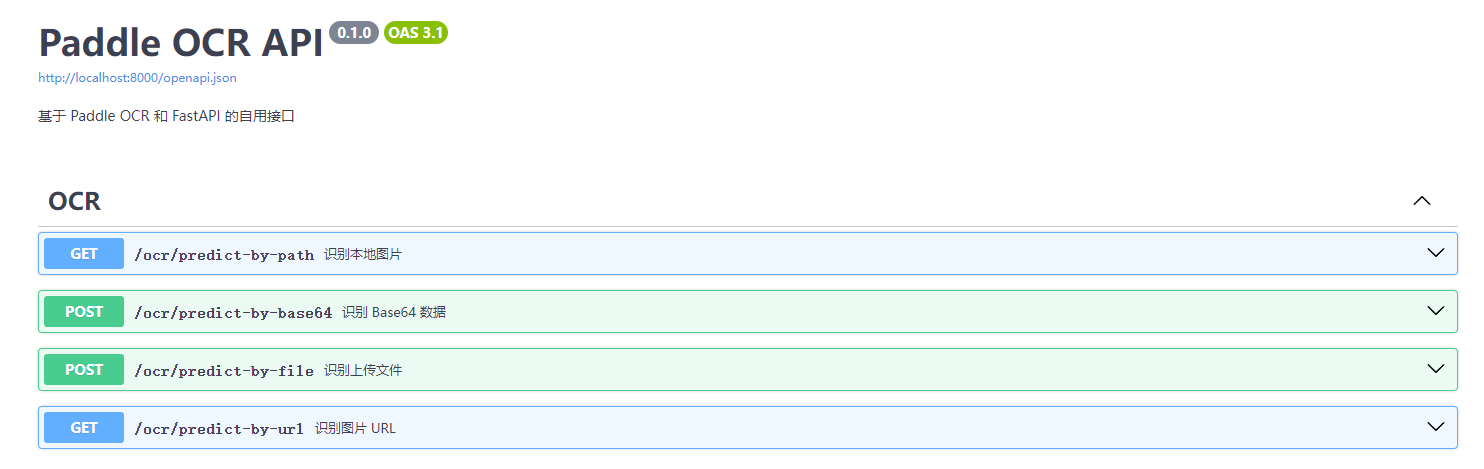
docker compose up -dSwagger Page at
localhost:<port>/docs
Change language
Clone this repo to localhost.
Edit
routers/ocr.py, modify the parameter "lang":ocr = PaddleOCR(use_angle_cls=True, lang="ch")Before modify, read the supported language list.
Rebuild the docker image, or run the
main.pydirectly.
Screenshots
API Docs: /docs
Todo
- support ppocr v4
- GPU mode
- Image url recognition
License
PaddleOCRFastAPI is licensed under the MIT license. Refer to LICENSE for more information.