
Spaces:
Paused

Paused
| # Cartoonizer | |
| > Convert images and videos into a cartoon! | |
| The webapp is deployed here - https://cartoonize-lkqov62dia-de.a.run.app | |
| <div style="text-align:center"><img height="100" alt="Powered by Algorithmia" style="border-width:0" src="static/sample_images/algorithmia.jpeg" /></div> | |
| You can find a writeup on this webapp's architecture [here](https://medium.com/@Niraj_pandkar/how-we-built-an-inexpensive-scalable-architecture-to-cartoonize-the-world-8610050f90a0)! | |
| --- | |
| ## Contents | |
| - [Prerequisites for Google Cloud and Algorithmia](#prerequisites-for-google-cloud-and-algorithmia) | |
| - [Installation](#installation) | |
| - [Docker](#using-docker) | |
| - [VirtualEnv](#using-virtualenv) | |
| - [Google Colab](#using-google-colab) | |
| - [Sample Image and Video](#sample-image-and-video) | |
| --- | |
| ## Prerequisites for Google Cloud and Algorithmia | |
| **These are important steps if you want to leverage Google buckets, signed URLs and Algorithmia's platform. Skip this if you want to run locally / colab.** | |
| ### Cloud Run authentication | |
| To use any functionalities pertaining to Google Cloud, you'll need a global authentication file (JSON). You can obtain this JSON by following the steps given here - [Getting started with authentication](https://cloud.google.com/docs/authentication/getting-started) | |
| After you get the JSON file, rename it to `token.json` (so that it's compatible with the codebase). | |
| Set the environment variable in your terminal - | |
| ``` | |
| export GOOGLE_APPLICATION_CREDENTIALS="/path/to/token.json" | |
| ``` | |
| **Notes**: | |
| - You can set it permanently by adding this line to `~/.bashrc`. | |
| - `Dockerfile` already includes the setting of this particular environment variable. :) | |
| ### Algorithmia | |
| We used the Serveless AI Layer product of [Algorithmia](https://algorithmia.com/serverless-ai-layer) for inference on videos. | |
| To learn more on how to deploy your model in Algorithmia, check here - https://algorithmia.com/developers | |
| --- | |
| ## Installation | |
| ### Application tested on: | |
| - python 3.7 | |
| - tensorflow 2.1.0 | |
| - tf_slim 1.1.0 | |
| - ffmpeg 3.4.8 | |
| - Cuda version 10.1 | |
| - OS: Linux (Ubuntu 18.04) | |
| ### Using Docker | |
| The easiest way to get the webapp running is by using the Dockerfile: | |
| 1. `cd` into the root directory and build the image | |
| ``` | |
| docker build -t cartoonize . | |
| ``` | |
| **Note**: Set the appropriate values in `config.yaml` before building the image. | |
| 2. Run the container by exposing the appropriate ports | |
| ``` | |
| docker run -p 8080:8080 cartoonize | |
| ``` | |
| ### Using `virtualenv` | |
| 1. Make a virtual environment using `virutalenv` and activate it | |
| ``` | |
| virtualenv -p python3 cartoonize | |
| source cartoonize/bin/activate | |
| ``` | |
| 2. Install python dependencies | |
| ``` | |
| pip install -r requirements.txt | |
| ``` | |
| 3. Run the webapp. Be sure to set the appropriate values in `config.yaml` file before running the application. | |
| ``` | |
| python app.py | |
| ``` | |
| ### Using [Google Colab](https://colab.research.google.com/drive/1oDhMEVMcsRbe7bt-2A7cDsx44KQpQwuB?usp=sharing) | |
| 1. Clone the repository using either of the below mentioned way: | |
| - Using Command: | |
| - Create a new Notebook in Colab and in the cell execute the below command. | |
| ``` | |
| ! git clone https://github.com/experience-ml/cartoonize.git | |
| ``` | |
| **Note:** Don't forget to add `!` at the beginning of the command | |
| - From Colab User Interface | |
| ``` | |
| Open Colab | |
| └── File | |
| └── Open Notebook | |
| └── Github | |
| └── paste the Url of the repository | |
| ``` | |
| Note : Before running the application change the runtime to GPU for processing videos but you for images CPU shall also work just fine. | |
| ``` | |
| Runtime | |
| └── Change runtime type | |
| └── Select GPU | |
| ``` | |
| 2. After cloning the repository navigate to the `/cartoonize` using below command in the notebook cell: | |
| ``` | |
| %cd cartoonize | |
| ``` | |
| 3. Run the below commands in the notebook cell to install the requirements. | |
| ``` | |
| !pip install -r requirements.txt | |
| ``` | |
| 4. In config.yaml file set: | |
| ``` | |
| colab-mode: true | |
| ``` | |
| 5. Launch the flask app on ngrok | |
| ``` | |
| !python app.py | |
| ``` | |
| #### Note : Sample [Google Colab Notebook](https://colab.research.google.com/drive/1oDhMEVMcsRbe7bt-2A7cDsx44KQpQwuB?usp=sharing) for reference | |
| --- | |
| ## Sample Image and Video | |
| ### Emma Watson Cartoonized | |
| <img alt="Emma Watson Cartoonized" style="border-width:0" src="static/sample_images/twitter_image.png" /> | |
| ### Youtube Video of Avenger's Bar Scene Cartoonized | |
| [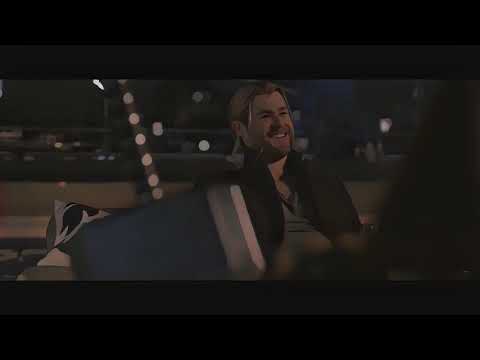](http://www.youtube.com/watch?v=GqduSLcmhto "AVENGERS BAR SCENE [Cartoonized Version]") | |
| --- | |
| ## License | |
| 1. Copyright © Cartoonizer ([Demo webapp](https://cartoonize-lkqov62dia-de.a.run.app/)) | |
| - Authors: [Niraj Pandkar](https://twitter.com/Niraj_pandkar) and [Tejas Mahajan](https://twitter.com/tjdevWorks). | |
| - Licensed under the [CC BY-NC-SA 4.0](https://creativecommons.org/licenses/by-nc-sa/4.0/legalcode) | |
| - Commercial application is prohibited by license | |
| 2. Copyright (C) Xinrui Wang, Jinze Yu. ([White box cartoonization](https://github.com/SystemErrorWang/White-box-Cartoonization)) | |
| - All rights reserved. | |
| - Licensed under the CC BY-NC-SA 4.0 | |
| - Also, Commercial application is prohibited license (https://creativecommons.org/licenses/by-nc-sa/4.0/legalcode). | |