| # 3. How OpenEnv environments scale |
|
|
| This section covers benchmarking and scaling OpenEnv environments. |
|
|
| **Contents:** |
| - [Provider Scaling](#provider-scaling) |
| - [WebSocket-based Scaling](#websocket-based-scaling) |
| - [Microservice Scaling](#microservice-scaling) |
| - [Scaling Experiments](#scaling-experiments) |
|
|
| --- |
|
|
| ## Provider Scaling |
|
|
| The easiest way to scale an OpenEnv environment is to use a `provider` these are abstractions based on runtimes like Uvicorn, Docker Swarm, or Kubernetes. |
|
|
| ```python |
| from openenv.providers import UVProvider, DockerSwarmProvider, LocalDockerProvider |
| |
| docker_provider = LocalDockerProvider() # default |
| uvicorn_provider = UVProvider() # python only |
| swarm_provider = DockerSwarmProvider() |
| |
| with EchoEnv.from_hub( |
| repo_id="openenv/echo-env", |
| provider=swarm_provider, |
| replicas=4, |
| ) as env: |
| result = env.reset() |
| result = env.step(EchoAction(message="Hello")) |
| ``` |
|
|
| ## WebSocket-based Scaling |
|
|
| OpenEnv uses WebSocket connections (`/ws`) instead of stateless HTTP for environment interactions. This design enables efficient scaling within a single container. |
|
|
| ### What are WebSockets? |
|
|
| WebSocket is a communication protocol that provides a persistent, bidirectional connection between client and server. Unlike HTTP—where each request opens a new connection, sends data, receives a response, and closes—a WebSocket connection stays open for the duration of a session. |
|
|
|  |
|
|
| For RL environments, this matters because a typical episode involves dozens to thousands of sequential `step()` calls. With HTTP, each step incurs TCP handshake overhead (~10-50ms). With WebSocket, messages are sent as lightweight frames (~0.1ms overhead) over the existing connection. |
|
|
| Also, with HTTP, long running sessions require logic to manage session state, which is not necessary with WebSocket. |
|
|
| ### Multiple sessions per container |
|
|
| With HTTP, maintaining session state requires cookies or session IDs with every request. Each isolated environment instance typically needs its own container: |
|
|
| ``` |
| HTTP approach: N parallel episodes → N containers |
| ``` |
|
|
| > [!NOTE] |
| > This is completely fine (and ideal) for larger deployments where containers can be scaled. But if your resources are constrained, this add loads of overhead. |
|
|
| With WebSocket, **one container handles many isolated sessions**. Each WebSocket connection gets its own environment instance server-side: |
|
|
| ```python |
| # Single container serving multiple concurrent sessions |
| # docker run -d -p 8000:8000 my-env:latest |
| |
| # Each client gets an isolated environment instance |
| with MyEnv(base_url="http://localhost:8000") as env1: # Session 1 |
| result = env1.reset() |
| |
| with MyEnv(base_url="http://localhost:8000") as env2: # Session 2 |
| result = env2.reset() |
| |
| with MyEnv(base_url="http://localhost:8000") as env3: # Session 3 |
| result = env3.reset() |
| ``` |
|
|
| > [!NOTE] |
| > This has its own advantages and disadvantages. For example: Separation of concerns and fault tolerance in environments like coding or terminal. |
|
|
| ### Server-side session state |
|
|
| The server maintains environment state per WebSocket connection which means that the environment builder does not need to worry about session state. |
|
|
| - No session IDs because Connection itself is the session |
| - Automatic cleanup because Environment instance destroyed when connection closes |
| - Isolation guaranteed because Each connection has dedicated state |
|
|
| ```python |
| # Server creates new environment instance per WebSocket connection |
| @app.websocket("/ws") |
| async def websocket_endpoint(websocket: WebSocket): |
| env = MyEnvironment() # Fresh instance per connection |
| await websocket.accept() |
| |
| while True: |
| data = await websocket.receive_json() |
| if data["type"] == "reset": |
| result = env.reset() |
| elif data["type"] == "step": |
| result = env.step(data["action"]) |
| await websocket.send_json(result) |
| ``` |
|
|
| ### Resource efficiency |
|
|
| | Approach | Containers | Memory | Startup | Max parallel | |
| |----------|------------|--------|---------|--------------| |
| | HTTP (1 env = 1 container) | N | N × ~100MB | N × ~5s | Limited by containers | |
| | WebSocket (N sessions = 1 container) | 1 | ~200MB | ~5s | Limited by `MAX_CONCURRENT_ENVS` | |
|
|
| Configure session limits via environment variable: |
|
|
| ```bash |
| docker run -d -p 8000:8000 -e MAX_CONCURRENT_ENVS=100 registry.hf.space/openenv-echo-env:latest |
| ``` |
|
|
| ## Scaling a Single Container |
|
|
| Before adding more containers, maximize the capacity of a single deployment. The key parameters are **workers** (CPU parallelism) and **MAX_CONCURRENT_ENVS** (session limit). |
|
|
| ### Uvicorn workers |
|
|
| Each Uvicorn worker is a separate process that can handle requests independently. More workers = more CPU cores utilized. |
|
|
| ```bash |
| # Clone and run locally |
| git clone https://huggingface.co/spaces/burtenshaw/openenv-benchmark |
| cd openenv-benchmark |
| pip install -e . |
| |
| # Run with 8 workers |
| WORKERS=8 uvicorn benchmark.server.app:app --host 0.0.0.0 --port 8000 --workers 8 |
| ``` |
|
|
| The above example will use 8 workers and each worker will be able to handle 100 concurrent sessions. **For simple environments, like text games, it's possible to get to 2000 concurrent sessions with 8 workers.** |
|
|
| > **Note:** More workers consume more memory. Each worker loads a full copy of the environment code. |
|
|
| ### Docker with environment variables |
|
|
| Pass scaling parameters when starting the container: |
|
|
| ```bash |
| # Pull from HF Spaces registry |
| docker pull registry.hf.space/burtenshaw-openenv-benchmark:latest |
| |
| # Run with custom configuration |
| docker run -d -p 8000:8000 \ |
| -e WORKERS=8 \ |
| -e MAX_CONCURRENT_ENVS=400 \ |
| --name openenv-benchmark \ |
| registry.hf.space/burtenshaw-openenv-benchmark:latest |
| ``` |
|
|
| | Variable | Default | Description | |
| |----------|---------|-------------| |
| | `WORKERS` | 4 | Uvicorn worker processes | |
| | `MAX_CONCURRENT_ENVS` | 100 | Max WebSocket sessions per worker | |
| | `PORT` | 8000 | Server port | |
| | `HOST` | 0.0.0.0 | Bind address | |
|
|
| ### HF Spaces configuration |
|
|
| Now, let's deploy the environment to HF Spaces so that we can interact with the server from the client. Configure scaling via Space Settings > Variables: |
|
|
| 1. Go to your Space settings page |
| 2. Add environment variables: |
| - `WORKERS=4` (max 4 on free tier, 8 on CPU Upgrade) |
| - `MAX_CONCURRENT_ENVS=100` |
| 3. Restart the Space |
|
|
| | Tier | vCPU | Recommended workers | Expected max batch (textarena) | |
| |------|------|--------------------|--------------------| |
| | CPU Basic (Free) | 2 | 2 | ~128 | |
| | CPU Upgrade | 8 | 4-8 | ~512 | |
|
|
| > **Limitation:** HF Spaces free users tier caps at ~128 concurrent sessions regardless of configuration. See [Scaling Experiments](#scaling-experiments) for measured limits. |
|
|
| ### Scaling limits |
|
|
| The experiments below found that even on larger instances, a single container eventually fails to scale and we need multiple containers to handle the load. For example, on a CPU Upgrade instance with 8 workers, the max batch was 1024 concurrent sessions: |
|
|
| - Success rate drops to 92% |
| - P99 latency exceeds 2× the expected step time |
| - Connection errors increase under load |
|
|
| When this happens, we need to scale to multiple containers and use a load balancer. |
|
|
| For high-throughput workloads, scale horizontally by running multiple environment containers behind a load balancer. |
|
|
| | Scenario | Recommended approach | |
| |----------|---------------------| |
| | Development / testing | Single container with WebSocket sessions | |
| | Moderate load (< 100 concurrent) | Single container, increase `MAX_CONCURRENT_ENVS` | |
| | High load (100+ concurrent) | Multiple containers + load balancer | |
| | GPU environments | One container per GPU | |
|
|
| We explored this in detail in the [Scaling Experiments](https://github.com/burtenshaw/openenv-scaling) repository. |
|
|
| <details> |
| <summary>Envoy configuration</summary> |
|
|
| ```yaml |
| static_resources: |
| listeners: |
| - name: listener_0 |
| address: |
| socket_address: |
| address: 0.0.0.0 |
| port_value: 8080 |
| filter_chains: |
| - filters: |
| - name: envoy.filters.network.http_connection_manager |
| typed_config: |
| "@type": type.googleapis.com/envoy.extensions.filters.network.http_connection_manager.v3.HttpConnectionManager |
| stat_prefix: ingress_http |
| upgrade_configs: |
| - upgrade_type: websocket |
| route_config: |
| name: local_route |
| virtual_hosts: |
| - name: openenv_service |
| domains: ["*"] |
| routes: |
| - match: |
| prefix: "/" |
| route: |
| cluster: openenv_cluster |
| http_filters: |
| - name: envoy.filters.http.router |
| typed_config: |
| "@type": type.googleapis.com/envoy.extensions.filters.http.router.v3.Router |
| |
| clusters: |
| - name: openenv_cluster |
| connect_timeout: 30s |
| type: STRICT_DNS |
| lb_policy: ROUND_ROBIN |
| load_assignment: |
| cluster_name: openenv_cluster |
| endpoints: |
| - lb_endpoints: |
| - endpoint: |
| address: |
| socket_address: |
| address: host.docker.internal |
| port_value: 8001 |
| - endpoint: |
| address: |
| socket_address: |
| address: host.docker.internal |
| port_value: 8002 |
| - endpoint: |
| address: |
| socket_address: |
| address: host.docker.internal |
| port_value: 8003 |
| - endpoint: |
| address: |
| socket_address: |
| address: host.docker.internal |
| port_value: 8004 |
| ``` |
|
|
|
|
| Start Envoy: |
|
|
| ```bash |
| docker run -d \ |
| -p 8080:8080 \ |
| -v $(pwd)/envoy.yaml:/etc/envoy/envoy.yaml \ |
| --add-host=host.docker.internal:host-gateway \ |
| envoyproxy/envoy:v1.28.0 |
| ``` |
|
|
| Connect through the load balancer: |
|
|
| ```python |
| # Clients connect to Envoy, which distributes to backend containers |
| with MyEnv(base_url="http://localhost:8080") as env: |
| result = env.reset() |
| ``` |
|
|
| </details> |
|
|
| ### Scaling expectations |
|
|
|  |
|
|
| | Setup | Containers | Sessions/container | Total capacity | Throughput | |
| |-------|------------|-------------------|----------------|------------| |
| | Single | 1 | 100 | 100 | ~100 req/s | |
| | 4× containers | 4 | 100 | 400 | ~350 req/s | |
| | 8× containers | 8 | 100 | 800 | ~600 req/s | |
|
|
| > **Note:** Actual throughput depends on environment complexity and hardware. Benchmark your specific workload. |
|
|
| ## Experiments Results |
|
|
| This section documents experiments measuring OpenEnv scaling characteristics across five infrastructure configurations. Full experiment data and code available at [burtenshaw/openenv-scaling](https://github.com/burtenshaw/openenv-scaling). |
|
|
| ### Experiment setup |
|
|
| **Benchmark environment:** A minimal OpenEnv environment with configurable wait time (simulates computation). Each `step()` call sleeps for the specified duration, isolating infrastructure overhead from environment logic. |
|
|
| **Infrastructure tested:** |
|
|
| | Infrastructure | Cores | Configuration | |
| |----------------|-------|---------------| |
| | local-uvicorn | 8 | Direct Uvicorn, 8 workers | |
| | local-docker | 8 | Docker container from HF Spaces image | |
| | hf-spaces | 2 | HF Spaces free tier (cpu-basic) | |
| | slurm-single | 48 | Single AWS HPC node | |
| | slurm-multi | 96 | Two AWS HPC nodes + Envoy load balancer | |
|
|
| **Protocol:** WebSocket (`/ws`) and HTTP (`/reset`, `/step`) compared where available. |
|
|
| **Metrics:** |
| - **Max batch:** Largest concurrent request count with ≥95% success rate |
| - **Batch/core:** Max batch divided by available cores (efficiency metric) |
| - **P99 latency:** 99th percentile total request time |
| - **RPS:** Requests per second at max batch |
|
|
| ### Results summary |
|
|
| | Infrastructure | Max Batch (WS) | Cores | Batch/Core | P99 Latency | RPS | |
| |----------------|----------------|-------|------------|-------------|-----| |
| | slurm-multi | 16,384 | 96 | 170.7 | 29.8s | 518 | |
| | local-uvicorn | 2,048 | 8 | 256.0 | 1.97s | 932 | |
| | local-docker | 2,048 | 8 | 256.0 | 2.90s | 682 | |
| | slurm-single | 512 | 48 | 10.7 | 1.45s | 358 | |
| | hf-spaces | 128 | 2 | 64.0 | 2.68s | 48 | |
|
|
| All results measured with `wait=10.0s` step duration. |
|
|
| 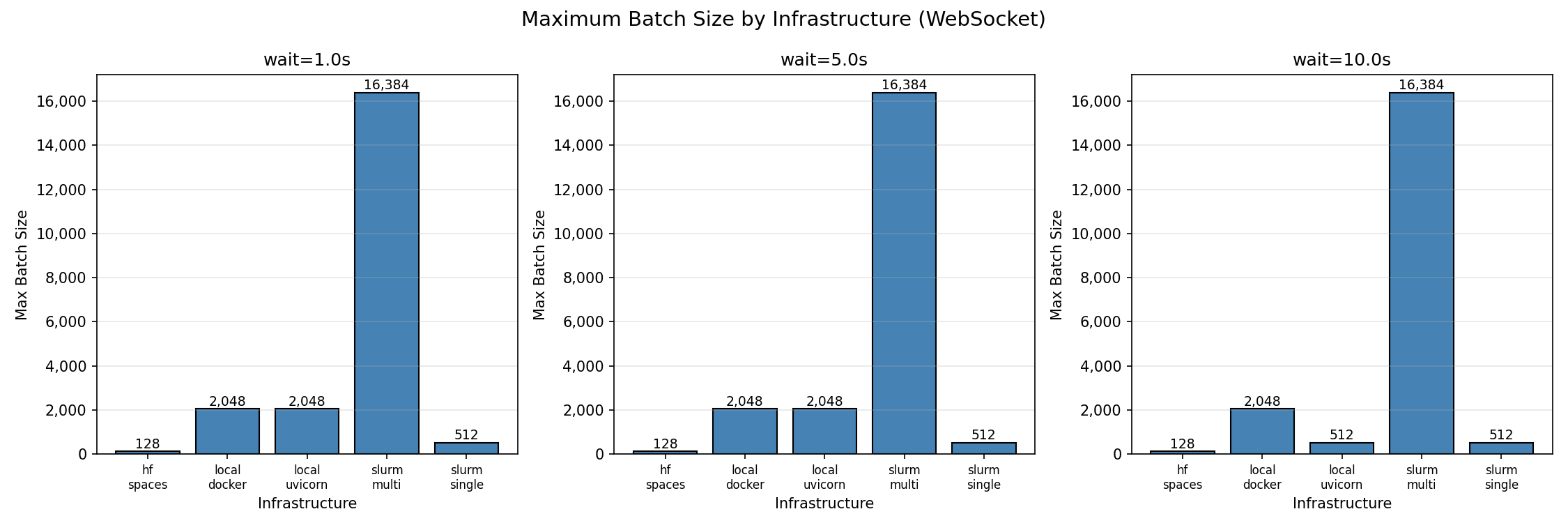 |
| *Maximum batch size by infrastructure (95% success threshold)* |
|
|
| ### Finding 1: Local deployments have highest per-core efficiency |
|
|
| Single instance of Python and Docker both achieve **256 concurrent sessions per core**—the highest efficiency observed. With 8 workers, both reach 2,048 concurrent sessions before degradation begins. |
|
|
| This makes sense because the environment is running in a single process and the overhead of the environment is relatively low. But it's ideal for hackers and developers who want to test their environment quickly or train on a single machine. |
|
|
| | Batch Size | Success Rate | P99 Latency | Notes | |
| |------------|--------------|-------------|-------| |
| | 32 | 100% | 1.05s | Perfect scaling | |
| | 128 | 100% | 1.07s | Perfect scaling | |
| | 512 | 100% | 1.33s | Perfect scaling | |
| | 2,048 | 96.5% | 1.97s | Max reliable batch | |
| | 4,096 | 63.8% | 3.20s | Connection failures begin | |
| | 8,192 | 36.9% | 5.75s | Above capacity | |
|
|
| Beyond 2,048 concurrent connections, success rate drops sharply. The failure mode is connection rejection, not timeout—the server saturates its connection pool. |
|
|
| 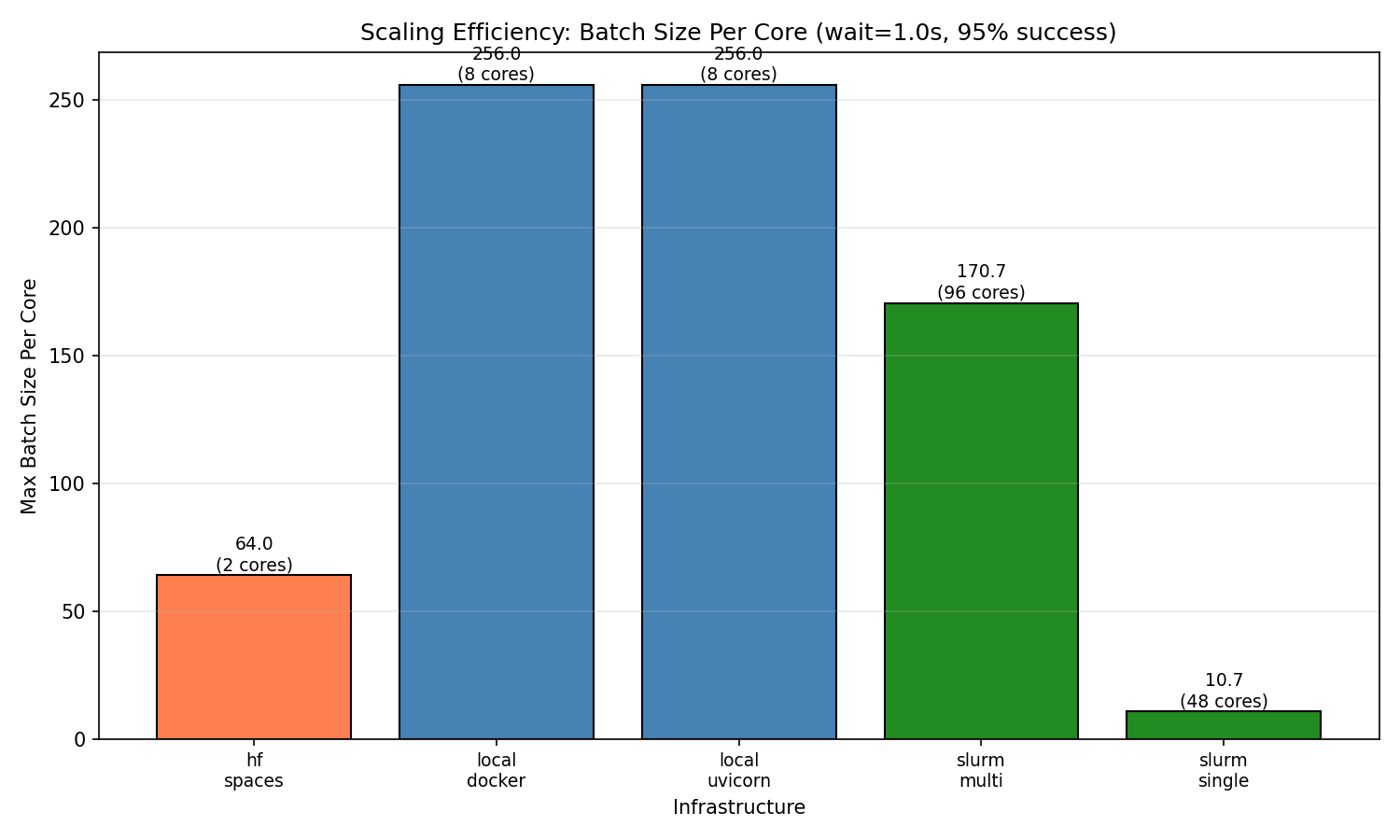 |
| *Per-core efficiency comparison across infrastructures* |
|
|
| ### Finding 2: HF Spaces works reliably up to 128 concurrent sessions |
|
|
| HF Spaces free tier (cpu-basic) provides 2 workers and achieves 128 concurrent WebSocket sessions with 100% success. This translates to **64 sessions per core**. |
|
|
| **HF Spaces scaling behavior (WebSocket):** |
|
|
| | Batch Size | Success Rate | P99 Latency | Notes | |
| |------------|--------------|-------------|-------| |
| | 1 | 100% | 1.64s | Baseline | |
| | 32 | 100% | 1.80s | Perfect scaling | |
| | 64 | 100% | 2.14s | Perfect scaling | |
| | 128 | 100% | 2.68s | Max reliable batch | |
| | 256 | ~33% | 4.41s | Inconsistent (some runs 0%, some 100%) | |
| | 512 | 0% | — | Complete failure | |
|
|
| At 256 concurrent connections, results become unstable. At 512+, connections fail entirely due to HF Spaces connection limits. |
|
|
| **HTTP mode does not work on HF Spaces.** The `/reset` and `/step` HTTP endpoints are not accessible on the deployed Space—all HTTP requests fail. Use WebSocket mode exclusively. |
|
|
| ### Finding 3: Multi-node scaling works |
|
|
| Multi-node SLURM (96 cores across 2 nodes) achieves **16,384 concurrent sessions** with 100% success rate—the highest absolute throughput tested. |
|
|
| **SLURM multi-node scaling behavior:** |
|
|
| | Batch Size | Success Rate | P99 Latency | Notes | |
| |------------|--------------|-------------|-------| |
| | 32 | 100% | 1.05s | Perfect scaling | |
| | 512 | 100% | 1.59s | Perfect scaling | |
| | 2,048 | 100% | 3.48s | Perfect scaling | |
| | 4,096 | 100% | 6.97s | Perfect scaling | |
| | 8,192 | 100% | 13.7s | Perfect scaling | |
| | 16,384 | 100% | 29.8s | Max tested batch | |
|
|
| The batch/core ratio (170.7) is lower than local deployments (256) but provides the highest absolute capacity for large-scale workloads. |
|
|
| 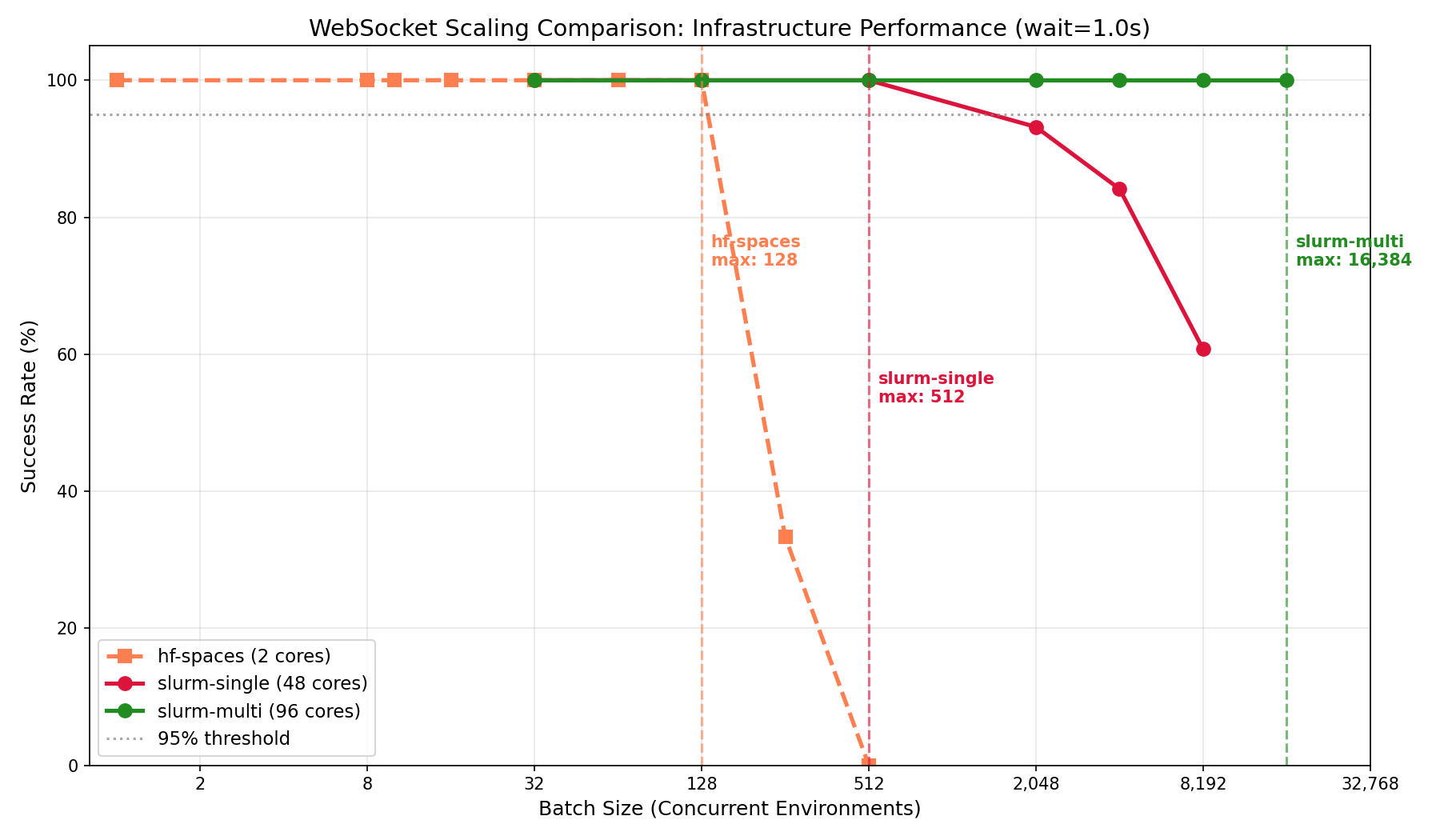 |
|
|
| *Multi-node vs single-node scaling behavior* |
|
|
| ### Latency breakdown |
|
|
| At max load (`wait=1.0s`), latency breaks down as: |
|
|
| | Infrastructure | Connect P50 | Reset P50 | Step P50 | Total P99 | |
| |----------------|-------------|-----------|----------|-----------| |
| | slurm-single | 0.26s | 0.04s | 1.00s | 1.33s | |
| | local-uvicorn | 0.58s | 0.08s | 1.05s | 1.95s | |
| | hf-spaces | 0.79s | 0.10s | 1.10s | 2.48s | |
| | local-docker | 1.38s | 0.19s | 1.05s | 2.90s | |
| | slurm-multi | 17.5s | 2.25s | 2.42s | 26.3s | |
|
|
| **Observations:** |
| - **Step latency** is consistent across infrastructures (~1.0s for 1.0s wait), confirming the benchmark measures infrastructure overhead accurately |
| - **Connect latency** varies significantly—local Docker shows higher connect time at load (1.38s), likely due to container networking |
| - **Multi-node has high connect latency** (17.5s) at 16,384 batch due to queuing at the load balancer; this is the cost of handling 16× more connections than single-node |
|
|
| 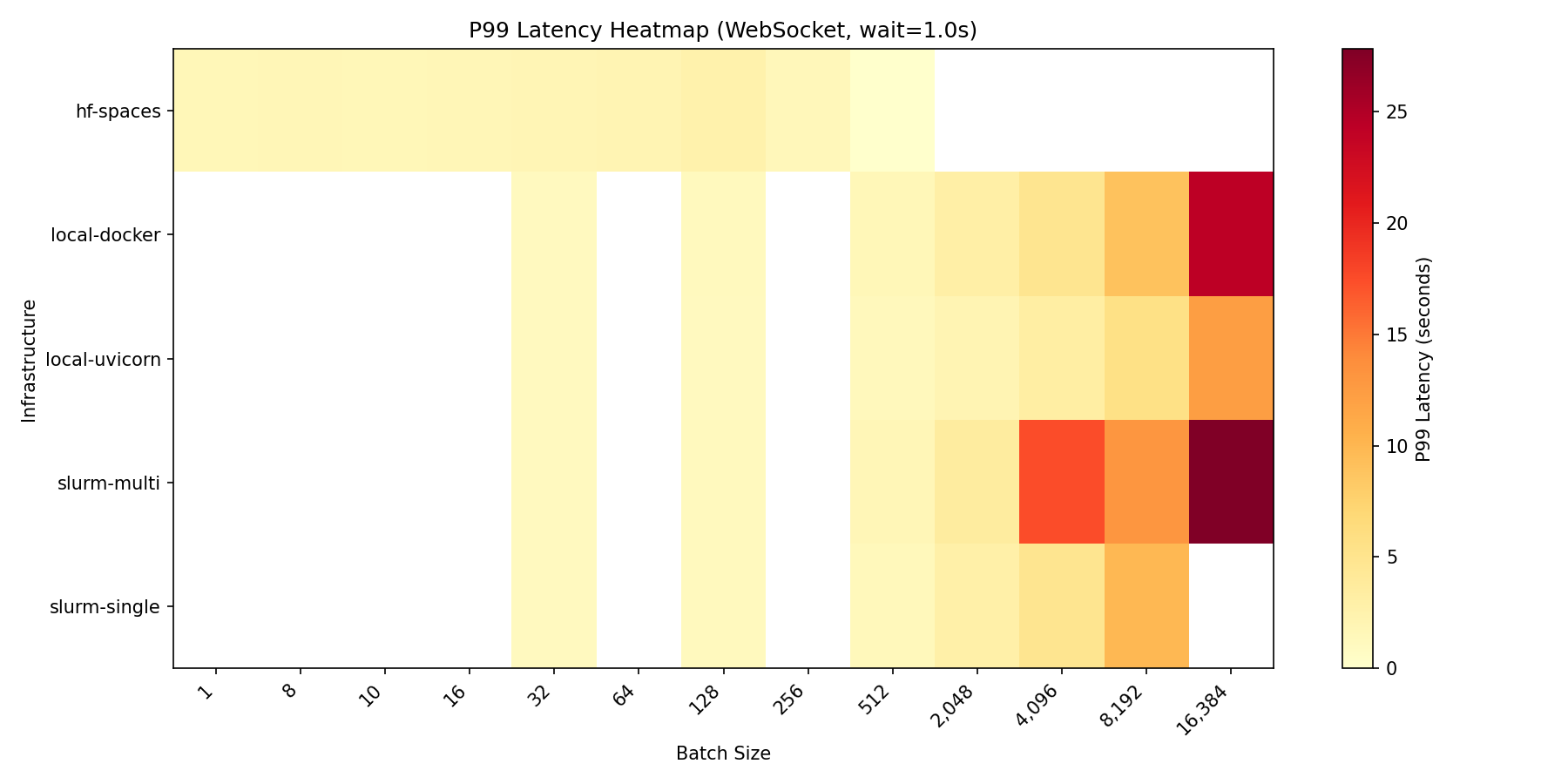 |
| *P99 latency across configurations and batch sizes* |
|
|
| 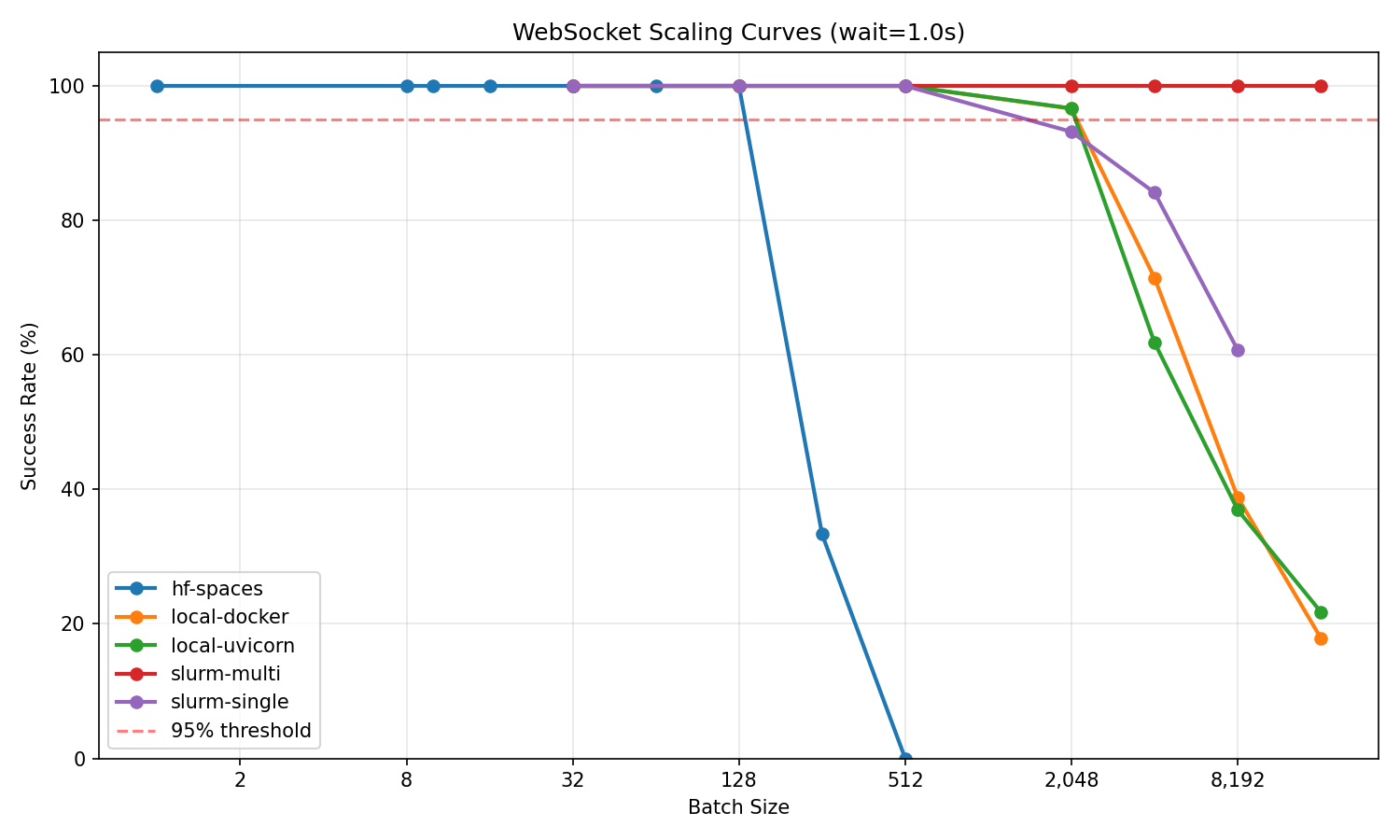 |
| *Success rate vs batch size for all infrastructures* |
|
|
| ### Test methodology |
|
|
| ```bash |
| # Clone benchmark environment |
| git clone https://huggingface.co/spaces/burtenshaw/openenv-scaling |
| cd openenv-scaling |
| |
| # Run scaling test |
| python tests/test_scaling.py \ |
| --url http://localhost:8000 \ |
| --requests-grid 32,128,512,2048,4096,8192,16384 \ |
| --wait-grid 1.0,5.0,10.0 \ |
| --reps 3 \ |
| --mode ws \ |
| --output-dir experiments/results/ |
| ``` |
|
|
| Each configuration was tested with 3 repetitions. Max batch is defined as the largest batch size achieving ≥95% success rate across all repetitions. |
|
|
| --- |
|
|
| ## Summary |
|
|
| | Infrastructure | Best for | Max concurrent | Batch/core | |
| |----------------|----------|----------------|------------| |
| | local-uvicorn | Development, <2K sessions | 2,048 | 256 | |
| | local-docker | Same as uvicorn, containerized | 2,048 | 256 | |
| | hf-spaces | Demos, moderate load | 128 | 64 | |
| | slurm-single | HPC, single-node jobs | 512 | 10.7 | |
| | slurm-multi | Large-scale training | 16,384 | 170.7 | |
|
|
| **Recommendations:** |
|
|
| 1. **For development and moderate workloads (<2,000 concurrent):** Use single node Uvicorn or Docker depending software environment. These provide the best per-core efficiency (256 sessions/core). |
|
|
| 2. **For demos, testing, and published environments:** HF Spaces free tier works reliably up to 128 concurrent sessions. |
|
|
| 3. **For large-scale training (>2,000 concurrent):** Deploy multi-node with proper load balancing. Expect ~170 sessions per core, but much higher absolute throughput. |
|
|

