


|  | |
| <div align="center"> | |
| [](https://twitter.com/intent/follow?screen_name=TenFramework) | |
| [](https://github.com/TEN-framework/ten-agent/discussions/) | |
| [](https://github.com/TEN-framework/ten-agent/graphs/commit-activity) | |
| [](https://github.com/TEN-framework/ten-agent/issues) | |
| [](https://github.com/TEN-framework/ten-agent/pulls) | |
| [](https://github.com/TEN-framework/ten-agent/blob/main/LICENSE) | |
| [](https://github.com/TEN-framework/ten-agent/discussions/170) | |
| [](https://discord.gg/VnPftUzAMJ) | |
| <a href="https://trendshift.io/repositories/11978" target="_blank"><img src="https://trendshift.io/api/badge/repositories/11978" alt="TEN-framework%2FTEN-Agent | Trendshift" style="width: 250px; height: 55px;" width="250" height="55"/></a> | |
| [](https://GitHub.com/TEN-framework/ten-agent/watchers/?WT.mc_id=academic-105485-koreyst) | |
| [](https://GitHub.com/TEN-framework/ten-agent/network/?WT.mc_id=academic-105485-koreyst) | |
| [](https://GitHub.com/TEN-framework/ten-agent/stargazers/?WT.mc_id=academic-105485-koreyst) | |
| <a href="https://github.com/TEN-framework/ten-agent/blob/main/README.md"><img alt="README in English" src="https://img.shields.io/badge/English-lightgrey"></a> | |
| <a href="https://github.com/TEN-framework/ten-agent/blob/main/docs/readmes/README-CN.md"><img alt="简体中文操作指南" src="https://img.shields.io/badge/简体中文-lightgrey"></a> | |
| <a href="https://github.com/TEN-framework/ten-agent/blob/main/docs/readmes/README-JP.md"><img alt="日本語のREADME" src="https://img.shields.io/badge/日本語-lightgrey"></a> | |
| <a href="https://github.com/TEN-framework/ten-agent/blob/main/docs/readmes/README-KR.md"><img alt="README in 한국어" src="https://img.shields.io/badge/한국어-lightgrey"></a> | |
| <a href="https://github.com/TEN-framework/ten-agent/blob/main/docs/readmes/README-ES.md"><img alt="README en Español" src="https://img.shields.io/badge/Español-lightgrey"></a> | |
| <a href="https://github.com/TEN-framework/ten-agent/blob/main/docs/readmes/README-FR.md"><img alt="README en Français" src="https://img.shields.io/badge/Français-lightgrey"></a> | |
| <a href="https://github.com/TEN-framework/ten-agent/blob/main/docs/readmes/README-IT.md"><img alt="README in Italiano" src="https://img.shields.io/badge/Italiano-lightgrey"></a> | |
| </div> | |
| <div align="center"> | |
| [文档](https://doc.theten.ai) | |
| <span> • </span> | |
| [快速开始](https://doc.theten.ai/getting-started/quickstart) | |
| <span> • </span> | |
| [TEN Framework 仓库](https://github.com/TEN-framework/ten_framework) | |
| </div> | |
| <br> | |
| <h2>TEN Agent 使用场景</h2> | |
|  | |
| <br> | |
| <h2>即用型扩展</h2> | |
|  | |
| <br> | |
| <h2>本地环境下的 TEN Agent 开发环境</h2> | |
| ### 先决条件 | |
| | 类别 | 要求 | | |
| |----------|-------------| | |
| | **Keys** | • [App ID](https://console.shengwang.cn) 和 [App Certificate](https://console.shengwang.cn)([注册教程](https://doc.shengwang.cn/doc/console/general/quickstart#%E6%B3%A8%E5%86%8C%E8%B4%A6%E5%8F%B7)) <br>• [OpenAI](https://openai.com/index/openai-api/) API 密钥<br>• [Deepgram](https://deepgram.com/) ASR(注册即可获得免费额度)<br>• [FishAudio](https://fish.audio/) TTS(注册即可获得免费额度)| | |
| | **安装要求** | • [Docker](https://www.docker.com/) / [Docker Compose](https://docs.docker.com/compose/)<br>• [Node.js(LTS) v18](https://nodejs.org/en) | | |
| | **最低系统要求** | • CPU >= 2核<br>• 内存 >= 4 GB | | |
| <br> | |
| ### macOS: Apple Silicon 上的 Docker 设置 | |
| 对于 Apple Silicon Mac,请在 Docker 设置中取消勾选"使用 Rosetta 进行 x86/amd64 模拟"。注意:这可能会导致 ARM 上的构建时间较慢,但部署到 x64 服务器时性能将恢复正常。 | |
|  | |
| <br> | |
| #### 设置国内代理 | |
| 如果在国内,我们强烈建议在 SSH 中把代理打开,下载和安装的依赖的时候会更加丝滑。如果遇到更多问题,请参考 [问题排查](../troubleshooting/troubleshooting-cn.md)。 | |
| ```bash | |
| # 如果用的代理软件没有增强模式的话, 建议手动把所有代理协议都打开 | |
| # export 的有效期为一个 session | |
| export https_proxy=http://127.0.0.1:<port> | |
| export http_proxy=http://127.0.0.1:<port> | |
| export all_proxy=socks5://127.0.0.1:<port> | |
| # Docker | |
| export https_proxy=http://host.docker.internal:<port> | |
| export http_proxy=http://host.docker.internal:<port> | |
| export all_proxy=http://host.docker.internal:<port> | |
| # tman 镜像设置 | |
| mkdir -p ~/.tman && echo '{ | |
| "registry": { | |
| "default": { | |
| "index": "https://registry-ten.rtcdeveloper.cn/api/ten-cloud-store/v1/packages" | |
| } | |
| } | |
| }' > ~/.tman/config.json | |
| # GO 代理设置 | |
| export GOPROXY=https://goproxy.cn,direct | |
| # pip 代理设置, 此设置需要先安装 pip | |
| pip config set global.index-url https://pypi.tuna.tsinghua.edu.cn/simple | |
| ``` | |
| <br> | |
| ### 后续步骤 | |
| #### 1. 创建 `.env` 文件 | |
| ```bash | |
| cp ./.env.example ./.env | |
| ``` | |
| #### 2. 在 `.env` 中设置 Agora 应用 ID 和应用证书 | |
| ```bash | |
| AGORA_APP_ID= | |
| AGORA_APP_CERTIFICATE= | |
| ``` | |
| #### 3. 启动代理开发容器 | |
| ```bash | |
| docker compose up -d | |
| ``` | |
| #### 4. 进入容器 | |
| ```bash | |
| docker exec -it ten_agent_dev bash | |
| ``` | |
| #### 5. 构建代理 | |
| ```bash | |
| task use | |
| ``` | |
| #### 6. 启动网络服务器 | |
| ```bash | |
| task run | |
| ``` | |
| #### 7. 编辑开发环境设置 | |
| 在 [localhost:3000](http://localhost:3000) 打开开发环境来配置你的代理。 | |
| 1. 选择图表类型(如语音代理、实时代理) | |
| 2. 选择对应模块 | |
| 3. 选择扩展并配置其 API 密钥设置 | |
|  | |
| <br> | |
| <h2>部署</h2> | |
| 一旦你完成了代理的自定义,你就可以通过创建服务的发布 Docker 镜像来部署。 | |
| 请参考 [部署指南](https://doc.theten.ai/ten-agent/deployment/deploy_agent_service) 有关部署的详细信息。 | |
| <br> | |
| <h2>TEN Agent 架构</h2> | |
|  | |
| <br> | |
| <h2>保持关注</h2> | |
| 在我们开始之前,请确保为我们的仓库点星标,以获取所有新版本的即时通知! | |
|  | |
| <br> | |
| <h2>加入社区</h2> | |
| - [Discord](https://discord.gg/VnPftUzAMJ):分享您的应用程序并与社区互动的理想平台。 | |
| - [GitHub 讨论](https://github.com/TEN-framework/ten-agent/discussions):提供反馈和提问的完美场所。 | |
| - [GitHub Issues](https://github.com/TEN-framework/ten-agent/issues):报告错误和提出新功能的最佳地点。请参阅我们的[贡献指南](./docs/code-of-conduct/contributing.md)了解更多详情。 | |
| - [X](https://img.shields.io/twitter/follow/TenFramework?logo=X&color=%20%23f5f5f5):分享您的代理并与社区互动的绝佳平台。 | |
| <br> | |
| <h2>Star History</h2> | |
| [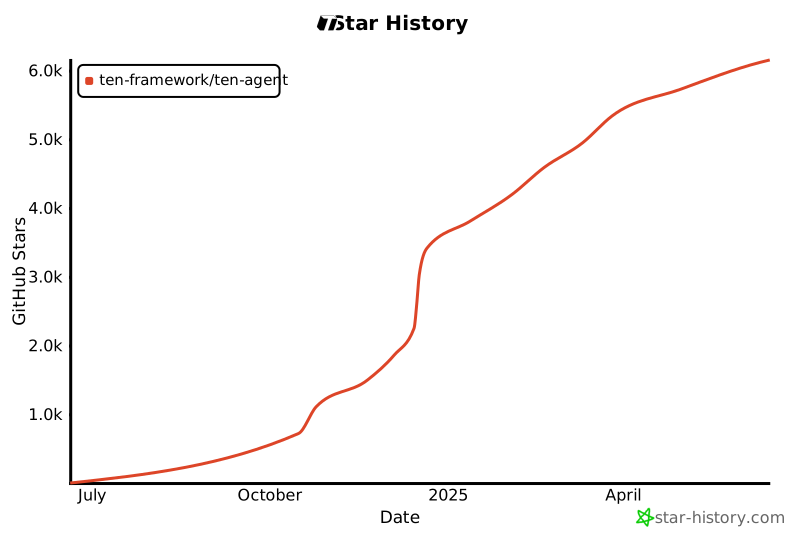](https://star-history.com/#ten-framework/ten-agent&Date) | |
| <br> | |
| <h2>Code Contributors</h2> | |
| [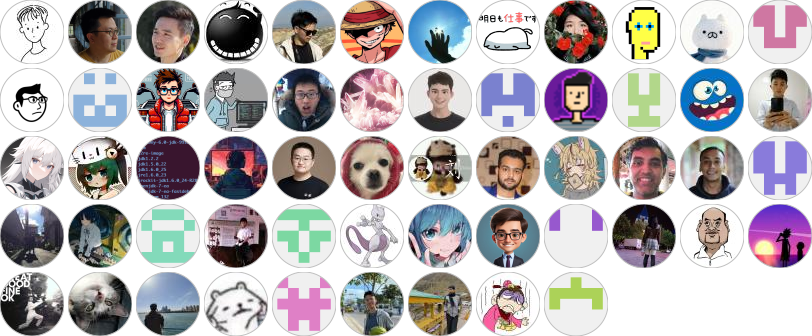](https://github.com/TEN-framework/ten-agent/graphs/contributors) | |
| <br> | |
| <h2>Contribution Guidelines</h2> | |
| Contributions are welcome! Please read the [contribution guidelines](./docs/code-of-conduct/contributing.md) first. | |
| <br> | |
| <h2>License</h2> | |
| This project is licensed under the Apache 2.0 License - see the [LICENSE](LICENSE) file for details. | |