
Spaces:
Sleeping


Sleeping
| title: TorchCode | |
| emoji: 🔥 | |
| colorFrom: red | |
| colorTo: yellow | |
| sdk: docker | |
| app_port: 7860 | |
| pinned: false | |
| <div align="center"> | |
| # 🔥 TorchCode | |
| **Crack the PyTorch interview.** | |
| Practice implementing operators and architectures from scratch — the exact skills top ML teams test for. | |
| *Like LeetCode, but for tensors. Self-hosted. Jupyter-based. Instant feedback.* | |
| [](https://pytorch.org) | |
| [](https://jupyter.org) | |
| [](https://www.docker.com) | |
| [](https://python.org) | |
| [](LICENSE) | |
| [](https://github.com/duoan/TorchCode) | |
| [](https://ghcr.io/duoan/torchcode) | |
| [](https://huggingface.co/spaces/duoan/TorchCode) | |
|  | |
|  | |
| [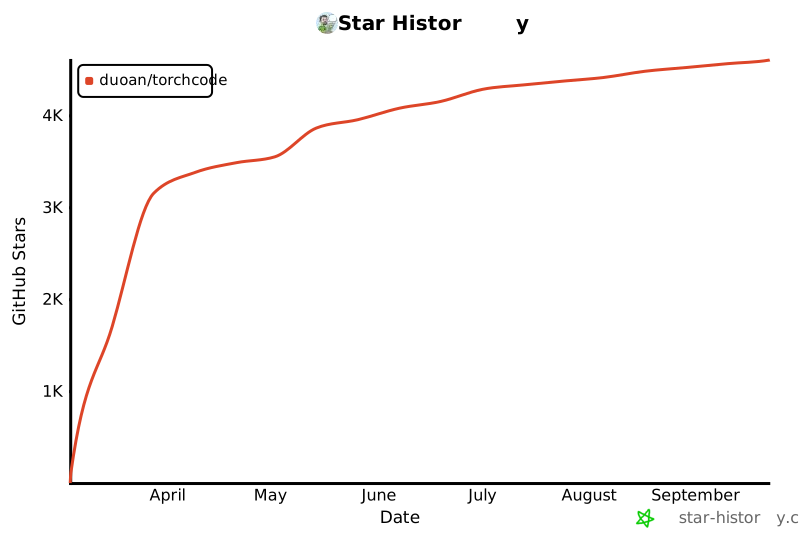](https://star-history.com/#duoan/TorchCode&Date) | |
| </div> | |
| --- | |
| ## 🎯 Why TorchCode? | |
| Top companies (Meta, Google DeepMind, OpenAI, etc.) expect ML engineers to implement core operations **from memory on a whiteboard**. Reading papers isn't enough — you need to write `softmax`, `LayerNorm`, `MultiHeadAttention`, and full Transformer blocks code. | |
| TorchCode gives you a **structured practice environment** with: | |
| | | Feature | | | |
| |---|---|---| | |
| | 🧩 | **40 curated problems** | The most frequently asked PyTorch interview topics | | |
| | ⚖️ | **Automated judge** | Correctness checks, gradient verification, and timing | | |
| | 🎨 | **Instant feedback** | Colored pass/fail per test case, just like competitive programming | | |
| | 💡 | **Hints when stuck** | Nudges without full spoilers | | |
| | 📖 | **Reference solutions** | Study optimal implementations after your attempt | | |
| | 📊 | **Progress tracking** | What you've solved, best times, and attempt counts | | |
| | 🔄 | **One-click reset** | Toolbar button to reset any notebook back to its blank template — practice the same problem as many times as you want | | |
| | [](#) | **Open in Colab** | Every notebook has an "Open in Colab" badge + toolbar button — run problems in Google Colab with zero setup | | |
| No cloud. No signup. No GPU needed. Just `make run` — or try it instantly on Hugging Face. | |
| --- | |
| ## 🚀 Quick Start | |
| ### Option 0 — Try it online (zero install) | |
| **[Launch on Hugging Face Spaces](https://huggingface.co/spaces/duoan/TorchCode)** — opens a full JupyterLab environment in your browser. Nothing to install. | |
| Or open any problem directly in Google Colab — every notebook has an [](https://colab.research.google.com/github/duoan/TorchCode/blob/master/templates/01_relu.ipynb) badge. | |
| ### Option 0b — Use the judge in Colab (pip) | |
| In Google Colab, install the judge from PyPI so you can run `check(...)` without cloning the repo: | |
| ```bash | |
| !pip install torch-judge | |
| ``` | |
| Then in a notebook cell: | |
| ```python | |
| from torch_judge import check, status, hint, reset_progress | |
| status() # list all problems and your progress | |
| check("relu") # run tests for the "relu" task | |
| hint("relu") # show a hint | |
| ``` | |
| ### Option 1 — Pull the pre-built image (fastest) | |
| ```bash | |
| docker run -p 8888:8888 -e PORT=8888 ghcr.io/duoan/torchcode:latest | |
| ``` | |
| ### Option 2 — Build locally | |
| ```bash | |
| make run | |
| ``` | |
| Open **<http://localhost:8888>** — that's it. Works with both Docker and Podman (auto-detected). | |
| --- | |
| ## 📋 Problem Set | |
| > **Frequency**: 🔥 = very likely in interviews, ⭐ = commonly asked, 💡 = emerging / differentiator | |
| ### 🧱 Fundamentals — "Implement X from scratch" | |
| The bread and butter of ML coding interviews. You'll be asked to write these without `torch.nn`. | |
| | # | Problem | What You'll Implement | Difficulty | Freq | Key Concepts | | |
| |:---:|---------|----------------------|:----------:|:----:|--------------| | |
| | 1 | <a href="https://github.com/duoan/TorchCode/blob/master/templates/01_relu.ipynb" target="_blank">ReLU</a> <a href="https://colab.research.google.com/github/duoan/TorchCode/blob/master/templates/01_relu.ipynb" target="_blank"><img src="https://colab.research.google.com/assets/colab-badge.svg" alt="Open In Colab" height="20"></a> | `relu(x)` |  | 🔥 | Activation functions, element-wise ops | | |
| | 2 | <a href="https://github.com/duoan/TorchCode/blob/master/templates/02_softmax.ipynb" target="_blank">Softmax</a> <a href="https://colab.research.google.com/github/duoan/TorchCode/blob/master/templates/02_softmax.ipynb" target="_blank"><img src="https://colab.research.google.com/assets/colab-badge.svg" alt="Open In Colab" height="20"></a> | `my_softmax(x, dim)` |  | 🔥 | Numerical stability, exp/log tricks | | |
| | 16 | <a href="https://github.com/duoan/TorchCode/blob/master/templates/16_cross_entropy.ipynb" target="_blank">Cross-Entropy Loss</a> <a href="https://colab.research.google.com/github/duoan/TorchCode/blob/master/templates/16_cross_entropy.ipynb" target="_blank"><img src="https://colab.research.google.com/assets/colab-badge.svg" alt="Open In Colab" height="20"></a> | `cross_entropy_loss(logits, targets)` |  | 🔥 | Log-softmax, logsumexp trick | | |
| | 17 | <a href="https://github.com/duoan/TorchCode/blob/master/templates/17_dropout.ipynb" target="_blank">Dropout</a> <a href="https://colab.research.google.com/github/duoan/TorchCode/blob/master/templates/17_dropout.ipynb" target="_blank"><img src="https://colab.research.google.com/assets/colab-badge.svg" alt="Open In Colab" height="20"></a> | `MyDropout` (nn.Module) |  | 🔥 | Train/eval mode, inverted scaling | | |
| | 18 | <a href="https://github.com/duoan/TorchCode/blob/master/templates/18_embedding.ipynb" target="_blank">Embedding</a> <a href="https://colab.research.google.com/github/duoan/TorchCode/blob/master/templates/18_embedding.ipynb" target="_blank"><img src="https://colab.research.google.com/assets/colab-badge.svg" alt="Open In Colab" height="20"></a> | `MyEmbedding` (nn.Module) |  | 🔥 | Lookup table, `weight[indices]` | | |
| | 19 | <a href="https://github.com/duoan/TorchCode/blob/master/templates/19_gelu.ipynb" target="_blank">GELU</a> <a href="https://colab.research.google.com/github/duoan/TorchCode/blob/master/templates/19_gelu.ipynb" target="_blank"><img src="https://colab.research.google.com/assets/colab-badge.svg" alt="Open In Colab" height="20"></a> | `my_gelu(x)` |  | ⭐ | Gaussian error linear unit, `torch.erf` | | |
| | 20 | <a href="https://github.com/duoan/TorchCode/blob/master/templates/20_weight_init.ipynb" target="_blank">Kaiming Init</a> <a href="https://colab.research.google.com/github/duoan/TorchCode/blob/master/templates/20_weight_init.ipynb" target="_blank"><img src="https://colab.research.google.com/assets/colab-badge.svg" alt="Open In Colab" height="20"></a> | `kaiming_init(weight)` |  | ⭐ | `std = sqrt(2/fan_in)`, variance scaling | | |
| | 21 | <a href="https://github.com/duoan/TorchCode/blob/master/templates/21_gradient_clipping.ipynb" target="_blank">Gradient Clipping</a> <a href="https://colab.research.google.com/github/duoan/TorchCode/blob/master/templates/21_gradient_clipping.ipynb" target="_blank"><img src="https://colab.research.google.com/assets/colab-badge.svg" alt="Open In Colab" height="20"></a> | `clip_grad_norm(params, max_norm)` |  | ⭐ | Norm-based clipping, direction preservation | | |
| | 31 | <a href="https://github.com/duoan/TorchCode/blob/master/templates/31_gradient_accumulation.ipynb" target="_blank">Gradient Accumulation</a> <a href="https://colab.research.google.com/github/duoan/TorchCode/blob/master/templates/31_gradient_accumulation.ipynb" target="_blank"><img src="https://colab.research.google.com/assets/colab-badge.svg" alt="Open In Colab" height="20"></a> | `accumulated_step(model, opt, ...)` |  | 💡 | Micro-batching, loss scaling | | |
| | 40 | <a href="https://github.com/duoan/TorchCode/blob/master/templates/40_linear_regression.ipynb" target="_blank">Linear Regression</a> <a href="https://colab.research.google.com/github/duoan/TorchCode/blob/master/templates/40_linear_regression.ipynb" target="_blank"><img src="https://colab.research.google.com/assets/colab-badge.svg" alt="Open In Colab" height="20"></a> | `LinearRegression` (3 methods) |  | 🔥 | Normal equation, GD from scratch, nn.Linear | | |
| | 3 | <a href="https://github.com/duoan/TorchCode/blob/master/templates/03_linear.ipynb" target="_blank">Linear Layer</a> <a href="https://colab.research.google.com/github/duoan/TorchCode/blob/master/templates/03_linear.ipynb" target="_blank"><img src="https://colab.research.google.com/assets/colab-badge.svg" alt="Open In Colab" height="20"></a> | `SimpleLinear` (nn.Module) |  | 🔥 | `y = xW^T + b`, Kaiming init, `nn.Parameter` | | |
| | 4 | <a href="https://github.com/duoan/TorchCode/blob/master/templates/04_layernorm.ipynb" target="_blank">LayerNorm</a> <a href="https://colab.research.google.com/github/duoan/TorchCode/blob/master/templates/04_layernorm.ipynb" target="_blank"><img src="https://colab.research.google.com/assets/colab-badge.svg" alt="Open In Colab" height="20"></a> | `my_layer_norm(x, γ, β)` |  | 🔥 | Normalization, running stats, affine transform | | |
| | 7 | <a href="https://github.com/duoan/TorchCode/blob/master/templates/07_batchnorm.ipynb" target="_blank">BatchNorm</a> <a href="https://colab.research.google.com/github/duoan/TorchCode/blob/master/templates/07_batchnorm.ipynb" target="_blank"><img src="https://colab.research.google.com/assets/colab-badge.svg" alt="Open In Colab" height="20"></a> | `my_batch_norm(x, γ, β)` |  | ⭐ | Batch vs layer statistics, train/eval behavior | | |
| | 8 | <a href="https://github.com/duoan/TorchCode/blob/master/templates/08_rmsnorm.ipynb" target="_blank">RMSNorm</a> <a href="https://colab.research.google.com/github/duoan/TorchCode/blob/master/templates/08_rmsnorm.ipynb" target="_blank"><img src="https://colab.research.google.com/assets/colab-badge.svg" alt="Open In Colab" height="20"></a> | `rms_norm(x, weight)` |  | ⭐ | LLaMA-style norm, simpler than LayerNorm | | |
| | 15 | <a href="https://github.com/duoan/TorchCode/blob/master/templates/15_mlp.ipynb" target="_blank">SwiGLU MLP</a> <a href="https://colab.research.google.com/github/duoan/TorchCode/blob/master/templates/15_mlp.ipynb" target="_blank"><img src="https://colab.research.google.com/assets/colab-badge.svg" alt="Open In Colab" height="20"></a> | `SwiGLUMLP` (nn.Module) |  | ⭐ | Gated FFN, `SiLU(gate) * up`, LLaMA/Mistral-style | | |
| | 22 | <a href="https://github.com/duoan/TorchCode/blob/master/templates/22_conv2d.ipynb" target="_blank">Conv2d</a> <a href="https://colab.research.google.com/github/duoan/TorchCode/blob/master/templates/22_conv2d.ipynb" target="_blank"><img src="https://colab.research.google.com/assets/colab-badge.svg" alt="Open In Colab" height="20"></a> | `my_conv2d(x, weight, ...)` |  | 🔥 | Convolution, unfold, stride/padding | | |
| ### 🧠 Attention Mechanisms — The heart of modern ML interviews | |
| If you're interviewing for any role touching LLMs or Transformers, expect at least one of these. | |
| | # | Problem | What You'll Implement | Difficulty | Freq | Key Concepts | | |
| |:---:|---------|----------------------|:----------:|:----:|--------------| | |
| | 23 | <a href="https://github.com/duoan/TorchCode/blob/master/templates/23_cross_attention.ipynb" target="_blank">Cross-Attention</a> <a href="https://colab.research.google.com/github/duoan/TorchCode/blob/master/templates/23_cross_attention.ipynb" target="_blank"><img src="https://colab.research.google.com/assets/colab-badge.svg" alt="Open In Colab" height="20"></a> | `MultiHeadCrossAttention` (nn.Module) |  | ⭐ | Encoder-decoder, Q from decoder, K/V from encoder | | |
| | 5 | <a href="https://github.com/duoan/TorchCode/blob/master/templates/05_attention.ipynb" target="_blank">Scaled Dot-Product Attention</a> <a href="https://colab.research.google.com/github/duoan/TorchCode/blob/master/templates/05_attention.ipynb" target="_blank"><img src="https://colab.research.google.com/assets/colab-badge.svg" alt="Open In Colab" height="20"></a> | `scaled_dot_product_attention(Q, K, V)` |  | 🔥 | `softmax(QK^T/√d_k)V`, the foundation of everything | | |
| | 6 | <a href="https://github.com/duoan/TorchCode/blob/master/templates/06_multihead_attention.ipynb" target="_blank">Multi-Head Attention</a> <a href="https://colab.research.google.com/github/duoan/TorchCode/blob/master/templates/06_multihead_attention.ipynb" target="_blank"><img src="https://colab.research.google.com/assets/colab-badge.svg" alt="Open In Colab" height="20"></a> | `MultiHeadAttention` (nn.Module) |  | 🔥 | Parallel heads, split/concat, projection matrices | | |
| | 9 | <a href="https://github.com/duoan/TorchCode/blob/master/templates/09_causal_attention.ipynb" target="_blank">Causal Self-Attention</a> <a href="https://colab.research.google.com/github/duoan/TorchCode/blob/master/templates/09_causal_attention.ipynb" target="_blank"><img src="https://colab.research.google.com/assets/colab-badge.svg" alt="Open In Colab" height="20"></a> | `causal_attention(Q, K, V)` |  | 🔥 | Autoregressive masking with `-inf`, GPT-style | | |
| | 10 | <a href="https://github.com/duoan/TorchCode/blob/master/templates/10_gqa.ipynb" target="_blank">Grouped Query Attention</a> <a href="https://colab.research.google.com/github/duoan/TorchCode/blob/master/templates/10_gqa.ipynb" target="_blank"><img src="https://colab.research.google.com/assets/colab-badge.svg" alt="Open In Colab" height="20"></a> | `GroupQueryAttention` (nn.Module) |  | ⭐ | GQA (LLaMA 2), KV sharing across heads | | |
| | 11 | <a href="https://github.com/duoan/TorchCode/blob/master/templates/11_sliding_window.ipynb" target="_blank">Sliding Window Attention</a> <a href="https://colab.research.google.com/github/duoan/TorchCode/blob/master/templates/11_sliding_window.ipynb" target="_blank"><img src="https://colab.research.google.com/assets/colab-badge.svg" alt="Open In Colab" height="20"></a> | `sliding_window_attention(Q, K, V, w)` |  | ⭐ | Mistral-style local attention, O(n·w) complexity | | |
| | 12 | <a href="https://github.com/duoan/TorchCode/blob/master/templates/12_linear_attention.ipynb" target="_blank">Linear Attention</a> <a href="https://colab.research.google.com/github/duoan/TorchCode/blob/master/templates/12_linear_attention.ipynb" target="_blank"><img src="https://colab.research.google.com/assets/colab-badge.svg" alt="Open In Colab" height="20"></a> | `linear_attention(Q, K, V)` |  | 💡 | Kernel trick, `φ(Q)(φ(K)^TV)`, O(n·d²) | | |
| | 14 | <a href="https://github.com/duoan/TorchCode/blob/master/templates/14_kv_cache.ipynb" target="_blank">KV Cache Attention</a> <a href="https://colab.research.google.com/github/duoan/TorchCode/blob/master/templates/14_kv_cache.ipynb" target="_blank"><img src="https://colab.research.google.com/assets/colab-badge.svg" alt="Open In Colab" height="20"></a> | `KVCacheAttention` (nn.Module) |  | 🔥 | Incremental decoding, cache K/V, prefill vs decode | | |
| | 24 | <a href="https://github.com/duoan/TorchCode/blob/master/templates/24_rope.ipynb" target="_blank">RoPE</a> <a href="https://colab.research.google.com/github/duoan/TorchCode/blob/master/templates/24_rope.ipynb" target="_blank"><img src="https://colab.research.google.com/assets/colab-badge.svg" alt="Open In Colab" height="20"></a> | `apply_rope(q, k)` |  | 🔥 | Rotary position embedding, relative position via rotation | | |
| | 25 | <a href="https://github.com/duoan/TorchCode/blob/master/templates/25_flash_attention.ipynb" target="_blank">Flash Attention</a> <a href="https://colab.research.google.com/github/duoan/TorchCode/blob/master/templates/25_flash_attention.ipynb" target="_blank"><img src="https://colab.research.google.com/assets/colab-badge.svg" alt="Open In Colab" height="20"></a> | `flash_attention(Q, K, V, block_size)` |  | 💡 | Tiled attention, online softmax, memory-efficient | | |
| ### 🏗️ Architecture & Adaptation — Put it all together | |
| | # | Problem | What You'll Implement | Difficulty | Freq | Key Concepts | | |
| |:---:|---------|----------------------|:----------:|:----:|--------------| | |
| | 26 | <a href="https://github.com/duoan/TorchCode/blob/master/templates/26_lora.ipynb" target="_blank">LoRA</a> <a href="https://colab.research.google.com/github/duoan/TorchCode/blob/master/templates/26_lora.ipynb" target="_blank"><img src="https://colab.research.google.com/assets/colab-badge.svg" alt="Open In Colab" height="20"></a> | `LoRALinear` (nn.Module) |  | ⭐ | Low-rank adaptation, frozen base + `BA` update | | |
| | 27 | <a href="https://github.com/duoan/TorchCode/blob/master/templates/27_vit_patch.ipynb" target="_blank">ViT Patch Embedding</a> <a href="https://colab.research.google.com/github/duoan/TorchCode/blob/master/templates/27_vit_patch.ipynb" target="_blank"><img src="https://colab.research.google.com/assets/colab-badge.svg" alt="Open In Colab" height="20"></a> | `PatchEmbedding` (nn.Module) |  | 💡 | Image → patches → linear projection | | |
| | 13 | <a href="https://github.com/duoan/TorchCode/blob/master/templates/13_gpt2_block.ipynb" target="_blank">GPT-2 Block</a> <a href="https://colab.research.google.com/github/duoan/TorchCode/blob/master/templates/13_gpt2_block.ipynb" target="_blank"><img src="https://colab.research.google.com/assets/colab-badge.svg" alt="Open In Colab" height="20"></a> | `GPT2Block` (nn.Module) |  | ⭐ | Pre-norm, causal MHA + MLP (4x, GELU), residual connections | | |
| | 28 | <a href="https://github.com/duoan/TorchCode/blob/master/templates/28_moe.ipynb" target="_blank">Mixture of Experts</a> <a href="https://colab.research.google.com/github/duoan/TorchCode/blob/master/templates/28_moe.ipynb" target="_blank"><img src="https://colab.research.google.com/assets/colab-badge.svg" alt="Open In Colab" height="20"></a> | `MixtureOfExperts` (nn.Module) |  | ⭐ | Mixtral-style, top-k routing, expert MLPs | | |
| ### ⚙️ Training & Optimization | |
| | # | Problem | What You'll Implement | Difficulty | Freq | Key Concepts | | |
| |:---:|---------|----------------------|:----------:|:----:|--------------| | |
| | 29 | <a href="https://github.com/duoan/TorchCode/blob/master/templates/29_adam.ipynb" target="_blank">Adam Optimizer</a> <a href="https://colab.research.google.com/github/duoan/TorchCode/blob/master/templates/29_adam.ipynb" target="_blank"><img src="https://colab.research.google.com/assets/colab-badge.svg" alt="Open In Colab" height="20"></a> | `MyAdam` |  | ⭐ | Momentum + RMSProp, bias correction | | |
| | 30 | <a href="https://github.com/duoan/TorchCode/blob/master/templates/30_cosine_lr.ipynb" target="_blank">Cosine LR Scheduler</a> <a href="https://colab.research.google.com/github/duoan/TorchCode/blob/master/templates/30_cosine_lr.ipynb" target="_blank"><img src="https://colab.research.google.com/assets/colab-badge.svg" alt="Open In Colab" height="20"></a> | `cosine_lr_schedule(step, ...)` |  | ⭐ | Linear warmup + cosine annealing | | |
| ### 🎯 Inference & Decoding | |
| | # | Problem | What You'll Implement | Difficulty | Freq | Key Concepts | | |
| |:---:|---------|----------------------|:----------:|:----:|--------------| | |
| | 32 | <a href="https://github.com/duoan/TorchCode/blob/master/templates/32_topk_sampling.ipynb" target="_blank">Top-k / Top-p Sampling</a> <a href="https://colab.research.google.com/github/duoan/TorchCode/blob/master/templates/32_topk_sampling.ipynb" target="_blank"><img src="https://colab.research.google.com/assets/colab-badge.svg" alt="Open In Colab" height="20"></a> | `sample_top_k_top_p(logits, ...)` |  | 🔥 | Nucleus sampling, temperature scaling | | |
| | 33 | <a href="https://github.com/duoan/TorchCode/blob/master/templates/33_beam_search.ipynb" target="_blank">Beam Search</a> <a href="https://colab.research.google.com/github/duoan/TorchCode/blob/master/templates/33_beam_search.ipynb" target="_blank"><img src="https://colab.research.google.com/assets/colab-badge.svg" alt="Open In Colab" height="20"></a> | `beam_search(log_prob_fn, ...)` |  | 🔥 | Hypothesis expansion, pruning, eos handling | | |
| | 34 | <a href="https://github.com/duoan/TorchCode/blob/master/templates/34_speculative_decoding.ipynb" target="_blank">Speculative Decoding</a> <a href="https://colab.research.google.com/github/duoan/TorchCode/blob/master/templates/34_speculative_decoding.ipynb" target="_blank"><img src="https://colab.research.google.com/assets/colab-badge.svg" alt="Open In Colab" height="20"></a> | `speculative_decode(target, draft, ...)` |  | 💡 | Accept/reject, draft model acceleration | | |
| ### 🔬 Advanced — Differentiators | |
| | # | Problem | What You'll Implement | Difficulty | Freq | Key Concepts | | |
| |:---:|---------|----------------------|:----------:|:----:|--------------| | |
| | 35 | <a href="https://github.com/duoan/TorchCode/blob/master/templates/35_bpe.ipynb" target="_blank">BPE Tokenizer</a> <a href="https://colab.research.google.com/github/duoan/TorchCode/blob/master/templates/35_bpe.ipynb" target="_blank"><img src="https://colab.research.google.com/assets/colab-badge.svg" alt="Open In Colab" height="20"></a> | `SimpleBPE` |  | 💡 | Byte-pair encoding, merge rules, subword splits | | |
| | 36 | <a href="https://github.com/duoan/TorchCode/blob/master/templates/36_int8_quantization.ipynb" target="_blank">INT8 Quantization</a> <a href="https://colab.research.google.com/github/duoan/TorchCode/blob/master/templates/36_int8_quantization.ipynb" target="_blank"><img src="https://colab.research.google.com/assets/colab-badge.svg" alt="Open In Colab" height="20"></a> | `Int8Linear` (nn.Module) |  | 💡 | Per-channel quantize, scale/zero-point, buffer vs param | | |
| | 37 | <a href="https://github.com/duoan/TorchCode/blob/master/templates/37_dpo_loss.ipynb" target="_blank">DPO Loss</a> <a href="https://colab.research.google.com/github/duoan/TorchCode/blob/master/templates/37_dpo_loss.ipynb" target="_blank"><img src="https://colab.research.google.com/assets/colab-badge.svg" alt="Open In Colab" height="20"></a> | `dpo_loss(chosen, rejected, ...)` |  | 💡 | Direct preference optimization, alignment training | | |
| | 38 | <a href="https://github.com/duoan/TorchCode/blob/master/templates/38_grpo_loss.ipynb" target="_blank">GRPO Loss</a> <a href="https://colab.research.google.com/github/duoan/TorchCode/blob/master/templates/38_grpo_loss.ipynb" target="_blank"><img src="https://colab.research.google.com/assets/colab-badge.svg" alt="Open In Colab" height="20"></a> | `grpo_loss(logps, rewards, group_ids, eps)` |  | 💡 | Group relative policy optimization, RLAIF, within-group normalized advantages | | |
| | 39 | <a href="https://github.com/duoan/TorchCode/blob/master/templates/39_ppo_loss.ipynb" target="_blank">PPO Loss</a> <a href="https://colab.research.google.com/github/duoan/TorchCode/blob/master/templates/39_ppo_loss.ipynb" target="_blank"><img src="https://colab.research.google.com/assets/colab-badge.svg" alt="Open In Colab" height="20"></a> | `ppo_loss(new_logps, old_logps, advantages, clip_ratio)` |  | 💡 | PPO clipped surrogate loss, policy gradient, trust region | | |
| --- | |
| ## ⚙️ How It Works | |
| Each problem has **two** notebooks: | |
| | File | Purpose | | |
| |------|---------| | |
| | `01_relu.ipynb` | ✏️ Blank template — write your code here | | |
| | `01_relu_solution.ipynb` | 📖 Reference solution — check when stuck | | |
| ### Workflow | |
| ```text | |
| 1. Open a blank notebook → Read the problem description | |
| 2. Implement your solution → Use only basic PyTorch ops | |
| 3. Debug freely → print(x.shape), check gradients, etc. | |
| 4. Run the judge cell → check("relu") | |
| 5. See instant colored feedback → ✅ pass / ❌ fail per test case | |
| 6. Stuck? Get a nudge → hint("relu") | |
| 7. Review the reference solution → 01_relu_solution.ipynb | |
| 8. Click 🔄 Reset in the toolbar → Blank slate — practice again! | |
| ``` | |
| ### In-Notebook API | |
| ```python | |
| from torch_judge import check, hint, status | |
| check("relu") # Judge your implementation | |
| hint("causal_attention") # Get a hint without full spoiler | |
| status() # Progress dashboard — solved / attempted / todo | |
| ``` | |
| --- | |
| ## 📅 Suggested Study Plan | |
| > **Total: ~12–16 hours spread across 3–4 weeks. Perfect for interview prep on a deadline.** | |
| | Week | Focus | Problems | Time | | |
| |:----:|-------|----------|:----:| | |
| | **1** | 🧱 Foundations | ReLU → Softmax → CE Loss → Dropout → Embedding → GELU → Linear → LayerNorm → BatchNorm → RMSNorm → SwiGLU MLP → Conv2d | 2–3 hrs | | |
| | **2** | 🧠 Attention Deep Dive | SDPA → MHA → Cross-Attn → Causal → GQA → KV Cache → Sliding Window → RoPE → Linear Attn → Flash Attn | 3–4 hrs | | |
| | **3** | 🏗️ Architecture + Training | GPT-2 Block → LoRA → MoE → ViT Patch → Adam → Cosine LR → Grad Clip → Grad Accumulation → Kaiming Init | 3–4 hrs | | |
| | **4** | 🎯 Inference + Advanced | Top-k/p Sampling → Beam Search → Speculative Decoding → BPE → INT8 Quant → DPO Loss → GRPO Loss → PPO Loss + speed run | 3–4 hrs | | |
| --- | |
| ## 🏛️ Architecture | |
| ```text | |
| ┌──────────────────────────────────────────┐ | |
| │ Docker / Podman Container │ | |
| │ │ | |
| │ JupyterLab (:8888) │ | |
| │ ├── templates/ (reset on each run) │ | |
| │ ├── solutions/ (reference impl) │ | |
| │ ├── torch_judge/ (auto-grading) │ | |
| │ ├── torchcode-labext (JLab plugin) │ | |
| │ │ 🔄 Reset — restore template │ | |
| │ │ 🔗 Colab — open in Colab │ | |
| │ └── PyTorch (CPU), NumPy │ | |
| │ │ | |
| │ Judge checks: │ | |
| │ ✓ Output correctness (allclose) │ | |
| │ ✓ Gradient flow (autograd) │ | |
| │ ✓ Shape consistency │ | |
| │ ✓ Edge cases & numerical stability │ | |
| └──────────────────────────────────────────┘ | |
| ``` | |
| Single container. Single port. No database. No frontend framework. No GPU. | |
| ## 🛠️ Commands | |
| ```bash | |
| make run # Build & start (http://localhost:8888) | |
| make stop # Stop the container | |
| make clean # Stop + remove volumes + reset all progress | |
| ``` | |
| ## 🧩 Adding Your Own Problems | |
| TorchCode uses auto-discovery — just drop a new file in `torch_judge/tasks/`: | |
| ```python | |
| TASK = { | |
| "id": "my_task", | |
| "title": "My Custom Problem", | |
| "difficulty": "medium", | |
| "function_name": "my_function", | |
| "hint": "Think about broadcasting...", | |
| "tests": [ ... ], | |
| } | |
| ``` | |
| No registration needed. The judge picks it up automatically. | |
| --- | |
| ## 📦 Publishing `torch-judge` to PyPI (maintainers) | |
| The judge is published as a separate package so Colab/users can `pip install torch-judge` without cloning the repo. | |
| ### Automatic (GitHub Action) | |
| Pushing to `master` after changing the package version triggers [`.github/workflows/pypi-publish.yml`](.github/workflows/pypi-publish.yml), which builds and uploads to PyPI. No git tag is required. | |
| 1. **Bump version** in `torch_judge/_version.py` (e.g. `__version__ = "0.1.1"`). | |
| 2. **Configure PyPI Trusted Publisher** (one-time): | |
| - PyPI → Your project **torch-judge** → **Publishing** → **Add a new pending publisher** | |
| - Owner: `duoan`, Repository: `TorchCode`, Workflow: `pypi-publish.yml`, Environment: (leave empty) | |
| - Run the workflow once (push a version bump to `master` or **Actions → Publish torch-judge to PyPI → Run workflow**); PyPI will then link the publisher. | |
| 3. **Release**: commit the version bump and `git push origin master`. | |
| Alternatively, use an API token: add repository secret `PYPI_API_TOKEN` (value = `pypi-...` from PyPI) and set `TWINE_USERNAME=__token__` and `TWINE_PASSWORD` from that secret in the workflow if you prefer not to use Trusted Publishing. | |
| ### Manual | |
| ```bash | |
| pip install build twine | |
| python -m build | |
| twine upload dist/* | |
| ``` | |
| Version is in `torch_judge/_version.py`; bump it before each release. | |
| --- | |
| ## ❓ FAQ | |
| <details> | |
| <summary><b>Do I need a GPU?</b></summary> | |
| <br> | |
| No. Everything runs on CPU. The problems test correctness and understanding, not throughput. | |
| </details> | |
| <details> | |
| <summary><b>Can I keep my solutions between runs?</b></summary> | |
| <br> | |
| Blank templates reset on every <code>make run</code> so you practice from scratch. Save your work under a different filename if you want to keep it. You can also click the <b>🔄 Reset</b> button in the notebook toolbar at any time to restore the blank template without restarting. | |
| </details> | |
| <details> | |
| <summary><b>Can I use Google Colab instead?</b></summary> | |
| <br> | |
| Yes! Every notebook has an <b>Open in Colab</b> badge at the top. Click it to open the problem directly in Google Colab — no Docker or local setup needed. You can also use the <b>Colab</b> toolbar button inside JupyterLab. | |
| </details> | |
| <details> | |
| <summary><b>How are solutions graded?</b></summary> | |
| <br> | |
| The judge runs your function against multiple test cases using <code>torch.allclose</code> for numerical correctness, verifies gradients flow properly via autograd, and checks edge cases specific to each operation. | |
| </details> | |
| <details> | |
| <summary><b>Who is this for?</b></summary> | |
| <br> | |
| Anyone preparing for ML/AI engineering interviews at top tech companies, or anyone who wants to deeply understand how PyTorch operations work under the hood. | |
| </details> | |
| --- | |
| <div align="center"> | |
| **Built for engineers who want to deeply understand what they build.** | |
| If this helped your interview prep, consider giving it a ⭐ | |
| --- | |
| ### ☕ Buy Me a Coffee | |
| <a href="https://buymeacoffee.com/duoan" target="_blank"><img src="https://cdn.buymeacoffee.com/buttons/default-orange.png" alt="Buy Me A Coffee" height="41" width="174"></a> | |
| <img src="./bmc_qr.png" alt="BMC QR Code" width="150" height="150"> | |
| *Scan to support* | |
| </div> | |