

AnimeSeg


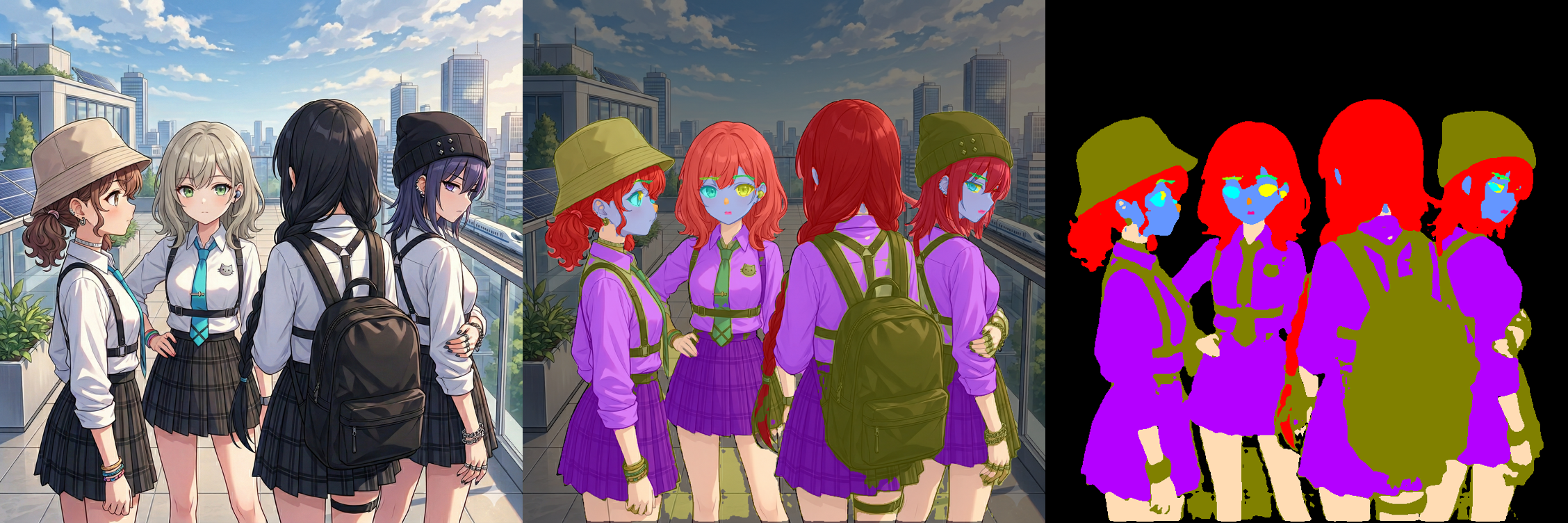
Anime Character Segmentation using Mask2Former and DINOv2 + U-Net++ with LoRA fine-tuning. Also integrates Background Removal via anime-segmentation.
sample image
Installation
pip install anime_seg
Usage
from anime_seg import AnimeSegPipeline
pipe = AnimeSegPipeline.from_mask2former().to("cuda")
mask = pipe("path/to/image.jpg")
mask.save("output.png")

# Background Removal (powered by anime-segmentation)
bg_pipe = AnimeSegPipeline.from_bg_remover().to("cuda")
no_bg_img = bg_pipe("path/to/image.jpg")
no_bg_img.save("no_bg_output.png")
AnimeSegPipeline() default constructor is deprecated. Use from_mask2former(), from_dinoV2(), or from_bg_remover().
Optional: output size
# Same as input size (default)
mask_same = pipe("path/to/image.jpg")

# Fixed output size
mask_fixed = pipe("path/to/image.jpg", width=1024, height=1024)

# Width/height can be specified independently
mask_w = pipe("path/to/image.jpg", width=1024)
mask_h = pipe("path/to/image.jpg", height=1024)
Advanced Usage
# Load specific file from HF repo
pipe = AnimeSegPipeline.from_mask2former(
    repo_id="suzukimain/AnimeSeg",
    filename="models/anime_seg_mask2former_v3.safetensors"
).to(device="cuda")

# DINOv2 backend
pipe_dino = AnimeSegPipeline.from_dinoV2(
    filename="models/anime_seg_dinov2_v2.safetensors"
).to("cuda")

# Use PIL Image
from PIL import Image
img = Image.open("image.jpg")
mask = pipe(img)

# Background Removal (powered by anime-segmentation)
bg_pipe = AnimeSegPipeline.from_bg_remover().to("cuda")
no_bg_img = bg_pipe("path/to/image.jpg")
no_bg_img.save("no_bg_output.png")
Model Files
Models should follow the naming convention:
models/anime_seg_{architecture}_v{version}.safetensors
Example:
models/anime_seg_dinov2_v2.safetensorsmodels/anime_seg_mask2former_v3.safetensors
Resolution order:
config.json- fallback scan by
models/anime_seg_{architecture}_v{max_version}.{ext}
Segmentation Classes and Mask Colors
Default from_mask2former() returns 12 classes:
| ID | Class Key | RGB | Color |
|---|---|---|---|
| 0 | background | (0, 0, 0) | Black |
| 1 | skin | (255, 220, 180) | Pale Orange |
| 2 | face | (100, 150, 255) | Blue |
| 3 | hair_main | (255, 0, 0) | Red |
| 4 | left_eye | (0, 255, 255) | Cyan |
| 5 | right_eye | (255, 255, 0) | Yellow |
| 6 | left_eyebrow | (150, 255, 0) | Yellow Green |
| 7 | right_eyebrow | (0, 255, 100) | Emerald Green |
| 8 | nose | (255, 140, 0) | Dark Orange |
| 9 | mouth | (255, 0, 150) | Magenta Pink |
| 10 | clothes | (180, 0, 255) | Purple |
| 11 | accessory | (128, 128, 0) | Olive |
from_dinoV2() returns 13 classes (includes unknown as ID 12).
DINOv2 Compatibility Note
Earlier versions primarily used DINOv2. Current recommendation is from_mask2former(), while from_dinoV2() remains for compatibility.
- Downloads last month
- 6,601