
Instructions to use t-tech/T-pro-it-2.0 with libraries, inference providers, notebooks, and local apps. Follow these links to get started.
- Libraries
- Transformers
How to use t-tech/T-pro-it-2.0 with Transformers:
# Use a pipeline as a high-level helper from transformers import pipeline pipe = pipeline("text-generation", model="t-tech/T-pro-it-2.0") messages = [ {"role": "user", "content": "Who are you?"}, ] pipe(messages)# Load model directly from transformers import AutoTokenizer, AutoModelForCausalLM tokenizer = AutoTokenizer.from_pretrained("t-tech/T-pro-it-2.0") model = AutoModelForCausalLM.from_pretrained("t-tech/T-pro-it-2.0") messages = [ {"role": "user", "content": "Who are you?"}, ] inputs = tokenizer.apply_chat_template( messages, add_generation_prompt=True, tokenize=True, return_dict=True, return_tensors="pt", ).to(model.device) outputs = model.generate(**inputs, max_new_tokens=40) print(tokenizer.decode(outputs[0][inputs["input_ids"].shape[-1]:])) - Inference
- Local Apps Settings
- vLLM
How to use t-tech/T-pro-it-2.0 with vLLM:
Install from pip and serve model
# Install vLLM from pip: pip install vllm # Start the vLLM server: vllm serve "t-tech/T-pro-it-2.0" # Call the server using curl (OpenAI-compatible API): curl -X POST "http://localhost:8000/v1/chat/completions" \ -H "Content-Type: application/json" \ --data '{ "model": "t-tech/T-pro-it-2.0", "messages": [ { "role": "user", "content": "What is the capital of France?" } ] }'Use Docker
docker model run hf.co/t-tech/T-pro-it-2.0
- SGLang
How to use t-tech/T-pro-it-2.0 with SGLang:
Install from pip and serve model
# Install SGLang from pip: pip install sglang # Start the SGLang server: python3 -m sglang.launch_server \ --model-path "t-tech/T-pro-it-2.0" \ --host 0.0.0.0 \ --port 30000 # Call the server using curl (OpenAI-compatible API): curl -X POST "http://localhost:30000/v1/chat/completions" \ -H "Content-Type: application/json" \ --data '{ "model": "t-tech/T-pro-it-2.0", "messages": [ { "role": "user", "content": "What is the capital of France?" } ] }'Use Docker images
docker run --gpus all \ --shm-size 32g \ -p 30000:30000 \ -v ~/.cache/huggingface:/root/.cache/huggingface \ --env "HF_TOKEN=<secret>" \ --ipc=host \ lmsysorg/sglang:latest \ python3 -m sglang.launch_server \ --model-path "t-tech/T-pro-it-2.0" \ --host 0.0.0.0 \ --port 30000 # Call the server using curl (OpenAI-compatible API): curl -X POST "http://localhost:30000/v1/chat/completions" \ -H "Content-Type: application/json" \ --data '{ "model": "t-tech/T-pro-it-2.0", "messages": [ { "role": "user", "content": "What is the capital of France?" } ] }' - Docker Model Runner
How to use t-tech/T-pro-it-2.0 with Docker Model Runner:
docker model run hf.co/t-tech/T-pro-it-2.0
the model is not working in LM studio
#2
by rail123 - opened
Getting following error when sending the prompt and in model settings
Failed to parse Jinja template: Parser Error: Expected closing statement token. OpenSquareBracket !== CloseStatement.
Error rendering prompt with jinja template: "Parser Error: Expected closing statement token. OpenSquareBracket !== CloseStatement.". This is usually an issue with the model's prompt template. If you are using a popular model, you can try to search the model under lmstudio-community, which will have fixed prompt templates. If you cannot find one, you are welcome to post this issue to our discord or issue tracker on GitHub. Alternatively, if you know how to write jinja templates, you can override the prompt template in My Models > model settings > Prompt Template
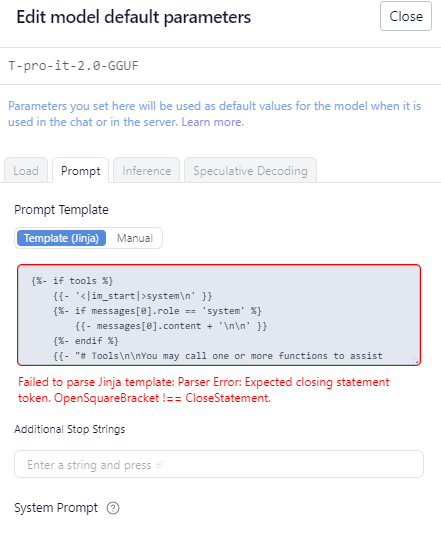
Got the same error. As I can see, this is because of focus on tools usage. Model works well after deleting template. As a workaround.
