


| [](https://www.npmjs.com/package/bunyan) | |
| Bunyan is **a simple and fast JSON logging library** for node.js services: | |
| ```js | |
| var bunyan = require('bunyan'); | |
| var log = bunyan.createLogger({name: "myapp"}); | |
| log.info("hi"); | |
| ``` | |
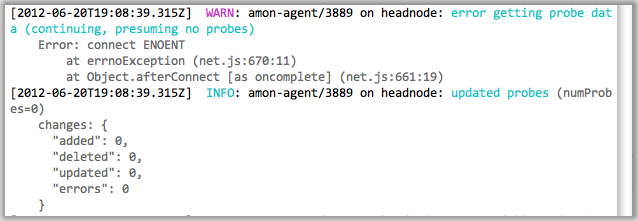
| and **a `bunyan` CLI tool** for nicely viewing those logs: | |
|  | |
| Manifesto: Server logs should be structured. JSON's a good format. Let's do | |
| that. A log record is one line of `JSON.stringify`'d output. Let's also | |
| specify some common names for the requisite and common fields for a log | |
| record (see below). | |
| Also: log4j is way more than you need. | |
| # Current Status | |
| Solid core functionality is there. Joyent is using this for a number of | |
| production services. Bunyan supports node 0.10 and greater. Follow | |
| <a href="https://twitter.com/intent/user?screen_name=trentmick" target="_blank">@trentmick</a> | |
| for updates to Bunyan. | |
| There is an email discussion list | |
| [bunyan-logging@googlegroups.com](mailto:bunyan-logging@googlegroups.com), | |
| also [as a forum in the | |
| browser](https://groups.google.com/forum/?fromgroups#!forum/bunyan-logging). | |
| # Installation | |
| ```sh | |
| npm install bunyan | |
| ``` | |
| **Tip**: The `bunyan` CLI tool is written to be compatible (within reason) with | |
| all versions of Bunyan logs. Therefore you might want to `npm install -g bunyan` | |
| to get the bunyan CLI on your PATH, then use local bunyan installs for | |
| node.js library usage of bunyan in your apps. | |
| # Features | |
| - elegant [log method API](#log-method-api) | |
| - extensible [streams](#streams) system for controlling where log records | |
| go (to a stream, to a file, [log file rotation](#stream-type-rotating-file), | |
| etc.) | |
| - [`bunyan` CLI](#cli-usage) for pretty-printing and filtering of Bunyan logs | |
| - simple include of log call source location (file, line, function) with | |
| [`src: true`](#src) | |
| - lightweight specialization of Logger instances with [`log.child`](#logchild) | |
| - custom rendering of logged objects with ["serializers"](#serializers) | |
| - [Runtime log snooping via DTrace support](#runtime-log-snooping-via-dtrace) | |
| - Support for a few [runtime environments](#runtime-environments): Node.js, | |
| [Browserify](http://browserify.org/), [NW.js](http://nwjs.io/). | |
| # Introduction | |
| Like most logging libraries you create a Logger instance and call methods | |
| named after the logging levels: | |
| ```js | |
| // hi.js | |
| var bunyan = require('bunyan'); | |
| var log = bunyan.createLogger({name: 'myapp'}); | |
| log.info('hi'); | |
| log.warn({lang: 'fr'}, 'au revoir'); | |
| ``` | |
| All loggers must provide a "name". This is somewhat akin to the log4j logger | |
| "name", but Bunyan doesn't do hierarchical logger names. | |
| **Bunyan log records are JSON.** A few fields are added automatically: | |
| "pid", "hostname", "time" and "v". | |
| ```sh | |
| $ node hi.js | |
| {"name":"myapp","hostname":"banana.local","pid":40161,"level":30,"msg":"hi","time":"2013-01-04T18:46:23.851Z","v":0} | |
| {"name":"myapp","hostname":"banana.local","pid":40161,"level":40,"lang":"fr","msg":"au revoir","time":"2013-01-04T18:46:23.853Z","v":0} | |
| ``` | |
| ## Constructor API | |
| ```js | |
| var bunyan = require('bunyan'); | |
| var log = bunyan.createLogger({ | |
| name: <string>, // Required | |
| level: <level name or number>, // Optional, see "Levels" section | |
| stream: <node.js stream>, // Optional, see "Streams" section | |
| streams: [<bunyan streams>, ...], // Optional, see "Streams" section | |
| serializers: <serializers mapping>, // Optional, see "Serializers" section | |
| src: <boolean>, // Optional, see "src" section | |
| // Any other fields are added to all log records as is. | |
| foo: 'bar', | |
| ... | |
| }); | |
| ``` | |
| ## Log Method API | |
| The example above shows two different ways to call `log.info(...)`. The | |
| full API is: | |
| ```js | |
| log.info(); // Returns a boolean: is the "info" level enabled? | |
| // This is equivalent to `log.isInfoEnabled()` or | |
| // `log.isEnabledFor(INFO)` in log4j. | |
| log.info('hi'); // Log a simple string message (or number). | |
| log.info('hi %s', bob, anotherVar); // Uses `util.format` for msg formatting. | |
| log.info({foo: 'bar'}, 'hi'); | |
| // The first field can optionally be a "fields" object, which | |
| // is merged into the log record. | |
| log.info(err); // Special case to log an `Error` instance to the record. | |
| // This adds an "err" field with exception details | |
| // (including the stack) and sets "msg" to the exception | |
| // message. | |
| log.info(err, 'more on this: %s', more); | |
| // ... or you can specify the "msg". | |
| log.info({foo: 'bar', err: err}, 'some msg about this error'); | |
| // To pass in an Error *and* other fields, use the `err` | |
| // field name for the Error instance. | |
| ``` | |
| Note that this implies **you cannot blindly pass any object as the first | |
| argument to log it** because that object might include fields that collide with | |
| Bunyan's [core record fields](#core-fields). In other words, | |
| `log.info(mywidget)` may not yield what you expect. Instead of a string | |
| representation of `mywidget` that other logging libraries may give you, Bunyan | |
| will try to JSON-ify your object. It is a Bunyan best practice to always give a | |
| field name to included objects, e.g.: | |
| ```js | |
| log.info({widget: mywidget}, ...) | |
| ``` | |
| This will dove-tail with [Bunyan serializer support](#serializers), discussed | |
| later. | |
| The same goes for all of Bunyan's log levels: `log.trace`, `log.debug`, | |
| `log.info`, `log.warn`, `log.error`, and `log.fatal`. See the [levels | |
| section](#levels) below for details and suggestions. | |
| ## CLI Usage | |
| Bunyan log output is a stream of JSON objects. This is great for processing, | |
| but not for reading directly. A **`bunyan` tool** is provided **for | |
| pretty-printing bunyan logs** and for **filtering** (e.g. | |
| `| bunyan -c 'this.foo == "bar"'`). Using our example above: | |
| ```sh | |
| $ node hi.js | ./bin/bunyan | |
| [2013-01-04T19:01:18.241Z] INFO: myapp/40208 on banana.local: hi | |
| [2013-01-04T19:01:18.242Z] WARN: myapp/40208 on banana.local: au revoir (lang=fr) | |
| ``` | |
| See the screenshot above for an example of the default coloring of rendered | |
| log output. That example also shows the nice formatting automatically done for | |
| some well-known log record fields (e.g. `req` is formatted like an HTTP request, | |
| `res` like an HTTP response, `err` like an error stack trace). | |
| One interesting feature is **filtering** of log content, which can be useful | |
| for digging through large log files or for analysis. We can filter only | |
| records above a certain level: | |
| ```sh | |
| $ node hi.js | bunyan -l warn | |
| [2013-01-04T19:08:37.182Z] WARN: myapp/40353 on banana.local: au revoir (lang=fr) | |
| ``` | |
| Or filter on the JSON fields in the records (e.g. only showing the French | |
| records in our contrived example): | |
| ```sh | |
| $ node hi.js | bunyan -c 'this.lang == "fr"' | |
| [2013-01-04T19:08:26.411Z] WARN: myapp/40342 on banana.local: au revoir (lang=fr) | |
| ``` | |
| See `bunyan --help` for other facilities. | |
| ## Streams Introduction | |
| By default, log output is to stdout and at the "info" level. Explicitly that | |
| looks like: | |
| ```js | |
| var log = bunyan.createLogger({ | |
| name: 'myapp', | |
| stream: process.stdout, | |
| level: 'info' | |
| }); | |
| ``` | |
| That is an abbreviated form for a single stream. **You can define multiple | |
| streams at different levels**. | |
| ```js | |
| var log = bunyan.createLogger({ | |
| name: 'myapp', | |
| streams: [ | |
| { | |
| level: 'info', | |
| stream: process.stdout // log INFO and above to stdout | |
| }, | |
| { | |
| level: 'error', | |
| path: '/var/tmp/myapp-error.log' // log ERROR and above to a file | |
| } | |
| ] | |
| }); | |
| ``` | |
| More on streams in the [Streams section](#streams) below. | |
| ## log.child | |
| Bunyan has a concept of a child logger to **specialize a logger for a | |
| sub-component of your application**, i.e. to create a new logger with | |
| additional bound fields that will be included in its log records. A child | |
| logger is created with `log.child(...)`. | |
| In the following example, logging on a "Wuzzle" instance's `this.log` will | |
| be exactly as on the parent logger with the addition of the `widget_type` | |
| field: | |
| ```js | |
| var bunyan = require('bunyan'); | |
| var log = bunyan.createLogger({name: 'myapp'}); | |
| function Wuzzle(options) { | |
| this.log = options.log.child({widget_type: 'wuzzle'}); | |
| this.log.info('creating a wuzzle') | |
| } | |
| Wuzzle.prototype.woos = function () { | |
| this.log.warn('This wuzzle is woosey.') | |
| } | |
| log.info('start'); | |
| var wuzzle = new Wuzzle({log: log}); | |
| wuzzle.woos(); | |
| log.info('done'); | |
| ``` | |
| Running that looks like (raw): | |
| ```sh | |
| $ node myapp.js | |
| {"name":"myapp","hostname":"myhost","pid":34572,"level":30,"msg":"start","time":"2013-01-04T07:47:25.814Z","v":0} | |
| {"name":"myapp","hostname":"myhost","pid":34572,"widget_type":"wuzzle","level":30,"msg":"creating a wuzzle","time":"2013-01-04T07:47:25.815Z","v":0} | |
| {"name":"myapp","hostname":"myhost","pid":34572,"widget_type":"wuzzle","level":40,"msg":"This wuzzle is woosey.","time":"2013-01-04T07:47:25.815Z","v":0} | |
| {"name":"myapp","hostname":"myhost","pid":34572,"level":30,"msg":"done","time":"2013-01-04T07:47:25.816Z","v":0} | |
| ``` | |
| And with the `bunyan` CLI (using the "short" output mode): | |
| ```sh | |
| $ node myapp.js | bunyan -o short | |
| 07:46:42.707Z INFO myapp: start | |
| 07:46:42.709Z INFO myapp: creating a wuzzle (widget_type=wuzzle) | |
| 07:46:42.709Z WARN myapp: This wuzzle is woosey. (widget_type=wuzzle) | |
| 07:46:42.709Z INFO myapp: done | |
| ``` | |
| A more practical example is in the | |
| [node-restify](https://github.com/mcavage/node-restify) web framework. | |
| Restify uses Bunyan for its logging. One feature of its integration, is that | |
| if `server.use(restify.requestLogger())` is used, each restify request handler | |
| includes a `req.log` logger that is: | |
| ```js | |
| log.child({req_id: <unique request id>}, true) | |
| ``` | |
| Apps using restify can then use `req.log` and have all such log records | |
| include the unique request id (as "req\_id"). Handy. | |
| ## Serializers | |
| Bunyan has a concept of **"serializer" functions to produce a JSON-able object | |
| from a JavaScript object**, so you can easily do the following: | |
| ```js | |
| log.info({req: <request object>}, 'something about handling this request'); | |
| ``` | |
| and have the `req` entry in the log record be just a reasonable subset of | |
| `<request object>` fields (or computed data about those fields). | |
| A logger instance can have a `serializers` mapping of log record field name | |
| ("req" in this example) to a serializer function. When creating the log | |
| record, Bunyan will call the serializer function for fields of that name. | |
| An example: | |
| ```js | |
| function reqSerializer(req) { | |
| return { | |
| method: req.method, | |
| url: req.url, | |
| headers: req.headers | |
| }; | |
| } | |
| var log = bunyan.createLogger({ | |
| name: 'myapp', | |
| serializers: { | |
| req: reqSerializer | |
| } | |
| }); | |
| ``` | |
| Typically serializers are added to a logger at creation time via | |
| `bunyan.createLogger({..., serializers: <serializers>})`. However, serializers | |
| can be added after creation via `<logger>.addSerializers(...)`, e.g.: | |
| ```js | |
| var log = bunyan.createLogger({name: 'myapp'}); | |
| log.addSerializers({req: reqSerializer}); | |
| ``` | |
| **Note**: Your own serializers should never throw, otherwise you'll get an | |
| ugly message on stderr from Bunyan (along with the traceback) and the field | |
| in your log record will be replaced with a short error message. | |
| ### Standard Serializers | |
| Bunyan includes a small set of "standard serializers", exported as | |
| `bunyan.stdSerializers`. Their use is completely optional. Example using | |
| all of them: | |
| ```js | |
| var log = bunyan.createLogger({ | |
| name: 'myapp', | |
| serializers: bunyan.stdSerializers | |
| }); | |
| ``` | |
| or particular ones: | |
| ```js | |
| var log = bunyan.createLogger({ | |
| name: 'myapp', | |
| serializers: {err: bunyan.stdSerializers.err} | |
| }); | |
| ``` | |
| Standard serializers are: | |
| | Field | Description | | |
| | ----- | ----------- | | |
| | err | Used for serializing JavaScript error objects, including traversing an error's cause chain for error objects with a `.cause()` -- e.g. as from [verror](https://github.com/davepacheco/node-verror). | | |
| | req | Common fields from a node.js HTTP request object. | | |
| | res | Common fields from a node.js HTTP response object. | | |
| Note that the `req` and `res` serializers intentionally do not include the | |
| request/response *body*, as that can be prohibitively large. If helpful, the | |
| [restify framework's audit logger plugin](https://github.com/restify/node-restify/blob/ac13902ad9716dcb20aaa62295403983075b1841/lib/plugins/audit.js#L38-L87) | |
| has its own req/res serializers that include more information (optionally | |
| including the body). | |
| ## src | |
| The **source file, line and function of the log call site** can be added to | |
| log records by using the `src: true` config option: | |
| ```js | |
| var log = bunyan.createLogger({src: true, ...}); | |
| ``` | |
| This adds the call source info with the 'src' field, like this: | |
| ```js | |
| { | |
| "name": "src-example", | |
| "hostname": "banana.local", | |
| "pid": 123, | |
| "component": "wuzzle", | |
| "level": 4, | |
| "msg": "This wuzzle is woosey.", | |
| "time": "2012-02-06T04:19:35.605Z", | |
| "src": { | |
| "file": "/Users/trentm/tm/node-bunyan/examples/src.js", | |
| "line": 20, | |
| "func": "Wuzzle.woos" | |
| }, | |
| "v": 0 | |
| } | |
| ``` | |
| **WARNING: Determining the call source info is slow. Never use this option | |
| in production.** | |
| # Levels | |
| The log levels in bunyan are as follows. The level descriptions are best | |
| practice *opinions* of the author. | |
| - "fatal" (60): The service/app is going to stop or become unusable now. | |
| An operator should definitely look into this soon. | |
| - "error" (50): Fatal for a particular request, but the service/app continues | |
| servicing other requests. An operator should look at this soon(ish). | |
| - "warn" (40): A note on something that should probably be looked at by an | |
| operator eventually. | |
| - "info" (30): Detail on regular operation. | |
| - "debug" (20): Anything else, i.e. too verbose to be included in "info" level. | |
| - "trace" (10): Logging from external libraries used by your app or *very* | |
| detailed application logging. | |
| Setting a logger instance (or one of its streams) to a particular level implies | |
| that all log records *at that level and above* are logged. E.g. a logger set to | |
| level "info" will log records at level info and above (warn, error, fatal). | |
| While using log level *names* is preferred, the actual level values are integers | |
| internally (10 for "trace", ..., 60 for "fatal"). Constants are defined for | |
| the levels: `bunyan.TRACE` ... `bunyan.FATAL`. The lowercase level names are | |
| aliases supported in the API, e.g. `log.level("info")`. There is one exception: | |
| DTrace integration uses the level names. The fired DTrace probes are named | |
| 'bunyan-$levelName'. | |
| Here is the API for querying and changing levels on an existing logger. | |
| Recall that a logger instance has an array of output "streams": | |
| ```js | |
| log.level() -> INFO // gets current level (lowest level of all streams) | |
| log.level(INFO) // set all streams to level INFO | |
| log.level("info") // set all streams to level INFO | |
| log.levels() -> [DEBUG, INFO] // get array of levels of all streams | |
| log.levels(0) -> DEBUG // get level of stream at index 0 | |
| log.levels("foo") // get level of stream with name "foo" | |
| log.levels(0, INFO) // set level of stream 0 to INFO | |
| log.levels(0, "info") // can use "info" et al aliases | |
| log.levels("foo", WARN) // set stream named "foo" to WARN | |
| ``` | |
| ## Level suggestions | |
| Trent's biased suggestions for server apps: Use "debug" sparingly. Information | |
| that will be useful to debug errors *post mortem* should usually be included in | |
| "info" messages if it's generally relevant or else with the corresponding | |
| "error" event. Don't rely on spewing mostly irrelevant debug messages all the | |
| time and sifting through them when an error occurs. | |
| Trent's biased suggestions for node.js libraries: IMHO, libraries should only | |
| ever log at `trace`-level. Fine control over log output should be up to the | |
| app using a library. Having a library that spews log output at higher levels | |
| gets in the way of the a clear story in the *app* logs. | |
| # Log Record Fields | |
| This section will describe *rules* for the Bunyan log format: field names, | |
| field meanings, required fields, etc. However, a Bunyan library doesn't | |
| strictly enforce all these rules while records are being emitted. For example, | |
| Bunyan will add a `time` field with the correct format to your log records, | |
| but you can specify your own. It is the caller's responsibility to specify | |
| the appropriate format. | |
| The reason for the above leniency is because IMO logging a message should | |
| never break your app. This leads to this rule of logging: **a thrown | |
| exception from `log.info(...)` or equivalent (other than for calling with the | |
| incorrect signature) is always a bug in Bunyan.** | |
| A typical Bunyan log record looks like this: | |
| ```js | |
| {"name":"myserver","hostname":"banana.local","pid":123,"req":{"method":"GET","url":"/path?q=1#anchor","headers":{"x-hi":"Mom","connection":"close"}},"level":3,"msg":"start request","time":"2012-02-03T19:02:46.178Z","v":0} | |
| ``` | |
| Pretty-printed: | |
| ```js | |
| { | |
| "name": "myserver", | |
| "hostname": "banana.local", | |
| "pid": 123, | |
| "req": { | |
| "method": "GET", | |
| "url": "/path?q=1#anchor", | |
| "headers": { | |
| "x-hi": "Mom", | |
| "connection": "close" | |
| }, | |
| "remoteAddress": "120.0.0.1", | |
| "remotePort": 51244 | |
| }, | |
| "level": 3, | |
| "msg": "start request", | |
| "time": "2012-02-03T19:02:57.534Z", | |
| "v": 0 | |
| } | |
| ``` | |
| ## Core fields | |
| - `v`: Required. Integer. Added by Bunyan. Cannot be overridden. | |
| This is the Bunyan log format version (`require('bunyan').LOG_VERSION`). | |
| The log version is a single integer. `0` is until I release a version | |
| "1.0.0" of node-bunyan. Thereafter, starting with `1`, this will be | |
| incremented if there is any backward incompatible change to the log record | |
| format. Details will be in "CHANGES.md" (the change log). | |
| - `level`: Required. Integer. Added by Bunyan. Cannot be overridden. | |
| See the "Levels" section. | |
| - `name`: Required. String. Provided at Logger creation. | |
| You must specify a name for your logger when creating it. Typically this | |
| is the name of the service/app using Bunyan for logging. | |
| - `hostname`: Required. String. Provided or determined at Logger creation. | |
| You can specify your hostname at Logger creation or it will be retrieved | |
| vi `os.hostname()`. | |
| - `pid`: Required. Integer. Filled in automatically at Logger creation. | |
| - `time`: Required. String. Added by Bunyan. Can be overridden. | |
| The date and time of the event in [ISO 8601 | |
| Extended Format](http://en.wikipedia.org/wiki/ISO_8601) format and in UTC, | |
| as from | |
| [`Date.toISOString()`](https://developer.mozilla.org/en/JavaScript/Reference/Global_Objects/Date/toISOString). | |
| - `msg`: Required. String. | |
| Every `log.debug(...)` et al call must provide a log message. | |
| - `src`: Optional. Object giving log call source info. This is added | |
| automatically by Bunyan if the "src: true" config option is given to the | |
| Logger. Never use in production as this is really slow. | |
| Go ahead and add more fields, and nested ones are fine (and recommended) as | |
| well. This is why we're using JSON. Some suggestions and best practices | |
| follow (feedback from actual users welcome). | |
| ## Recommended/Best Practice Fields | |
| - `err`: Object. A caught JS exception. Log that thing with `log.info(err)` | |
| to get: | |
| ```js | |
| ... | |
| "err": { | |
| "message": "boom", | |
| "name": "TypeError", | |
| "stack": "TypeError: boom\n at Object.<anonymous> ..." | |
| }, | |
| "msg": "boom", | |
| ... | |
| ``` | |
| Or use the `bunyan.stdSerializers.err` serializer in your Logger and | |
| do this `log.error({err: err}, "oops")`. See "examples/err.js". | |
| - `req_id`: String. A request identifier. Including this field in all logging | |
| tied to handling a particular request to your server is strongly suggested. | |
| This allows post analysis of logs to easily collate all related logging | |
| for a request. This really shines when you have a SOA with multiple services | |
| and you carry a single request ID from the top API down through all APIs | |
| (as [node-restify](https://github.com/mcavage/node-restify) facilitates | |
| with its 'Request-Id' header). | |
| - `req`: An HTTP server request. Bunyan provides `bunyan.stdSerializers.req` | |
| to serialize a request with a suggested set of keys. Example: | |
| ```js | |
| { | |
| "method": "GET", | |
| "url": "/path?q=1#anchor", | |
| "headers": { | |
| "x-hi": "Mom", | |
| "connection": "close" | |
| }, | |
| "remoteAddress": "120.0.0.1", | |
| "remotePort": 51244 | |
| } | |
| ``` | |
| - `res`: An HTTP server response. Bunyan provides `bunyan.stdSerializers.res` | |
| to serialize a response with a suggested set of keys. Example: | |
| ```js | |
| { | |
| "statusCode": 200, | |
| "header": "HTTP/1.1 200 OK\r\nContent-Type: text/plain\r\nConnection: keep-alive\r\nTransfer-Encoding: chunked\r\n\r\n" | |
| } | |
| ``` | |
| ## Other fields to consider | |
| - `req.username`: Authenticated user (or for a 401, the user attempting to | |
| auth). | |
| - Some mechanism to calculate response latency. "restify" users will have | |
| a "X-Response-Time" header. A `latency` custom field would be fine. | |
| - `req.body`: If you know that request bodies are small (common in APIs, | |
| for example), then logging the request body is good. | |
| # Streams | |
| A "stream" is Bunyan's name for where it outputs log messages (the equivalent | |
| to a log4j Appender). Ultimately Bunyan uses a | |
| [Writable Stream](https://nodejs.org/docs/latest/api/all.html#writable_Stream) | |
| interface, but there are some additional attributes used to create and | |
| manage the stream. A Bunyan Logger instance has one or more streams. | |
| In general streams are specified with the "streams" option: | |
| ```js | |
| var bunyan = require('bunyan'); | |
| var log = bunyan.createLogger({ | |
| name: "foo", | |
| streams: [ | |
| { | |
| stream: process.stderr, | |
| level: "debug" | |
| }, | |
| ... | |
| ] | |
| }); | |
| ``` | |
| For convenience, if there is only one stream, it can specified with the | |
| "stream" and "level" options (internally converted to a `Logger.streams`). | |
| ```js | |
| var log = bunyan.createLogger({ | |
| name: "foo", | |
| stream: process.stderr, | |
| level: "debug" | |
| }); | |
| ``` | |
| Note that "file" streams do not support this shortcut (partly for historical | |
| reasons and partly to not make it difficult to add a literal "path" field | |
| on log records). | |
| If neither "streams" nor "stream" are specified, the default is a stream of | |
| type "stream" emitting to `process.stdout` at the "info" level. | |
| ## stream errors | |
| A Bunyan logger instance can be made to re-emit "error" events from its | |
| streams. Bunyan does so by default for [`type === "file"` | |
| streams](#stream-type-file), so you can do this: | |
| ```js | |
| var log = bunyan.createLogger({name: 'mylog', streams: [{path: LOG_PATH}]}); | |
| log.on('error', function (err, stream) { | |
| // Handle stream write or create error here. | |
| }); | |
| ``` | |
| As of bunyan@1.7.0, the `reemitErrorEvents` field can be used when adding a | |
| stream to control whether "error" events are re-emitted on the Logger. For | |
| example: | |
| var EventEmitter = require('events').EventEmitter; | |
| var util = require('util'); | |
| function MyFlakyStream() {} | |
| util.inherits(MyFlakyStream, EventEmitter); | |
| MyFlakyStream.prototype.write = function (rec) { | |
| this.emit('error', new Error('boom')); | |
| } | |
| var log = bunyan.createLogger({ | |
| name: 'this-is-flaky', | |
| streams: [ | |
| { | |
| type: 'raw', | |
| stream: new MyFlakyStream(), | |
| reemitErrorEvents: true | |
| } | |
| ] | |
| }); | |
| log.info('hi there'); | |
| The behaviour is as follows: | |
| - `reemitErrorEvents` not specified: `file` streams will re-emit error events | |
| on the Logger instance. | |
| - `reemitErrorEvents: true`: error events will be re-emitted on the Logger | |
| for any stream with a `.on()` function -- which includes file streams, | |
| process.stdout/stderr, and any object that inherits from EventEmitter. | |
| - `reemitErrorEvents: false`: error events will not be re-emitted for any | |
| streams. | |
| Note: "error" events are **not** related to log records at the "error" level | |
| as produced by `log.error(...)`. See [the node.js docs on error | |
| events](https://nodejs.org/api/events.html#events_error_events) for details. | |
| ## stream type: `stream` | |
| A `type === 'stream'` is a plain ol' node.js [Writable | |
| Stream](http://nodejs.org/docs/latest/api/all.html#writable_Stream). A | |
| "stream" (the writable stream) field is required. E.g.: `process.stdout`, | |
| `process.stderr`. | |
| ```js | |
| var log = bunyan.createLogger({ | |
| name: 'foo', | |
| streams: [{ | |
| stream: process.stderr | |
| // `type: 'stream'` is implied | |
| }] | |
| }); | |
| ``` | |
| <table> | |
| <tr> | |
| <th>Field</th> | |
| <th>Required?</th> | |
| <th>Default</th> | |
| <th>Description</th> | |
| </tr> | |
| <tr> | |
| <td>stream</td> | |
| <td>Yes</td> | |
| <td>-</td> | |
| <td>A "Writable Stream", e.g. a std handle or an open file write stream.</td> | |
| </tr> | |
| <tr> | |
| <td>type</td> | |
| <td>No</td> | |
| <td>n/a</td> | |
| <td>`type == 'stream'` is implied if the `stream` field is given.</td> | |
| </tr> | |
| <tr> | |
| <td>level</td> | |
| <td>No</td> | |
| <td>info</td> | |
| <td>The level to which logging to this stream is enabled. If not | |
| specified it defaults to "info". If specified this can be one of the | |
| level strings ("trace", "debug", ...) or constants (`bunyan.TRACE`, | |
| `bunyan.DEBUG`, ...). This serves as a severity threshold for that stream | |
| so logs of greater severity will also pass through (i.e. If level="warn", | |
| error and fatal will also pass through this stream).</td> | |
| </tr> | |
| <tr> | |
| <td>name</td> | |
| <td>No</td> | |
| <td>-</td> | |
| <td>A name for this stream. This may be useful for usage of `log.level(NAME, | |
| LEVEL)`. See the [Levels section](#levels) for details. A stream "name" isn't | |
| used for anything else.</td> | |
| </tr> | |
| </table> | |
| ## stream type: `file` | |
| A `type === 'file'` stream requires a "path" field. Bunyan will open this | |
| file for appending. E.g.: | |
| ```js | |
| var log = bunyan.createLogger({ | |
| name: 'foo', | |
| streams: [{ | |
| path: '/var/log/foo.log', | |
| // `type: 'file'` is implied | |
| }] | |
| }); | |
| ``` | |
| <table> | |
| <tr> | |
| <th>Field</th> | |
| <th>Required?</th> | |
| <th>Default</th> | |
| <th>Description</th> | |
| </tr> | |
| <tr> | |
| <td>path</td> | |
| <td>Yes</td> | |
| <td>-</td> | |
| <td>A file path to which to log.</td> | |
| </tr> | |
| <tr> | |
| <td>type</td> | |
| <td>No</td> | |
| <td>n/a</td> | |
| <td>`type == 'file'` is implied if the `path` field is given.</td> | |
| </tr> | |
| <tr> | |
| <td>level</td> | |
| <td>No</td> | |
| <td>info</td> | |
| <td>The level to which logging to this stream is enabled. If not | |
| specified it defaults to "info". If specified this can be one of the | |
| level strings ("trace", "debug", ...) or constants (`bunyan.TRACE`, | |
| `bunyan.DEBUG`, ...). This serves as a severity threshold for that | |
| stream so logs of greater severity will also pass through (i.e. If | |
| level="warn", error and fatal will also pass through this stream).</td> | |
| </tr> | |
| <tr> | |
| <td>name</td> | |
| <td>No</td> | |
| <td>-</td> | |
| <td>A name for this stream. This may be useful for usage of `log.level(NAME, | |
| LEVEL)`. See the [Levels section](#levels) for details. A stream "name" isn't | |
| used for anything else.</td> | |
| </tr> | |
| </table> | |
| ## stream type: `rotating-file` | |
| **WARNING on node 0.8 usage:** Users of Bunyan's `rotating-file` should (a) be | |
| using at least bunyan 0.23.1 (with the fix for [this | |
| issue](https://github.com/trentm/node-bunyan/pull/97)), and (b) should use at | |
| least node 0.10 (node 0.8 does not support the `unref()` method on | |
| `setTimeout(...)` needed for the mentioned fix). The symptom is that process | |
| termination will hang for up to a full rotation period. | |
| **WARNING on [cluster](http://nodejs.org/docs/latest/api/all.html#all_cluster) | |
| usage:** Using Bunyan's `rotating-file` stream with node.js's "cluster" module | |
| can result in unexpected file rotation. You must not have multiple processes | |
| in the cluster logging to the same file path. In other words, you must have | |
| a separate log file path for the master and each worker in the cluster. | |
| Alternatively, consider using a system file rotation facility such as | |
| `logrotate` on Linux or `logadm` on SmartOS/Illumos. See | |
| [this comment on issue #117](https://github.com/trentm/node-bunyan/issues/117#issuecomment-44804938) | |
| for details. | |
| A `type === 'rotating-file'` is a file stream that handles file automatic | |
| rotation. | |
| ```js | |
| var log = bunyan.createLogger({ | |
| name: 'foo', | |
| streams: [{ | |
| type: 'rotating-file', | |
| path: '/var/log/foo.log', | |
| period: '1d', // daily rotation | |
| count: 3 // keep 3 back copies | |
| }] | |
| }); | |
| ``` | |
| This will rotate '/var/log/foo.log' every day (at midnight) to: | |
| ```sh | |
| /var/log/foo.log.0 # yesterday | |
| /var/log/foo.log.1 # 1 day ago | |
| /var/log/foo.log.2 # 2 days ago | |
| ``` | |
| *Currently*, there is no support for providing a template for the rotated | |
| files, or for rotating when the log reaches a threshold size. | |
| <table> | |
| <tr> | |
| <th>Field</th> | |
| <th>Required?</th> | |
| <th>Default</th> | |
| <th>Description</th> | |
| </tr> | |
| <tr> | |
| <td>type</td> | |
| <td>Yes</td> | |
| <td>-</td> | |
| <td>"rotating-file"</td> | |
| </tr> | |
| <tr> | |
| <td>path</td> | |
| <td>Yes</td> | |
| <td>-</td> | |
| <td>A file path to which to log. Rotated files will be "$path.0", | |
| "$path.1", ...</td> | |
| </tr> | |
| <tr> | |
| <td>period</td> | |
| <td>No</td> | |
| <td>1d</td> | |
| <td>The period at which to rotate. This is a string of the format | |
| "$number$scope" where "$scope" is one of "ms" (milliseconds -- only useful for | |
| testing), "h" (hours), "d" (days), "w" (weeks), "m" (months), "y" (years). Or | |
| one of the following names can be used "hourly" (means 1h), "daily" (1d), | |
| "weekly" (1w), "monthly" (1m), "yearly" (1y). Rotation is done at the start of | |
| the scope: top of the hour (h), midnight (d), start of Sunday (w), start of the | |
| 1st of the month (m), start of Jan 1st (y).</td> | |
| </tr> | |
| <tr> | |
| <td>count</td> | |
| <td>No</td> | |
| <td>10</td> | |
| <td>The number of rotated files to keep.</td> | |
| </tr> | |
| <tr> | |
| <td>level</td> | |
| <td>No</td> | |
| <td>info</td> | |
| <td>The level at which logging to this stream is enabled. If not | |
| specified it defaults to "info". If specified this can be one of the | |
| level strings ("trace", "debug", ...) or constants (`bunyan.TRACE`, | |
| `bunyan.DEBUG`, ...).</td> | |
| </tr> | |
| <tr> | |
| <td>name</td> | |
| <td>No</td> | |
| <td>-</td> | |
| <td>A name for this stream. This may be useful for usage of `log.level(NAME, | |
| LEVEL)`. See the [Levels section](#levels) for details. A stream "name" isn't | |
| used for anything else.</td> | |
| </tr> | |
| </table> | |
| **Note on log rotation**: Often you may be using external log rotation utilities | |
| like `logrotate` on Linux or `logadm` on SmartOS/Illumos. In those cases, unless | |
| your are ensuring "copy and truncate" semantics (via `copytruncate` with | |
| logrotate or `-c` with logadm) then the fd for your 'file' stream will change. | |
| You can tell bunyan to reopen the file stream with code like this in your | |
| app: | |
| ```js | |
| var log = bunyan.createLogger(...); | |
| ... | |
| process.on('SIGUSR2', function () { | |
| log.reopenFileStreams(); | |
| }); | |
| ``` | |
| where you'd configure your log rotation to send SIGUSR2 (or some other signal) | |
| to your process. Any other mechanism to signal your app to run | |
| `log.reopenFileStreams()` would work as well. | |
| ## stream type: `raw` | |
| - `raw`: Similar to a "stream" writable stream, except that the write method | |
| is given raw log record *Object*s instead of a JSON-stringified string. | |
| This can be useful for hooking on further processing to all Bunyan logging: | |
| pushing to an external service, a RingBuffer (see below), etc. | |
| ## `raw` + RingBuffer Stream | |
| Bunyan comes with a special stream called a RingBuffer which keeps the last N | |
| records in memory and does *not* write the data anywhere else. One common | |
| strategy is to log 'info' and higher to a normal log file but log all records | |
| (including 'trace') to a ringbuffer that you can access via a debugger, or your | |
| own HTTP interface, or a post-mortem facility like MDB or node-panic. | |
| To use a RingBuffer: | |
| ```js | |
| /* Create a ring buffer that stores the last 100 records. */ | |
| var bunyan = require('bunyan'); | |
| var ringbuffer = new bunyan.RingBuffer({ limit: 100 }); | |
| var log = bunyan.createLogger({ | |
| name: 'foo', | |
| streams: [ | |
| { | |
| level: 'info', | |
| stream: process.stdout | |
| }, | |
| { | |
| level: 'trace', | |
| type: 'raw', // use 'raw' to get raw log record objects | |
| stream: ringbuffer | |
| } | |
| ] | |
| }); | |
| log.info('hello world'); | |
| console.log(ringbuffer.records); | |
| ``` | |
| This example emits: | |
| ```js | |
| [ { name: 'foo', | |
| hostname: '912d2b29', | |
| pid: 50346, | |
| level: 30, | |
| msg: 'hello world', | |
| time: '2012-06-19T21:34:19.906Z', | |
| v: 0 } ] | |
| ``` | |
| ## third-party streams | |
| (There are a lot that aren't listed here. `npm search bunyan` is a good | |
| place to start.) | |
| - syslog: | |
| [mcavage/node-bunyan-syslog](https://github.com/mcavage/node-bunyan-syslog) | |
| provides support for directing bunyan logging to a syslog server. | |
| - bunyan-slack: | |
| [qualitybath/bunyan-slack](https://github.com/qualitybath/bunyan-slack) Bunyan stream for Slack chat integration. | |
| - bunyan-fogbugz | |
| [qualitybath/bunyan-fogbugz](https://github.com/qualitybath/bunyan-fogbugz) Bunyan stream for sending automated crash reports to FogBugz | |
| - bunyan-cloudwatch: | |
| [mirkokiefer/bunyan-cloudwatch](https://github.com/mirkokiefer/bunyan-cloudwatch) Bunyan stream for sending logs to AWS CloudWatch. | |
| - TODO: eventually https://github.com/trentm/node-bunyan-winston | |
| # Runtime log snooping via DTrace | |
| On systems that support DTrace (e.g., illumos derivatives like SmartOS and | |
| OmniOS, FreeBSD, Mac), Bunyan will create a DTrace provider (`bunyan`) that | |
| makes available the following probes: | |
| ```sh | |
| log-trace | |
| log-debug | |
| log-info | |
| log-warn | |
| log-error | |
| log-fatal | |
| ``` | |
| Each of these probes has a single argument: the string that would be | |
| written to the log. Note that when a probe is enabled, it will | |
| fire whenever the corresponding function is called, even if the level of | |
| the log message is less than that of any stream. | |
| ## DTrace examples | |
| Trace all log messages coming from any Bunyan module on the system. | |
| (The `-x strsize=4k` is to raise dtrace's default 256 byte buffer size | |
| because log messages are longer than typical dtrace probes.) | |
| ```sh | |
| dtrace -x strsize=4k -qn 'bunyan*:::log-*{printf("%d: %s: %s", pid, probefunc, copyinstr(arg0))}' | |
| ``` | |
| Trace all log messages coming from the "wuzzle" component: | |
| ```sh | |
| dtrace -x strsize=4k -qn 'bunyan*:::log-*/strstr(this->str = copyinstr(arg0), "\"component\":\"wuzzle\"") != NULL/{printf("%s", this->str)}' | |
| ``` | |
| Aggregate debug messages from process 1234, by message: | |
| ```sh | |
| dtrace -x strsize=4k -n 'bunyan1234:::log-debug{@[copyinstr(arg0)] = count()}' | |
| ``` | |
| Have the bunyan CLI pretty-print the traced logs: | |
| ```sh | |
| dtrace -x strsize=4k -qn 'bunyan1234:::log-*{printf("%s", copyinstr(arg0))}' | bunyan | |
| ``` | |
| A convenience handle has been made for this: | |
| ```sh | |
| bunyan -p 1234 | |
| ``` | |
| On systems that support the | |
| [`jstack`](http://dtrace.org/blogs/dap/2012/04/25/profiling-node-js/) action | |
| via a node.js helper, get a stack backtrace for any debug message that | |
| includes the string "danger!": | |
| ```sh | |
| dtrace -x strsize=4k -qn 'log-debug/strstr(copyinstr(arg0), "danger!") != NULL/{printf("\n%s", copyinstr(arg0)); jstack()}' | |
| ``` | |
| Output of the above might be: | |
| ``` | |
| {"name":"foo","hostname":"763bf293-d65c-42d5-872b-4abe25d5c4c7.local","pid":12747,"level":20,"msg":"danger!","time":"2012-10-30T18:28:57.115Z","v":0} | |
| node`0x87e2010 | |
| DTraceProviderBindings.node`usdt_fire_probe+0x32 | |
| DTraceProviderBindings.node`_ZN4node11DTraceProbe5_fireEN2v85LocalINS1_5ValueEEE+0x32d | |
| DTraceProviderBindings.node`_ZN4node11DTraceProbe4FireERKN2v89ArgumentsE+0x77 | |
| << internal code >> | |
| (anon) as (anon) at /root/node-bunyan/lib/bunyan.js position 40484 | |
| << adaptor >> | |
| (anon) as doit at /root/my-prog.js position 360 | |
| (anon) as list.ontimeout at timers.js position 4960 | |
| << adaptor >> | |
| << internal >> | |
| << entry >> | |
| node`_ZN2v88internalL6InvokeEbNS0_6HandleINS0_10JSFunctionEEENS1_INS0_6ObjectEEEiPS5_Pb+0x101 | |
| node`_ZN2v88internal9Execution4CallENS0_6HandleINS0_6ObjectEEES4_iPS4_Pbb+0xcb | |
| node`_ZN2v88Function4CallENS_6HandleINS_6ObjectEEEiPNS1_INS_5ValueEEE+0xf0 | |
| node`_ZN4node12MakeCallbackEN2v86HandleINS0_6ObjectEEENS1_INS0_8FunctionEEEiPNS1_INS0_5ValueEEE+0x11f | |
| node`_ZN4node12MakeCallbackEN2v86HandleINS0_6ObjectEEENS1_INS0_6StringEEEiPNS1_INS0_5ValueEEE+0x66 | |
| node`_ZN4node9TimerWrap9OnTimeoutEP10uv_timer_si+0x63 | |
| node`uv__run_timers+0x66 | |
| node`uv__run+0x1b | |
| node`uv_run+0x17 | |
| node`_ZN4node5StartEiPPc+0x1d0 | |
| node`main+0x1b | |
| node`_start+0x83 | |
| node`0x87e2010 | |
| DTraceProviderBindings.node`usdt_fire_probe+0x32 | |
| DTraceProviderBindings.node`_ZN4node11DTraceProbe5_fireEN2v85LocalINS1_5ValueEEE+0x32d | |
| DTraceProviderBindings.node`_ZN4node11DTraceProbe4FireERKN2v89ArgumentsE+0x77 | |
| << internal code >> | |
| (anon) as (anon) at /root/node-bunyan/lib/bunyan.js position 40484 | |
| << adaptor >> | |
| (anon) as doit at /root/my-prog.js position 360 | |
| (anon) as list.ontimeout at timers.js position 4960 | |
| << adaptor >> | |
| << internal >> | |
| << entry >> | |
| node`_ZN2v88internalL6InvokeEbNS0_6HandleINS0_10JSFunctionEEENS1_INS0_6ObjectEEEiPS5_Pb+0x101 | |
| node`_ZN2v88internal9Execution4CallENS0_6HandleINS0_6ObjectEEES4_iPS4_Pbb+0xcb | |
| node`_ZN2v88Function4CallENS_6HandleINS_6ObjectEEEiPNS1_INS_5ValueEEE+0xf0 | |
| node`_ZN4node12MakeCallbackEN2v86HandleINS0_6ObjectEEENS1_INS0_8FunctionEEEiPNS1_INS0_5ValueEEE+0x11f | |
| node`_ZN4node12MakeCallbackEN2v86HandleINS0_6ObjectEEENS1_INS0_6StringEEEiPNS1_INS0_5ValueEEE+0x66 | |
| node`_ZN4node9TimerWrap9OnTimeoutEP10uv_timer_si+0x63 | |
| node`uv__run_timers+0x66 | |
| node`uv__run+0x1b | |
| node`uv_run+0x17 | |
| node`_ZN4node5StartEiPPc+0x1d0 | |
| node`main+0x1b | |
| node`_start+0x83 | |
| ``` | |
| # Runtime environments | |
| Node-bunyan supports running in a few runtime environments: | |
| - [Node.js](https://nodejs.org/) | |
| - [Browserify](http://browserify.org/): See the | |
| [Browserify section](#browserify) below. | |
| - [NW.js](http://nwjs.io/) | |
| Support for other runtime environments is welcome. If you have suggestions, | |
| fixes, or mentions that node-bunyan already works in some other JavaScript | |
| runtime, please open an [issue](https://github.com/trentm/node-bunyan/issues/new) | |
| or a pull request. | |
| The primary target is Node.js. It is the only environment in which I | |
| regularly test. If you have suggestions for how to automate testing for other | |
| environments, I'd appreciate feedback on [this automated testing | |
| issue](https://github.com/trentm/node-bunyan/issues/342). | |
| ## Browserify | |
| As the [Browserify](http://browserify.org/) site says it "lets you | |
| `require('modules')` in the browser by bundling up all of your dependencies." | |
| It is a build tool to run on your node.js script to bundle up your script and | |
| all its node.js dependencies into a single file that is runnable in the | |
| browser via: | |
| ```html | |
| <script src="play.browser.js"></script> | |
| ``` | |
| As of version 1.1.0, node-bunyan supports being run via Browserify. The | |
| default [stream](#streams) when running in the browser is one that emits | |
| raw log records to `console.log/info/warn/error`. | |
| Here is a quick example showing you how you can get this working for your | |
| script. | |
| 1. Get browserify and bunyan installed in your module: | |
| ```sh | |
| $ npm install browserify bunyan | |
| ``` | |
| 2. An example script using Bunyan, "play.js": | |
| ```js | |
| var bunyan = require('bunyan'); | |
| var log = bunyan.createLogger({name: 'play', level: 'debug'}); | |
| log.trace('this one does not emit'); | |
| log.debug('hi on debug'); // console.log | |
| log.info('hi on info'); // console.info | |
| log.warn('hi on warn'); // console.warn | |
| log.error('hi on error'); // console.error | |
| ``` | |
| 3. Build this into a bundle to run in the browser, "play.browser.js": | |
| ```sh | |
| $ ./node_modules/.bin/browserify play.js -o play.browser.js | |
| ``` | |
| 4. Put that into an HTML file, "play.html": | |
| ```html | |
| <!DOCTYPE html> | |
| <html> | |
| <head> | |
| <meta charset="utf-8"> | |
| <script src="play.browser.js"></script> | |
| </head> | |
| <body> | |
| <div>hi</div> | |
| </body> | |
| </html> | |
| ``` | |
| 5. Open that in your browser and open your browser console: | |
| ```sh | |
| $ open play.html | |
| ``` | |
| Here is what it looks like in Firefox's console:  | |
| For some, the raw log records might not be desired. To have a rendered log line | |
| you'll want to add your own stream, starting with something like this: | |
| ```js | |
| var bunyan = require('./lib/bunyan'); | |
| function MyRawStream() {} | |
| MyRawStream.prototype.write = function (rec) { | |
| console.log('[%s] %s: %s', | |
| rec.time.toISOString(), | |
| bunyan.nameFromLevel[rec.level], | |
| rec.msg); | |
| } | |
| var log = bunyan.createLogger({ | |
| name: 'play', | |
| streams: [ | |
| { | |
| level: 'info', | |
| stream: new MyRawStream(), | |
| type: 'raw' | |
| } | |
| ] | |
| }); | |
| log.info('hi on info'); | |
| ``` | |
| # Versioning | |
| All versions are `<major>.<minor>.<patch>` which will be incremented for | |
| breaking backward compat and major reworks, new features without breaking | |
| change, and bug fixes, respectively. tl;dr: [Semantic | |
| versioning](http://semver.org/). | |
| # License | |
| [MIT](./LICENSE.txt). | |
| # See Also | |
| - Bunyan syslog support: <https://github.com/mcavage/node-bunyan-syslog>. | |
| - Bunyan + Graylog2: <https://github.com/mhart/gelf-stream>. | |
| - Bunyan middleware for Express: <https://github.com/villadora/express-bunyan-logger> | |
| - An example of a Bunyan shim to the Winston logging system: | |
| <https://github.com/trentm/node-bunyan-winston>. Also a [comparison of | |
| Winston and Bunyan](http://strongloop.com/strongblog/compare-node-js-logging-winston-bunyan/). | |
| - [Bunyan for Bash](https://github.com/trevoro/bash-bunyan). | |
| - TODO: `RequestCaptureStream` example from restify. | |
| - [Bunyan integration for https://logentries.com](https://www.npmjs.org/package/logentries-stream) | |
| - [Bunyan integration for Kafka](https://github.com/yunong/bunyan-kafka) | |