
import torch
from diffusers import DiffusionPipeline

# switch to "mps" for apple devices
pipe = DiffusionPipeline.from_pretrained("tolgadev/sdxl_tk", dtype=torch.bfloat16, device_map="cuda")

prompt = "photo of a tktktk"
image = pipe(prompt).images[0]SDXL-Finetuned Model by HuggingFace AutoTrain
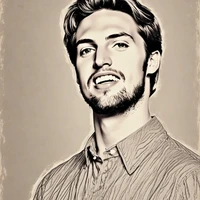
This is the text-to-image model based on SDXL model trained with my several selfie pics.
I used this colab notebook for fine-tuning.
Stable Diffusion XL Base model: https://huggingface.co/stabilityai/stable-diffusion-xl-base-1.0
Sample picture:
- Downloads last month
- 14
Model tree for tolgadev/sdxl_tk
Base model
stabilityai/stable-diffusion-xl-base-1.0