Instructions to use unsloth/GLM-4.1V-9B-Thinking-GGUF with libraries, inference providers, notebooks, and local apps. Follow these links to get started.
- Libraries
- Transformers
How to use unsloth/GLM-4.1V-9B-Thinking-GGUF with Transformers:
# Use a pipeline as a high-level helper from transformers import pipeline pipe = pipeline("image-text-to-text", model="unsloth/GLM-4.1V-9B-Thinking-GGUF") messages = [ { "role": "user", "content": [ {"type": "image", "url": "https://huggingface.co/datasets/huggingface/documentation-images/resolve/main/p-blog/candy.JPG"}, {"type": "text", "text": "What animal is on the candy?"} ] }, ] pipe(text=messages)# Load model directly from transformers import AutoModel model = AutoModel.from_pretrained("unsloth/GLM-4.1V-9B-Thinking-GGUF", device_map="auto") - Notebooks
- Google Colab
- Kaggle
- Local Apps Settings
- llama.cpp
How to use unsloth/GLM-4.1V-9B-Thinking-GGUF with llama.cpp:
Install (macOS, Linux)
curl -LsSf https://llama.app/install.sh | sh # Start a local OpenAI-compatible server with a web UI: llama serve -hf unsloth/GLM-4.1V-9B-Thinking-GGUF:UD-Q4_K_XL # Run inference directly in the terminal: llama cli -hf unsloth/GLM-4.1V-9B-Thinking-GGUF:UD-Q4_K_XL
Install from WinGet (Windows)
winget install llama.cpp # Start a local OpenAI-compatible server with a web UI: llama serve -hf unsloth/GLM-4.1V-9B-Thinking-GGUF:UD-Q4_K_XL # Run inference directly in the terminal: llama cli -hf unsloth/GLM-4.1V-9B-Thinking-GGUF:UD-Q4_K_XL
Use pre-built binary
# Download pre-built binary from: # https://github.com/ggerganov/llama.cpp/releases # Start a local OpenAI-compatible server with a web UI: ./llama-server -hf unsloth/GLM-4.1V-9B-Thinking-GGUF:UD-Q4_K_XL # Run inference directly in the terminal: ./llama-cli -hf unsloth/GLM-4.1V-9B-Thinking-GGUF:UD-Q4_K_XL
Build from source code
git clone https://github.com/ggerganov/llama.cpp.git cd llama.cpp cmake -B build cmake --build build -j --target llama-server llama-cli # Start a local OpenAI-compatible server with a web UI: ./build/bin/llama-server -hf unsloth/GLM-4.1V-9B-Thinking-GGUF:UD-Q4_K_XL # Run inference directly in the terminal: ./build/bin/llama-cli -hf unsloth/GLM-4.1V-9B-Thinking-GGUF:UD-Q4_K_XL
Use Docker
docker model run hf.co/unsloth/GLM-4.1V-9B-Thinking-GGUF:UD-Q4_K_XL
- LM Studio
- Jan
- vLLM
How to use unsloth/GLM-4.1V-9B-Thinking-GGUF with vLLM:
Install from pip and serve model
# Install vLLM from pip: pip install vllm # Start the vLLM server: vllm serve "unsloth/GLM-4.1V-9B-Thinking-GGUF" # Call the server using curl (OpenAI-compatible API): curl -X POST "http://localhost:8000/v1/chat/completions" \ -H "Content-Type: application/json" \ --data '{ "model": "unsloth/GLM-4.1V-9B-Thinking-GGUF", "messages": [ { "role": "user", "content": [ { "type": "text", "text": "Describe this image in one sentence." }, { "type": "image_url", "image_url": { "url": "https://cdn.britannica.com/61/93061-050-99147DCE/Statue-of-Liberty-Island-New-York-Bay.jpg" } } ] } ] }'Use Docker
docker model run hf.co/unsloth/GLM-4.1V-9B-Thinking-GGUF:UD-Q4_K_XL
- SGLang
How to use unsloth/GLM-4.1V-9B-Thinking-GGUF with SGLang:
Install from pip and serve model
# Install SGLang from pip: pip install sglang # Start the SGLang server: python3 -m sglang.launch_server \ --model-path "unsloth/GLM-4.1V-9B-Thinking-GGUF" \ --host 0.0.0.0 \ --port 30000 # Call the server using curl (OpenAI-compatible API): curl -X POST "http://localhost:30000/v1/chat/completions" \ -H "Content-Type: application/json" \ --data '{ "model": "unsloth/GLM-4.1V-9B-Thinking-GGUF", "messages": [ { "role": "user", "content": [ { "type": "text", "text": "Describe this image in one sentence." }, { "type": "image_url", "image_url": { "url": "https://cdn.britannica.com/61/93061-050-99147DCE/Statue-of-Liberty-Island-New-York-Bay.jpg" } } ] } ] }'Use Docker images
docker run --gpus all \ --shm-size 32g \ -p 30000:30000 \ -v ~/.cache/huggingface:/root/.cache/huggingface \ --env "HF_TOKEN=<secret>" \ --ipc=host \ lmsysorg/sglang:latest \ python3 -m sglang.launch_server \ --model-path "unsloth/GLM-4.1V-9B-Thinking-GGUF" \ --host 0.0.0.0 \ --port 30000 # Call the server using curl (OpenAI-compatible API): curl -X POST "http://localhost:30000/v1/chat/completions" \ -H "Content-Type: application/json" \ --data '{ "model": "unsloth/GLM-4.1V-9B-Thinking-GGUF", "messages": [ { "role": "user", "content": [ { "type": "text", "text": "Describe this image in one sentence." }, { "type": "image_url", "image_url": { "url": "https://cdn.britannica.com/61/93061-050-99147DCE/Statue-of-Liberty-Island-New-York-Bay.jpg" } } ] } ] }' - Ollama
How to use unsloth/GLM-4.1V-9B-Thinking-GGUF with Ollama:
ollama run hf.co/unsloth/GLM-4.1V-9B-Thinking-GGUF:UD-Q4_K_XL
- Unsloth Studio
How to use unsloth/GLM-4.1V-9B-Thinking-GGUF with Unsloth Studio:
Install Unsloth Studio (macOS, Linux, WSL)
curl -fsSL https://unsloth.ai/install.sh | sh # Run unsloth studio unsloth studio -H 0.0.0.0 -p 8888 # Then open http://localhost:8888 in your browser # Search for unsloth/GLM-4.1V-9B-Thinking-GGUF to start chatting
Install Unsloth Studio (Windows)
irm https://unsloth.ai/install.ps1 | iex # Run unsloth studio unsloth studio -H 0.0.0.0 -p 8888 # Then open http://localhost:8888 in your browser # Search for unsloth/GLM-4.1V-9B-Thinking-GGUF to start chatting
Using HuggingFace Spaces for Unsloth
# No setup required # Open https://huggingface.co/spaces/unsloth/studio in your browser # Search for unsloth/GLM-4.1V-9B-Thinking-GGUF to start chatting
- Atomic Chat new
- Docker Model Runner
How to use unsloth/GLM-4.1V-9B-Thinking-GGUF with Docker Model Runner:
docker model run hf.co/unsloth/GLM-4.1V-9B-Thinking-GGUF:UD-Q4_K_XL
- Lemonade
How to use unsloth/GLM-4.1V-9B-Thinking-GGUF with Lemonade:
Pull the model
# Download Lemonade from https://lemonade-server.ai/ lemonade pull unsloth/GLM-4.1V-9B-Thinking-GGUF:UD-Q4_K_XL
Run and chat with the model
lemonade run user.GLM-4.1V-9B-Thinking-GGUF-UD-Q4_K_XL
List all available models
lemonade list
Includes Unsloth chat template fixes!
Forllama.cpp, use--jinja
Unsloth Dynamic 2.0 achieves superior accuracy & outperforms other leading quants.
GLM-4.1V-9B-Thinking
📖 View the GLM-4.1V-9B-Thinking paper.
💡 Try the Hugging Face or ModelScope online demo for GLM-4.1V-9B-Thinking.
📍 Using GLM-4.1V-9B-Thinking API at Zhipu Foundation Model Open Platform
Model Introduction
Vision-Language Models (VLMs) have become foundational components of intelligent systems. As real-world AI tasks grow increasingly complex, VLMs must evolve beyond basic multimodal perception to enhance their reasoning capabilities in complex tasks. This involves improving accuracy, comprehensiveness, and intelligence, enabling applications such as complex problem solving, long-context understanding, and multimodal agents.
Based on the GLM-4-9B-0414 foundation model, we present the new open-source VLM model GLM-4.1V-9B-Thinking, designed to explore the upper limits of reasoning in vision-language models. By introducing a "thinking paradigm" and leveraging reinforcement learning, the model significantly enhances its capabilities. It achieves state-of-the-art performance among 10B-parameter VLMs, matching or even surpassing the 72B-parameter Qwen-2.5-VL-72B on 18 benchmark tasks. We are also open-sourcing the base model GLM-4.1V-9B-Base to support further research into the boundaries of VLM capabilities.
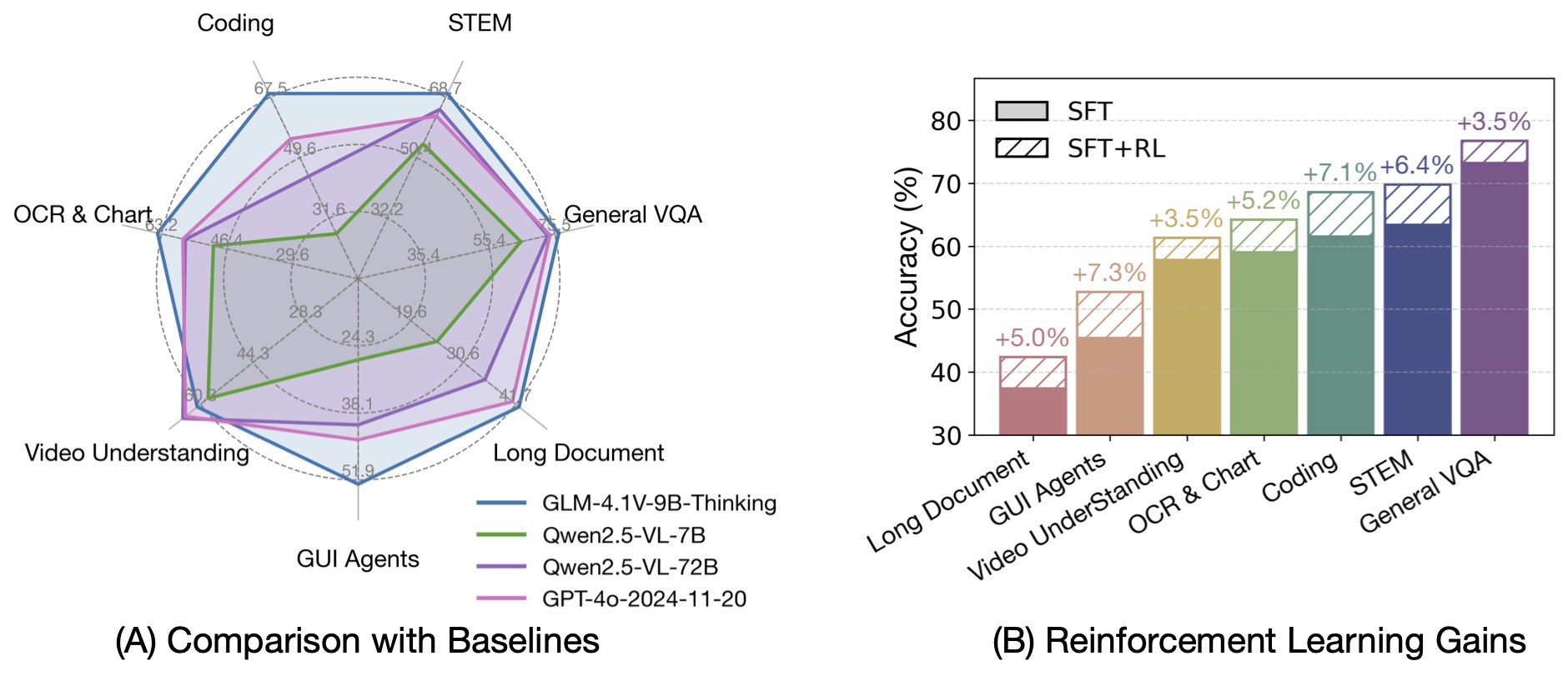
Compared to the previous generation models CogVLM2 and the GLM-4V series, GLM-4.1V-Thinking offers the following improvements:
- The first reasoning-focused model in the series, achieving world-leading performance not only in mathematics but also across various sub-domains.
- Supports 64k context length.
- Handles arbitrary aspect ratios and up to 4K image resolution.
- Provides an open-source version supporting both Chinese and English bilingual usage.
Benchmark Performance
By incorporating the Chain-of-Thought reasoning paradigm, GLM-4.1V-9B-Thinking significantly improves answer accuracy, richness, and interpretability. It comprehensively surpasses traditional non-reasoning visual models. Out of 28 benchmark tasks, it achieved the best performance among 10B-level models on 23 tasks, and even outperformed the 72B-parameter Qwen-2.5-VL-72B on 18 tasks.
Quick Inference
This is a simple example of running single-image inference using the transformers library.
First, install the transformers library from source:
pip install git+https://github.com/huggingface/transformers.git
Then, run the following code:
from transformers import AutoProcessor, Glm4vForConditionalGeneration
import torch
MODEL_PATH = "THUDM/GLM-4.1V-9B-Thinking"
messages = [
{
"role": "user",
"content": [
{
"type": "image",
"url": "https://upload.wikimedia.org/wikipedia/commons/f/fa/Grayscale_8bits_palette_sample_image.png"
},
{
"type": "text",
"text": "describe this image"
}
],
}
]
processor = AutoProcessor.from_pretrained(MODEL_PATH, use_fast=True)
model = Glm4vForConditionalGeneration.from_pretrained(
pretrained_model_name_or_path=MODEL_PATH,
torch_dtype=torch.bfloat16,
device_map="auto",
)
inputs = processor.apply_chat_template(
messages,
tokenize=True,
add_generation_prompt=True,
return_dict=True,
return_tensors="pt"
).to(model.device)
generated_ids = model.generate(**inputs, max_new_tokens=8192)
output_text = processor.decode(generated_ids[0][inputs["input_ids"].shape[1]:], skip_special_tokens=False)
print(output_text)
For video reasoning, web demo deployment, and more code, please check our GitHub.
- Downloads last month
- 2,408
1-bit
2-bit
3-bit
4-bit
5-bit
6-bit
8-bit
16-bit