

Qwen-CUA: Native Computer Use for (almost) Everything
Collection
Official Qwen-CUA collection from XLang, bringing together model releases, papers, and related resources for native computer use. • 2 items • Updated
A Qwen-based computer-use model that sees screenshots, reasons over visible state,
and acts through native keyboard and mouse events.




Qwen-CUA is a native computer-use model from the Qwen Team and XLang Lab. It operates from pixels: the model receives screenshots and natural-language instructions, reasons about the visible interface, and emits grounded keyboard and mouse actions. The evaluation setup does not provide DOM trees, accessibility metadata, shell access, or task-specific APIs.
| Property | Value |
|---|---|
| Model family | Qwen multimodal Mixture-of-Experts (MoE) |
| Parameters | 397B total, 17B activated per token |
| Public Transformers architecture | Qwen3_5MoeForConditionalGeneration (qwen3_5_moe) |
| Language backbone | 60 layers, hidden size 4096, 32 query heads, 2 KV heads |
| MoE | 512 experts, top-10 routing, MoE intermediate size 1024 |
| Attention | Hybrid linear/full attention; one full-attention layer every four layers |
| Vision encoder | 27 layers, hidden size 1152, 16×16 spatial patches, temporal patch size 2 |
| Native context length | 262,144 tokens |
| Weight format | BF16 safetensors, approximately 807 GB |
| Input | Text and screenshots |
| Output | Reasoning and XML-formatted computer_use actions |
The checkpoint is only one part of a computer-use agent. A complete deployment must also capture screenshots, build multimodal history, parse and validate actions, execute them in an environment, gate sensitive actions, and verify outcomes. The reference demo provides this surrounding runtime for browser workflows.
The model is prompted with a computer_use function and returns actions as XML. Coordinates use a normalized 0..999 grid, independent of the actual screenshot resolution. A typical action is:
<tool_call>
<function=computer_use>
<parameter=action>
left_click
</parameter>
<parameter=coordinate>
[500, 420]
</parameter>
</function>
</tool_call>
The reference runtime supports key presses, key down/up, typing, mouse movement, left/right/middle clicks, double/triple clicks, drag, vertical/horizontal scrolling, screenshots, waiting, asking the user, and terminating with success or failure. It validates every parsed action before execution.
The paper's agent scaffold keeps the 20 most recent screenshots active. Older screenshots are folded in blocks of 10 into a fixed textual placeholder while reasoning and action history are retained. This bounds image-heavy context growth and preserves a stable prefix for KV-cache reuse. Context folding is runtime behavior and is not performed automatically by the checkpoint or inference server.
This is a very large checkpoint. The examples below use tensor parallelism across eight high-memory GPUs. The roughly 807 GB of BF16 weights require enough aggregate accelerator memory for the weights plus KV cache and runtime buffers; H200 141 GB-class GPUs are an appropriate reference configuration. Reducing the context length reduces KV-cache use but does not reduce model-weight memory.
Qwen-CUA uses the public qwen3_5_moe architecture. Use current development/nightly builds of the serving frameworks; older releases may report that this model type is unknown.
Install the current SGLang source build:
uv pip install 'git+https://github.com/sgl-project/sglang.git#subdirectory=python&egg=sglang[all]'
Launch an OpenAI-compatible endpoint:
python -m sglang.launch_server \
  --model-path xlangai/Qwen-CUA \
  --host 0.0.0.0 \
  --port 8000 \
  --tp-size 8 \
  --mem-fraction-static 0.8 \
  --context-length 262144 \
  --reasoning-parser qwen3 \
  --trust-remote-code
Install a current vLLM nightly build:
uv pip install vllm --torch-backend=auto \
  --extra-index-url https://wheels.vllm.ai/nightly
Launch the endpoint:
vllm serve xlangai/Qwen-CUA \
  --host 0.0.0.0 \
  --port 8000 \
  --tensor-parallel-size 8 \
  --max-model-len 262144 \
  --reasoning-parser qwen3 \
  --trust-remote-code
The reference agent supplies the computer_use schema in the prompt and parses the raw XML response itself. Do not enable a standard tool-call parser when connecting that demo. The qwen3 reasoning parser only separates reasoning from the final response.
The Qwen-CUA demo is the recommended end-to-end starting point. It combines a FastAPI runner, a Next.js operator console, isolated Playwright Chromium sessions, typed action validation, approval gates, and replay artifacts.
After starting either OpenAI-compatible endpoint above:
git clone https://github.com/xlang-ai/Qwen-CUA.git
cd Qwen-CUA/demo

python -m venv .venv
source .venv/bin/activate
pip install -e '.[dev]'
python -m playwright install chromium

corepack enable
corepack prepare pnpm@10.26.0 --activate
pnpm install
cp .env.example .env
Set these values in .env:
QWEN_CUA_BASE_URL=http://127.0.0.1:8000/v1
QWEN_CUA_API_KEY=dummy
QWEN_CUA_MODELS=xlangai/Qwen-CUA
QWEN_CUA_DEFAULT_MODEL=xlangai/Qwen-CUA

QWEN_CUA_ENABLE_THINKING=true
QWEN_CUA_MAX_TOKENS=32768
QWEN_CUA_TEMPERATURE=0.6
QWEN_CUA_TOP_P=0.95
QWEN_CUA_TOP_K=20
QWEN_CUA_IMAGE_MAX=20
QWEN_CUA_VIEWPORT_WIDTH=1920
QWEN_CUA_VIEWPORT_HEIGHT=1080
Then start the runner and console:
set -a
source .env
set +a
pnpm dev
Open http://127.0.0.1:3000, select a safe local lab, and start a run. The first demo release targets browser workflows in Chromium rather than unrestricted Linux, Windows, or macOS desktop control. See the demo documentation for Docker, CLI, replay, and safety configuration.
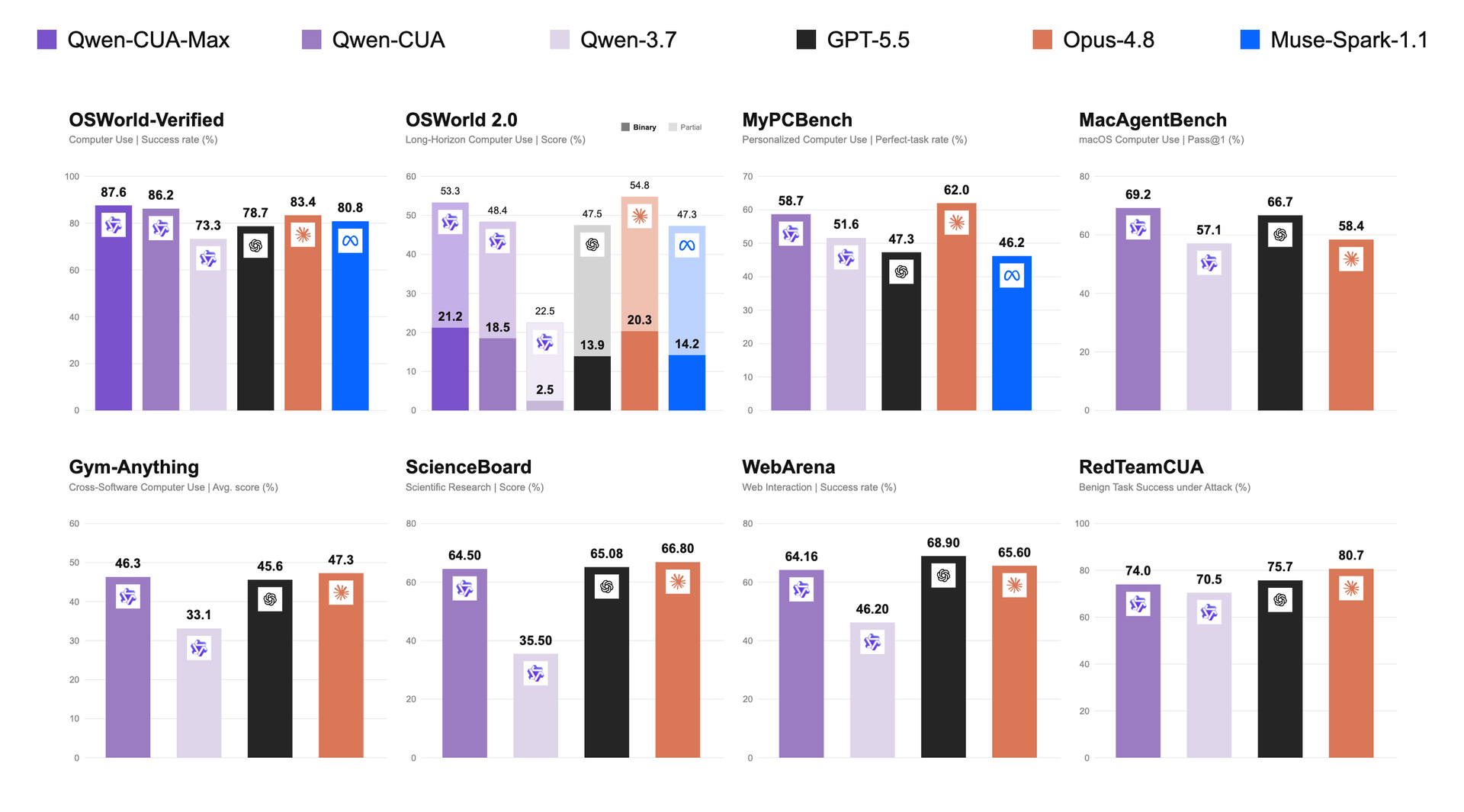
The following results are reported in the Qwen-CUA technical report. They are system-level evaluations under each paper's agent scaffold, not isolated single-forward-pass checkpoint metrics. Reproduction depends on matching the observation loop, multimodal history construction, prompts, action execution, inference settings, environment, and benchmark versions described by the corresponding work.
| Model | OSWorld-Verified ↑ | OSWorld 2.0 binary ↑ | OSWorld 2.0 partial ↑ | MyPCBench perfect-task ↑ | MacAgentBench Pass@1 ↑ | Gym-Anything ↑ | ScienceBoard ↑ | WebArena ↑ | RedTeamCUA task success ↑ | RedTeamCUA ASR ↓ |
|---|---|---|---|---|---|---|---|---|---|---|
| Qwen-CUA | 86.2 | 18.5 | 48.4 | 58.7 | 69.2 | 46.3 | 64.50 | 64.16 | 74.0 | 16.4 |
| Qwen3.7 | 73.3 | 2.5 | 22.5 | 51.6 | 57.1 | 33.1 | 35.50 | 46.20 | 70.5 | 36.6 |
| GPT-5.5 | 78.7 | 13.9 | 47.5 | 47.3 | 66.7 | 45.6 | 65.08 | 68.90 | 75.7 | 15.6 |
| Claude Opus 4.8 | 83.4 | 20.3 | 54.8 | 62.0 | 58.4 | 47.3 | 66.80 | 65.60 | 80.7 | 0.7 |
For RedTeamCUA, task success measures utility and attack success rate (ASR) measures susceptibility to adversarial prompt injection, so lower ASR is better. The observed ASR does not constitute a deployment-safety guarantee.
The development pipeline reported in the technical report combines iterative supervised fine-tuning (SFT) with reinforcement learning from verifiable rewards (RLVR):
The report's final RL setup uses 512 H200 GPUs across 64 nodes. Please refer to the technical report for the full training recipe and ablations. The model files alone do not encode every data, prompt, rollout, or runtime choice used during development.
Qwen-CUA is intended for research and development of screenshot-grounded computer-use agents, including:
The model is not designed to serve as an autonomous authority for financial, medical, legal, security-critical, or other high-stakes decisions. Do not use it for unauthorized access, credential harvesting, covert surveillance, bypassing security controls, or destructive actions.
Computer-use models can misread screenshots, click the wrong target, enter incorrect text, mishandle state changes, or falsely claim success. Websites and documents may contain prompt injection intended to redirect the agent. Native pixel interaction also requires repeated inference and serialized low-level actions, which can be slower and more expensive than code, APIs, or shell tools when those interfaces are appropriate.
For safer evaluation and deployment:
terminate(success) action is not proof of real-world success.The reference browser demo implements several of these controls, but it is a local development system without authentication and does not eliminate prompt-injection or execution risk.
If you find Qwen-CUA useful in your work, please cite the technical report:
@misc{lu2026qwencuanativecomputeruse,
      title={Qwen-CUA: Native Computer Use for (almost) Everything},
      author={Dunjie Lu and Shuai Bai and Tianyi Bai and Sicheng Fan and Chang Gao and Jian Guan and Feng Hu and Mianqiu Huang and Xingyang Huang and Yizhen Jiang and Yuheng Jing and Dehui Kong and Ning Li and Dayiheng Liu and Shixuan Liu and Zheng Liu and Que Shen and Bowen Wang and Junli Wang and Chencan Wu and Rui Xie and Tianbao Xie and Zhihui Xie and Haiyang Xu and An Yang and Tao Yu and Wenzhen Yuan and Xi Zhang and Zhenru Zhang and Mingkang Zhu and Zhaoqing Zhu and Yizhong Cao and Kai Dang and Binyuan Hui and Kaixin Li and Junyang Lin and Haiquan Wang and Zekun Wang and Yiheng Xu and Fan Yan and Mengqi Yuan and Danyang Zhang and Jiajun Zhang and Zhipeng Zhang and Fan Zhou and Fan Zhou},
      year={2026},
      eprint={2608.02352},
      archivePrefix={arXiv},
      primaryClass={cs.LG},
      url={https://arxiv.org/abs/2608.02352},
}
Qwen-CUA is released under the Apache License 2.0. See the model repository's LICENSE and the source repository's NOTICE for attribution information.