

TF-ID: Table/Figure IDentifier for academic papers
Model Summary
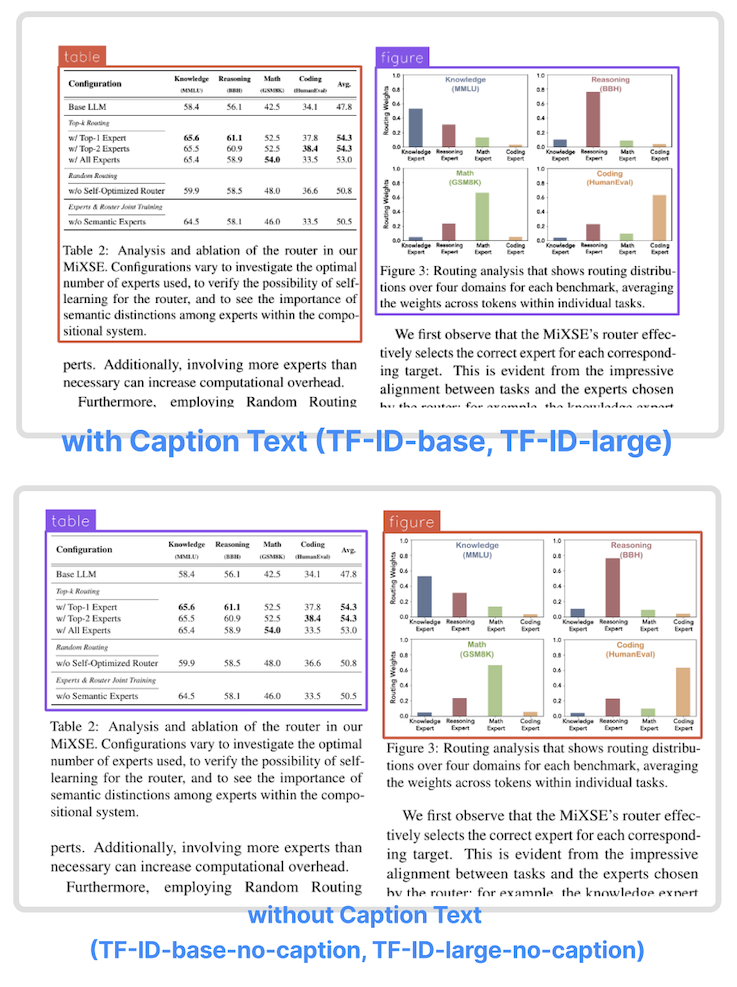
TF-ID (Table/Figure IDentifier) is a family of object detection models finetuned to extract tables and figures in academic papers created by Yifei Hu. They come in four versions:
| Model | Model size | Model Description |
|---|---|---|
| TF-ID-base[HF] | 0.23B | Extract tables/figures and their caption text |
| TF-ID-large[HF] (Recommended) | 0.77B | Extract tables/figures and their caption text |
| TF-ID-base-no-caption[HF] | 0.23B | Extract tables/figures without caption text |
| TF-ID-large-no-caption[HF] (Recommended) | 0.77B | Extract tables/figures without caption text |
| All TF-ID models are finetuned from microsoft/Florence-2 checkpoints. |
- The models were finetuned with papers from Hugging Face Daily Papers. All bounding boxes are manually annotated and checked by humans.
- TF-ID models take an image of a single paper page as the input, and return bounding boxes for all tables and figures in the given page.
- TF-ID-base and TF-ID-large draw bounding boxes around tables/figures and their caption text.
- TF-ID-base-no-caption and TF-ID-large-no-caption draw bounding boxes around tables/figures without their caption text.
Large models are always recommended!
Object Detection results format: {'<OD>': {'bboxes': [[x1, y1, x2, y2], ...], 'labels': ['label1', 'label2', ...]} }
Training Code and Dataset
- Dataset: yifeihu/TF-ID-arxiv-papers
- Code: github.com/ai8hyf/TF-ID
Benchmarks
We tested the models on paper pages outside the training dataset. The papers are a subset of huggingface daily paper.
Correct output - the model draws correct bounding boxes for every table/figure in the given page.
| Model | Total Images | Correct Output | Success Rate |
|---|---|---|---|
| TF-ID-base[HF] | 258 | 251 | 97.29% |
| TF-ID-large[HF] | 258 | 253 | 98.06% |
| Model | Total Images | Correct Output | Success Rate |
|---|---|---|---|
| TF-ID-base-no-caption[HF] | 261 | 253 | 96.93% |
| TF-ID-large-no-caption[HF] | 261 | 254 | 97.32% |
Depending on the use cases, some "incorrect" output could be totally usable. For example, the model draw two bounding boxes for one figure with two child components.
How to Get Started with the Model
Use the code below to get started with the model.
import requests
from PIL import Image
from transformers import AutoProcessor, AutoModelForCausalLM

model = AutoModelForCausalLM.from_pretrained("yifeihu/TF-ID-base", trust_remote_code=True)
processor = AutoProcessor.from_pretrained("yifeihu/TF-ID-base", trust_remote_code=True)

prompt = "<OD>"
url = "https://huggingface.co/yifeihu/TF-ID-base/resolve/main/arxiv_2305_10853_5.png?download=true"
image = Image.open(requests.get(url, stream=True).raw)

inputs = processor(text=prompt, images=image, return_tensors="pt")
generated_ids = model.generate(
    input_ids=inputs["input_ids"],
    pixel_values=inputs["pixel_values"],
    max_new_tokens=1024,
    do_sample=False,
    num_beams=3
)

generated_text = processor.batch_decode(generated_ids, skip_special_tokens=False)[0]
parsed_answer = processor.post_process_generation(generated_text, task="<OD>", image_size=(image.width, image.height))
print(parsed_answer)
To visualize the results, see this tutorial notebook for more details.
BibTex and citation info
@misc{TF-ID,
  author = {Yifei Hu},
  title = {TF-ID: Table/Figure IDentifier for academic papers},
  year = {2024},
  publisher = {GitHub},
  journal = {GitHub repository},
  howpublished = {\url{https://github.com/ai8hyf/TF-ID}},
}
- Downloads last month
- 8